Establishing secure connection…Loading editor…Preparing document…

Contractor Agreement

This template is fully customizable. Edit the text, fill out the fields, and send it for signature. Give it a try!
Contractor Agreement

What the Contractor Agreement Is and When It Applies

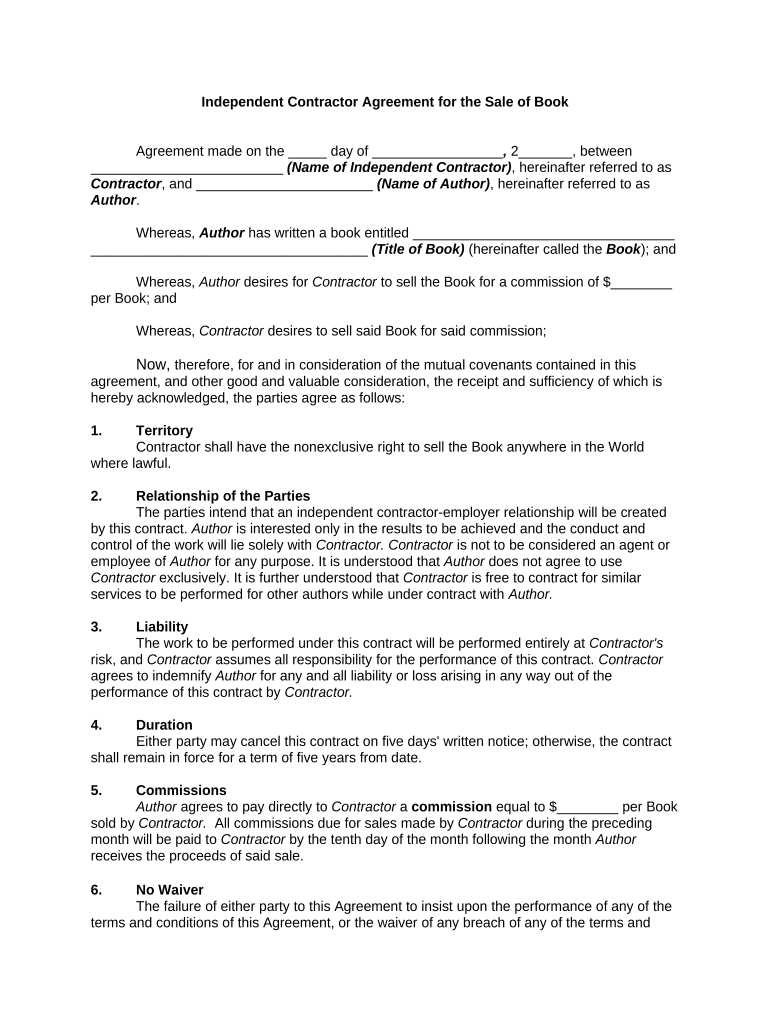
A Contractor Agreement is a written contract that defines the working relationship between a hiring party and an independent contractor. It sets the scope of work, payment terms, delivery milestones, intellectual property rights, confidentiality obligations, and termination conditions. Unlike employment agreements, contractor agreements clarify independent status, tax responsibilities, and liability allocations. Properly drafted and executed, the agreement reduces disputes by specifying deliverables, acceptance criteria, and remedies. Parties often attach exhibits such as statements of work, rate schedules, insurance certificates, and project timelines to make obligations explicit and enforceable.

Why a Clear Contractor Agreement Matters

A clear Contractor Agreement protects both parties by documenting expectations, payment terms, IP ownership, and dispute resolution. It reduces misclassification risk, supports tax and audit positions, and provides a contractual basis for remedies if work is incomplete or late.

Why a Clear Contractor Agreement Matters

Who Commonly Prepares and Signs Contractor Agreements

Organizations and independent contractors use this agreement to define commercial relationships and avoid misunderstandings.

  • Small business owners hiring short-term specialists or consultants for defined projects
  • Procurement and legal teams at companies engaging vendors for services or deliverables
  • Freelancers, contractors, and agencies formalizing payment, scope, and IP arrangements

Who Can Sign and What Their Role Is

Company Executive

An authorized officer, director, or person with delegated contracting authority must sign on behalf of a business. Verify internal approval thresholds and procurement rules before execution to ensure enforceability and internal compliance.

Independent Contractor

The contractor or an authorized representative signs to accept scope, rates, and IP terms. If the contractor is an entity, use the company name and signatory title; for individuals, use the legal name that matches tax reporting documents.

Core Sections to Include in a Professional Contractor Agreement

A robust agreement uses clear, stand-alone sections so each party’s rights and obligations are unambiguous and enforceable in the chosen jurisdiction.

Parties

Full legal names and entity types for each party, including mailing addresses and a contact person for notices.
Scope of Work

Detailed description of services, deliverables, acceptance criteria, milestones, and any associated exhibits or SOW documents.

Payment Terms

Rates, invoicing frequency, payment due dates, expenses, late fees, and any advance or milestone payments.

Intellectual Property

Clauses defining ownership of work product, license grants, moral rights waivers, and assignment of copyrights if required.

Confidentiality

Non-disclosure provisions describing protected information, duration, permitted disclosures, and return or destruction requirements.

Termination and Remedies

Grounds for termination, cure periods, transition obligations, indemnity, limitation of liability, and dispute resolution mechanisms.

Essential Data Elements to Capture

Legal Names: Contracting party names
Effective Date: MM/DD/YYYY format
Scope Reference: SOW or exhibit ID
Payment Terms: Rate and timing
Signatory Title: Authority level
Tax Info: TIN or EIN

Step-by-Step: Complete and Execute a Contractor Agreement

Follow these steps to prepare, review, and execute the agreement in a compliant and auditable way.

  • 01
    Draft: Populate parties, scope, payment, and term.
  • 02
    Review: Legal and procurement review for risk and compliance.
  • 03
    Sign: Obtain authorized signatures and dates.
  • 04
    Distribute: Provide fully executed copies to all parties.

How to Configure an Online Signing Workflow

Set up a repeatable digital workflow that enforces signer order, authentication, and retention of execution records.

Field Configuration
Signer Order Sequential or parallel routing
Authentication Email link, SMS code, or KBA
Required Fields Signature, date, initials
Audit Trail Store IP, timestamp, and actions

Digital Signing and Submission: Platform Considerations

Choose a signing platform that provides legal audit trails, secure storage, and appropriate authentication methods.

  • Authentication Options: Email, SMS, or KBA
  • Document Formats: PDF, DOCX supported
  • Integrations: CRM and storage connectors

Where to Send or File the Executed Agreement

After execution, distribute copies to stakeholders, store the master copy securely, and attach to relevant project or vendor records.

  • Internal Records: Attach to vendor file or project folder
  • Accounting: Send invoice copy for payment processing
  • Legal: Retain for audit and dispute defense
  • Contractor: Provide fully executed PDF copy

Key Timing and Filing Deadlines to Track

Monitor payment timelines, contract renewal windows, tax reporting milestones, and notice periods to maintain compliance and avoid penalties.

Payment Due Date:

Follow the invoice terms specified in the agreement

Tax Reporting:

1099-NEC to recipient and IRS by Jan 31

Contract Renewals:

Begin negotiation within the notice period specified

Termination Notice:

Provide notice per the contract's termination clause

Record Retention Start:

Retention begins on execution or last effective date

Common Risks and Consequences of a Faulty Contractor Agreement

Misclassification: Risk of payroll taxes and penalties
Ambiguous Scope: Disputes and nonpayment claims
Missing IP Terms: Loss of ownership or rights
No Termination Rights: Difficulties ending the relationship
Improper Signatures: Enforceability challenges
Inadequate Insurance: Potential uncovered liabilities

Frequent Preparation Mistakes to Avoid

  • Using vague deliverables that leave acceptance criteria open to subjective interpretation and later disputes
  • Failing to confirm the signer's authority which can produce internal ratification issues and delay enforcement
  • Neglecting tax reporting details (TIN/EIN) which can trigger backup withholding and IRS notices
  • Overlooking insurance and indemnity limits that expose the hiring party to unexpected claims

eSignature Platform Comparison for Contract Execution

Compare core pricing and feature criteria relevant to signing Contractor Agreements; signNow is listed first per product data for cost and feature context.

signNow DocuSign Adobe Sign PandaDoc HelloSign
Starting Price $8/user/mo $15/user/mo $14/user/mo $19/user/mo $15/user/mo
Free Trial 7-day free trial Varies Varies Varies Varies
Bulk Send Yes Yes Yes Yes No
Audit Trail Yes Yes Yes Yes Yes
HIPAA Compliant Yes Yes Yes No No
Envelope Cap No cap 100 envelopes/user/year Varies Varies Varies

Practical Tips for Accurate and Efficient Completion

Adopt consistent processes and templates to reduce review time and legal exposure while ensuring enforceability.

Use a Standard Template
Start with a vetted template that includes required boilerplate and industry-specific exhibits; limit changes to material terms to speed approvals.
Confirm Signatory Authority
Check corporate resolution, officer sign-off thresholds, or procurement delegation to ensure the signer can bind the organization.
Record Execution Metadata
Retain signature timestamps, IP addresses, and audit trails for electronic signatures to support enforceability and dispute resolution.
Coordinate Tax Reporting
Collect TIN/EIN and W-9 information before payments to avoid backup withholding and late reporting penalties.

Frequently Asked Questions About Contractor Agreements

Answers to common execution, enforceability, and recordkeeping questions about Contractor Agreements and electronic signatures.


Need help? Contact support

be ready to get more
Join over 28 million airSlate SignNow users