Distribution
Defines how cash, inventory, property, and receivables are divided among partners, including immediate distributions, installment plans, or contingent transfers tied to future sales.
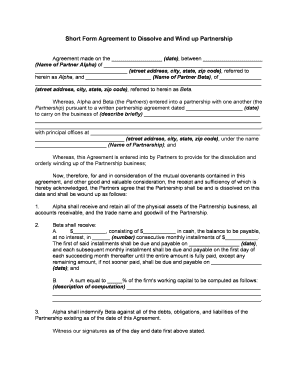
A Dissolve Partnership Agreement clarifies division of assets and liabilities, preserves evidence for tax and creditor obligations, and establishes responsibilities after dissolution. It minimizes litigation risk, supports accurate reporting to the IRS and state agencies, and documents post-termination restrictions that partners agreed to.

Typical users who prepare or sign this agreement include partners, attorneys, and business administrators seeking formal closure of partnership affairs.
A partner should confirm dissolution terms, sign the agreement, and ensure asset transfers are documented. They may remain responsible for personally guaranteed debts unless the agreement specifies otherwise and should consult tax counsel for final reporting.
An attorney drafts or reviews clauses covering asset distribution, creditor notices, indemnities, and tax allocations; advises on state filing requirements; and prepares releases to limit future liability for clients participating in the dissolution.
| Field | Configuration |
|---|---|
| Signature authentication | Email, SMS code, or ID verification |
| Signing order | Parallel or sequential signer routing |
| Document retention | Set retention period and export formats |
| Notifications | Automated emails and reminders for signers |
Use an eSignature platform that supports legal audit trails, document export in PDF/DOCX, and appropriate signer authentication for this agreement.
Defines how cash, inventory, property, and receivables are divided among partners, including immediate distributions, installment plans, or contingent transfers tied to future sales.
Specifies which entity or partner assumes outstanding loans, trade payables, and guarantees, and sets indemnity terms to address creditor claims post-dissolution.
Allocates responsibility for final returns, K-1 issuance, and tax payments; includes cooperation language for audits and procedures for handling tax adjustments.
Partners warrant ownership, authority, and absence of undisclosed liabilities to reduce later disputes and to support defenses against third-party claims.
Restricts disclosure of trade secrets, customer lists, and proprietary information post-dissolution and specifies remedies for breach to protect business value.
Specifies governing law, venue, mediation or arbitration steps, and enforcement procedures to streamline resolution and reduce litigation costs.
Provide K-1s to partners by tax deadline (Jan 31 typical).
File final Form 1065 and schedule K-1 with the IRS.
Send notices per state law and agreed procedures.
Terminate business names, licenses, and permits within state deadlines.
Retain partnership records for the required federal and state periods.
A two-partner retail business needed to close after one partner bought out the other to avoid bankruptcy.
Three partners in a consulting firm dissolved the partnership after strategic disagreements and needed to reassign client contracts.
| signNow | DocuSign | Adobe Sign | PandaDoc | HelloSign | |
|---|---|---|---|---|---|
| Starting Price | $8/user/mo | $15/user/mo | $14/user/mo | $19/user/mo | $15/user/mo |
| Free Trial | 7-day free trial | Varies by vendor | Varies by vendor | Varies by vendor | Varies by vendor |
| Bulk Send | Yes | Yes | Yes | Yes | No |
| Audit Trail | Yes | Yes | Yes | Yes | Yes |
| HIPAA Compliant | Yes | Yes | Yes | No | No |