Establishing secure connection… Loading editor… Preparing document…
Navigation

Fill and Sign the If a Question is Not Applicable Please Put Quotnot Form
Fill and Sign the If a Question is Not Applicable Please Put Quotnot Form

How it works

Open the document and fill out all its fields.
Apply your legally-binding eSignature.
Save and invite other recipients to sign it.

Rate template

4.6
41 votes
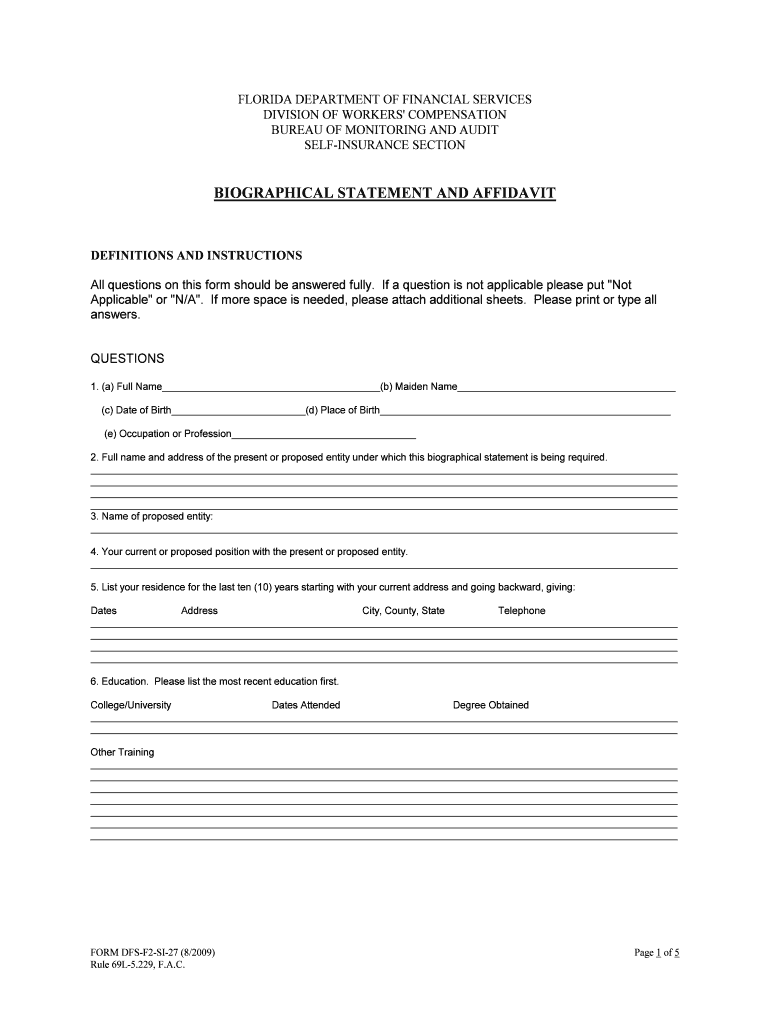
FORM DFS-F2 -SI -27 (8/2009) Page 1 of 5 Rule 69L-5.229 , F.A.C. FLORIDA DEPARTMENT OF FINANCIAL SERVICES DIVISION OF WORKERS' COMPENSATION BUREAU OF MONITORING AND AUDIT SELF -INSURANCE SECTION BIOGRAPHICAL STATEMENT AND AFFIDAVIT DEFINITIONS AND INSTRUCTIONS All questions on this form should be answered fully. If a question is not applicable please put "Not Applicable" or "N/A". If more space is needed, please attach additional sheets. Please print or type all answers. QUESTIONS 1. (a) Full Name_______________________________________(b) Maiden Name______ _________________________________ (c) Date of Birth________________________(d) Place of Birth____________________________________________________ (e) Occupation or Profession_________________________________ 2. Full name and address of the present or proposed entity under which this biographical statement is being required. _________________________________________________________________________________________________________ _________________________________________________________________________________________________________ _________________________________________________________________________________________________________ _________________________________________________________________________________________________________ 3. Name of proposed entity: _________________________________________________________________________________________________________ 4. Your current or proposed position with the present or proposed entity. _________________________________________________________________________________________________________ 5. List your residence for the last ten (10) years starting with your current address and going backward, giving: Dates Address City, County, State Telephone _________________________________________________________________________________________________________ _________________________________________________________________________________________________________ _________________________________________________________________________________________________________ _________________________________________________________________________________________________________ 6. Education. Please list the most recent education first. College/University Dates Attended Degree Obtained _________________________________________________________________________________________________________ _________________________________________________________________________________________________________ Other Training _________________________________________________________________________________________________________ _________________________________________________________________________________________________________ _________________________________________________________________________________________________________ _________________________________________________________________________________________________________ _________________________________________________________________________________________________________ _________________________________________________________________________________________________________ _________________________________________________________________________________________________________ FORM DFS-F2 -SI -27 (8/2009) Page 2 of 5 Rule 69L-5.229 , F.A.C. 7. Business and employment record for past ten (10) years. Please list the most recent first. Include all director and officer pos itions held. Dates Employer's Name Address & Telephone Offices/Positions Held _________________________________________________________________________________________________________ _______________________________________________________________________________________________________ _________________________________________________________________________________________________________ _________________________________________________________________________________________________________ _________________________________________________________________________________________________________ May present employer be contacted? Yes  No  8. List Other current business activities:______________________________________________________________________ ___ _________________________________________________________________________________________________________ 9. (a) Have you or your spouse ever been affiliated or associated with or in any way connected with an entity regulated by th e Department of Fina ncial Services? Yes  No  (b) If "yes", please list all such entities________________________________________________________________________ _________________________________________________________________________________________________________ 10. (a) Do you or members of your immediate family have or will have an ownership interest of any kind in the present or proposed entity? Yes  No  (b) If "yes", list all such ownership interests and give full details. If the ownership interest is pledged or hypothecated in any way, give full details. _________________________________________________________________________________________________________ _________________________________________________________________________________________________________ 11. (a) Have you ever used an alias or a different name? Yes  No  (b) If "yes", list all other names used and give full explanation and supporting documentation. _________________________________________________________________________________________________________ 12. (a) Have you ever been bonded? Yes  No  (b) If "yes": 1. W ere any claims ever made or attempted to be made against your Yes  No  bond? 2. Has your bond ever been canceled or revoked? Yes  No  3. Has your application for bond been declined? Yes  No  4. If the response to 1, 2, or 3 is "yes", please provide reasons__________________________________________________ _________________________________________________________________________________________________________ 13. (a) Have you ever been licensed as an insurance agent, broker, solicitor, Yes  No  adjuster, or claims investigator in Florida or any other state? (b) If "yes": 1. State(s)____________________________________________ _______________________________________________ 2. Date license(s) held_________________________________________________________________________________ 3. License number(s)_______________________________________________________________ ___________________ 4. Name of issuer of license(s)___________________________________________________________________________ 14. (a) Have you ever been licensed to sell securities? Yes  No  (b) If "yes": 1. By whom (state(s) and/or federal)______________________________________________________________________ 2. Dates license(s) held_____________________________________________________________________________ ___ 3. License number(s)__________________________________________________________________________________ 4. Name of issuer of license(s)__________________________________________________________________________ FORM DFS-F2 -SI -27 (8/2009) Page 3 of 5 Rule 69L-5.229 , F.A.C. 15. (a) Have you ever been licensed to practice medicine or dentistry? Yes  No  (b) If "yes": 1. State(s)___________________________________________________________________________________________ 2. Dates license(s) held________________________________________________________________________________ 3. License number(s)__________________________________________________________________________________ 4. Name of issuer of license(s)___________________________________________________________________________ 16. List any other occupational, professional, or vocational licenses you have ever held and identify the state(s), the dates license(s) held, and the license number(s): _________________________________________________________________________________________________________ 17. List any entities regulated by the Department in which you control directly or indirectly or own legally or beneficially five (5) percent or more of the outstanding stock (in voting power). _________________________________________________________________________________________________________ If any of the stock is pledged or hypothecated in any way, give details.________________________________________________ _________________________________________________________________________________________________________ 18. List memberships in professional societies and associations._____________________________________________________ 19. Are you a citizen of any country other than the United States? Yes  No  If "yes", what country?_____________ _______________________________________________________________________ 20. Have you ever: (a) Been refused an occupational, professional, or vocational license or permit Yes  No  by any regulatory authority, or any public, administrative, or governmental licensing agency? (b) Had any occupational, professional or vocational license or permit you hold, Yes  No  or have held, been subject to any judicial, administrative, regulatory or disciplinary action? (c) Been placed on probation or had a fine levied against you or your Yes  No  occupational, professional, or vocational license or permit in any judicial, administrative, regulatory, or disciplinary acti on? (d) Been charged with, or indicted for, any criminal offense(s) other than minor Yes  No  traffic offenses? (e) Pled guilty, or nolo contendere, or been convicted of any criminal offense(s) Yes  No  other than minor traffic offenses? (f) Had adjudication of guilt withheld, had a sentence imposed or suspended, Yes  No  had pronouncement of a sentence suspended, or been pardoned, fined or placed on probation, for any criminal offense(s) other than minor traffic offenses? (g) Been subject to any federal bankruptcy proceedings, state insolvency, Yes  No  supervision, receivership, rehabilitation, liquidation, or conservatorship proceeding, or any other similar proceeding? (h) Been subject to a cease and desist letter or order, or enjoined, either Yes  No  tempo rarily or permanently, in any judicial, administrative, regulatory, or disciplinary action, from violating any federal or state law regulating the business of insurance, securities or banking, or from carrying out any particular practice or practices in the course of the business of insurance, securities or banking? (i) Been, within the last ten (10) years, a party to any civil action other than for Yes  No  minor traffic offenses? (j) Had a finding made by any state or the Federal Government that you have Yes  No  violated any rule or regulation lawfully made by any state or the Federal Government? If the response to any question above is answered "yes", please provide full details. _________________________________________________________________________________________________________ ________________________________________________________________________________________________________ _ _________________________________________________________________________________________________________ _________________________________________________________________________________________________________ FORM DFS-F2 -SI -27 (8/2009) Page 4 of 5 Rule 69L-5.229 , F.A.C. 21. (a) For the purpose of this question, if you hold or have held any of the following positions with an entity, please indicate below. 1. Incorporator Yes  No  2. Administrator Yes  No  3. Organizer Yes  No  4. Subscriber of a corpo ration Yes  No  5. Subscriber to a reciprocal agreement of indemnity Yes  No  6. Subscriber of a limited reciprocal Yes  No  7. Director Yes  No  8. Officer Yes  No  9. Manager or operator Yes  No  10. Trustee Yes  No  11. Owner, if not a corporation Yes  No  12. Sole proprietor Yes  No  13. Joint venturer Yes  No  14. Partner, including all general and limited partners of a limited partnership. Yes  No  15. Stockholder owning or holding five (5) percent or more of the outstanding stock of a stock corporation Yes  No  16. Member of a non -stock corporation Yes  No  17. Person associated or to be associated with the formation or financing of an underwriting member on an Insurance Exchange in any state or country Yes  No  18. Attorney in fact for a reciprocal insurer/company or a limited reciprocal insurer/company, if the attorney in fact is an indi vidual Yes  No  19. Any position listed in this subparagraph (a) held in an entity serving as attorney in fact for a reciprocal insurer/company or a limited reciprocal insurer/ company, if the entity serving as attorney in fact is not an individual Yes  No  20. Any position listed in this subparagraph (a) held in an incorporated or unincorporated association Yes  No  21. Any other position where the person filling the position performs any duties similar to those duties performed by persons in the above mentioned positions Yes  No  (b) Has any entity while you were associated with that entity or within twelve (12) months after you left: 1. Been refused a permit, license, or certificate of authority by any regulatory authority, or governmental licensing agency? Yes  No  2. Had its permit, license, or certificate of authority suspended, revoked, Yes  No  cancelled, non -renewed, or subjected to any judicial, administrative, regulatory, or disciplinary action? 3. Been placed on probation or had a fine levied against it or against its Yes  No  license, or certificate of authority in any judicial, administrative, regulatory, or disciplinary action? 4. Been charged with, or indicted for any criminal offense? Yes  No  5. Pled guilty to, or nolo contendere to, or been convicted of any criminal Yes  No  offense? FORM DFS-F2 -SI -27 (8/2009) Page 5 of 5 Rule 69L-5.229 , F.A.C. 6. Had an adjudication of guilt withheld, had a sentence imposed or Yes  No  suspended, had pronouncement of a sentence suspended, or been pardoned, fined, or placed on probation for any criminal offense? 7. Been insolvent or impaired? Yes  No  8. Been subject to any federal bankruptcy proceeding, state in solvency, Yes  No  supervision, receivership, rehabilitation, liquidation, or conservatorship proceeding, or any other similar proceeding? 9. Been enjoined, either temporarily or permanently, in any judicial, Yes  No  administrat ive, regulatory, or disciplinary action from violating any federal or state law regulating the business of insurance, securities, or banking, or from carrying out any particular practice or practices in the course of business insurance, securities, or banking? 10. Been within the last ten (10) years a party to any civil action? Yes  No  (c) If the response to any question above is answered "yes", please provide full details below: _________________________________________________________________________________________________________ _________________________________________________________________________________________________________ I HEREBY CERTIFY, under penalty of perjury, that the foregoing answers, statements, and information are true and correct. I, the undersigned affiant, under penalty of perjury, do declare that I have carefully examined each of the questions asked in this BIOGRAPHICAL STATEMENT AND AFFIDAVIT and each of my responses thereto, and do solemnly swear or affirm that all of my responses, information, exhibits, and documentary evidence submitted in support thereof are true and correct. ________________________________________ (Typed Name) ________________________________________ (Signature) ________________________________________ (Date)

Valuable tips for completing your ‘If A Question Is Not Applicable Please Put Quotnot’ online

Are you fed up with the inconvenience of managing paperwork? Look no further than airSlate SignNow, the premier electronic signature tool for individuals and small to medium-sized businesses. Bid farewell to the tedious routine of printing and scanning documents. With airSlate SignNow, you can effortlessly fill out and sign documents online. Utilize the robust features integrated into this user-friendly and cost-effective platform and transform your approach to document handling. Whether you need to approve forms or gather eSignatures, airSlate SignNow takes care of it all effortlessly, with just a few clicks.

Follow this detailed guide:

  1. Log into your account or register for a complimentary trial with our service.
  2. Click +Create to upload a file from your device, cloud storage, or our template library.
  3. Open your ‘If A Question Is Not Applicable Please Put Quotnot’ in the editor.
  4. Click Me (Fill Out Now) to complete the form on your end.
  5. Add and assign fillable fields for others (if necessary).
  6. Proceed with the Send Invite settings to request eSignatures from others.
  7. Save, print your copy, or convert it into a reusable template.

No need to worry if you wish to collaborate with your colleagues on your If A Question Is Not Applicable Please Put Quotnot or send it for notarization—our solution provides you with everything you require to accomplish such tasks. Create an account with airSlate SignNow today and elevate your document management to a new standard!

Here is a list of the most common customer questions. If you can’t find an answer to your question, please don’t hesitate to reach out to us.

Need help? Contact Support

The best way to complete and sign your if a question is not applicable please put quotnot form

Save time on document management with airSlate SignNow and get your if a question is not applicable please put quotnot form eSigned quickly from anywhere with our fully compliant eSignature tool.

How to Sign a PDF Online How to Sign a PDF Online

How to fill out and sign forms online

Previously, coping with paperwork took lots of time and effort. But with airSlate SignNow, document management is fast and easy. Our robust and easy-to-use eSignature solution enables you to easily complete and eSign your if a question is not applicable please put quotnot form online from any internet-connected device.

Follow the step-by-step guide to eSign your if a question is not applicable please put quotnot form template online:

  • 1.Register for a free trial with airSlate SignNow or log in to your account with password credentials or SSO authentication.
  • 2.Click Upload or Create and add a file for eSigning from your device, the cloud, or our form collection.
  • 3.Click on the document name to open it in the editor and use the left-side menu to complete all the blank areas accordingly.
  • 4.Place the My Signature field where you need to eSign your form. Type your name, draw, or import an image of your regular signature.
  • 5.Click Save and Close to accomplish modifying your completed form.

As soon as your if a question is not applicable please put quotnot form template is ready, download it to your device, export it to the cloud, or invite other people to electronically sign it. With airSlate SignNow, the eSigning process only takes several clicks. Use our robust eSignature solution wherever you are to deal with your paperwork successfully!


How to Sign a PDF Using Google Chrome How to Sign a PDF Using Google Chrome

How to complete and sign forms in Google Chrome

Completing and signing paperwork is simple with the airSlate SignNow extension for Google Chrome. Adding it to your browser is a quick and productive way to manage your forms online. Sign your if a question is not applicable please put quotnot form template with a legally-binding electronic signature in a few clicks without switching between tools and tabs.

Follow the step-by-step guide to eSign your if a question is not applicable please put quotnot form template in Google Chrome:

  • 1.Go to the Chrome Web Store, find the airSlate SignNow extension for Chrome, and install it to your browser.
  • 2.Right-click on the link to a form you need to approve and choose Open in airSlate SignNow.
  • 3.Log in to your account using your password or Google/Facebook sign-in option. If you don’t have one, sign up for a free trial.
  • 4.Use the Edit & Sign menu on the left to fill out your template, then drag and drop the My Signature field.
  • 5.Insert a picture of your handwritten signature, draw it, or simply enter your full name to eSign.
  • 6.Verify all the details are correct and click Save and Close to finish modifying your form.

Now, you can save your if a question is not applicable please put quotnot form template to your device or cloud storage, email the copy to other individuals, or invite them to eSign your form via an email request or a protected Signing Link. The airSlate SignNow extension for Google Chrome enhances your document processes with minimum effort and time. Try airSlate SignNow today!


How to Sign a PDF in Gmail How to Sign a PDF in Gmail How to Sign a PDF in Gmail

How to fill out and sign forms in Gmail

When you receive an email containing the if a question is not applicable please put quotnot form for approval, there’s no need to print and scan a file or download and re-upload it to another program. There’s a better solution if you use Gmail. Try the airSlate SignNow add-on to promptly eSign any paperwork right from your inbox.

Follow the step-by-step guidelines to eSign your if a question is not applicable please put quotnot form in Gmail:

  • 1.Visit the Google Workplace Marketplace and look for a airSlate SignNow add-on for Gmail.
  • 2.Set up the tool with a related button and grant the tool access to your Google account.
  • 3.Open an email containing an attachment that needs signing and utilize the S sign on the right panel to launch the add-on.
  • 4.Log in to your airSlate SignNow account. Select Send to Sign to forward the document to other people for approval or click Upload to open it in the editor.
  • 5.Drop the My Signature option where you need to eSign: type, draw, or upload your signature.

This eSigning process saves time and only takes a couple of clicks. Use the airSlate SignNow add-on for Gmail to update your if a question is not applicable please put quotnot form with fillable fields, sign forms legally, and invite other people to eSign them al without leaving your inbox. Improve your signature workflows now!


How to Sign a PDF on a Mobile Device How to Sign a PDF on a Mobile Device How to Sign a PDF on a Mobile Device

How to fill out and sign forms in a mobile browser

Need to rapidly fill out and sign your if a question is not applicable please put quotnot form on a smartphone while doing your work on the go? airSlate SignNow can help without needing to install extra software programs. Open our airSlate SignNow tool from any browser on your mobile device and add legally-binding eSignatures on the go, 24/7.

Follow the step-by-step guidelines to eSign your if a question is not applicable please put quotnot form in a browser:

  • 1.Open any browser on your device and go to the www.signnow.com
  • 2.Sign up for an account with a free trial or log in with your password credentials or SSO option.
  • 3.Click Upload or Create and import a file that needs to be completed from a cloud, your device, or our form catalogue with ready-made templates.
  • 4.Open the form and complete the empty fields with tools from Edit & Sign menu on the left.
  • 5.Place the My Signature field to the sample, then enter your name, draw, or add your signature.

In a few easy clicks, your if a question is not applicable please put quotnot form is completed from wherever you are. Once you're done with editing, you can save the document on your device, build a reusable template for it, email it to other people, or invite them eSign it. Make your documents on the go speedy and productive with airSlate SignNow!


How to Sign a PDF on iPhone How to Sign a PDF on iPhone

How to complete and sign forms on iOS

In today’s business world, tasks must be completed rapidly even when you’re away from your computer. With the airSlate SignNow mobile app, you can organize your paperwork and sign your if a question is not applicable please put quotnot form with a legally-binding eSignature right on your iPhone or iPad. Set it up on your device to conclude agreements and manage forms from just about anywhere 24/7.

Follow the step-by-step guide to eSign your if a question is not applicable please put quotnot form on iOS devices:

  • 1.Go to the App Store, search for the airSlate SignNow app by airSlate, and install it on your device.
  • 2.Open the application, tap Create to upload a form, and select Myself.
  • 3.Choose Signature at the bottom toolbar and simply draw your signature with a finger or stylus to eSign the sample.
  • 4.Tap Done -> Save right after signing the sample.
  • 5.Tap Save or utilize the Make Template option to re-use this paperwork later on.

This method is so easy your if a question is not applicable please put quotnot form is completed and signed within a couple of taps. The airSlate SignNow app works in the cloud so all the forms on your mobile device remain in your account and are available any time you need them. Use airSlate SignNow for iOS to enhance your document management and eSignature workflows!


How to Sign a PDF on Android How to Sign a PDF on Android

How to complete and sign paperwork on Android

With airSlate SignNow, it’s simple to sign your if a question is not applicable please put quotnot form on the go. Set up its mobile application for Android OS on your device and start boosting eSignature workflows right on your smartphone or tablet.

Follow the step-by-step guide to eSign your if a question is not applicable please put quotnot form on Android:

  • 1.Go to Google Play, search for the airSlate SignNow application from airSlate, and install it on your device.
  • 2.Sign in to your account or create it with a free trial, then upload a file with a ➕ key on the bottom of you screen.
  • 3.Tap on the imported document and select Open in Editor from the dropdown menu.
  • 4.Tap on Tools tab -> Signature, then draw or type your name to electronically sign the sample. Fill out empty fields with other tools on the bottom if necessary.
  • 5.Utilize the ✔ button, then tap on the Save option to finish editing.

With an easy-to-use interface and total compliance with primary eSignature requirements, the airSlate SignNow app is the perfect tool for signing your if a question is not applicable please put quotnot form. It even works offline and updates all document changes once your internet connection is restored and the tool is synced. Complete and eSign documents, send them for approval, and create multi-usable templates whenever you need and from anywhere with airSlate SignNow.

Sign up and try If a question is not applicable please put quotnot form
  • Close deals faster
  • Improve productivity
  • Delight customers
  • Increase revenue
  • Save time & money
  • Reduce payment cycles

