Establishing secure connection… Loading editor… Preparing document…
Navigation

Fill and Sign the Inccom Small Business Ideas and Resources for Entrepreneurs Form
Fill and Sign the Inccom Small Business Ideas and Resources for Entrepreneurs Form

How it works

Open the document and fill out all its fields.
Apply your legally-binding eSignature.
Save and invite other recipients to sign it.

Rate template

4.5
33 votes
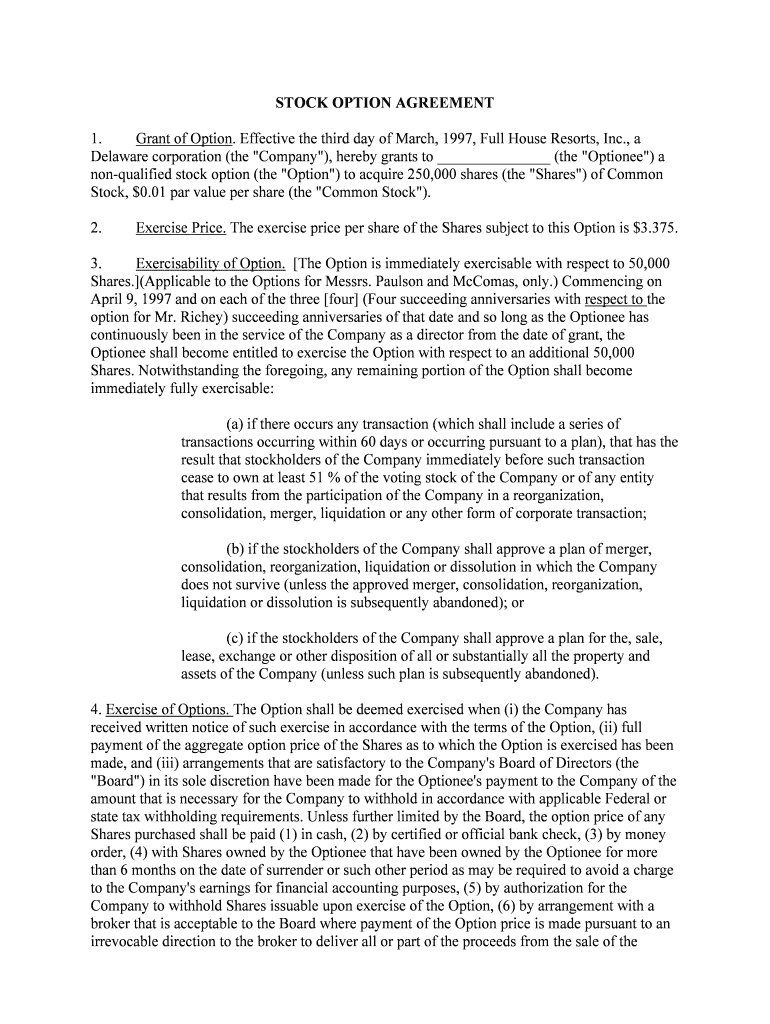
STOCK OPTION AGREEMENT 1. Grant of Option. Effective the third day of March, 1997, Full House Resorts, Inc., a Delaware corporation (the "Company"), hereby grants to _______________ (the "Optionee") a non-qualified stock option (the "Option") to acquire 250,000 shares (the "Shares") of Common Stock, $0.01 par value per share (the "Common Stock"). 2. Exercise Price. The exercise price per share of the Shares subject to this Option is $3.375. 3. Exercisability of Option. [The Option is immediately exercisable with respect to 50,000 Shares.](Applicable to the Options for Messrs. Paulson and McComas, only.) Commencing on April 9, 1997 and on each of the three [four] (Four succeeding anniversaries with respect to the option for Mr. Richey) succeeding anniversaries of that date and so long as the Optionee has continuously been in the service of the Company as a director from the date of grant, the Optionee shall become entitled to exercise the Option with respect to an additional 50,000 Shares. Notwithstanding the foregoing, any remaining portion of the Option shall become immediately fully exercisable: (a) if there occurs any transaction (which shall include a series of transactions occurring within 60 days or occurring pursuant to a plan), that has the result that stockholders of the Company immediately before such transaction cease to own at least 51 % of the voting stock of the Company or of any entity that results from the participation of the Company in a reorganization, consolidation, merger, liquidation or any other form of corporate transaction; (b) if the stockholders of the Company shall approve a plan of merger, consolidation, reorganization, liquidation or dissolution in which the Company does not survive (unless the approved merger, consolidation, reorganization, liquidation or dissolution is subsequently abandoned); or (c) if the stockholders of the Company shall approve a plan for the, sale, lease, exchange or other disposition of all or substantially all the property and assets of the Company (unless such plan is subsequently abandoned). 4. Exercise of Options. The Option shall be deemed exercised when (i) the Company has received written notice of such exercise in accordance with the terms of the Option, (ii) full payment of the aggregate option price of the Shares as to which the Option is exercised has been made, and (iii) arrangements that are satisfactory to the Company's Board of Directors (the "Board") in its sole discretion have been made for the Optionee's payment to the Company of the amount that is necessary for the Company to withhold in accordance with applicable Federal or state tax withholding requirements. Unless further limited by the Board, the option price of any Shares purchased shall be paid (1) in cash, (2) by certified or official bank check, (3) by money order, (4) with Shares owned by the Optionee that have been owned by the Optionee for more than 6 months on the date of surrender or such other period as may be required to avoid a charge to the Company's earnings for financial accounting purposes, (5) by authorization for the Company to withhold Shares issuable upon exercise of the Option, (6) by arrangement with a broker that is acceptable to the Board where payment of the Option price is made pursuant to an irrevocable direction to the broker to deliver all or part of the proceeds from the sale of the Option Shares to the Company in payment of the Option price, or (7) any combination of the foregoing. The Board in its sole discretion may accept a personal check in full or partial payment of any Shares. If the exercise price is paid in whole or in part with Shares, the value of the Shares surrendered shall be their Fair Market Value (as defined below) on the date the Option is exercised. For purposes of this Option, "Fair Market Value" shall mean the "Closing Price" (as defined below) of the Common Stock on the business day immediately preceding the date of transfer, unless the Board in its sole discretion shall determine otherwise in a fair and uniform manner. For the purpose of determining Fair Market Value, the "Closing Price" of the Common Stock on any business day shall be, if the Common Stock is quoted on the National Association of Securities Dealers Automated Quotations System, or any similar system of automated dissemination of quotations of securities prices in common use, the last reported sale price of Common Stock for such day on such system, or if such source is not applicable, the mean between the high bid and low asked quotations for the Common Stock as reported by the National Quotation Bureau, Incorporated if at least two securities dealers have inserted both bid and asked quotations for Common Stock on at least five of the ten preceding days. If neither such source is applicable, then Fair Market Value shall be determined in good faith by the Board in a fair and uniform manner. The Company in its sole discretion may, on an individual basis or pursuant to a general program established in connection with this Option, and subject to applicable law, lend money to the Optionee, guarantee a loan to the Optionee, or otherwise assist the Optionee to obtain the cash necessary to exercise all or a portion of the Option granted hereunder or to pay any tax liability of the Optionee attributable to such exercise. If the exercise price is paid in whole or part with Optionee's promissory note, such note shall (i) provide for full recourse to the maker, (ii) be collateralized by the pledge of the Shares that the Optionee purchases upon exercise of such Option, (iii) bear interest at a rate no less than the prime rate of the Company's principal lender, and (iv) contain such other terms as the Board in its sole discretion shall reasonably require. The Optionee shall not be deemed to be a holder of any Shares subject to an Option unless and until a stock certificate or certificates for such Shares are issued to such person(s) under the terms of this Option. No adjustment shall be made for dividends (ordinary or extraordinary, whether in cash, securities or other property) or distributions or other rights for which the record date is prior to the date such stock certificate is issued, except as expressly provided in Section 6 hereof. 5. Termination of Option. This Option shall terminate, and in no event be exercisable, after March 2, 2007 [April 8, 2007] (Mr. Richey's Option expires on April 8, 2007.). In addition, any unexercised portion of this Option shall automatically and without notice terminate and become null and void at the time of the earliest to occur of the following: (a) 90 days after the date on which the Optionee's service as a director of the Company is terminated for any reason other than as set forth in subsections (b), (c) and (d) immediately below; (b) immediately upon the termination of the Optionee's service as a director for "Cause", which shall mean for purposes of this Option the termination of the Optionee's service as a director for reason of the Optionee's willful misconduct or gross negligence. (c) twelve months after the date on which the Optionee's service as a director is terminated by reason of mental or physical disability (within the meaning of Internal Revenue Code Section 22(e)) as determined by a medical doctor satisfactory to the Board; or(d) (i) twelve months after the date of the Optionee's death or (ii) three months after the date of the Optionee's death if such death shall occur during the twelve month period specified in Subsection (c) hereof. Notwithstanding the foregoing, the Board or the Board in its sole discretion may by giving written notice (the "Cancellation Notice") cancel, effective upon the date of the consummation of any corporate transaction described in Subsections 3(a), (b) or (c) hereof, any Option that remains unexercised on such date. Such Cancellation Notice shall be given a reasonable period of time prior to the proposed date of such cancellation and may be given either before or after approval of such corporate transaction. 6. Adjustment of Shares (a) If at any time while an unexercised portion of the Option is outstanding, there shall be any increase or decrease in the number of issued and outstanding shares of Common Stock through the declaration of a stock dividend or through any recapitalization resulting in a stock split-up, combination or exchange of shares of Common Stock, then and in such event appropriate adjustment shall be made in the number of Shares and the exercise price per Share thereof then subject to the Option, so that the same percentage of the Company's issued and outstanding shares of Common Stock shall remain subject to purchase at the same aggregate exercise price. (b) The Board may change the terms of the Option when, in the Board's sole discretion, such adjustments become appropriate by reason of a corporate transaction described in Subsections 3(a), (b), or (c) hereof. (c) Except as otherwise expressly provided herein, the issuance by the Company of shares of its capital stock of any class, or securities convertible into shares of capital stock of any class, either in connection with direct sale or upon the exercise of rights or warrants to subscribe therefor, or upon conversion of shares or obligations of the Company convertible into such shares or other securities, shall not affect, and no adjustment by reason thereof shall be made with respect to the number of or exercise price of Shares then subject to the Option. (d) Without limiting the generality of the foregoing, the existence of the Option shall not affect in any manner the right or power of the Company to make, authorize or consummate (i) any or all adjustments, recapitalizations, reorganizations or other changes in the Company's capital structure or its business; (ii) any merger or consolidation of the Company; (iii) any issue by the Company of debt securities or preferred or preference stock that would rank above the Shares subject to outstanding Options; (iv) the dissolution or liquidation of the Company; (v) any sale, transfer or assignment of all or any part of the assets or business of the Company; or (vi) any other corporate act or proceeding, whether of a similar character or otherwise or would otherwise prohibit the registration of the Common Stock with the United States Securities and Exchange Commission. 7. Issuance of Shares. (a) Notwithstanding any other provision of this Option, the Company shall not be obligated to issue any Shares unless it is advised by counsel of its selection that it may do so without violation of the applicable Federal and state laws pertaining to the issuance of securities, and may require any stock so issued to bear a legend, may give its transfer agent instructions, and may take such other steps, as in its judgment are reasonably required to prevent any such violation. (b) As a condition of any sale or issuance of Shares upon exercise of the Option, the Board may require such agreements or undertakings, if any, as the Board may deem necessary or advisable to assure compliance with any such law or regulation including, but not limited to, the following: (i) a representation and warranty by the Optionee to the Company, at the time any portion of the Option is exercised, that he is acquiring the Shares to be issued to him for investment and not with a view to, or for sale in connection with, the distribution of any such Shares; and (ii) a representation, warranty and/or agreement to be bound by any legends that are, in the opinion of the Board, necessary or appropriate to comply with the provisions of any securities law deemed by the Board to be applicable to the issuance of the Shares and are endorsed upon the Share certificates. 8. Withholding or Deduction for Taxes. If at any time specified herein for the making of any issuance or delivery of Shares to the Optionee, any law or regulation of any governmental authority having jurisdiction in the premises shall require the Company to withhold, or to make any deduction for, any taxes or take any other action in connection with the issuance or delivery then to be made, such issuance or delivery shall be deferred until such withholding or deduction shall have been . provided for by the Optionee or beneficiary, or other appropriate action shall have been taken. 9. Transferability of Options and Shares. (a) Unless the Board's prior written consent is obtained and the transaction does not violate the requirements of Rule 16b-3 promulgated under the Exchange Act 1934, as amended (the "Exchange Act"), or would otherwise prohibit the registration of the Common Stock on Form S-8, the Option shall not be subject to alienation, assignment, pledge, charge or other transfer other than by the Optionee by will or the laws of descent and distribution, and any attempt to make any such prohibited transfer shall be void. The Option shall be exercisable during the Optionee's lifetime only by the Optionee, or in the case where the Option has been assigned or otherwise transferred with the Board's prior written consent, only by the assignee consented to by the Board. (b) Unless the Board's prior written consent is obtained and the transaction does not violate the requirements of Rule 16b-3 promulgated under the Exchange Act, no Shares acquired by the Optionee may be sold, assigned, pledged or otherwise transferred prior to the expiration of the six-month period following the date on which the Option was granted. 10. Section 83(h) Election . If as a result of exercising all or any part of this Option, an Optionee receives Shares that are subject to a "substantial risk of forfeiture" and are not "transferable" as those terms are defined for purposes of Section 83(a) of the Internal Revenue Code of 1986, as amended (the "Code"), then such Optionee may elect under Section 83(b) of the Code to include in the Optionee's gross income, for the Optionee's taxable year in which the Shares are transferred to the Optionee, the excess of the Fair Market Value of such Shares at the time of transfer (determined without regard to any restriction other than one that by its terms will never lapse), over the amount paid for the Shares. If the Optionee makes the Section 83(b) election described above, the Optionee shall (i) make such election in a manner that the Board determines in its reasonable judgment to be satisfactory, (ii) provide the Company with a copy of such election, (iii) agree to promptly notify the Company if any Internal Revenue Service or state tax agent, on audit or otherwise, questions the validity or correctness of such election or of the amount of income reportable on account of such election, and (iv) agree to such tax withholding as the Board may reasonably require in its sole and absolute discretion.11. Law Governing. This Agreement shall be governed in accordance with the internal laws of the State of Delaware.12. Interpretation. The Optionee accepts this Option subject to all the terms and provisions of this Agreement. The undersigned Optionee hereby accepts as binding, conclusive and final all decisions or interpretations of the Board upon any questions arising this Agreement. 13. Notices. Any notice under this Agreement shall be in writing and shall be deemed to have been duly given when delivered personally or when deposited in the United States mail, registered, postage prepaid, and addressed, in the case of the Company, to the Company's Secretary at Highway 85 South, P.O. Box 643, Deadwood, South Dakota 57732 or if the Company should move its principal office, to such principal office, and, in the case of the Optionee, to the Optionee's last permanent address as shown on the Company's records, subject to the right of either party to designate some other address at any time hereafter in a notice satisfying the requirements of this Section. Full House Resorts, Inc. 4/14/97

Useful hints for setting up your ‘Inccom Small Business Ideas And Resources For Entrepreneurs’ online

Are you fed up with the inconvenience of managing paperwork? Look no further than airSlate SignNow, the premier e-signature solution for individuals and small to medium-sized businesses. Bid farewell to the lengthy steps of printing and scanning documents. With airSlate SignNow, you can seamlessly complete and sign documents online. Take advantage of the extensive features offered by this intuitive and cost-effective platform and transform your approach to document management. Whether you need to sign applications or gather signatures, airSlate SignNow takes care of everything with ease, just a few clicks away.

Follow these detailed instructions:

  1. Log into your account or initiate a free trial with our service.
  2. Click +Create to upload a file from your device, cloud storage, or our template collection.
  3. Open your ‘Inccom Small Business Ideas And Resources For Entrepreneurs’ in the editor.
  4. Click Me (Fill Out Now) to finalize the form on your end.
  5. Add and designate fillable fields for other individuals (if needed).
  6. Continue with the Send Invite options to solicit eSignatures from others.
  7. Save, print your copy, or convert it into a reusable template.

Don’t fret if you need to work with others on your Inccom Small Business Ideas And Resources For Entrepreneurs or send it for notarization—our platform provides everything required to complete such tasks. Join airSlate SignNow today and elevate your document management to new levels!

Here is a list of the most common customer questions. If you can’t find an answer to your question, please don’t hesitate to reach out to us.

Need help? Contact Support

The best way to complete and sign your inccom small business ideas and resources for entrepreneurs form


Save time on document management with airSlate SignNow and get your inccom small business ideas and resources for entrepreneurs form eSigned quickly from anywhere with our fully compliant eSignature tool.

How to Sign a PDF Online How to Sign a PDF Online

How to fill out and sign documents online

In the past, working with paperwork took lots of time and effort. But with airSlate SignNow, document management is quick and easy. Our robust and easy-to-use eSignature solution enables you to effortlessly complete and eSign your inccom small business ideas and resources for entrepreneurs form online from any internet-connected device.

Follow the step-by-step guidelines to eSign your inccom small business ideas and resources for entrepreneurs form template online:

  • 1.Sign up for a free trial with airSlate SignNow or log in to your account with password credentials or SSO authentication.
  • 2.Click Upload or Create and import a file for eSigning from your device, the cloud, or our form library.
  • 3.Click on the document name to open it in the editor and use the left-side toolbar to fill out all the empty areas appropriately.
  • 4.Put the My Signature field where you need to eSign your form. Provide your name, draw, or upload a photo of your handwritten signature.
  • 5.Click Save and Close to finish modifying your completed document.

Once your inccom small business ideas and resources for entrepreneurs form template is ready, download it to your device, export it to the cloud, or invite other parties to eSign it. With airSlate SignNow, the eSigning process only takes a couple of clicks. Use our robust eSignature tool wherever you are to manage your paperwork successfully!


How to Sign a PDF Using Google Chrome How to Sign a PDF Using Google Chrome

How to complete and sign paperwork in Google Chrome

Completing and signing documents is simple with the airSlate SignNow extension for Google Chrome. Adding it to your browser is a quick and effective way to deal with your forms online. Sign your inccom small business ideas and resources for entrepreneurs form sample with a legally-binding electronic signature in just a couple of clicks without switching between tools and tabs.

Follow the step-by-step guidelines to eSign your inccom small business ideas and resources for entrepreneurs form template in Google Chrome:

  • 1.Go to the Chrome Web Store, locate the airSlate SignNow extension for Chrome, and add it to your browser.
  • 2.Right-click on the link to a document you need to eSign and choose Open in airSlate SignNow.
  • 3.Log in to your account with your credentials or Google/Facebook sign-in buttons. If you don’t have one, sign up for a free trial.
  • 4.Use the Edit & Sign menu on the left to complete your sample, then drag and drop the My Signature option.
  • 5.Insert a picture of your handwritten signature, draw it, or simply type in your full name to eSign.
  • 6.Make sure all information is correct and click Save and Close to finish editing your form.

Now, you can save your inccom small business ideas and resources for entrepreneurs form sample to your device or cloud storage, send the copy to other individuals, or invite them to electronically sign your form with an email request or a protected Signing Link. The airSlate SignNow extension for Google Chrome enhances your document workflows with minimum time and effort. Start using airSlate SignNow today!


How to Sign a PDF in Gmail How to Sign a PDF in Gmail How to Sign a PDF in Gmail

How to fill out and sign paperwork in Gmail

When you receive an email with the inccom small business ideas and resources for entrepreneurs form for signing, there’s no need to print and scan a file or save and re-upload it to a different tool. There’s a much better solution if you use Gmail. Try the airSlate SignNow add-on to quickly eSign any documents right from your inbox.

Follow the step-by-step guide to eSign your inccom small business ideas and resources for entrepreneurs form in Gmail:

  • 1.Navigate to the Google Workplace Marketplace and look for a airSlate SignNow add-on for Gmail.
  • 2.Set up the program with a corresponding button and grant the tool access to your Google account.
  • 3.Open an email containing an attached file that needs approval and utilize the S sign on the right sidebar to launch the add-on.
  • 4.Log in to your airSlate SignNow account. Opt for Send to Sign to forward the document to other parties for approval or click Upload to open it in the editor.
  • 5.Put the My Signature field where you need to eSign: type, draw, or upload your signature.

This eSigning process saves time and only requires a couple of clicks. Take advantage of the airSlate SignNow add-on for Gmail to update your inccom small business ideas and resources for entrepreneurs form with fillable fields, sign paperwork legally, and invite other parties to eSign them al without leaving your mailbox. Enhance your signature workflows now!


How to Sign a PDF on a Mobile Device How to Sign a PDF on a Mobile Device How to Sign a PDF on a Mobile Device

How to fill out and sign documents in a mobile browser

Need to rapidly submit and sign your inccom small business ideas and resources for entrepreneurs form on a mobile phone while working on the go? airSlate SignNow can help without needing to set up extra software applications. Open our airSlate SignNow tool from any browser on your mobile device and create legally-binding eSignatures on the go, 24/7.

Follow the step-by-step guide to eSign your inccom small business ideas and resources for entrepreneurs form in a browser:

  • 1.Open any browser on your device and go to the www.signnow.com
  • 2.Sign up for an account with a free trial or log in with your password credentials or SSO option.
  • 3.Click Upload or Create and add a file that needs to be completed from a cloud, your device, or our form catalogue with ready-to go templates.
  • 4.Open the form and fill out the blank fields with tools from Edit & Sign menu on the left.
  • 5.Put the My Signature field to the sample, then enter your name, draw, or add your signature.

In a few simple clicks, your inccom small business ideas and resources for entrepreneurs form is completed from wherever you are. Once you're finished editing, you can save the file on your device, generate a reusable template for it, email it to other individuals, or ask them to electronically sign it. Make your documents on the go speedy and efficient with airSlate SignNow!


How to Sign a PDF on iPhone How to Sign a PDF on iPhone

How to complete and sign paperwork on iOS

In today’s business world, tasks must be done quickly even when you’re away from your computer. Using the airSlate SignNow application, you can organize your paperwork and approve your inccom small business ideas and resources for entrepreneurs form with a legally-binding eSignature right on your iPhone or iPad. Install it on your device to conclude agreements and manage forms from anywhere 24/7.

Follow the step-by-step guidelines to eSign your inccom small business ideas and resources for entrepreneurs form on iOS devices:

  • 1.Open the App Store, find the airSlate SignNow app by airSlate, and install it on your device.
  • 2.Open the application, tap Create to import a form, and select Myself.
  • 3.Choose Signature at the bottom toolbar and simply draw your autograph with a finger or stylus to eSign the sample.
  • 4.Tap Done -> Save after signing the sample.
  • 5.Tap Save or take advantage of the Make Template option to re-use this paperwork later on.

This method is so easy your inccom small business ideas and resources for entrepreneurs form is completed and signed within a couple of taps. The airSlate SignNow app works in the cloud so all the forms on your mobile device remain in your account and are available any time you need them. Use airSlate SignNow for iOS to boost your document management and eSignature workflows!


How to Sign a PDF on Android How to Sign a PDF on Android

How to complete and sign forms on Android

With airSlate SignNow, it’s simple to sign your inccom small business ideas and resources for entrepreneurs form on the go. Set up its mobile app for Android OS on your device and start enhancing eSignature workflows right on your smartphone or tablet.

Follow the step-by-step guidelines to eSign your inccom small business ideas and resources for entrepreneurs form on Android:

  • 1.Navigate to Google Play, find the airSlate SignNow application from airSlate, and install it on your device.
  • 2.Log in to your account or register it with a free trial, then import a file with a ➕ option on the bottom of you screen.
  • 3.Tap on the uploaded file and select Open in Editor from the dropdown menu.
  • 4.Tap on Tools tab -> Signature, then draw or type your name to electronically sign the sample. Fill out empty fields with other tools on the bottom if needed.
  • 5.Use the ✔ button, then tap on the Save option to end up with editing.

With an intuitive interface and total compliance with major eSignature laws and regulations, the airSlate SignNow app is the best tool for signing your inccom small business ideas and resources for entrepreneurs form. It even operates without internet and updates all document changes when your internet connection is restored and the tool is synced. Fill out and eSign forms, send them for eSigning, and create multi-usable templates anytime and from anyplace with airSlate SignNow.

Sign up and try Inccom small business ideas and resources for entrepreneurs form
  • Close deals faster
  • Improve productivity
  • Delight customers
  • Increase revenue
  • Save time & money
  • Reduce payment cycles

