Parties Identified
Identify the informant (legal name and alias), the signing officer, title, badge number, and the agency responsible for supervision and record custody.
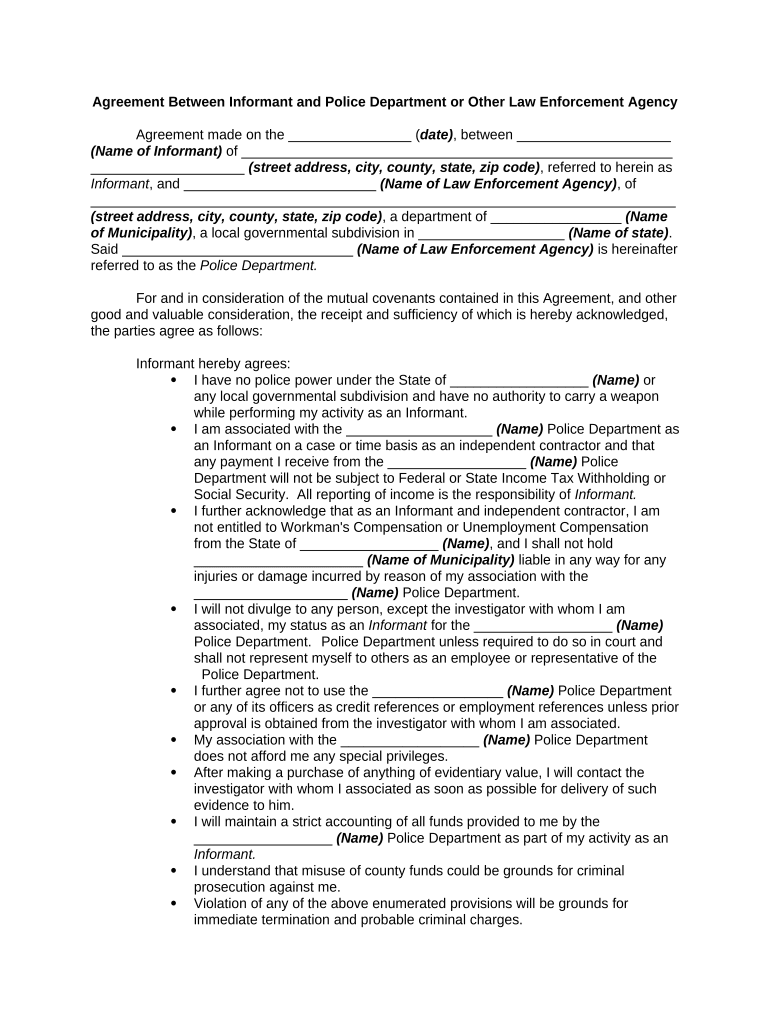
A formal agreement clarifies expectations, preserves admissibility of evidence, reduces legal risk, and provides a record of consent and protections for both the informant and the agency under applicable law such as ESIGN and UETA where electronic records are used.

These agreements are primarily used by law enforcement units, prosecutors, and legal advisors to document controlled cooperation and protect chain-of-custody and confidentiality.
Smaller agencies and multi-jurisdiction task forces also use similar templates; procedures for identity verification and record retention should be aligned with local policy and state law.
| Field | Configuration |
|---|---|
| Authentication | Use email + SMS OTP or agency SSO for signer identity |
| Template | Lock required fields and apply conditional visibility |
| Routing Order | Define signer sequence: informant → officer → legal review |
| Retention Setting | Configure read-only archive and exportable audit trail |
Digital completion requires secure storage, auditable signatures, and integration with records systems to preserve chain-of-custody and confidentiality.
Ensure chosen platform supports audit trails, encryption (TLS/AES), and applicable compliance requirements such as HIPAA or 21 CFR Part 11 when those regimes apply.
Identify the informant (legal name and alias), the signing officer, title, badge number, and the agency responsible for supervision and record custody.
Define the specific activities, timeframe, and types of information the informant will provide, and any limits on tasks or operations they will engage in.
Specify confidentiality level, permitted disclosures, court orders exceptions, and procedures for evaluating requests to reveal informant identity.
Describe safety measures, anonymity options, relocation or protective services if applicable, and internal protocols for threat assessment.
Document any payment, expenses, or other consideration. Include method, timing, and conditions tied to performance or prosecutorial approval.
State whether signatures require notarization or witnesses, retention location, and how amendments must be made and approved.
| signNow | DocuSign | Adobe Sign | PandaDoc | HelloSign | |
|---|---|---|---|---|---|
| Starting Price | $8/user/mo | $15/user/mo | $14/user/mo | $19/user/mo | $15/user/mo |
| Free Trial | 7-day free trial | Varies by plan | Varies by plan | Varies by plan | Varies by plan |
| Bulk Send | Yes | Yes | Yes | Yes | No |
| Audit Trail | Yes | Yes | Yes | Yes | Yes |
| HIPAA Compliant | Yes | Yes | Yes | No | No |
| Envelope Cap | No envelope cap | 100 envelopes/user/year | Varies by plan | Varies by plan | Varies by plan |
A detective documents a short-term cooperation agreement with an informant to provide transaction details
A task force uses a written agreement to outline controlled buy procedures and informant compensation
Complete verification within 24–72 hours of agreement initiation
Obtain prosecutor sign-off before any compensation is paid
Upload executed agreement to RMS within 24 hours of signing
Review active informant agreements at least quarterly
Archive per retention policy after case closure