Establishing secure connection… Loading editor… Preparing document…
Navigation

Fill and Sign the Lease Agreement Dated January 10 2018 by and Secgov Form
Fill and Sign the Lease Agreement Dated January 10 2018 by and Secgov Form

How it works

Open the document and fill out all its fields.
Apply your legally-binding eSignature.
Save and invite other recipients to sign it.

Rate template

4.4
39 votes
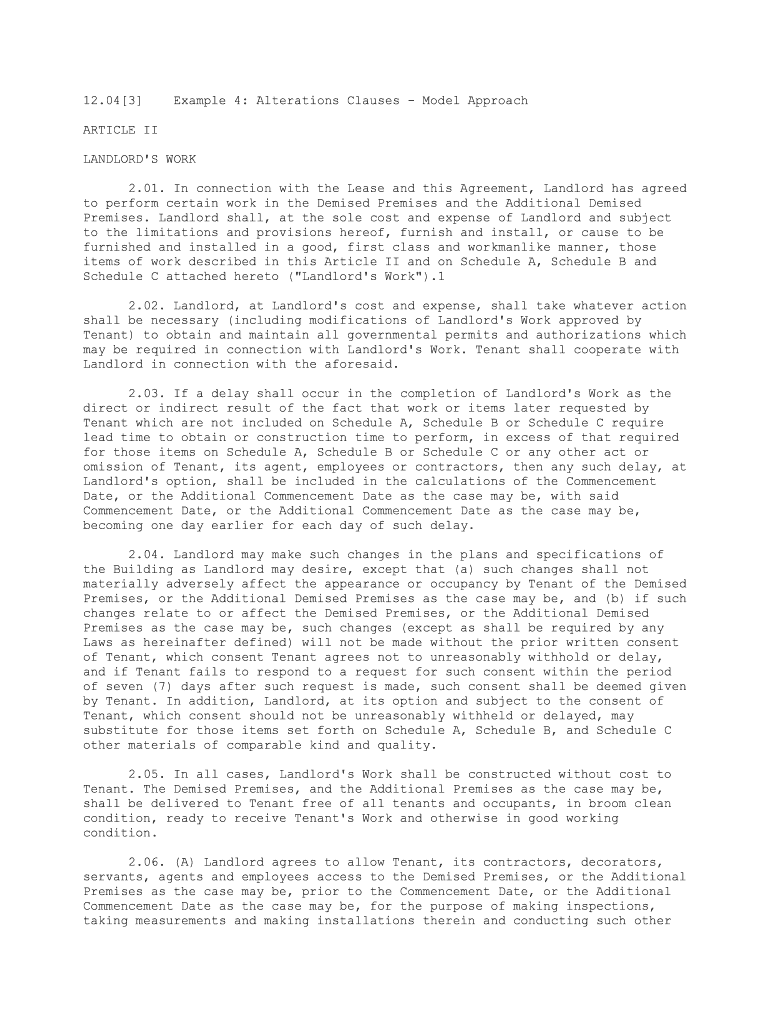
12.04[3] Example 4: Alterations Clauses - Model ApproachARTICLE II LANDLORD'S WORK 2.01. In connection with the Lease and this Agreement, Landlord has agreed to perform certain work in the Demised Premises and the Additional Demised Premises. Landlord shall, at the sole cost and expense of Landlord and subject to the limitations and provisions hereof, furnish and install, or cause to be furnished and installed in a good, first class and workmanlike manner, those items of work described in this Article II and on Schedule A, Schedule B and Schedule C attached hereto ("Landlord's Work").1 2.02. Landlord, at Landlord's cost and expense, shall take whatever action shall be necessary (including modifications of Landlord's Work approved by Tenant) to obtain and maintain all governmental permits and authorizations which may be required in connection with Landlord's Work. Tenant shall cooperate with Landlord in connection with the aforesaid. 2.03. If a delay shall occur in the completion of Landlord's Work as the direct or indirect result of the fact that work or items later requested by Tenant which are not included on Schedule A, Schedule B or Schedule C require lead time to obtain or construction time to perform, in excess of that required for those items on Schedule A, Schedule B or Schedule C or any other act or omission of Tenant, its agent, employees or contractors, then any such delay, at Landlord's option, shall be included in the calculations of the Commencement Date, or the Additional Commencement Date as the case may be, with said Commencement Date, or the Additional Commencement Date as the case may be, becoming one day earlier for each day of such delay. 2.04. Landlord may make such changes in the plans and specifications of the Building as Landlord may desire, except that (a) such changes shall not materially adversely affect the appearance or occupancy by Tenant of the Demised Premises, or the Additional Demised Premises as the case may be, and (b) if such changes relate to or affect the Demised Premises, or the Additional Demised Premises as the case may be, such changes (except as shall be required by any Laws as hereinafter defined) will not be made without the prior written consent of Tenant, which consent Tenant agrees not to unreasonably withhold or delay, and if Tenant fails to respond to a request for such consent within the period of seven (7) days after such request is made, such consent shall be deemed given by Tenant. In addition, Landlord, at its option and subject to the consent of Tenant, which consent should not be unreasonably withheld or delayed, may substitute for those items set forth on Schedule A, Schedule B, and Schedule C other materials of comparable kind and quality. 2.05. In all cases, Landlord's Work shall be constructed without cost to Tenant. The Demised Premises, and the Additional Premises as the case may be, shall be delivered to Tenant free of all tenants and occupants, in broom clean condition, ready to receive Tenant's Work and otherwise in good working condition. 2.06. (A) Landlord agrees to allow Tenant, its contractors, decorators, servants, agents and employees access to the Demised Premises, or the Additional Premises as the case may be, prior to the Commencement Date, or the Additional Commencement Date as the case may be, for the purpose of making inspections, taking measurements and making installations therein and conducting such other work which is part of Tenant's Work, provided that the construction of Landlord's Work in the Demised Premises, or in the Additional Premises as the case may be, shall have reached a point, in Landlord's judgment, exercised in good faith, such that Landlord will not be delayed or hampered in the completion thereof by such access or by the performance by Tenant of Tenant's Work and Tenant shall not thereby be deemed to have taken possession of the Demised Premises, or the Additional Demised Premises as the case may be.(B) In connection with such access prior to the Commencement Date, or the Additional Commencement Date as the case may be, Tenant covenants (a) to cease promptly upon request by Landlord any activity or work within the Demised Premises, or the Additional Demised Premises as the case may be, during any period which, in Landlord's judgment exercised in good faith, shall interfere with or delay Landlord's prosecution or completion of Landlord's Work at the earliest possible date, (b) that Tenant shall comply promptly with all reasonable procedures and regulations prescribed by Landlord from time to time for coordinating such work and activities with any other activity or work in the Demised Premises, or the Additional Demised Premises as the case may be, or the Building, (c) that such access shall be at the sole risk of Tenant, (d) that prior to exercising such right of access during the performance of Landlord's Work, Tenant shall deliver to Landlord the policies of insurance required by this Lease including public liability, property damage and Worker's Compensation to protect Landlord and Tenant during the period of Tenant's access, in amounts and with such companies as are reasonably satisfactory to Landlord, and that Landlord shall be named as insured under all such policies as its interest may appear, (e) that Tenant shall indemnify and hold harmless Landlord from and against any and all claims arising from, or claimed to arise from, or out of the performance of any work by or on behalf of Tenant in the Building or the Demised Premises, or the Additional Demised Premises as the case may be, or which may arise by reason of any matter collateral thereto, other than Landlord's Work and from and against any and all claims arising from, or claimed to arise from, any negligence, wrongful act, or wrongful failure to act, of Tenant, its contractors, decorators, servants, agents or employees or for any other reason whatsoever arising out of Tenant's access to or being in the Demised Premises, or the Additional Demised Premises as the case may be, prior to the Commencement Date, or the Additional Commencement Date, as the case may be, or in connection with Tenant's Work during such access, (f) that Tenant shall not employ or permit the employment of any contractor, mechanic or laborer, or permit any materials in the Demised Premises, or the Additional Demised Premises as the case may be, if the use of such contractor, mechanic or laborer would, in Landlord's opinion, exercised in good faith, create any difficulty, strike or jurisdictional dispute with other contractors, mechanics or laborers employed by Tenant, Landlord or others, or would in any way disturb, interfere with or delay any work being performed by Landlord or any other Tenant or their respective contractors in the Building, and (g) to pay any additional expense of Landlord caused by any delay in the completion of Landlord's Work resulting from Tenant's access and Tenant's Work during such access. Such access by Tenant shall be deemed to be pursuant to all the provisions of the Lease and Tenant shall comply therewith except that the obligation to pay Fixed Rent and Additional Rent in connection with the Demised Premises, or the Additional Demised Premises as the case may be, shall not commence until the Rent Commencement Date, or the Additional Commencement Date as the case may be, and Tenant shall not thereby be deemed to have taken possession of the Demised Premises, or the Additional Demised Premises as the case may be. No material or equipment shall be incorporated in the Demised Premises, or the Additional Demised Premises as the case may be, in connection with the making of such installations which is subject to any lien, charge, mortgage or other encumbrance of any kind whatsoever, or subject to any conditional sale or other similar or dissimilar title retention agreement. If Tenant fails to comply with any of the foregoing obligations, then, in addition to all other rights and remedies hereunder, Landlord may by notice to Tenant require Tenant to cease the performance of such activity and Tenant's Work until Landlord's Work has been substantially completed.2.07. Landlord covenants that the Demised Premises, or the Additional Demised Premises as the case may be, shall at the Commencement Date, or the Additional Commencement Date as the case may be, conform to all laws, ordinances, rules, regulations and orders of all governmental authorities ("Laws") and shall be in a condition suitable for the use by Tenant of the Demised Premises, or the Additional Demised Premises as the case may be, as contemplated under the Lease. Landlord further covenants that the Building shall at the Commencement Date and at all times during the term of the Lease conform to all Laws, the noncompliance with which may adversely affect Tenant's use of the Demised Premises and the Additional Demised Premises or delay or otherwise impact on the filing of plans and specifications or filing for permits, certificates or other filings by Tenant. 2.08. If Landlord fails to substantially complete Landlord's Work and deliver actual possession of the Demised Premises to Tenant, free and clear of tenants and occupants on or before [insert date], Tenant may at its option, at any time prior to taking possession of the Demised Premises, cancel this Lease and upon the giving of written notice of such cancellations this Lease shall thereupon terminate and Tenant shall be released and discharged from further liability under the Lease and hereunder. If the Lease is so terminated, Landlord shall return to Tenant all payments, if any, of Fixed Rent, Additional Rent and any other payments and deposits made by Tenant to Landlord. This Article 2.08 shall not apply to the Additional Demised Premises. 2.09. Prior to the commencement of Landlord's Work with respect to the Additional Demised Premises, Landlord shall give tenant twenty (20) days notice in which time Tenant shall designate which improvements in the Additional Demised Premises shall remain within the Additional Demised Premises after the Additional Commencement Date and such improvements shall be deemed part of Landlord's Work for all purposes of this Agreement. 2.10. Landlord's Work with respect to the Additional Demised Premises shall include subdividing the Additional Demised Premises from the remainder of the 9th floor, joining the Additional Demised Premises to the Demised Premises if any already delivered to Tenant on the 9th floor and segregating, tying in and integrating the alarm system, sprinkler system, heating, ventilation and air conditioning controls and such other mechanical, electrical and heating, ventilation and air conditioning systems as Tenant shall require; all in a manner acceptable to Tenant. 2.11. The provisions of Section 4.03(B) of the Lease relating to submission of a punch list to Landlord shall apply to Landlord's Work with respect to the Additional Demised Premises and govern the submission of a punch list in connection therewith. 2.12. Landlord covenants that the Demised Premises, or the Additional Demised Premises as the case may be, shall be on the Commencement Date, or the Additional Commencement Date as the case may be, free of all asbestos, asbestos containing materials and any and all other hazardous substances and free of all environmental and environmentally related violations.2.13. Landlord hereby unconditionally guarantees all of Landlord's Work against defective workmanship and materials for the later of one (1) year from the Commencement Date, one (1) year from such later date that such portion of Landlord's Work is fully completed or with respect to the heating, ventilation and air conditioning system, one (1) year from the date that one complete heating season and cooling season has occurred after the Commencement Date, or the Additional Commencement Date as the case may be. Further, Landlord shall assign to Tenant all warranties on Landlord's Work which shall be provided to Landlord. ARTICLE III TENANT'S WORK 3.01. Tenant's Work shall mean the initial installations, alterations, additions, substitutions, improvements and decorations to be performed by Tenant or its agents, employees or contractors for the purpose of making the Demised Premises, and the Additional Demised Premises as the case may be, ready for occupancy by Tenant, and not including Landlord's Work. Tenant's Work shall be performed in compliance with the standard construction regulations for the Building, as amended by the provisions set forth on Schedule D attached hereto. 3.02. Article 12.01 of the Lease shall govern the construction of Tenant's Work except as herein modified. ... 3.08. (A) If a delay shall occur in the completion of Tenant's Work as the direct or indirect result of (i) any failure of Landlord to approve when due Tenant's plans and specifications or revisions thereto in accordance with Section 12.02 of the Lease, (ii) the quality of, performance or completion of Landlord's Work, (iii) the breach of a representation or covenant of Landlord in this Agreement or the Lease, (iv) direction by Landlord that Tenant hold up a segment of Tenant's Work for any reason, (v) any other act or omission of Landlord, its agents, employees or contractors, including any delay in giving authorizations or approvals pursuant to this Agreement, or (vi) any violation of Law or other condition in the Building then any such delay shall be included in the calculations of the Fixed Rent abatement under Section 1.03 of the Lease with respect to the Demised Premises and Section 42.06 of the Lease, as modified herein, with respect to the Additional Demised Premises, with said Fixed Rent abatements being extended one day later than provided for in Section 1.03, and Section 42.06 as the case may be, of the Lease for each day of such delay. In addition, Landlord shall pay all additional expenses of Tenant caused by any delay in the completion of Tenant's Work as hereinabove provided. Landlord hereby fully indemnifies and holds Tenant harmless from and against any and all losses, costs, damages, actions and suits (including attorneys' fees) that may arise out of such delay or the matters causing such delay, or which may arise by reason of any matter collateral thereto and from and against any and all claims arising from or claimed to arise from, any negligence, act or failure to act of Landlord, its contractors, decorators, servants, agents or employees or for any other reason whatsoever arising in connection with Landlord's Work or any other work done by or on behalf of Landlord in the Building. (B) If a delay in the completion of Tenant's Work, or any portion of such delay, is the result of strikes or labor troubles or accident, adjustment of insurance or any cause whatsoever beyond Tenant's reasonable control in the ordinary course of Tenant's business, including, but not limited to, Laws or governmental preemption in connection with a national emergency, or by reason of any laws and/or requirements of public authorities or the conditions of supply and demand which have been or are affected by war or other emergency, then any such delay, which would not have occurred but for a delay described in subparagraph (A) of this Section 3.08, shall be deemed added to the delay described in such subparagraph (A). 3.09. Landlord hereby agrees to reimburse Tenant, within ten (10) days upon request therefore, up to $50.00 per rentable square foot ($ 1,493,100.00 with respect to the Demised Premises and approximately $450,000.00 with respect to the Additional Demised Premises) for the cost of Tenant's Work (the "Allowance"). In connection with any requisition by Tenant for such reimbursement, Tenant shall submit to Landlord copies of invoices for completed work, partial lien waivers from the contractors performing that portion of Tenant's Work which is the subject of a previous requisition and such other information and documentation as Landlord, in its good faith judgment, deems necessary. Any balance of the Allowance not so depleted shall be paid to Tenant or credited against Fixed rent at Landlord's election. If the balance of the Allowance is credited against Fixed Rent, the Allowance shall earn interest as provided in Section 3.10 hereof until exhausted. 3.10. In the event Landlord fails or is unable to reimburse Tenant for Tenant's Work in the full amount of the Allowance in accordance with the provisions of Section 3.09 hereof, Tenant may unilaterally elect to abate the payment of Fixed Rent as a set-off against that portion of the Allowance that remains unreimbursed to Tenant. In the event Landlord fails to reimburse Tenant and Tenant makes the aforementioned election, the balance of the Allowance remaining unreimbursed and not set-off shall earn interest at the annual interest rate of ten (10%) percent until such time as the Allowance is either fully paid to Tenant or fully setoff against the Fixed Rent abatement.

Valuable suggestions for preparing your ‘Lease Agreement Dated January 10 2018 By And Secgov’ online

Are you fed up with the burden of managing paperwork? Look no further than airSlate SignNow, the premier eSignature solution for individuals and businesses. Bid farewell to the lengthy procedure of printing and scanning documents. With airSlate SignNow, you can seamlessly finalize and sign paperwork online. Leverage the powerful tools included in this user-friendly and economical platform and transform your method of paperwork management. Whether you need to approve forms or collect eSignatures, airSlate SignNow takes care of it all effortlessly, needing just a few clicks.

Follow this step-by-step guide:

  1. Sign in to your account or initiate a free trial with our service.
  2. Click +Create to upload a file from your device, cloud, or our form repository.
  3. Open your ‘Lease Agreement Dated January 10 2018 By And Secgov’ in the editor.
  4. Click Me (Fill Out Now) to complete the document on your end.
  5. Add and assign fillable fields for others (if needed).
  6. Proceed with the Send Invite settings to solicit eSignatures from others.
  7. Save, print your copy, or convert it into a reusable template.

Don’t fret if you need to collaborate with others on your Lease Agreement Dated January 10 2018 By And Secgov or send it for notarization—our solution provides everything necessary to accomplish these tasks. Register with airSlate SignNow today and take your document management to new levels!

Here is a list of the most common customer questions. If you can’t find an answer to your question, please don’t hesitate to reach out to us.

Need help? Contact Support

The best way to complete and sign your lease agreement dated january 10 2018 by and secgov form

Save time on document management with airSlate SignNow and get your lease agreement dated january 10 2018 by and secgov form eSigned quickly from anywhere with our fully compliant eSignature tool.

How to Sign a PDF Online How to Sign a PDF Online

How to complete and sign paperwork online

In the past, working with paperwork required pretty much time and effort. But with airSlate SignNow, document management is easy and fast. Our powerful and easy-to-use eSignature solution lets you easily complete and electronically sign your lease agreement dated january 10 2018 by and secgov form online from any internet-connected device.

Follow the step-by-step guidelines to eSign your lease agreement dated january 10 2018 by and secgov form template online:

  • 1.Sign up for a free trial with airSlate SignNow or log in to your account with password credentials or SSO authentication.
  • 2.Click Upload or Create and import a file for eSigning from your device, the cloud, or our form collection.
  • 3.Click on the document name to open it in the editor and use the left-side menu to fill out all the blank areas accordingly.
  • 4.Put the My Signature field where you need to approve your sample. Type your name, draw, or import a photo of your regular signature.
  • 5.Click Save and Close to finish editing your completed form.

As soon as your lease agreement dated january 10 2018 by and secgov form template is ready, download it to your device, save it to the cloud, or invite other individuals to electronically sign it. With airSlate SignNow, the eSigning process only takes several clicks. Use our robust eSignature solution wherever you are to manage your paperwork productively!


How to Sign a PDF Using Google Chrome How to Sign a PDF Using Google Chrome

How to complete and sign documents in Google Chrome

Completing and signing documents is simple with the airSlate SignNow extension for Google Chrome. Installing it to your browser is a fast and effective way to deal with your forms online. Sign your lease agreement dated january 10 2018 by and secgov form sample with a legally-binding electronic signature in a couple of clicks without switching between applications and tabs.

Follow the step-by-step guidelines to eSign your lease agreement dated january 10 2018 by and secgov form in Google Chrome:

  • 1.Go to the Chrome Web Store, find the airSlate SignNow extension for Chrome, and install it to your browser.
  • 2.Right-click on the link to a form you need to sign and choose Open in airSlate SignNow.
  • 3.Log in to your account with your password or Google/Facebook sign-in option. If you don’t have one, you can start a free trial.
  • 4.Utilize the Edit & Sign menu on the left to complete your template, then drag and drop the My Signature option.
  • 5.Add a picture of your handwritten signature, draw it, or simply type in your full name to eSign.
  • 6.Verify all data is correct and click Save and Close to finish editing your form.

Now, you can save your lease agreement dated january 10 2018 by and secgov form template to your device or cloud storage, send the copy to other people, or invite them to electronically sign your document via an email request or a secure Signing Link. The airSlate SignNow extension for Google Chrome improves your document workflows with minimum effort and time. Try airSlate SignNow today!


How to Sign a PDF in Gmail How to Sign a PDF in Gmail How to Sign a PDF in Gmail

How to complete and sign forms in Gmail

When you get an email containing the lease agreement dated january 10 2018 by and secgov form for signing, there’s no need to print and scan a document or download and re-upload it to a different tool. There’s a much better solution if you use Gmail. Try the airSlate SignNow add-on to quickly eSign any documents right from your inbox.

Follow the step-by-step guide to eSign your lease agreement dated january 10 2018 by and secgov form in Gmail:

  • 1.Visit the Google Workplace Marketplace and find a airSlate SignNow add-on for Gmail.
  • 2.Set up the program with a corresponding button and grant the tool access to your Google account.
  • 3.Open an email with an attachment that needs approval and use the S key on the right sidebar to launch the add-on.
  • 4.Log in to your airSlate SignNow account. Choose Send to Sign to forward the file to other parties for approval or click Upload to open it in the editor.
  • 5.Put the My Signature option where you need to eSign: type, draw, or upload your signature.

This eSigning process saves efforts and only requires a couple of clicks. Utilize the airSlate SignNow add-on for Gmail to adjust your lease agreement dated january 10 2018 by and secgov form with fillable fields, sign documents legally, and invite other parties to eSign them al without leaving your inbox. Boost your signature workflows now!


How to Sign a PDF on a Mobile Device How to Sign a PDF on a Mobile Device How to Sign a PDF on a Mobile Device

How to fill out and sign documents in a mobile browser

Need to rapidly fill out and sign your lease agreement dated january 10 2018 by and secgov form on a smartphone while doing your work on the go? airSlate SignNow can help without needing to install extra software programs. Open our airSlate SignNow solution from any browser on your mobile device and create legally-binding eSignatures on the go, 24/7.

Follow the step-by-step guide to eSign your lease agreement dated january 10 2018 by and secgov form in a browser:

  • 1.Open any browser on your device and go to the www.signnow.com
  • 2.Create an account with a free trial or log in with your password credentials or SSO option.
  • 3.Click Upload or Create and add a file that needs to be completed from a cloud, your device, or our form library with ready-made templates.
  • 4.Open the form and fill out the empty fields with tools from Edit & Sign menu on the left.
  • 5.Put the My Signature field to the sample, then enter your name, draw, or add your signature.

In a few simple clicks, your lease agreement dated january 10 2018 by and secgov form is completed from wherever you are. When you're finished editing, you can save the document on your device, build a reusable template for it, email it to other people, or invite them eSign it. Make your paperwork on the go quick and efficient with airSlate SignNow!


How to Sign a PDF on iPhone How to Sign a PDF on iPhone

How to fill out and sign documents on iOS

In today’s corporate environment, tasks must be accomplished rapidly even when you’re away from your computer. Using the airSlate SignNow mobile app, you can organize your paperwork and sign your lease agreement dated january 10 2018 by and secgov form with a legally-binding eSignature right on your iPhone or iPad. Set it up on your device to conclude contracts and manage documents from just about anywhere 24/7.

Follow the step-by-step guide to eSign your lease agreement dated january 10 2018 by and secgov form on iOS devices:

  • 1.Open the App Store, find the airSlate SignNow app by airSlate, and set it up on your device.
  • 2.Open the application, tap Create to add a template, and choose Myself.
  • 3.Choose Signature at the bottom toolbar and simply draw your signature with a finger or stylus to eSign the sample.
  • 4.Tap Done -> Save after signing the sample.
  • 5.Tap Save or take advantage of the Make Template option to re-use this paperwork later on.

This process is so simple your lease agreement dated january 10 2018 by and secgov form is completed and signed in just a couple of taps. The airSlate SignNow app works in the cloud so all the forms on your mobile device are kept in your account and are available any time you need them. Use airSlate SignNow for iOS to improve your document management and eSignature workflows!


How to Sign a PDF on Android How to Sign a PDF on Android

How to complete and sign forms on Android

With airSlate SignNow, it’s easy to sign your lease agreement dated january 10 2018 by and secgov form on the go. Install its mobile app for Android OS on your device and start boosting eSignature workflows right on your smartphone or tablet.

Follow the step-by-step guidelines to eSign your lease agreement dated january 10 2018 by and secgov form on Android:

  • 1.Open Google Play, search for the airSlate SignNow application from airSlate, and install it on your device.
  • 2.Sign in to your account or create it with a free trial, then upload a file with a ➕ option on the bottom of you screen.
  • 3.Tap on the imported document and choose Open in Editor from the dropdown menu.
  • 4.Tap on Tools tab -> Signature, then draw or type your name to eSign the sample. Fill out blank fields with other tools on the bottom if needed.
  • 5.Utilize the ✔ key, then tap on the Save option to end up with editing.

With an intuitive interface and full compliance with main eSignature standards, the airSlate SignNow application is the best tool for signing your lease agreement dated january 10 2018 by and secgov form. It even operates offline and updates all document modifications once your internet connection is restored and the tool is synced. Fill out and eSign forms, send them for approval, and create multi-usable templates whenever you need and from anyplace with airSlate SignNow.

Sign up and try Lease agreement dated january 10 2018 by and secgov form
  • Close deals faster
  • Improve productivity
  • Delight customers
  • Increase revenue
  • Save time & money
  • Reduce payment cycles

