Establishing secure connection…Loading editor…Preparing document…

Letter of Acceptance of Job Offer

This template is fully customizable. Edit the text, fill out the fields, and send it for signature. Give it a try!
Letter of Acceptance of Job Offer

What a Letter of Acceptance of Job Offer Is and When It’s Used

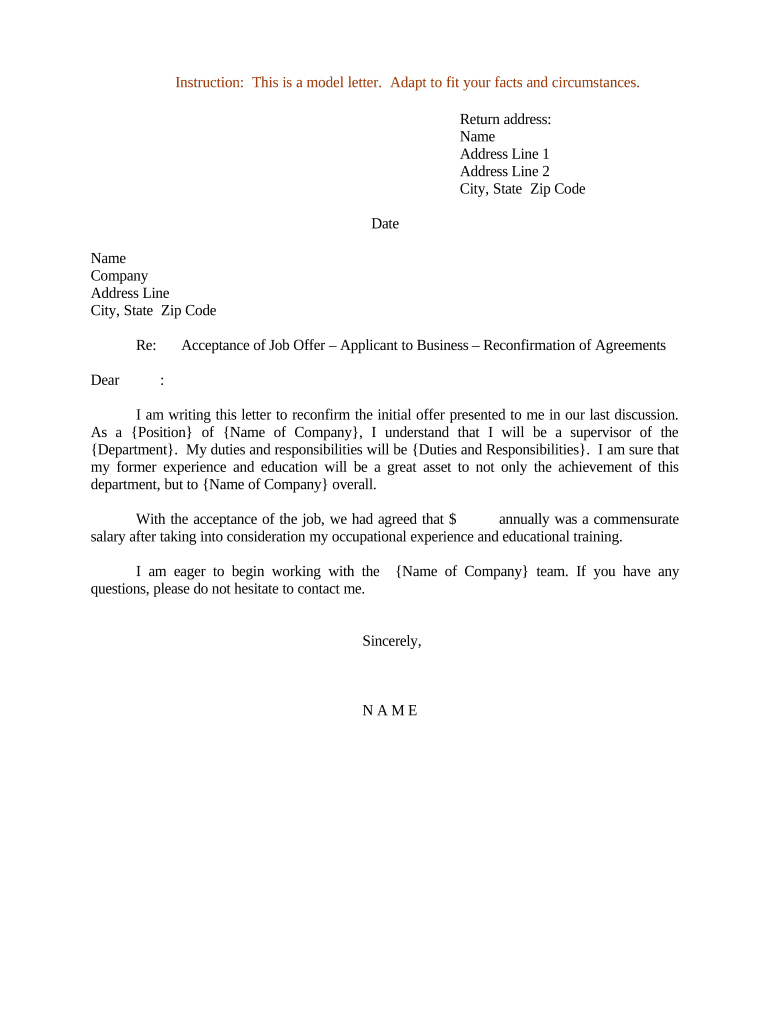
A Letter of Acceptance of Job Offer is a short written confirmation from a candidate that they accept the terms of employment proposed by an employer. It records the accepted job title, start date, base salary or pay rate, reporting manager or department, and any contingencies such as background checks, drug testing, or work authorization verification. The letter creates mutual expectations, helps HR open new-hire workflows, and serves as a dated record should either party need to reference agreed terms before a formal employment contract or onboarding packet is completed.

Why Sending a Clear Acceptance Letter Matters

A concise, properly completed acceptance letter reduces ambiguity about start dates, compensation, and contingencies and creates a clear record for payroll and benefits setup.

Why Sending a Clear Acceptance Letter Matters

Who Prepares and Receives the Letter

Typical parties involved include the accepted candidate, hiring manager, and HR or talent acquisition representative.

  • New hire: Confirms role, salary, and start date in writing to create mutual expectations.
  • Hiring manager: Verifies operational details and notifies team to prepare workstation and access.
  • HR / Payroll: Uses the letter to begin onboarding, benefits enrollment, and I-9 scheduling.

The letter is usually exchanged directly between the candidate and employer; HR retains a copy for the personnel file and payroll records.

Step-by-step: Complete and Return the Acceptance Letter

Follow these steps to complete your Letter of Acceptance of Job Offer and return it to the employer promptly.

  • 01
    Review Offer: Confirm title, salary, start date, and any contingencies before responding.
  • 02
    Fill Details: Enter your full legal name, address, and the effective start date.
  • 03
    Accept Terms: State clear acceptance language and any limited exceptions in one sentence.
  • 04
    Sign & Send: Sign and return by the employer’s preferred method (email, eSignature, or post).

Common Questions About Acceptance Letters

Answers to frequent issues when preparing, signing, or submitting a Letter of Acceptance of Job Offer.


Need help? Contact support

Typical eSignature Vendor Pricing and Capabilities

Common eSignature vendors and representative starting prices and capabilities for handling documents like acceptance letters.

signNow DocuSign Adobe Sign PandaDoc HelloSign
Starting Price $8/user/mo $15/user/mo $14/user/mo $19/user/mo $15/user/mo
Free Trial 7-day free trial No No Yes, limited Yes, limited
Bulk Send Yes Yes Yes Yes No
Audit Trail Yes Yes Yes Yes Yes
HIPAA Compliant Yes Yes Yes No No

Essential Elements to Include in a Professional Acceptance Letter

A clear acceptance letter should be concise, confirm the core terms, and provide contact and logistical details for onboarding.

Clear Acceptance

One sentence explicitly stating you accept the offer and any limited exceptions or clarifications the candidate requires.
Confirmed Start Date

Exact start date written as MM/DD/YYYY so payroll and scheduling are aligned without further emails.

Compensation Summary

Base salary or hourly rate and frequency; mention bonus, signing bonus, or stock if part of the agreement.

Reporting Line

Name of manager or department to ensure proper access, equipment, and introductions on day one.

Contingencies

List any outstanding conditions such as background checks, employment eligibility verification, or security clearances.

Contact Info

Provide a phone number and email for follow-up and HR to schedule onboarding tasks.

Security and Legal Controls to Consider

Encryption: TLS 1.2/1.3, AES-256 at rest
Audit Trail: Timestamped events and IP logging
HIPAA: BAA available for healthcare use
ESIGN/UETA: Compliant with U.S. e-signature law
Access Controls: Role-based permissions and SSO
Certifications: SOC 2 Type II, ISO 27001

Risks of an Incomplete or Incorrect Acceptance

No Signature: No enforceable acknowledgment
Wrong Start Date: Payroll and onboarding errors
Missing Contingencies: Unclear obligations lead to disputes
Mismatched Names: I-9 and tax issues
Undisclosed Conditions: May void acceptance
Late Response: Offer withdrawal risk

Common Preparation Pitfalls to Avoid

  • Using informal or ambiguous language that fails to state explicit acceptance can create ambiguity over whether employment was actually accepted.
  • Failing to specify the start date in MM/DD/YYYY format often delays payroll setup and benefits enrollment in HR systems.
  • Altering material terms in the acceptance without employer signature can be treated as a counteroffer rather than a true acceptance.
  • Sending unsigned or scanned, low-quality copies of the acceptance can prevent HR from processing I-9s and payroll on time.

Typical Digital Acceptance Workflow

This sequence shows how a Letter of Acceptance moves from candidate to HR when completed electronically.

  • Upload Offer: Employer uploads the offer and acceptance template to the signing platform.
  • Place Fields: Employer or HR adds name, date, and signature fields to the document.
  • Candidate Signs: Candidate receives link, reviews terms, and applies an electronic signature.
  • Store & Notify: Signed copy and audit trail are stored and shared with payroll and hiring managers.

How to Configure an eSigning Workflow for Acceptance Letters

Recommended settings for a secure, compliant online acceptance letter workflow.

Field Configuration
Authentication Email link or SMS code for signer verification
Signature Type Simple e-signature with audit trail; PKI optional
Retention Store signed PDF and audit trail for required period
Notifications Automatic copies to HR and hiring manager

Technical Considerations for eSigning Acceptance Letters

Ensure the chosen platform supports secure signatures, tamper-evident PDFs, and searchable storage.

  • Document Formats: PDF, DOCX supported
  • Integrations: Works with HRIS and cloud storage
  • Compliance: ESIGN, UETA, SOC 2, HIPAA (BAA)

Verify integrations (HRIS, payroll, or ATS) and select authentication strength appropriate to your compliance needs.

Typical Deadlines and Timing Expectations

Common timing milestones related to an acceptance letter and subsequent onboarding actions.

Employer Response Deadline:

If employer sets a reply deadline, respond by that date to preserve the offer.

Start Date Confirmation:

Confirm start date at least one week before to finalize logistics.

I-9 Verification Window:

Schedule I-9 verification before or on the first day of employment per DHS rules.

Benefits Enrollment:

Complete enrollment forms within employer-specified benefits window, often 30 days from start.

Background Checks:

Allow 3–10 business days for standard checks unless longer clearances are required.

Real-world Examples of eSigned Acceptance Letters

Practical examples showing how organizations use signed acceptance letters to speed hiring and improve compliance.

Optica Ventures

The interface is simple and easy-to-use for our team

  • Improved customer signature rate by 40%
  • Optica uses digital acceptance letters to reduce onboarding time and ensure consistent records across HR and finance teams, reducing manual follow-up.

Fertility Centers of Illinois

API integration allowed automated storage of signed documents

  • Reduced backlog of unsigned offers
  • The integration enabled automated routing to HR systems and secure long-term storage, improving audit readiness for compliance reviews.

be ready to get more
Join over 28 million airSlate SignNow users