Establishing secure connection…Loading editor…Preparing document…

Notice of Defective Goods

This template is fully customizable. Edit the text, fill out the fields, and send it for signature. Give it a try!
Notice of Defective Goods

What a Notice of Defective Goods Is and When it Applies

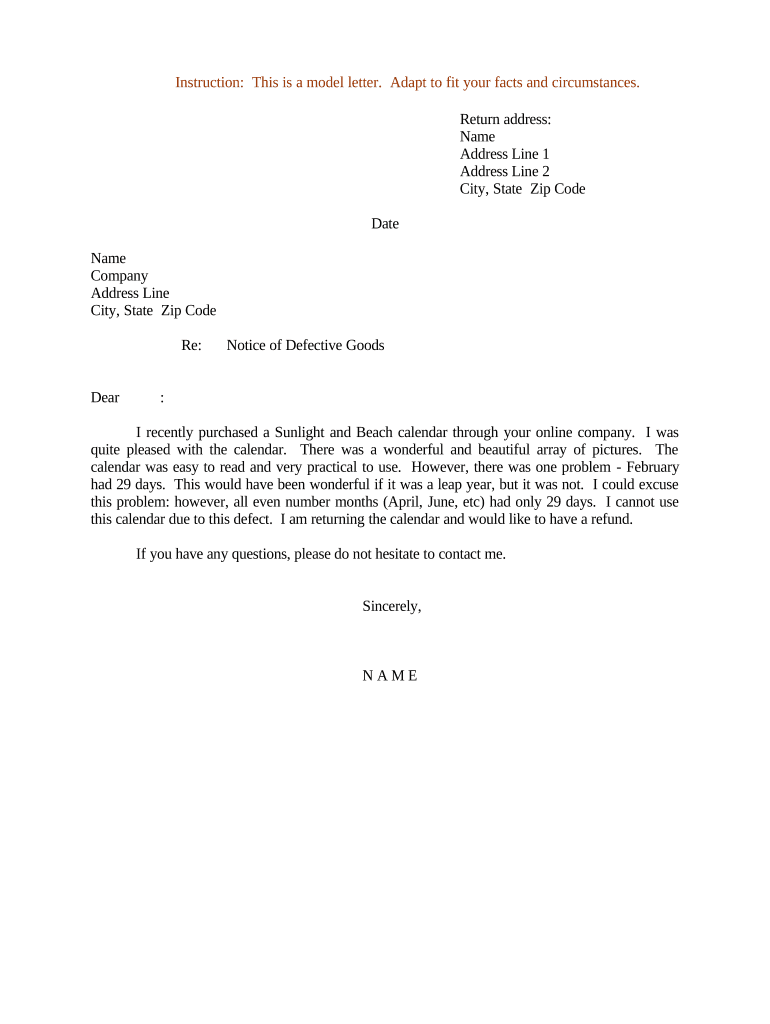
A Notice of Defective Goods is a formal written communication used by a buyer, consignee, or recipient to inform a seller, supplier, or shipper that received goods are nonconforming or defective. The notice typically identifies the transaction, describes the defect(s), provides supporting evidence, and requests a specified remedy such as repair, replacement, price adjustment, or return authorization. In many commercial contracts the notice starts statutory or contractual cure periods and preserves warranty and indemnity rights. The notice is often delivered by email plus an e-signed document or by certified mail depending on contract terms.

Why documenting defects matters for remedies and liability

A clear Notice of Defective Goods preserves contractual and statutory remedies, starts contractual cure periods, and creates a written record for dispute resolution. When executed and retained correctly it supports claims under warranty, product recalls, or insurance subrogation and is generally enforceable under ESIGN (15 U.S.C. ch. 96) and UETA where e-signatures are used.

Why documenting defects matters for remedies and liability

Who typically prepares or receives this notice

The Notice of Defective Goods is used across supply-chain roles to document defects and request corrective action.

  • Suppliers and manufacturers verifying returned or rejected inventory and tracking batch-level defects.
  • Buyers, distributors, and retailers documenting received nonconforming shipments to preserve warranty and return rights.
  • Legal, quality assurance, and compliance teams using notices to support claims, recalls, and insurance recoveries.

Clear role assignment and prompt delivery reduce commercial disputes and help meet contractual notice requirements.

Essential elements to include in a professional notice

A complete notice is concise, factual, and organized so the recipient can evaluate and respond. Include identifiers, clear defect descriptions, evidence, requested remedy, deadline, and signature to make the notice actionable.

Transaction ID

Reference the purchase order, invoice, shipment, or contract number so the recipient can locate the sale and related documentation quickly.
Goods Identification

List SKU, model, serial numbers, lot or batch numbers, quantity delivered, and packaging condition to precisely identify affected items.

Defect Description

Describe the defect with objective details: observed failure mode, inspection date, and whether defect affects safety, function, or compliance.

Evidence Attached

Attach photos, inspection reports, lab results, and shipping documents. Timestamped evidence strengthens the factual record.

Remedy Requested

State the specific remedy sought — repair, replacement, credit, or return — and any proposed logistics or cost allocation.

Response Deadline

Set a reasonable cure or response period tied to the contract (commonly 10–30 days) and state the effect of nonresponse.

Security and compliance controls to preserve evidence

Encryption: TLS 1.2/1.3 and AES-256
Audit Trail: IP, timestamp, action log
Access Controls: Role-based permissions
Tamper Evidence: Immutable file audit
HIPAA Support: BAA available
Regulatory Certs: SOC 2 Type II, ISO 27001

Step-by-step: drafting and issuing the notice

Follow a short, consistent workflow to ensure the notice is complete, supported, and delivered to the correct contact.

  • 01
    Identify parties: Enter buyer, seller, and contract identifiers.
  • 02
    Describe defect: State facts, dates, and inspection results.
  • 03
    Attach evidence: Include photos, reports, and shipment records.
  • 04
    Deliver and document: Send via certified or e-signed channel and retain proof.

How to configure an online notice workflow

Set up reusable templates and routing rules to reduce errors and speed response times when issuing multiple notices.

Template Create a template with required fields and default remedy options.
Conditional Fields Show serial number and photos fields only if 'Goods' selected.
Attachments Require photo or inspection report upload before sending.
Signature Order Specify buyer signature before seller acknowledgment.
Notifications Auto-notify legal and QA upon signing.

Typical routing: from discovery to resolution

A predictable routing sequence helps confirm receipt, assign responsibility, and document responses for dispute records.

  • Prepare: Draft notice, attach evidence, set remedy and deadline.
  • Send: Deliver via e-signature platform and/or certified mail.
  • Acknowledge: Seller reviews, responds, and proposes corrective action.
  • Resolve: Complete remedy, record acceptance, retain final documents.

Technical considerations for secure delivery and e-submission

Choose formats and delivery methods that preserve evidentiary value and meet contract authentication requirements.

  • File Formats: PDF, DOCX accepted
  • Integrations: CRM, ERP, cloud storage
  • Auth Methods: Email, SMS, KBA

Confirm whether a contract requires notarization or RON and whether your platform supports audit trails, long-term archive, and the required authentication level.

Common timelines and response expectations

Timelines are often set by contract; when absent, use prompt, documented timelines to preserve rights.

Notice Timing:

Send immediately after discovery; document inspection date.

Cure Periods:

Typically 10–30 days per commercial contracts.

Preserve Samples:

Retain samples for inspection during the cure period.

Response Deadline:

State a clear due date for seller reply.

Statute Impact:

Prompt notice preserves warranty and indemnity rights.

Common preparation errors to avoid

  • Vague descriptions that fail to identify affected SKUs or serial numbers, which slows remediation and may forfeit rights.
  • Missing or low-quality evidence such as unclear photos or unsigned inspection reports that weaken claim validity.
  • Sending to incorrect contractual contact or failing to follow notice method required by the contract, leading to disputes over timeliness.
  • Not documenting chain of custody for returned goods, complicating liability allocation and insurance recovery.

Risks if the notice is incomplete or late

Waived Remedies: Loss of warranty or return rights
Contract Breach: Counterclaims or damages exposure
Insurance Denial: Compromised subrogation claims
Evidence Loss: Unable to prove defect
Escalation Costs: Higher legal and logistics fees
Reputational Risk: Supplier relationship strain

Realistic examples of Notices of Defective Goods

Two brief scenarios show how notices are used to document defects and request practical remedies.

Case Study 1

A contractor receives a pallet of fasteners with corroded heads discovered on delivery

  • Contractor attached photos, batch number, and inspection date
  • The notice requested replacement within 15 days, reserved all warranty claims, and asked for transport authorization to return defective stock.

Case Study 2

A retailer finds 20% of electronic units failing power-on self-test in QC

  • Retailer included serial numbers and lab test results
  • The notice sought credit or replacement, signaled possible recall, and asked the supplier to cover reverse logistics costs.

eSignature vendor comparison for issuing and storing notices

Compare typical vendor pricing and core features relevant to delivering and archiving Notice of Defective Goods. Pricing reflects common entry-level plans and feature availability.

signNow DocuSign Adobe Sign PandaDoc HelloSign
Starting Price $8/user/mo $15/user/mo $14/user/mo $19/user/mo $15/user/mo
Free Trial 7-day free trial Varies Varies Varies Varies
Bulk Send Yes Yes Yes Yes No
Audit Trail Yes Yes Yes Yes Yes
HIPAA Compliant Yes Yes Yes No No

Frequently asked questions about Notices of Defective Goods

Answers to common questions about validity, delivery, and practical next steps when issuing or responding to a notice.


Need help? Contact support

be ready to get more
Join over 28 million airSlate SignNow users