Establishing secure connection…Loading editor…Preparing document…

Letter Requesting Pension Evaluation

This template is fully customizable. Edit the text, fill out the fields, and send it for signature. Give it a try!
Letter Requesting Pension Evaluation

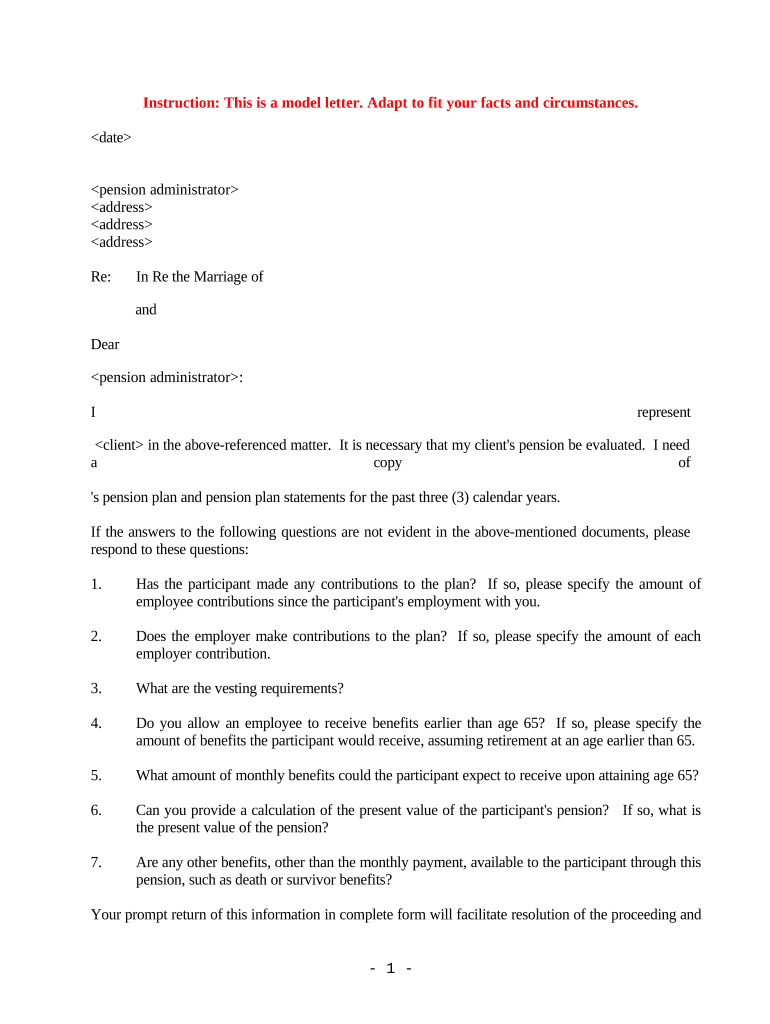
What a Letter Requesting Pension Evaluation Is and When to Use It

A Letter Requesting Pension Evaluation is a formal written request from a plan participant, beneficiary, employer representative, or authorized agent asking a pension plan administrator to re-evaluate benefits, verify service credit, recalculate a benefit amount, or confirm eligibility. The letter identifies the requester and participant, explains the reason for the review (for example, missing service time, disability determination, survivor benefits, or recalculation after a break in service), and lists supporting documentation. It establishes a clear administrative record, creates a start date for plan processing, and often initiates appeal or reconsideration timelines under plan rules or ERISA procedures.

Why a Clear, Formal Request Helps Your Case

A concise, properly formatted letter improves clarity, reduces processing delays, and creates an auditable record for appeals or further review. It signals factual basis and organizes supporting documents for the plan administrator.

Why a Clear, Formal Request Helps Your Case

Who Typically Prepares or Receives This Letter

The format and required content may vary by plan; use plan rules to confirm who may submit requests and what supporting evidence is mandatory.

  • Plan participants and beneficiaries who seek benefit recalculation, service-credit corrections, or eligibility confirmation.
  • Employer HR or benefits teams sending requests on behalf of former or current employees.
  • Attorneys and fiduciary representatives preparing formal administrative appeals or documentation for litigation or negotiation.

Step-by-Step: How to Prepare and Submit the Letter

Follow a clear sequence to ensure the request is accepted and routed correctly by the plan administrator.

  • 01
    Draft the letter: State participant details, issue, and desired action concisely.
  • 02
    Attach evidence: Include pay records, ID, and any prior plan correspondence.
  • 03
    Choose recipient: Address the plan administrator or the designated appeals office.
  • 04
    Retain proof: Send by tracked mail or eSubmit with audit trail; keep copies for records.

Core Components Every Professional Letter Should Include

A complete letter balances clear identification, factual summary, supporting evidence, and a precise request for administrative action.

Header

Include sender name, participant name, plan name, participant identifier, and date to ensure correct file matching.
Issue Summary

A concise factual statement of the problem (for example, missing years of service or incorrect benefit computation) with key dates.

Supporting Evidence

Enumerate attached documents such as pay stubs, W-2s, termination letters, and prior communications that substantiate the claim.

Requested Outcome

Clearly specify the remedy requested—recalculation, retroactive benefits, correction of records, or expedited review—and the rationale.

Signature Block

Signed and dated by the participant or authorized representative; include title and contact details for follow-up.

Document Index

Number attachments and reference them in the body so reviewers can quickly verify supporting data.

Required Identifying Details and Supporting Items

Full legal name: Exact name
Participant identifier: Plan ID or SSN
Dates of service: Inclusive dates
Proof of employment: Pay stubs or W-2
Authorization: POA or representative form
Contact details: Phone and email

Typical Administrative Routing and Review Flow

Understanding the common routing path helps you address the right office and anticipate next steps.

  • Initial intake: Plan admin logs request and assigns file number.
  • Document verification: Administrator validates identity and supporting documents.
  • Actuarial review: Benefit recalculation or records correction occurs as required.
  • Decision notice: Plan issues written determination with appeal instructions.

How to Set Up an eSubmission Workflow for the Letter

Configure an electronic workflow that captures signatures, timestamps, and an auditable delivery trail.

Field Configuration
Signature field Collect signer name, date, and signature
Attachment field Require supporting documents before submission
Recipient routing Address to plan administrator or appeals inbox
Audit trail Enable IP, timestamp, and delivery receipts

Technical Options for Secure Electronic Delivery

Ensure the chosen channel preserves signatures and timestamps and that recipients accept electronic submissions under plan rules.

  • File formats: PDF, DOCX supported
  • Authentication: Email link, SMS code, or KBA
  • Integrations: Common CRMs and storage

Typical Processing Timeframes and Response Deadlines

Timelines vary by plan, but common timeframes and statutory appeal windows help set expectations.

Acknowledgment timeframe:

Plan often acknowledges receipt within 7–30 days.

Initial review period:

Substantive review and recalculation may take 30–90 days.

Appeal deadline:

Plans commonly allow 30–180 days for internal appeals.

Retroactive adjustments:

Effective dates and retro pay depend on plan rules and discovery date.

Statutory considerations:

ERISA-related timelines depend on plan and notice requirements.

Key Milestones from Submission Through Decision

Follow these sequential milestones so you can monitor progress and prepare next steps if the request is denied.

01

Prepare request

Assemble letter and supporting records before submission.

02

Submit to administrator

Deliver by accepted channel with proof of delivery.

03

Administrative review

Plan verifies facts and performs recalculation if warranted.

04

Receive determination

Decision issued with instructions for appeal or next actions.

Common Mistakes That Slow or Derail a Request

  • Using inconsistent names or identifiers that don’t match plan records, which triggers identity verification delays and additional requests.
  • Failing to attach primary evidence (pay stubs, W-2s, separation letters), forcing the administrator to request supplemental documentation.
  • Addressing the wrong recipient or department, causing routing delays or misfiling of the request within the plan office.
  • Submitting unsigned or undated letters, which may be treated as informal inquiries rather than formal requests under plan procedures.

Consequences of Incomplete or Incorrect Requests

Processing delay: Longer review times
Denial of claim: Administrative rejection
Appeal complications: Harder to prove the record
Potential forfeiture: Statute or plan deadlines
Data inconsistency: Conflicting records create disputes
Legal costs: Attorney involvement increases expense

How This Letter Differs from Other Benefit Documents

Compare common document types so you select the right form and process for your issue.

Document Type Purpose Formality Typical Outcome
Pension evaluation letter request recalculation formal plan determination
Administrative appeal challenge decision highly formal written appeal record
Initial benefits application request enrollment formal eligibility determination
Informal inquiry email ask a question informal guidance only

eSignature Vendor Pricing Snapshot for Submitting the Letter

Platform choice affects cost, authentication options, and whether you can use advanced identity verification and audit trails when submitting a Letter Requesting Pension Evaluation.

signNow DocuSign Adobe Sign PandaDoc HelloSign
Starting Price $8/user/mo $15/user/mo $14/user/mo $19/user/mo $15/user/mo
Free Trial 7-day free trial Varies by vendor Varies by vendor Varies by vendor Varies by vendor
Bulk Send Yes Yes Yes Yes No
Audit Trail Yes Yes Yes Yes Yes
HIPAA Compliant Yes Yes Yes No No
Envelope Cap No cap 100 envelopes/user/year Varies Varies Varies

Real-World Examples of Pension Evaluation Requests

Two anonymized examples show how letters are used to resolve common issues encountered by plan participants and employers.

Municipal employee correction

An employee discovered missing years on an account statement

  • Employer payroll records showed uncredited service
  • After a formal letter with W-2s attached, the plan recalculated benefits and paid a retroactive adjustment.

Survivor benefit clarification

A beneficiary requested confirmation of survivor eligibility following a death

  • Beneficiary submitted marriage certificate and death certificate
  • The plan issued a written determination and outlined benefit steps and appeal rights.

Tips to Improve Accuracy and Speed of Your Request

Follow these best practices to reduce back-and-forth and increase the chance of a favorable, timely resolution.

Use precise identifiers
Always include the participant ID or last four SSN, full legal name, and date of birth to match plan records and avoid identity verification delays.
Organize attachments
Number and label attachments in the order referenced by the letter; include a simple index so reviewers can quickly verify evidence.
Confirm recipient and process
Verify the designated appeals address or administrative inbox in plan documents to prevent misrouting and start the correct review timeline.
Preserve proof of delivery
Use tracked mail, certified mail, or an eSubmission platform that provides an audit trail with timestamps and access logs.

Frequently Asked Questions About Letter Requests and eSubmission

Answers to common questions on content, timing, electronic signatures, and next steps when a request is denied.


Need help? Contact support

be ready to get more
Join over 28 million airSlate SignNow users