Establishing secure connection…Loading editor…Preparing document…

Letter Regarding Closing of Estate

This template is fully customizable. Edit the text, fill out the fields, and send it for signature. Give it a try!
Letter Regarding Closing of Estate

What a Letter Regarding Closing of Estate Is

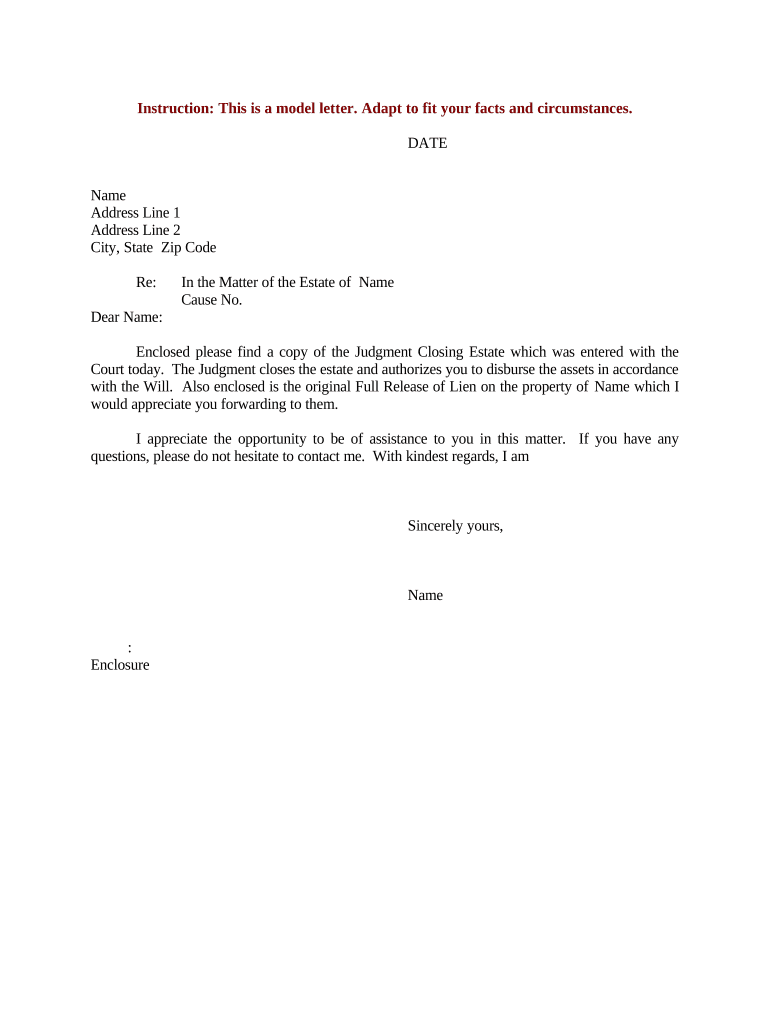
A Letter Regarding Closing of Estate is a formal written notification from an executor, administrator, or estate attorney that confirms final distributions, account closings, and administrative steps taken to conclude an estate. It typically summarizes actions taken under the will or applicable intestacy law, identifies recipients of final distributions, and documents that assets have been transferred or debts paid. The letter is used to inform beneficiaries, financial institutions, title companies, and taxing authorities that the estate is closed and to request release of account holds or final accounting acceptance.

Why a Clear Closing Letter Matters

A clear closing letter creates an auditable record that reduces disputes, speeds release of assets, and provides a point of reference for banks and agencies during final reconciliation.

Why a Clear Closing Letter Matters

Who Typically Prepares and Receives This Letter

Executors, estate administrators, and probate attorneys most commonly prepare a formal closing letter to finalize estate affairs and notify interested parties.

  • Executor or Administrator — Individual responsible for estate administration and distribution of assets.
  • Estate Attorney — Prepares formal language, attaches accounting, and ensures legal compliance.
  • Banks & Title Companies — Use the letter to release holds, transfer assets, or update records.

Step-by-Step: Drafting and Issuing the Closing Letter

Follow these sequential steps to prepare a concise, legally defensible Letter Regarding Closing of Estate. Keep records of each step and attach supporting documentation where indicated.

  • 01
    Gather Documents: Collect will, death certificate, probate orders, bank statements.
  • 02
    Draft Letter: State executor details, asset distribution, and effective closing date.
  • 03
    Attach Evidence: Include receipts, account statements, and signed release forms.
  • 04
    Send & Record: Mail/email to recipients and retain proof of delivery.

Where to Send the Letter and Typical Routing

Routes vary by asset type and recipient; include copies of supporting documentation for each recipient to avoid follow-up requests.

  • Probate Court Clerk: File if local rules require final accounting or closing entry.
  • Financial Institutions: Banks and brokerage firms use it to close or transfer accounts.
  • Title Companies: Provide for real estate conveyance and clearing of liens.
  • Beneficiaries & Creditors: Serve as formal notice of distributions and final settlement.

Digital Workflow Settings for Preparing and Sending the Letter

Configure your digital workflow so the letter, attachments, and delivery receipts are preserved in a defensible audit trail.

Field Configuration
Document Format PDF/A for preservation and compatibility
Signature Type Electronic signature with audit trail
Authentication Email or SMS code for recipient verification
Retention Save signed PDF and delivery certificate

Digital Delivery and Compatibility Considerations

Choose platforms that preserve audit trails, support common file formats, and permit optional signer authentication.

  • File Formats: PDF, DOCX, and scanned images supported
  • Integrations: Works with CRM and cloud storage platforms
  • Authentication Options: Email, SMS code, or stronger methods

Essential Components to Include in the Letter

A professional closing letter contains clear identity, authority, context, distribution details, attachments, and explicit requests or confirmations.

Executor Identification

State your name, capacity (executor/administrator), and reference the probate order that grants authority to act on behalf of the estate.
Decedent Details

Provide the decedent's full legal name, date of death, and the probate case number to ensure accurate matching with court and financial records.

Summary of Actions

Brief timeline of actions taken: asset collection, debt payments, claims resolution, and distributions made, with reference dates for each entry.

Detailed Distributions

List beneficiaries, what they received (cash or property), and any remaining account balances or contingency reserves held before closing.

Attached Documentation

Attach copies of probate order, receipts, account statements, release forms, and any signed waivers or beneficiary acknowledgments.

Requested Responses

State the action requested from the recipient (release hold, transfer title, close account) and the preferred method for confirmation.

Records and Security Items to Include with the Letter

Transmission Security: TLS 1.2/1.3
At-Rest Encryption: AES-256 storage
Audit Trail: Timestamped signature log
HIPAA Capability: BAA available when required
Document Formats: PDF, DOCX accepted
Authentication Modes: Email, SMS, or advanced MFA

Common Preparation Mistakes to Avoid

  • Using informal language or vague distribution descriptions that cause banks or title companies to request additional proof and delay closure.
  • Omitting the probate case number or attaching incomplete court orders, which prevents institutions from confirming the executor's authority.
  • Failing to include supporting account statements or receipts, leading recipients to withhold releases pending further verification.
  • Sending unsigned or improperly witnessed documents where the recipient requires notarization or witness confirmation for acceptance.

Risks and Consequences of an Inaccurate or Missing Letter

Probate Delays: Delayed asset distribution
Account Holds: Banks may freeze assets
Tax Exposure: Incorrect reporting may trigger IRS penalties
Civil Liability: Beneficiary disputes can lead to litigation
I-9 / Employment: Not applicable; documentary verification risk
1099 Backup: Missing TINs trigger backup withholding 24%

Timing Considerations and Common Deadlines

While exact deadlines vary by state and court, these are common timing milestones to monitor when closing an estate and issuing a closing letter.

Final Accounting Submission:

Submit as required by local probate rules; timing varies by jurisdiction.

Tax Filings:

Federal estate and income tax returns follow IRS deadlines; file when due.

Beneficiary Notices:

Provide written notice of distribution per court or state requirements.

Bank Account Closures:

Coordinate with institutions after distributions are complete to remove holds.

Document Retention:

Preserve records for statutory retention periods and potential audits.

Key Milestones from Opening to Closing the Estate

Track these sequential stages to manage expectations and ensure final steps are completed in order.

01

Case Opened

Probate court issues letters testamentary or administration.

02

Asset Collection

Identify and secure estate assets and account information.

03

Debts & Taxes Paid

Resolve creditor claims and file required tax returns.

04

Final Distribution

Transfer assets and issue the closing letter with attachments.

Sample Scenarios: Using a Closing Letter in Practice

These examples illustrate common situations where a closing letter resolves outstanding administrative steps.

Estate Closed — Bank Release

An executor provided a distribution summary and probate order

  • Bank requested original probate case number
  • The bank released funds after receiving the signed closing letter and statements, avoiding a hold that would have delayed distributions.

Title Transfer — Property Sale

A title company required written confirmation of lien satisfaction

  • Executor attached paid invoices and release forms
  • The title company cleared the title and completed transfer paperwork using the closing letter as formal evidence.

Practical Tips for Accurate and Efficient Letters

Follow these best practices to improve acceptance rates and reduce follow-up requests from recipients.

Be Specific
Use exact figures, dates, and document references rather than general descriptions to reduce ambiguity.
Attach Proof
Include copies of probate orders, receipts, and bank statements to substantiate distributions and payments.
Confirm Preferences
Ask institutions whether they accept electronic copies or require originals, and whether notarization is necessary.
Keep Logs
Retain delivery receipts, email confirmations, and signed PDFs with audit trails for recordkeeping.

How This Letter Differs from Similar Estate Documents

Compare the closing letter with other estate documents to choose the correct form for each purpose.

Document Type Purpose Typical Destination
Closing Letter notify closure banks, title firms, beneficiaries
Final Accounting detailed financials probate court, beneficiaries
Release Form acknowledges receipt specific creditors or payees
Deed of Distribution transfers title county recorder or title company

eSignature Vendor Pricing and Feature Comparison for Closing Letters

Compare common pricing and capability criteria for eSignature solutions often used to prepare and deliver estate closing letters. signNow is listed first for direct comparison.

signNow DocuSign Adobe Sign PandaDoc HelloSign
Starting Price $8/user/mo $15/user/mo $14/user/mo $19/user/mo $15/user/mo
Free Trial 7-day free trial, no credit card Trial varies Trial varies Trial varies Trial varies
Bulk Send Yes Yes Yes Yes No
Audit Trail Yes Yes Yes Yes Yes
HIPAA Compliant Yes (BAA) Yes Yes No No
Envelope Cap No cap 100 envelopes/user/year Varies by plan Varies by plan Varies by plan

Frequently Asked Questions About Closing Letters

Answers to common questions about authority, signatures, notarization, and electronic submission for a Letter Regarding Closing of Estate.


Need help? Contact support

be ready to get more
Join over 28 million airSlate SignNow users