Establishing secure connection…Loading editor…Preparing document…

Letter Requesting Entry of Order

This template is fully customizable. Edit the text, fill out the fields, and send it for signature. Give it a try!
Letter Requesting Entry of Order

What a Letter Requesting Entry of Order Is

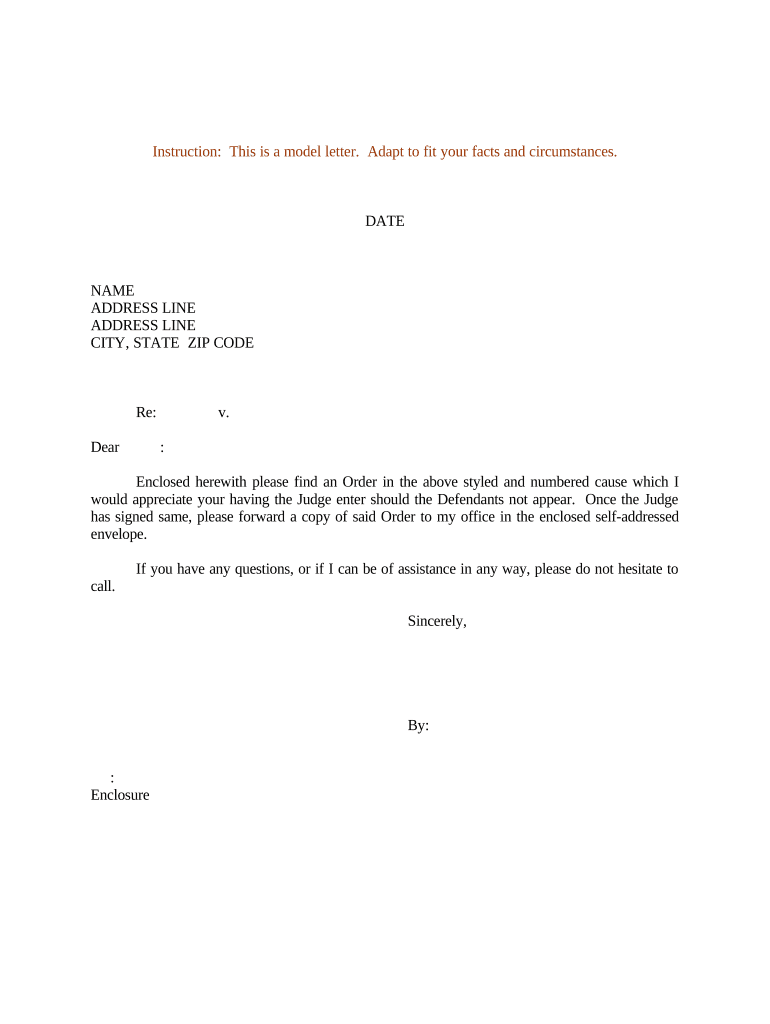
A Letter Requesting Entry of Order is a formal written submission to a court or clerk asking that a proposed order be entered on the docket. It typically accompanies a settled agreement, stipulated judgment, or court-approved resolution and identifies the case, the parties, and the specific relief requested. The letter explains why the proposed order meets procedural and substantive requirements, attaches the proposed order as an exhibit, and directs the court clerk to enter the order or set a follow-up docket event. Language should be precise and reference the underlying case number and judge where applicable.

Why this letter matters in court workflows

Using a clear Letter Requesting Entry of Order shortens post-settlement steps, documents the parties’ joint request, and reduces clerk follow-up. A properly prepared letter helps ensure the proposed order is entered promptly and accurately, limiting procedural delays and the need for additional filings.

Why this letter matters in court workflows

Who prepares and relies on this letter

Typical preparers include litigants’ attorneys, self-represented parties, and court clerks who coordinate docketing and entry of orders.

  • Private litigators and law firms who secure settlements and need prompt entry of a stipulated order or judgment.
  • In-house counsel and corporate legal teams who finalize regulatory or contractual resolutions requiring court entry.
  • Self-represented parties who have reached agreement and must ask the court to formalize the resolution.

Parties and clerks use the letter to create a clear administrative record and to set expectations for entry, service, and any follow-up deadlines.

Step-by-step: preparing and submitting the letter

Follow these sequential steps to prepare a complete and court-ready Letter Requesting Entry of Order.

  • 01
    Identify Case: List court name, case number, and assigned judge.
  • 02
    Explain Request: State that parties request entry of the attached proposed order and why entry is appropriate.
  • 03
    Attach Order: Include the proposed order as a clearly labeled exhibit in editable PDF or PDF/A format.
  • 04
    Service and Filing: Note how parties were served and include proof of service if required.

Common questions and solutions

Answers to frequent issues encountered when drafting, signing, or filing a Letter Requesting Entry of Order.


Need help? Contact support

Essential parts of a professional letter

Include these elements to create a complete, clerk-ready Letter Requesting Entry of Order that minimizes follow-up.

Caption

Case caption with full party names and docket number placed at the top so the clerk immediately identifies the matter and prevents misfiling.
Opening Statement

One-sentence opening that states the filing purpose (e.g., 'Plaintiff and Defendant jointly request entry of the attached order').

Background

Brief factual and procedural background (one short paragraph) explaining the settlement or basis for the proposed order.

Requested Action

Clear directive to the clerk (for example, 'Please enter the attached order and docket a judgment accordingly').

Attachments

Numbered exhibit list and file names for proposed order, proof of service, settlement agreement, or declarations supporting entry.

Signature and Contact

Typed name, title, firm, email, phone, and signature date so a clerk can reach the submitting party for questions.

Security and recordkeeping considerations

Encryption: TLS in transit; AES-256 at rest
Authentication: Email, SMS, or multi-factor options
Audit Trail: Timestamped signing events
Retention: Reproducible signed copy
HIPAA: BAA required for PHI
21 CFR Part 11: Compliant options available

Risks of incomplete or incorrect letters

Clerk Rejection: Filing returns for correction
Misentry: Wrong docketing or judge assignment
Delay: Extended time to effect settlement
Waiver: Missed deadlines or rights
Sanctions: Potential sanctions for false statements
Privacy: Improper PHI exposure risk

Common preparation pitfalls to avoid

  • Leaving the case caption incomplete or using inconsistent party names that differ from the operative complaint or docket entries.
  • Submitting a proposed order without a corresponding exhibit list or without matching filenames, causing clerks to misplace or refuse the order.
  • Using vague language in the request that does not clearly state the specific relief sought or the effect of entry on pending deadlines.
  • Failing to include proof of service or the required declaration, which many clerks treat as a jurisdictional defect.

How the submission process typically flows

A standard operational flow from preparation to docket entry helps align parties and clerks on responsibilities and timing.

  • Prepare: Draft letter, attach proposed order and exhibits.
  • Sign: Authorized signatory signs letter and order.
  • File: Submit via court e-filing or deliver to clerk.
  • Entry: Clerk reviews and enters the order on docket.

Setting up a repeatable electronic workflow

Use these configuration items to streamline repeated Letter Requesting Entry of Order filings.

Field Configuration
Signer Order Define primary filer then co-signers
Document Template Save a reusable letter and order template
Authentication Require email or SMS code
Retention Policy Auto-archive signed records

Digital submission and e-signature considerations

Confirm the court accepts electronic filings and whether the clerk requires editable formats or signed PDFs.

  • File Formats: PDF/A and DOCX accepted
  • Authentication Options: Email, SMS, or ID verification
  • Integrations: E-filing and case management links

Ensure your eSignature provider supports secure storage, an auditable trail, and any specific authentication the court or local rules require.

Timing and deadlines to track

Track these common timing issues tied to entry of order and subsequent obligations.

Filing Deadline:

Submit letter within any court-imposed settlement entry timeframe.

Service Deadline:

Serve opposing parties and include proof before entry when required.

Objection Period:

Note any statutory or local rule period for third-party objections.

Appeal Timing:

Entry may start appeal periods—confirm applicable appeal deadlines.

Record Retention:

Keep signed copies per retention rules and case management policies.

Common eSignature vendor pricing and capabilities

Basic plan pricing and common capabilities for vendor comparison; signNow is listed first per vendor ordering rules.

signNow DocuSign Adobe Sign PandaDoc HelloSign
Starting Price $8/user/mo $15/user/mo $14/user/mo $19/user/mo $15/user/mo
Free Trial 7-day free trial Varies by plan Varies by plan Varies by plan Varies by plan
Bulk Send Yes Yes Yes Yes No
Audit Trail Yes Yes Yes Yes Yes
HIPAA Compliant Yes Yes Yes No No
be ready to get more
Join over 28 million airSlate SignNow users