Establishing secure connection…Loading editor…Preparing document…

Lien Judgment

This template is fully customizable. Edit the text, fill out the fields, and send it for signature. Give it a try!
Lien Judgment

What a Lien Judgment Is and how it functions

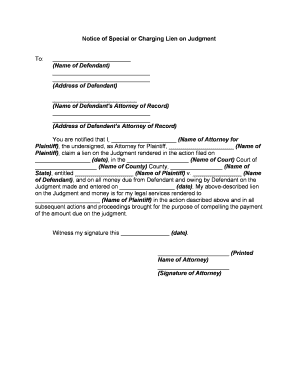
A Lien Judgment is a court-issued determination that creates a lien on specified property or assets to secure payment of a money judgment. After a plaintiff obtains a money judgment, the judgment may be recorded with the county recorder or other appropriate office to create a public lien that can block transfers or encumbrances of the debtor's real property. Recording a certified copy of the judgment and meeting local recording requirements are typically required steps before the lien attaches to title or becomes enforceable against third parties.

Why a properly prepared Lien Judgment matters

A correctly drafted and recorded Lien Judgment preserves creditor remedies by placing public notice on title, improving leverage for collection and prioritizing claims in later disposition. It also documents the court’s finding and establishes the legal basis for garnishments, levy actions, or negotiations tied to the judgment.

Why a properly prepared Lien Judgment matters

Who prepares and relies on Lien Judgments

Typical parties who prepare, file, or rely on lien judgments include legal counsel, judgment creditors, and county clerks who process recordings.

  • Judgment creditors and collections counsel who need to secure recovery rights against debtor property.
  • Title companies and real estate closing agents who must identify encumbrances before transfer.
  • County recorder or clerk offices that accept and index certified judgment recordings for public notice.

Each participant has a distinct role—preparing accurate certified copies, filing with the correct office, and verifying recorded entries during title or sale processes.

Core components of a professional Lien Judgment

A professional Lien Judgment combines legal findings, precise lien descriptions, and recording details so it is enforceable and searchable once recorded with the appropriate county office.

Caption

Court name, case number, and parties clearly shown in the caption to connect the judgment to the underlying litigation and court file.
Judgment Amount

Exact principal, applicable post-judgment interest rate, costs, and attorney fees itemized so the lien secures the full enforceable monetary obligation.

Property Description

Legal description or specific asset identifiers (parcel number, VIN) that precisely identify the property subject to the lien for accurate recording and indexing.

Recording Instructions

Statement describing where to record (county name), required certification language, and format for certified copies to prevent recording rejections.

Execution Details

Judge’s signature, date of entry, and clerk certification or seal required to create an official record suitable for recording.

Enforcement Terms

Duration, renewal or renewal procedure, priority statement versus other encumbrances, and any statutory references affecting enforceability.

Required information typically included

Court Identifier: Court and case number
Parties: Plaintiff and defendant names
Judgment Amount: Principal and interest
Property Details: Parcel or asset ID
Entry Date: Date judgment entered
Clerk Certification: Certified copy or clerk seal

Step-by-step workflow for creating and recording a Lien Judgment

Follow these ordered steps to prepare a judgment for recording, verify acceptance by the recorder, and preserve enforcement rights.

  • 01
    Obtain Certified Copy: Request clerk-certified judgment from the issuing court.
  • 02
    Verify Property: Confirm legal description and parcel identifiers.
  • 03
    Prepare Recording Package: Assemble certified copy, cover letter, and fee.
  • 04
    Record and Index: Submit to county recorder and confirm recording number.

How to configure an online e-filing or eSignature workflow

Set up a consistent digital workflow that combines certified judgment files, signer roles, and secure submission to the recorder or clerk.

Field Configuration
Document Source Upload certified PDF from court clerk
Signer Roles Judge or clerk signature read-only; filing agent sign-and-date
Authentication Use multi-factor or ID verification for filing agents
Delivery Email copy to parties and optionally to county recorder

Where to file and how the submission process works

Recording a Lien Judgment requires submitting a certified copy and any local cover forms to the county recorder or the office designated by state law.

  • County Recorder: Record certified judgment to create public lien
  • Clerk of Court: Obtain certified copy and required stamps
  • Title Examiner: Verify lien appearance on title reports
  • Enforcement Counsel: Use recorded lien in collection actions

Digital filing and eSignature considerations

Use secure platforms that support certified PDF uploads, audit trails, and appropriate signer authentication for legal filings.

  • File Formats: PDF/A or certified PDF
  • Authentication: Email, SMS code, or stronger ID
  • Integrations: Title systems and cloud storage

Platforms with audit trails, secure storage (AES-256), and integrations with systems like NetSuite or Box streamline submission and post-recording distribution while preserving evidentiary records.

Timing and common deadline considerations

Key dates affect priority, enforceability, and potential statute of limitations exposure—track event dates precisely from judgment entry forward.

Entry Date Importance:

Judgment entry date controls lien priority and enforcement timing

Recording Window:

Record promptly to preserve priority against later encumbrances

Renewal Deadlines:

State statutes limit duration; renew before expiration to maintain lien

Enforcement Actions:

Levies and garnishments follow statutory notice periods

Title Clearance:

Allow recorder processing time before closing real estate sales

Common legal risks and consequences of errors

Recording Rejection: Incorrect certification may cause refusal
Priority Loss: Late recording reduces lien seniority
Enforceability Issues: Defective judgment language weakens remedies
Cost Overruns: Additional fees for re-recording
Title Delays: Closings may be postponed
Statute Expiry: Failure to renew can extinguish lien

Typical vendor pricing and capability snapshot for eSignature

Compare starting prices and basic capabilities commonly relevant when choosing an eSignature provider for document execution and secure filing workflows.

signNow DocuSign Adobe Sign PandaDoc HelloSign
Starting Price $8/user/mo $15/user/mo $14/user/mo $19/user/mo $15/user/mo
Free Trial Yes, 7-day free trial Yes, trial available Yes, trial available Yes, trial available Yes, trial available
Bulk Send Yes Yes Yes Yes No
Audit Trail Yes Yes Yes Yes Yes
HIPAA Compliant Yes Yes Yes No No

Real-world examples of judgment and recording workflows

These brief examples illustrate how organizations used e-signature and certified copies to create, record, and enforce Lien Judgments.

Optica Ventures (COO)

The team centralized judgment processing to avoid recording delays and maintain clean title records.

  • They uploaded clerk-certified PDF judgments and tracked recorder confirmations.
  • By standardizing the certified copy process and combining secure uploads with automated distribution to title and collections teams, they reduced recording errors and accelerated lien enforcement steps.

Martin Properties (Founder)

A property manager recorded judgments tied to unpaid leases and upkeep charges.

  • They used certified entries and parcel numbers for clarity.
  • With consistent property identifiers and clerk certification attached, the recorded liens appeared promptly in title searches, making it easier to resolve outstanding balances during subsequent property sales or refinancing.

Practical tips for accurate and efficient completion

Adopt standard checks and documentation practices to reduce recording rejections and preserve enforcement options.

Verify Party Names
Confirm debtor and plaintiff names against court records and government IDs; discrepancies between court caption and recorder copy often cause indexing errors or rejections.
Use Certified Copies
Always record a clerk-certified copy or certification stamp from the court; unofficial copies may be rejected by recorders and fail to create public notice.
Confirm County Requirements
Check recorder-specific cover forms, required fees, and accepted file formats before submission to prevent processing delays or additional trips to the clerk’s office.
Preserve Audit Trails
Keep digital audit trails, signer authentication records, and delivery receipts to support chain-of-title queries and demonstrate proper execution if later challenged.

Frequently asked questions about Lien Judgments and recording

Answers address common uncertainties about validity, recording steps, e-signatures, and post-recording actions to help avoid mistakes and delays.


Need help? Contact support

be ready to get more
Join over 28 million airSlate SignNow users