Establishing secure connection… Loading editor… Preparing document…
Navigation

Fill and Sign the Maryland Directive Form
Fill and Sign the Maryland Directive Form

How it works

Open the document and fill out all its fields.
Apply your legally-binding eSignature.
Save and invite other recipients to sign it.

Rate template

4.8
34 votes
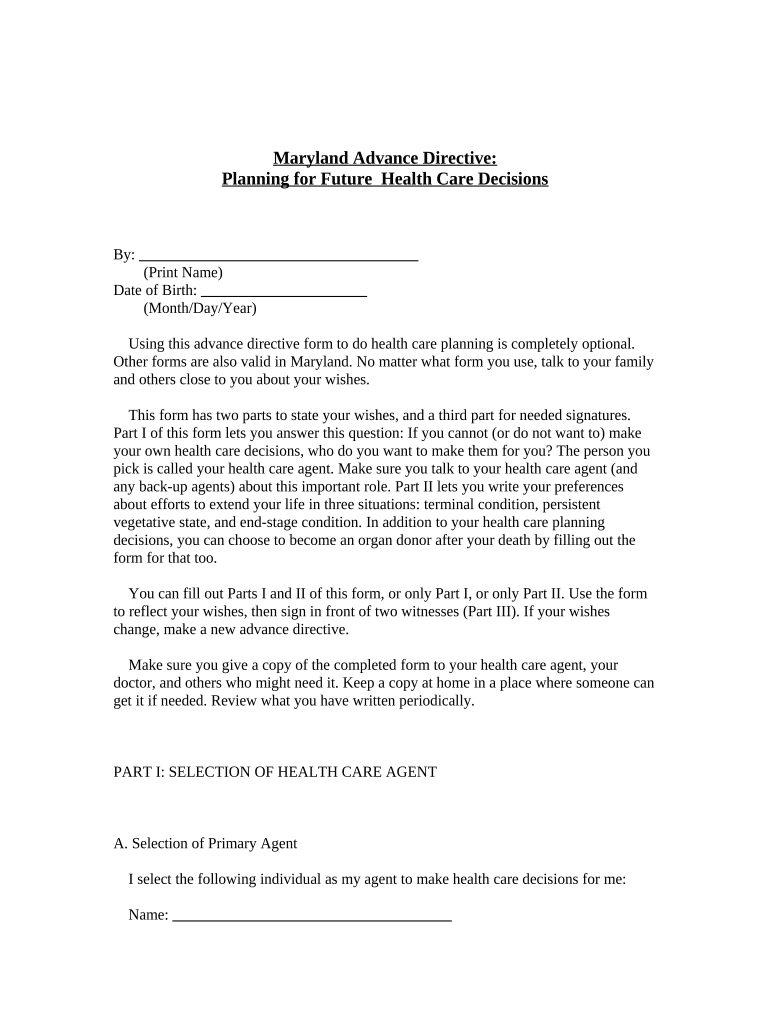
Maryland Advance Directive: Planning for Future Health Care Decisions By: _____________________________________ (Print Name) Date of Birth: ______________________ (Month/Day/Year) Using this advance directive form to do health care planning is completely optional. Other forms are also valid in Maryland. No matter what form you use, talk to your family and others close to you about your wishes. This form has two parts to state your wishes, and a third part for needed signatures. Part I of this form lets you answer this question: If you cannot (or do not want to) make your own health care decisions, who do you want to make them for you? The person you pick is called your health care agent. Make sure you talk to your health care agent (and any back-up agents) about this important role. Part II lets you write your preferences about efforts to extend your life in three situations: terminal condition, persistent vegetative state, and end-stage condition. In addition to your health care planning decisions, you can choose to become an organ donor after your death by filling out the form for that too. You can fill out Parts I and II of this form, or only Part I, or only Part II. Use the form to reflect your wishes, then sign in front of two witnesses (Part III). If your wishes change, make a new advance directive. Make sure you give a copy of the completed form to your health care agent, your doctor, and others who might need it. Keep a copy at home in a place where someone can get it if needed. Review what you have written periodically. PART I: SELECTION OF HEALTH CARE AGENT A. Selection of Primary Agent I select the following individual as my agent to make health care decisions for me: Name: _____________________________________ Address: _____________________________________ Telephone Numbers: _____________________________________ (home and cell) B. Selection of Back-up Agents (Optional; form valid if left blank) 1. If my primary agent cannot be contacted in time or for any reason is unavailable or unable or unwilling to act as my agent, then I select the following person to act in this capacity: Name: _____________________________________ Address: _____________________________________ Telephone Numbers: _____________________________________ (home and cell) 2. If my primary agent and my first back-up agent cannot be contacted in time or for any reason are unavailable or unable or unwilling to act as my agent, then I select the following person to act in this capacity: Name: _____________________________________ Address: _____________________________________ Telephone Numbers: _____________________________________ (home and cell) C. Powers and Rights of Health Care Agent I want my agent to have full power to make health care decisions for me, including the power to: 1. Consent or not consent to medical procedures and treatments which my doctors offer, including things that are intended to keep me alive, like ventilators and feeding tubes; 2. Decide who my doctor and other health care providers should be; and 3. Decide where I should be treated, including whether I should be in a hospital, nursing home, other medical care facility, or hospice program. I also want my agent to: 1. Ride with me in an ambulance if ever I need to be rushed to the hospital; and 2. Be able to visit me if I am in a hospital or any other health care facility. This advance directive does not make my agent responsible for any of the costs of my care. This power is subject to the following conditions or limitations: (Optional; form valid if left blank) ____________________________________________________________ D. How My Agent Is To Decide Specific Issues I trust my agent's judgment. My agent should look first to see if there is anything in Part II of this advance directive that helps decide the issue. Then, my agent should think about the conversations we have had, my religious or other beliefs and values, my personality, and how I handled medical and other important issues in the past. If what I would decide is still unclear, then my agent is to make decisions for me that my agent believes are in my best interest. In doing so, my agent should consider the benefits, burdens, and risks of the choices presented by my doctors. E. People My Agent Should Consult (Optional; form valid if left blank) In making important decisions on my behalf, I encourage my agent to consult with the following people. By filling this in, I do not intend to limit the number of people with whom my agent might want to consult or my agent's power to make these decisions. Name(s) Telephone Number(s) ___________________________ ______________________ ___________________________ ______________________ ___________________________ ______________________ ___________________________ ______________________ ___________________________ ______________________ F. In Case of Pregnancy (Optional, for women of child-bearing years only; form valid if left blank) If I am pregnant, my agent shall follow these specific instructions: _______________________________________________________ G. Access to My Health Information - Federal Privacy Law (HIPAA) Authorization 1. If, prior to the time the person selected as my agent has power to act under this document, my doctor wants to discuss with that person my capacity to make my own health care decisions, I authorize my doctor to disclose protected health information which relates to that issue. 2. Once my agent has full power to act under this document, my agent may request, receive, and review any information, oral or written, regarding my physical or mental health, including, but not limited to, medical and hospital records and other protected health information, and consent to disclosure of this information. 3. For all purposes related to this document, my agent is my personal representative under the Health Insurance Portability and Accountability Act (HIPAA). My agent may sign, as my personal representative, any release forms or other HIPAA-related materials. H. Effectiveness of This Part (Read both of these statements carefully. Then, initial one only.) My agent's power is in effect: 1. Immediately after I sign this document, subject to my right to make any decision about my health care if I want and am able to. _____________________________________ ((or)) 2. Whenever I am not able to make informed decisions about my health care, either because the doctor in charge of my care (attending physician) decides that I have lost this ability temporarily, or my attending physician and a consulting doctor agree that I have lost this ability permanently. _____________________________________ If the only thing you want to do is select a health care agent, skip Part II. Go to Part III to sign and have the advance directive witnessed. If you also want to write your treatment preferences, use Part II. Also consider becoming an organ donor, using the separate form for that. PART II: TREATMENT PREFERENCES ("LIVING WILL") A. Statement of Goals and Values (Optional; form valid if left blank) I want to say something about my goals and values, and especially what's most important to me during the last part of my life: _____________________________________ _____________________________________ B. Preference in Case of Terminal Condition (If you want to state your preference, initial one only. If you do not want to state a preference here, cross through the whole section.) 1. Keep me comfortable and allow natural death to occur. I do not want any medical interventions used to try to extend my life. I do not want to receive nutrition and fluids by tube or other medical means.       ((or)) 2. Keep me comfortable and allow natural death to occur. I do not want medical interventions used to try to extend my life. If I am unable to take enough nourishment by mouth, however, I want to receive nutrition and fluids by tube or other medical means.       ((or)) 3. Try to extend my life for as long as possible, using all available interventions that in reasonable medical judgment would prevent or delay my death. If I am unable to take enough nourishment by mouth, I want to receive nutrition and fluids by tube or other medical means.       C. Preference in Case of Persistent Vegetative State (If you want to state your preference, initial one only. If you do not want to state a preference here, cross through the whole section.) If my doctors certify that I am in a persistent vegetative state, that is, if I am not conscious and am not aware of myself or my environment or able to interact with others, and there is no reasonable expectation that I will ever regain consciousness: 1. Keep me comfortable and allow natural death to occur. I do not want any medical interventions used to try to extend my life. I do not want to receive nutrition and fluids by tube or other medical means.       ((or)) 2. Keep me comfortable and allow natural death to occur. I do not want medical interventions used to try to extend my life. If I am unable to take enough nourishment by mouth, however, I want to receive nutrition and fluids by tube or other medical means.       ((or)) 3. Try to extend my life for as long as possible, using all available interventions that in reasonable medical judgment would prevent or delay my death. If I am unable to take enough nourishment by mouth, I want to receive nutrition and fluids by tube or other medical means.       D. Preference in Case of End-Stage Condition (If you want to state your preference, initial one only. If you do not want to state a preference here, cross through the whole section.) If my doctors certify that I am in an end-stage condition, that is, an incurable condition that will continue in its course until death and that has already resulted in loss of capacity and complete physical dependency: 1. Keep me comfortable and allow natural death to occur. I do not want any medical interventions used to try to extend my life. I do not want to receive nutrition and fluids by tube or other medical means.       ((or)) 2. Keep me comfortable and allow natural death to occur. I do not want medical interventions used to try to extend my life. If I am unable to take enough nourishment by mouth, however, I want to receive nutrition and fluids by tube or other medical means.       ((or)) 3. Try to extend my life for as long as possible, using all available interventions that in reasonable medical judgment would prevent or delay my death. If I am unable to take enough nourishment by mouth, I want to receive nutrition and fluids by tube or other medical means.       E. Pain Relief No matter what my condition, give me the medicine or other treatment I need to relieve pain.       F. In Case of Pregnancy (Optional, for women of child-bearing years only; form valid if left blank) If I am pregnant, my decision concerning life-sustaining procedures shall be modified as follows: _____________________________________ G. Effect of Stated Preferences (Read both of these statements carefully. Then, initial one only.) 1. I realize I cannot foresee everything that might happen after I can no longer decide for myself. My stated preferences are meant to guide whoever is making decisions on my behalf and my health care providers, but I authorize them to be flexible in applying these statements if they feel that doing so would be in my best interest.       ((or)) 2. I realize I cannot foresee everything that might happen after I can no longer decide for myself. Still, I want whoever is making decisions on my behalf and my health care providers to follow my stated preferences exactly as written, even if they think that some alternative is better.       PART III: SIGNATURE AND WITNESSES By signing below as the Declarant, I indicate that I am emotionally and mentally competent to make this advance directive and that I understand its purpose and effect. I also understand that this document replaces any similar advance directive I may have completed before this date. ______________________ (Signature of Declarant) (Date) The declarant signed or acknowledged signing this document in my presence and, based upon personal observation, appears to be emotionally and mentally competent to make this advance directive. ______________________ (Signature of Witness) (Date) ______________________ Telephone Number(s) ______________________ (Signature of Witness) (Date) ______________________ Telephone Number(s) (Note: Anyone selected as a health care agent in Part I may not be a witness. Also, at least one of the witnesses must be someone who will not knowingly inherit anything from the declarant or otherwise knowingly gain a financial benefit from the declarant's death. Maryland law does not require this document to be notarized.) AFTER MY DEATH (This form is optional. Fill out only what reflects your wishes.) By: ______________________ (Print Name) Date of Birth: ______________________ (Month/Day/Year) PART I: ORGAN DONATION (Initial the ones that you want.) Upon my death I wish to donate: Any needed organs, tissues, or eyes.       Only the following organs, tissues, or eyes: _____________________________________ I authorize the use of my organs, tissues, or eyes: For transplantation       For therapy       For research       For medical education       For any purpose authorized by law       I understand that no vital organ, tissue, or eye may be removed for transplantation until after I have been pronounced dead under legal standards. This document is not intended to change anything about my health care while I am still alive. After death, I authorize any appropriate support measures to maintain the viability for transplantation of my organs, tissues, and eyes until organ, tissue, and eye recovery has been completed. I understand that my estate will not be charged for any costs related to this donation. PART II: DONATION OF BODY After any organ donation indicated in Part I, I wish my body to be donated for use in a medical study program.       PART III: DISPOSITION OF BODY AND FUNERAL ARRANGEMENTS I want the following person to make decisions about the disposition of my body and my funeral arrangements: (Either initial the first or fill in the second.) The health care agent who I named in my advance directive.       ((or)) This person: Name: _____________________________________ Address: _____________________________________ Telephone Numbers: _____________________________________ (home and cell) If I have written my wishes below, they should be followed. If not, the person I have named should decide based on conversations we have had, my religious or other beliefs and values, my personality, and how I reacted to other peoples' funeral arrangements. My wishes about the disposition of my body and my funeral arrangements are: _____________________________________ _____________________________________ _____________________________________ PART IV: SIGNATURE AND WITNESSES By signing below, I indicate that I am emotionally and mentally competent to make this donation and that I understand the purpose and effect of this document. ______________________ (Signature of Donor) (Date) The Donor signed or acknowledged signing this donation document in my presence and, based upon personal observation, appears to be emotionally and mentally competent to make this donation. ______________________ (Signature of Witness) (Date) Telephone Numbers: ______________________ ______________________ (Signature of Witness) (Date) Telephone Numbers: ______________________

Valuable suggestions for completing your ‘Maryland Directive’ online

Are you fed up with the inconvenience of managing paperwork? Look no further than airSlate SignNow, the premier eSignature platform for individuals and businesses. Wave farewell to the lengthy process of printing and scanning documents. With airSlate SignNow, you can effortlessly fill out and sign documents online. Leverage the robust features built into this user-friendly and cost-effective platform and transform your method of document management. Whether you need to approve forms or collect signatures, airSlate SignNow manages everything seamlessly, requiring just a few clicks.

Follow this comprehensive guide:

  1. Sign in to your account or sign up for a free trial with our service.
  2. Click +Create to upload a file from your device, cloud storage, or our template library.
  3. Open your ‘Maryland Directive’ in the editor.
  4. Click Me (Fill Out Now) to finalize the document on your end.
  5. Insert and allocate fillable fields for other parties (if necessary).
  6. Proceed with the Send Invite options to request eSignatures from others.
  7. Save, print your copy, or convert it into a multi-usable template.

Don’t fret if you need to collaborate with others on your Maryland Directive or send it for notarization—our solution has everything required to accomplish such tasks. Create an account with airSlate SignNow today and elevate your document management to a new height!

Here is a list of the most common customer questions. If you can’t find an answer to your question, please don’t hesitate to reach out to us.

Need help? Contact Support

The best way to complete and sign your maryland directive form

Save time on document management with airSlate SignNow and get your maryland directive form eSigned quickly from anywhere with our fully compliant eSignature tool.

How to Sign a PDF Online How to Sign a PDF Online

How to fill out and sign paperwork online

Previously, dealing with paperwork required lots of time and effort. But with airSlate SignNow, document management is quick and simple. Our powerful and user-friendly eSignature solution lets you effortlessly complete and eSign your maryland directive form online from any internet-connected device.

Follow the step-by-step guide to eSign your maryland directive form template online:

  • 1.Sign up for a free trial with airSlate SignNow or log in to your account with password credentials or SSO authorization option.
  • 2.Click Upload or Create and import a file for eSigning from your device, the cloud, or our form collection.
  • 3.Click on the file name to open it in the editor and utilize the left-side toolbar to fill out all the empty fields properly.
  • 4.Drop the My Signature field where you need to eSign your form. Type your name, draw, or upload a photo of your regular signature.
  • 5.Click Save and Close to accomplish editing your completed form.

After your maryland directive form template is ready, download it to your device, save it to the cloud, or invite other people to eSign it. With airSlate SignNow, the eSigning process only takes a couple of clicks. Use our powerful eSignature tool wherever you are to handle your paperwork efficiently!

How to Sign a PDF Using Google Chrome How to Sign a PDF Using Google Chrome

How to fill out and sign documents in Google Chrome

Completing and signing documents is easy with the airSlate SignNow extension for Google Chrome. Installing it to your browser is a quick and productive way to manage your paperwork online. Sign your maryland directive form sample with a legally-binding electronic signature in just a few clicks without switching between tools and tabs.

Follow the step-by-step guide to eSign your maryland directive form template in Google Chrome:

  • 1.Go to the Chrome Web Store, find the airSlate SignNow extension for Chrome, and add it to your browser.
  • 2.Right-click on the link to a form you need to sign and select Open in airSlate SignNow.
  • 3.Log in to your account with your credentials or Google/Facebook sign-in option. If you don’t have one, sign up for a free trial.
  • 4.Utilize the Edit & Sign menu on the left to fill out your template, then drag and drop the My Signature field.
  • 5.Insert an image of your handwritten signature, draw it, or simply type in your full name to eSign.
  • 6.Make sure all data is correct and click Save and Close to finish modifying your paperwork.

Now, you can save your maryland directive form sample to your device or cloud storage, email the copy to other individuals, or invite them to eSign your document with an email request or a secure Signing Link. The airSlate SignNow extension for Google Chrome improves your document workflows with minimum effort and time. Try airSlate SignNow today!

How to Sign a PDF in Gmail How to Sign a PDF in Gmail How to Sign a PDF in Gmail

How to complete and sign forms in Gmail

When you receive an email containing the maryland directive form for signing, there’s no need to print and scan a file or download and re-upload it to a different tool. There’s a better solution if you use Gmail. Try the airSlate SignNow add-on to rapidly eSign any paperwork right from your inbox.

Follow the step-by-step guidelines to eSign your maryland directive form in Gmail:

  • 1.Visit the Google Workplace Marketplace and look for a airSlate SignNow add-on for Gmail.
  • 2.Install the program with a related button and grant the tool access to your Google account.
  • 3.Open an email with an attached file that needs signing and utilize the S sign on the right sidebar to launch the add-on.
  • 4.Log in to your airSlate SignNow account. Choose Send to Sign to forward the document to other people for approval or click Upload to open it in the editor.
  • 5.Put the My Signature field where you need to eSign: type, draw, or upload your signature.

This eSigning process saves time and only takes a few clicks. Utilize the airSlate SignNow add-on for Gmail to update your maryland directive form with fillable fields, sign paperwork legally, and invite other parties to eSign them al without leaving your mailbox. Enhance your signature workflows now!

How to Sign a PDF on a Mobile Device How to Sign a PDF on a Mobile Device How to Sign a PDF on a Mobile Device

How to fill out and sign documents in a mobile browser

Need to quickly complete and sign your maryland directive form on a mobile phone while doing your work on the go? airSlate SignNow can help without needing to set up additional software apps. Open our airSlate SignNow solution from any browser on your mobile device and create legally-binding electronic signatures on the go, 24/7.

Follow the step-by-step guide to eSign your maryland directive form in a browser:

  • 1.Open any browser on your device and go to the www.signnow.com
  • 2.Sign up for an account with a free trial or log in with your password credentials or SSO authentication.
  • 3.Click Upload or Create and pick a file that needs to be completed from a cloud, your device, or our form library with ready-made templates.
  • 4.Open the form and fill out the blank fields with tools from Edit & Sign menu on the left.
  • 5.Put the My Signature field to the form, then enter your name, draw, or upload your signature.

In a few easy clicks, your maryland directive form is completed from wherever you are. When you're done with editing, you can save the file on your device, build a reusable template for it, email it to other people, or invite them eSign it. Make your documents on the go prompt and productive with airSlate SignNow!


How to Sign a PDF on iPhone How to Sign a PDF on iPhone

How to complete and sign documents on iOS

In today’s corporate environment, tasks must be done rapidly even when you’re away from your computer. Using the airSlate SignNow app, you can organize your paperwork and approve your maryland directive form with a legally-binding eSignature right on your iPhone or iPad. Install it on your device to close deals and manage forms from just about anywhere 24/7.

Follow the step-by-step guide to eSign your maryland directive form on iOS devices:

  • 1.Open the App Store, find the airSlate SignNow app by airSlate, and install it on your device.
  • 2.Open the application, tap Create to add a form, and select Myself.
  • 3.Select Signature at the bottom toolbar and simply draw your signature with a finger or stylus to eSign the form.
  • 4.Tap Done -> Save right after signing the sample.
  • 5.Tap Save or use the Make Template option to re-use this paperwork in the future.

This method is so straightforward your maryland directive form is completed and signed in a couple of taps. The airSlate SignNow app works in the cloud so all the forms on your mobile device are kept in your account and are available any time you need them. Use airSlate SignNow for iOS to enhance your document management and eSignature workflows!


How to Sign a PDF on Android How to Sign a PDF on Android

How to fill out and sign paperwork on Android

With airSlate SignNow, it’s easy to sign your maryland directive form on the go. Set up its mobile application for Android OS on your device and start improving eSignature workflows right on your smartphone or tablet.

Follow the step-by-step guide to eSign your maryland directive form on Android:

  • 1.Go to Google Play, search for the airSlate SignNow app from airSlate, and install it on your device.
  • 2.Log in to your account or register it with a free trial, then upload a file with a ➕ option on the bottom of you screen.
  • 3.Tap on the uploaded file and select Open in Editor from the dropdown menu.
  • 4.Tap on Tools tab -> Signature, then draw or type your name to electronically sign the sample. Complete empty fields with other tools on the bottom if necessary.
  • 5.Use the ✔ button, then tap on the Save option to end up with editing.

With an intuitive interface and total compliance with primary eSignature standards, the airSlate SignNow application is the perfect tool for signing your maryland directive form. It even operates without internet and updates all document changes when your internet connection is restored and the tool is synced. Fill out and eSign forms, send them for approval, and make re-usable templates anytime and from anyplace with airSlate SignNow.

Sign up and try Maryland directive form
  • Close deals faster
  • Improve productivity
  • Delight customers
  • Increase revenue
  • Save time & money
  • Reduce payment cycles







