Establishing secure connection…Loading editor…Preparing document…

Massachusetts Lien

This template is fully customizable. Edit the text, fill out the fields, and send it for signature. Give it a try!
Massachusetts Lien

What a Massachusetts Lien Is and when it applies

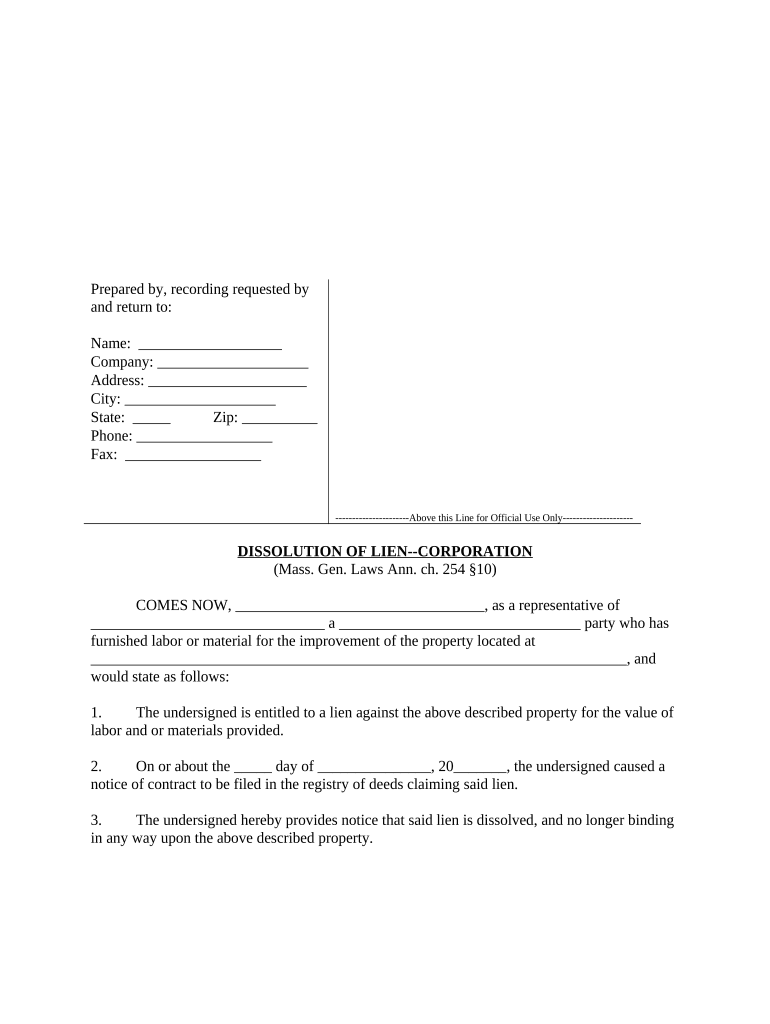
The Massachusetts Lien is a statutory claim that secures payment against real property for work, labor, or materials provided to improve that property. In Massachusetts, contractors, subcontractors, suppliers, and certain service providers may file a lien to preserve collection rights when an owner fails to pay. Common forms include mechanic's liens and judgment liens; each has distinct filing, notice, and priority rules. Claims are typically recorded in the county Registry of Deeds and must meet statutory content and timing requirements to be enforceable. Electronic filing and e-signatures may be available but must comply with ESIGN and state recording rules.

Why filing a correct Massachusetts Lien matters

Using a properly prepared Massachusetts Lien preserves a claimant's right to payment, establishes legal priority against the property, and creates leverage for collection or negotiation. Timely and accurate filing protects recovery options and reduces the risk of waiver or dismissal under state statute.

Why filing a correct Massachusetts Lien matters

Who commonly files or reviews Massachusetts Liens

Contractors, subcontractors, suppliers, and service professionals use the Massachusetts Lien to secure unpaid invoices and preserve collection remedies.

  • General contractors pursuing unpaid balances on commercial and residential building projects.
  • Subcontractors and material suppliers who lack a direct payment agreement with the owner.
  • Equipment lessors and service vendors asserting claims for work, repair, or onsite services.

Representative signers and stakeholders

General Contractor

A general contractor or project manager uses the lien to protect payment for subcontracted work and materials. They must gather contract copies, detailed invoices, and precise legal descriptions of the property before filing to meet statutory requirements and deadlines.

Property Owner

Property owners and title officers monitor recorded liens to assess encumbrances that affect sale or financing. When served with a claim, owners should verify contractor contracts, payment histories, and consult counsel to resolve disputes or negotiate lien releases.

Essential data fields required on a Massachusetts Lien

Claimant Name: Full legal name of claimant
Claimant Address: Street, city, state, ZIP
Owner Name: Legal owner(s) of record
Property Description: Legal description or parcel ID
Amount Claimed: Itemized sum with currency
Filing Date: Date claim recorded MM/DD/YYYY

Consequences and common risks of improper lien filings

Missed Deadline: Claim barred; loss of lien rights
Insufficient Notice: May invalidate priority or lien
Incorrect Description: Rejection for vague property details
Missing Notarization: Record may be rejected
Waiver Risk: Partial payments may waive lien
Fraudulent Claim: Civil penalties and sanctions

Practical examples of lien use in typical scenarios

Real-world examples show how the Massachusetts Lien secures payment and resolves disputes across construction and contracting scenarios.

Construction Claim

A subcontractor completed HVAC work on a mixed-use building but the general contractor failed to pay within contract terms.

  • Filed a timely Massachusetts mechanic's lien.
  • By recording the claim at the county Registry of Deeds and preserving detailed invoices and lien waivers, the subcontractor regained negotiating leverage, obtained a partial settlement, and scheduled foreclosure only as a last-resort enforcement step.

Supplier Recovery

A material supplier delivered lumber to a residential project and lacked a direct contract with the owner but maintained delivery tickets and unpaid invoices.

  • Recorded a lien to secure payment rights.
  • The recorded lien preserved the supplier's priority while negotiations proceeded; after presenting the claim and supporting documents, the supplier and developer agreed to a staged payment plan, avoiding protracted litigation and preserving business relationships.

Step-by-step: preparing and filing a Massachusetts Lien

Follow these steps to prepare, file, and enforce a Massachusetts Lien correctly and to preserve your statutory rights.

  • 01
    Confirm Eligibility: Verify contract, work performed, and unpaid balance
  • 02
    Gather Evidence: Collect contracts, invoices, delivery tickets, and change orders
  • 03
    Prepare Claim: Draft claim with legal description and itemized amounts
  • 04
    Record & Serve: File at Registry of Deeds and serve owner per statute

Workflow overview: from preparation to enforcement

Typical workflow for filing and enforcing a Massachusetts Lien from preparation to collection in four practical stages.

  • Prepare: Assemble contract, invoices, and legal description
  • File: Record claim at the county Registry of Deeds
  • Serve: Provide statutory notice to property owner and other parties
  • Enforce: Litigate or negotiate using lien priority as leverage

Digital workflow settings for online lien preparation

Set up a digital workflow to prepare, sign, notarize, and submit lien forms online securely.

Field Configuration
Signature Type Email link or in-person with notary
Authentication Email + SMS or knowledge-based checks
Notary Mode In-person or RON where allowed
Storage Encrypted PDF (AES-256) with audit trail

Platform and technical requirements for eSubmission

Digital submission requires platform features such as secure signing, notarization options, and integrations with record repositories.

  • File Formats: PDF, DOCX, and flattened records
  • Integrations: Registry APIs, NetSuite, Salesforce
  • Security: TLS 1.2/1.3; AES-256 at rest

Timing notes and statutory deadlines to track

Key statutory deadlines and practical timing for filing and serving a Massachusetts Lien require strict adherence.

Start Date to Track:

Use the date work began or materials first delivered

Preliminary Notice Requirement:

Not mandatory in all cases; check contract and statute

Filing Deadline:

Record within statutory deadline after completion; consult counsel

Service of Claim:

Serve owner and others as required by law

Enforcement Period:

Initiate foreclosure within statutory limitations to preserve rights

Anatomy of a professionally prepared Massachusetts Lien

A professional Massachusetts Lien must include precise legal elements to be effective and enforceable; attention to detail reduces rejection risk and strengthens collection options.

Claimant Info

Provide claimant's full legal name, business entity type, mailing address, and contact information. Include taxpayer identification if relevant and ensure the name matches contract and any invoices to avoid challenges.
Owner Info

List the record owner(s) of the property, including full legal names and mailing addresses as shown in the land records. Accurate owner identification affects service requirements and enforceability.

Property Description

Include a complete legal description or assessor parcel number plus street address. Vague descriptions invite rejection; attach recorded deed excerpt when available to support the claim.

Work Detail

Itemize labor, materials, change orders, and dates of performance. Attach copies of contracts, purchase orders, delivery tickets, and timesheets to substantiate amounts claimed.

Amount Claimed

Provide a precise, itemized dollar amount with calculations and dates. Note retainage held or partial payments and state the balance remaining to avoid overstatement.

Signature & Verification

Signed by authorized claimant or agent; include date and notarization if required. A verified statement under oath may be necessary where statute demands.

Practical tips to reduce rejection risk and speed resolution

Practical tips help reduce rejection risk, preserve rights, and streamline enforcement when filing the Massachusetts Lien.

Verify contractual privity and payment terms
Confirm whether the claimant has direct contractual privity with the owner or qualifying subcontractor status under Massachusetts statute. Determine contract dates, scope changes, and any agreed retainage to calculate accurate claim amounts and prioritize notices.
Use exact legal property descriptions
Obtain the parcel identifier, recorded deed reference, and assessor map when possible. A precise legal description reduces challenges from title examiners and prevents rejection for vagueness; attach supporting deed extracts where available.
Document chain of supply and services
Collect purchase orders, delivery tickets, signed work orders, change notices, and correspondence demonstrating acceptance. Chronological documentation supports the claimant's timeline and helps rebut owner disputes over scope or payment responsibility.
Consider electronic workflows and audit trails
Implement secure eSignature and document management to produce time-stamped audit trails, capture signer attribution, and store supporting exhibits. Ensure any RON transactions meet state notary rules and preserve recorded AV logs when required.

Key milestones from claim assessment to enforcement

Sequential milestones clarify timing from unpaid invoice to potential foreclosure for a Massachusetts Lien when applicable.

01

Assess Claim

Confirm unpaid balance and collect supporting documents

02

Serve Notice

Provide required notices to owner and interested parties

03

Record Claim

File with the county Registry of Deeds promptly

04

Enforce Rights

Begin foreclosure or negotiation within statutory remedies

Frequently asked questions and troubleshooting tips

Common questions and troubleshooting tips for preparing and filing a Massachusetts Lien address eligibility, filing mechanics, and resolution options.


Need help? Contact support

How mechanic's liens compare with court judgments

Quick comparison between a mechanic's lien and a judgment lien to help choose the proper remedy and understand filing differences.

Claim Type Mechanic's Lien Judgment Lien
Purpose payment for improvements enforce court judgment
Typical Filing county registry of deeds court clerk / docket
Common Priority depends on recording and mortgages attaches to debtor assets
Typical Enforcement foreclosure action on property execution or garnishment

eSignature vendor pricing and capability snapshot for lien workflows

Comparison of starting prices and key features across common eSignature vendors. signNow appears first per vendor ordering rules and verified product data is used for signNow pricing and capabilities.

signNow DocuSign Adobe Sign PandaDoc HelloSign
Starting Price $8/user/mo $15/user/mo $14/user/mo $19/user/mo $15/user/mo
Free Trial 7-day free trial Varies Varies Varies Varies
Bulk Send Yes Yes Yes Yes No
Audit Trail Yes Yes Yes Yes Yes
HIPAA Compliant Yes Yes Yes No No
be ready to get more
Join over 28 million airSlate SignNow users