Establishing secure connection… Loading editor… Preparing document…
Navigation

Fill and Sign the Medicore Inc Form
Fill and Sign the Medicore Inc Form

How it works

Open the document and fill out all its fields.
Apply your legally-binding eSignature.
Save and invite other recipients to sign it.

Rate template

4.8
60 votes
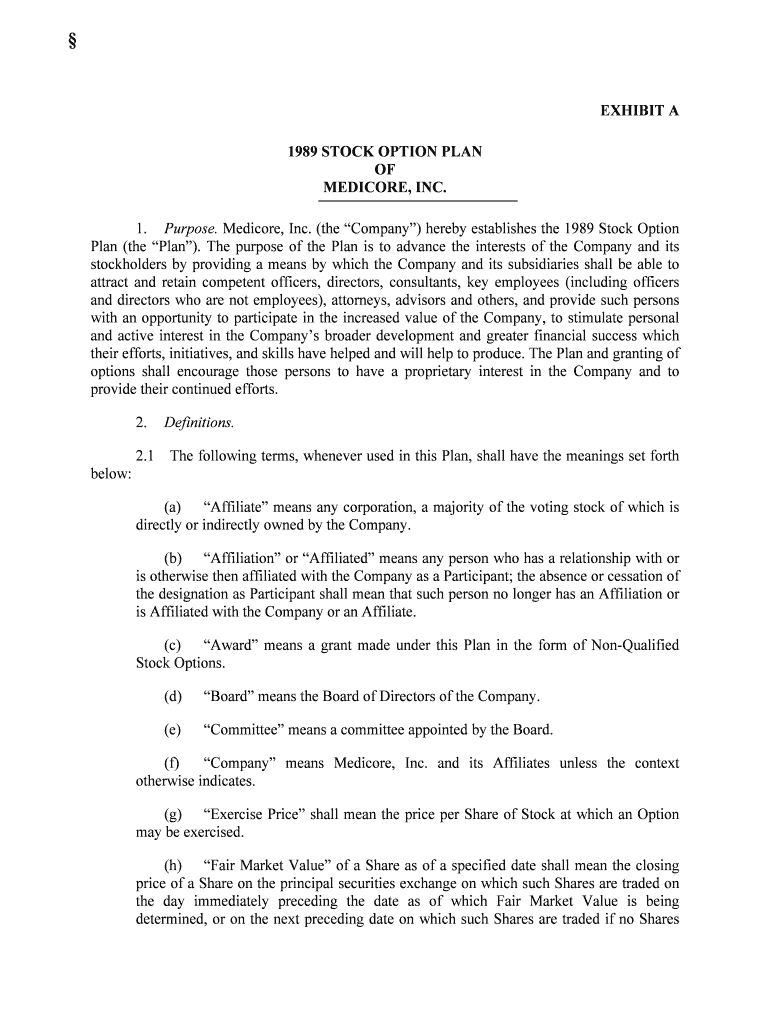
§ EXHIBIT A 1989 STOCK OPTION PLAN OF MEDICORE, INC. 1. Purpose. Medicore, Inc. (the “Company”) hereby establishes the 1989 Stock Option Plan (the “Plan”). The purpose of the Plan is to advance the interests of the Company a nd its stockholders by providing a means by which the Company and its subsidiaries shall be able to attract and retain competent officers, directors, consultants, key employees (including offi cers and directors who are not employees), attorneys, advisors and others, and provide such persons with an opportunity to participate in the increased value of the Company, to stimul ate personal and active interest in the Company’s broader development and greater financial success which their efforts, initiatives, and skills have helped and will help to produce. The Plan and granting of options shall encourage those persons to have a proprietary interest in the Company and to provide their continued efforts. 2.Definitions. 2.1 The following terms, whenever used in this Plan, shall have the meanings set forth below: (a) “Affiliate” means any corporation, a majority of the voting stock of which is directly or indirectly owned by the Company. (b) “Affiliation” or “Affiliated” means any person who has a relationship with or is otherwise then affiliated with the Company as a Participant; the absence or cessation of the designation as Participant shall mean that such person no longer has an Affiliation or is Affiliated with the Company or an Affiliate. (c) “Award” means a grant made under this Plan in the form of Non-Qualified Stock Options. (d) “Board” means the Board of Directors of the Company. (e) “Committee” means a committee appointed by the Board. (f) “Company” means Medicore, Inc. and its Affiliates unless the context otherwise indicates. (g) “Exercise Price” shall mean the price per Share of Stock at which an Option may be exercised. (h) “Fair Market Value” of a Share as of a specified date shall mean the closing price of a Share on the principal securities exchange on which such Shares are traded on the day immediately preceding the date as of which Fair Market Value is being determined, or on the next preceding date on which such Shares are traded if no Shares §18.207PROXY STATEMENTS: STRATEGY & FORMS were traded on such immediately preceding day; or if the Shares are not traded on a securities exchange, Fair Market Value shall be deemed to be the average of the high bid and low asked prices of the Shares in the over-the-counter market on the day immediate ly preceding the date as of which Fair Market Value is being determined or on the next preceding date on which such high bid and low asked prices were recorded. If the Shares are not publicly traded, Fair Market Value shall be determined by the Committ ee or the Board. In no case shall Fair Market Value be less than the par value of the Stock. (i) “Option” means a right (Non-Qualified Stock Option) to purchase Stock. (j) “Participant” means a person designated by the Board or the Committee to receive an Award under the Plan who has a relationship with or is otherwise then Affiliated with the Company as either an officer, director (including directors who a re not employees of the Company) consultant, key employee, attorney or advisor or similarly situated persons, at the time of such designation. (k) “Plan” means this 1989 Medicore, Inc. Stock Option Plan, as amended from time to time. (1) “Share” means a share of Stock adjusted in accordance with Section 14 of the Plan (if applicable). (m) “Stock” means the common stock, $.01 par value per share, of the Company. (n) “Successor” means the legal representative of the estate of a deceased Participant or the person or persons who may acquire the right to exercise an Option or to receive Shares issuable in satisfaction of an Award, by bequest or inheritance. (o) “Term” means the period during which an Option may be exercised. 2.2 Gender and Number. Except when otherwise indicated by context, reference to the masculine gender shall include, when used, the feminine gender and any term used in the singular shall also include the plural. 3.Administration. The Board shall appoint a Committee consisting of not less than three (3) members of the Board to administer the Plan. The Board may from time t o time remove members from, or add members to, the Committee. Vacancies on the Committee, however caused, shall be filled by the Board. Subject to the provisions of the Plan, the Committ ee shall determine the individuals to whom and the time or times at which Options shall be granted, the number of Shares to be subject to each Option, and the Term of any such Option, and shall determine other terms and provisions of the respective Options, which may or may not be identical. The Committee shall also interpret the Plan, prescribe, amend and rescind rules and regulations relating to the Plan, and make all other determinations necessary or advi sable for the administration of the Plan. The determinations of the Committee shall be made in accordance with its judgment as to the best interests of the Company and its stockholders and in accordance with the purposes of the Plan. A majority of members of the Committee shall constit ute a quorum, and all determinations of the Committee shall be made by a majority of its members. Any determination of the Committee under the Plan may be made, after the consult ation of the § entire Committee, without notice or meeting of the Committee, by a writing signed by a majority of the Committee members. The Committee may authorize the modification, extension or renewal of any Option outstanding under the Plan, or accept the exchange of outstanding Options (to the extent not theretofore exercised) for the granting of new Options in substitution therefor, when, and subjec t to such conditions, as are deemed to be in the best interests of the Company and in accordance with the purposes of the Plan, provided notwithstanding the foregoing, no such modifications of an Option shall, without the consent of the Optionee, alter or impair any rights or obliga tions under and Option theretofore granted under the Plan. 4.Shares Available Under the Plan. The number of Shares available for distribution under this Plan shall not exceed 1,000,000 Shares (subject to adjustment in accordance wit h Section 14 hereof). These Shares may consist, in whole or in part, of authorized but unissued Stock or treasury Stock not reserved for any other purpose. Any Shares subject to the terms and conditions of an Award under this Plan which are not used because the terms and conditions of the Award are not met and any Shares. which are used for full or partial payment of the Exercise Price of an Option may again be used for an Award under the Plan. 5.Participation. Participation in the Plan shall be limited to Participants of the Company selected by the Committee. Participation is entirely at the disc retion of the Committee, and is not automatically continued after an initial period of Participation or Affiliation. 6.Stock Options. 6.1 Agreements. An Award of an Option shall be evidenced by an Option Agreement in such form and not inconsistent with the Plan as the Committee shall approve from tim e to time, which shall include the following terms and conditions: (a)Type of Option; Number of Shares. A statement identifying the Option represented thereby as a Non-Qualified Stock Option and the number of Shares to which the Option applies and shall provide for adjustment in accordance with the provisions of Section 14 hereof. (b) Option Price. A statement of the Exercise Price of the Stock subject to Option which shall not be less than the Fair Market Value, and in any event not less than the par value, of the Stock on the date the Option is granted. (c) Exercise Term. A statement of the Term of each Option granted as established by the Committee, provided that no Option shall be exercisable after the earlie r of (i) two years from retirement, permanent disability or death, or (ii) ten years from the date of grant. Subject to Section 15.2 of this Plan, the Participant may not exercise the Opti on granted for a period of one year from the date of grant. Subsequent to the first anniversary date of the grant of an Option, the Participant may exercise the Option t o the extent of fifty (50%) percent thereof and the full amount on and after the second anniversary of the grant of the Option; provided, however, that any termination by permanent disability, death or Change in Control will entitle the Participant or his §18.207PROXY STATEMENTS: STRATEGY & FORMS Successor to exercise the Option in full to the extent the Participant did not init iate and cause such Change in Control. (d)Payment for Shares. A statement that the Exercise Price shall be payable in full at the time of exercise. The Exercise Price may be payable in (i) ca sh, (ii) in Stock having a Fair Market Value on the date the Option is exercised equal to the Exerc ise Price for the Stock being purchased, (iii) a combination thereof, as the Committee sha ll determine, or (iv) a ten (10%) percent down payment and the issuance of five-year recourse promissory notes, fully collateralized equal to the principle of the notes, with interest at the prime rate as then charged by the Company’s primary bank, as the Committee shall determine. (e)Nontransferability. Each Option Agreement shall state that the Option is not transferable other than by will or the laws of descent and distribution or a Change in Control of the Company as provided in Section 8 hereof, and during the lifetime of the Participant is exercisable only by him or by his guardian or legal representative. (f)Rights as a Shareholder. An Optionee shall have no rights as a shareholder with respect to any Shares covered by his or her Option until immediately subsequent t o an effective exercise of the Option. No adjustment shall be made for dividends (ordinary or extraordinary, whether in cash, securities or other property) or distributions or other rights for which the record date is prior to exercise of the Option, except as provided in Section 14. 6.2 Termination of Affiliation Due to Death, Disability, or Retirement. If a Participant ceases Affiliation with the Company by reason of his death, permanent disability or reti rement, all Options outstanding shall remain exercisable for a period of two years from such death, disability or retirement, but not beyond the expiration date of said Options. If terminati on of Affiliation is due to death or permanent disability of the Participant, all such Participant’s Options shall become fully exercisable. For this purpose, Affiliation will be treated as continuing intact while the Participant is on sick leave or other bona fide leave of abse nce, to be determined in the sole discretion of the Committee. 6.3Termination of Affiliation for Reasons Other Than Death, Disability or Retirement. Except as otherwise determined by the Committee, in the event a Participa nt ceases Affiliation with the Company for any reason other than his death, permanent disability, retireme nt, or pursuant to a Change in Control as per Section 8, all rights of the Participant under thi s Plan shall immediately terminate without notice of any kind. 7.Termination of Affiliation. Changes in Control or transfers of employment or directorships, or as consultant, advisor or attorney between the Company and an Affiliate, or between Affiliates, will not constitute termination of Affiliation for purposes of any Award. 8.Change in Control. Upon the occurrence of any Change in Control through an Acquiring Person, Reorganization or Board Changes as set forth herein all Options granted under the Plan shall be fully exercisable and the Company or surviving entity shall immedi ately redeem all outstanding Options for cash in an amount equal to the excess of the greater of (i) the price § per Share paid in such acquisition by Acquiring Person or in such Reorganization, or (ii) the highest Fair Market Value of the Stock during ten (10) days following a public announcement that an Acquiring Person has acquired the requisite beneficial ownership of the outstanding Stock or ten (10) days following the commencement of or announcement of an intention to make a tender offer or exchange offer the consummation of which would result in the requisite beneficial ownership by an Acquiring Person, or (iii) the Fair Market Value upon a Change in the Board, over the Option Exercise Price. 8.1Acquiring Person. Any person or group of affiliated or associated persons who have acquired beneficial ownership of twenty-five (25%) percent or more of the outstanding Shares or who commence, or announce an intention to make a tender offer or exchange offer the consummation of which would result in the beneficial ownership by a person or group of twenty- five (25%) percent or more of such outstanding Shares. 8.2Reorganization. A reorganization shall mean that substantially all of the assets of the Company or its affiliate, Techdyne, Inc. are acquired by another person or entity other than the existing Board (see Section 8.3) or a reorganization involving the acquisition of t he Company by another or its merger or consolidation with another. The Reorganization shall be deem ed to have occurred upon consummation of the reorganization transaction. 8.3Board Changes. Board Changes shall be the date that a majority of the Board shall be persons other than persons (a) for whose election proxies shall have been solicited by the Board, or (b) who are then serving as directors appointed by the Board to fill vacancies on the Board caused by death or resignation (but not by removal) or to fill newly created directorships. Within ten (10) days of such Change in Control the Company, Acquiring Person or successor, as the case may be, shall give written notification to the Participa nt of such redemption of the Options: The Participant shall have the right to elect to kee p the Options by written notification to the Company, Acquiring Person, or successor, as the case may be, within five (5) days of the redemption notification by virtue of any Change in Control. Notwithstandi ng anything herein to the contrary, the Options shall continue in full force and effect upon such Change in Control if elected to be kept by the Participant even if subsequent to but by virtue of such Change in Control the Participant no longer has an Affiliation. Such Options shall there after terminate at the earlier of (i) two years from death, or (ii) ten years from the date of grant. 9.Effective Date of the Plan. 9.1 Effective Date. The Plan shall become effective as of May 19, 1989. If necessary at a future date, the Company may seek approval and ratification of the Plan by the a ffirmative vote of the holders of a majority of the outstanding Shares present or represented and entitled to vote in person or by proxy at a meeting of the stockholders of the Company. 9.2Duration of the Plan. The Plan shall remain in effect until all Stock subject to it shall be distributed, until the Term of all Options granted under this Plan shall expi re, but no Award shall be made after May 18, 2009. §18.207PROXY STATEMENTS: STRATEGY & FORMS 10.Right to Terminate Affiliation. Nothing in the Plan shall confer upon any Participant the right to continue Affiliation with the Company or affect any right which the Compa ny may have to terminate such Affiliation of the Participant. 11.Withholding Taxes. The Company shall have the right to deduct form all payments under this Plan, whether in cash or in Stock, an amount necessary to satisfy any federa l, state or local withholding tax requirements. 12.Deferral of Payments. The Company may, from time to time, establish rules and conditions under which a Participant may defer the payment of Awards. Such terms and conditions shall be included in a deferral agreement signed by a Participant elec ting such deferral. 13.Amendment, Modification and Termination of the Plan. The Board may at any time terminate, suspend or modify the Plan, except that the Board will not, without authoriza tion of the stockholders of the Company if such Shareholder approval had then been obtained, effect any change (other than through adjustment for changes in capitalization as provided in Se ction 14) which will: (a) Increase the total amount of Stock which may be awarded under the Plan. (b) Change the class of Participants eligible to participate in the Plan. (c) Withdraw the administration of the Plan from the Committee. (d) Extend the duration of the Plan. No termination, suspension, or modification of the Plan will adversely affect any right acquired by any Participant or any Successor under an Award granted before the date of termination, suspension, or modification, unless otherwise agreed to by the Participant; but it will be conclusively presumed that any adjustment for changes in capitalization provided for in Section 14 does not adversely affect any right. 14.Adjustment for Changes in Capitalization. Any change in the number of outstanding Shares occurring through Stock splits, reverse Stock splits, or Stock dividends after the grant of an Award will be reflected proportionately in the aggregate number of Shares then availa ble for Awards and in the number of Shares subject to Awards then outstanding; and a proportionate change will be made in the per share Option price as to any outstanding Options. Any fractional Shares resulting from adjustments will be rounded to the nearest whole Share. If the Company shall be the surviving corporation in any merger or consolidation, each outstanding Option shall pertain and apply to the securities to which a holder of the num ber of Shares subject to the Option would have been entitled. In the event of a change in the Shares as presently constituted, which is limited to a change of all of its authorized shares with par value into the same number of shares with a different par value or without par value, the shares resulting from any such change shall be deemed to be the Shares within the meaning of the Plan. § To the extent that the foregoing adjustments relate to Stock or other securities of the Company such adjustments shall be made by the Committee, whose determination in t hat respect shall be final, binding and conclusive. The grant of an Option pursuant to the Plan shall not affect in any way the right or power of the Company to make adjustments, reclassifica tions, reorganizations or changes of its capital or business structure or to merge or consolidate or to dissolve, liquidate, sell or transfer all or any part of its business or assets. 15.Securities Law Requirements. 15.1 No Shares shall be issued upon the exercise of any Option unless and until the Company has determined that (i) it and the Participant have taken all ac tions required to register the Shares under the Securities Act of 1933 or perfect an exemption from the registration requirements thereof; (ii) any applicable listing requirement of any stock exchange on whi ch the Stock is listed has been satisfied; and (iii) any other applicable provision of state or federal law has been satisfied. Nothing herein is deemed nor shall be construed to confer any re gistration rights upon the Participant for an Option or the Shares, and no such registration right with respect to any Option or Share is provided to any Participant by the Company. 15.2 Pursuant to the Company Guide of the American Stock Exchange until the Company obtains shareholder approval for the Plan and the issuance of the Options and Shares, no Participant may exercise Options under the Plan or any other options granted by the Com pany to the extent that such exercise would, when aggregated with all exercises of other out standing options by Participants, exceed five (5%) percent of the outstanding Stock in any one year or exceed more than ten (10%) percent of the outstanding Stock in any five-year period; and further, a Participant may only exercise Options pro rata with other Optionees and Partic ipants for the aggregate five (5%) percent limitation of outstanding Stock. 16.Miscellaneous. 16.1 The proceeds received by the Company from the sale of the Shares pursuant to the exercise of the Option will be used for general corporate purposes. 16.2 The granting of an Option shall impose no obligation upon the Participant to exercise the Option. Medicore, Inc. 6/3/94

Helpful tips on setting up your ‘Medicore Inc’ online

Are you fed up with the inconvenience of managing documentation? Search no further than airSlate SignNow, the leading eSignature solution for individuals and small to medium-sized businesses. Bid farewell to the lengthy process of printing and scanning documents. With airSlate SignNow, you can effortlessly complete and sign documents online. Take advantage of the extensive features provided by this intuitive and budget-friendly platform and transform your method of document handling. Whether you need to authorize forms or collect signatures, airSlate SignNow simplifies it all with just a few clicks.

Follow this thorough guide:

  1. Access your account or register for a complimentary trial with our service.
  2. Click +Create to upload a file from your device, cloud storage, or our template library.
  3. Open your ‘Medicore Inc’ in the editor.
  4. Click Me (Fill Out Now) to fulfill the form on your end.
  5. Add and designate fillable fields for others (if necessary).
  6. Proceed with the Send Invite settings to solicit eSignatures from others.
  7. Download, print your version, or transform it into a reusable template.

Don’t be concerned if you need to collaborate with your coworkers on your Medicore Inc or send it for notarization—our service is fully equipped to assist you in accomplishing such tasks. Create an account with airSlate SignNow today and take your document management to the next level!

Here is a list of the most common customer questions. If you can’t find an answer to your question, please don’t hesitate to reach out to us.

Need help? Contact Support

The best way to complete and sign your medicore inc form

Save time on document management with airSlate SignNow and get your medicore inc form eSigned quickly from anywhere with our fully compliant eSignature tool.

How to Sign a PDF Online How to Sign a PDF Online

How to fill out and sign forms online

In the past, working with paperwork took pretty much time and effort. But with airSlate SignNow, document management is easy and fast. Our powerful and easy-to-use eSignature solution enables you to easily complete and electronically sign your medicore inc form online from any internet-connected device.

Follow the step-by-step guide to eSign your medicore inc form template online:

  • 1.Register for a free trial with airSlate SignNow or log in to your account with password credentials or SSO authentication.
  • 2.Click Upload or Create and import a file for eSigning from your device, the cloud, or our form library.
  • 3.Click on the document name to open it in the editor and utilize the left-side menu to fill out all the empty areas appropriately.
  • 4.Place the My Signature field where you need to approve your form. Provide your name, draw, or upload a photo of your handwritten signature.
  • 5.Click Save and Close to accomplish editing your completed document.

As soon as your medicore inc form template is ready, download it to your device, export it to the cloud, or invite other individuals to eSign it. With airSlate SignNow, the eSigning process only requires a couple of clicks. Use our powerful eSignature tool wherever you are to handle your paperwork productively!


How to Sign a PDF Using Google Chrome How to Sign a PDF Using Google Chrome

How to fill out and sign documents in Google Chrome

Completing and signing paperwork is easy with the airSlate SignNow extension for Google Chrome. Adding it to your browser is a fast and effective way to deal with your forms online. Sign your medicore inc form template with a legally-binding electronic signature in just a couple of clicks without switching between tools and tabs.

Follow the step-by-step guide to eSign your medicore inc form template in Google Chrome:

  • 1.Navigate to the Chrome Web Store, search for the airSlate SignNow extension for Chrome, and add it to your browser.
  • 2.Right-click on the link to a document you need to approve and select Open in airSlate SignNow.
  • 3.Log in to your account using your credentials or Google/Facebook sign-in option. If you don’t have one, you can start a free trial.
  • 4.Use the Edit & Sign toolbar on the left to complete your template, then drag and drop the My Signature option.
  • 5.Add a picture of your handwritten signature, draw it, or simply enter your full name to eSign.
  • 6.Verify all the details are correct and click Save and Close to finish modifying your paperwork.

Now, you can save your medicore inc form sample to your device or cloud storage, email the copy to other people, or invite them to eSign your document with an email request or a protected Signing Link. The airSlate SignNow extension for Google Chrome enhances your document workflows with minimum time and effort. Try airSlate SignNow today!


How to Sign a PDF in Gmail How to Sign a PDF in Gmail How to Sign a PDF in Gmail

How to fill out and sign paperwork in Gmail

When you receive an email containing the medicore inc form for signing, there’s no need to print and scan a document or download and re-upload it to another program. There’s a better solution if you use Gmail. Try the airSlate SignNow add-on to promptly eSign any paperwork right from your inbox.

Follow the step-by-step guidelines to eSign your medicore inc form in Gmail:

  • 1.Go to the Google Workplace Marketplace and locate a airSlate SignNow add-on for Gmail.
  • 2.Set up the program with a corresponding button and grant the tool access to your Google account.
  • 3.Open an email with an attachment that needs signing and utilize the S key on the right sidebar to launch the add-on.
  • 4.Log in to your airSlate SignNow account. Choose Send to Sign to forward the file to other parties for approval or click Upload to open it in the editor.
  • 5.Place the My Signature field where you need to eSign: type, draw, or import your signature.

This eSigning process saves time and only requires a couple of clicks. Use the airSlate SignNow add-on for Gmail to adjust your medicore inc form with fillable fields, sign forms legally, and invite other individuals to eSign them al without leaving your mailbox. Boost your signature workflows now!


How to Sign a PDF on a Mobile Device How to Sign a PDF on a Mobile Device How to Sign a PDF on a Mobile Device

How to fill out and sign forms in a mobile browser

Need to rapidly fill out and sign your medicore inc form on a mobile phone while doing your work on the go? airSlate SignNow can help without the need to install additional software programs. Open our airSlate SignNow tool from any browser on your mobile device and add legally-binding eSignatures on the go, 24/7.

Follow the step-by-step guidelines to eSign your medicore inc form in a browser:

  • 1.Open any browser on your device and go to the www.signnow.com
  • 2.Create an account with a free trial or log in with your password credentials or SSO authentication.
  • 3.Click Upload or Create and add a file that needs to be completed from a cloud, your device, or our form catalogue with ready-to go templates.
  • 4.Open the form and complete the blank fields with tools from Edit & Sign menu on the left.
  • 5.Put the My Signature area to the form, then enter your name, draw, or add your signature.

In a few easy clicks, your medicore inc form is completed from wherever you are. Once you're finished editing, you can save the file on your device, generate a reusable template for it, email it to other people, or invite them electronically sign it. Make your documents on the go speedy and effective with airSlate SignNow!


How to Sign a PDF on iPhone How to Sign a PDF on iPhone

How to complete and sign forms on iOS

In today’s business community, tasks must be done rapidly even when you’re away from your computer. Using the airSlate SignNow app, you can organize your paperwork and sign your medicore inc form with a legally-binding eSignature right on your iPhone or iPad. Set it up on your device to conclude contracts and manage documents from just about anywhere 24/7.

Follow the step-by-step guidelines to eSign your medicore inc form on iOS devices:

  • 1.Open the App Store, search for the airSlate SignNow app by airSlate, and set it up on your device.
  • 2.Launch the application, tap Create to upload a template, and select Myself.
  • 3.Opt for Signature at the bottom toolbar and simply draw your autograph with a finger or stylus to eSign the form.
  • 4.Tap Done -> Save right after signing the sample.
  • 5.Tap Save or utilize the Make Template option to re-use this document later on.

This method is so simple your medicore inc form is completed and signed within a couple of taps. The airSlate SignNow application works in the cloud so all the forms on your mobile device remain in your account and are available whenever you need them. Use airSlate SignNow for iOS to enhance your document management and eSignature workflows!


How to Sign a PDF on Android How to Sign a PDF on Android

How to fill out and sign documents on Android

With airSlate SignNow, it’s easy to sign your medicore inc form on the go. Install its mobile app for Android OS on your device and start boosting eSignature workflows right on your smartphone or tablet.

Follow the step-by-step guide to eSign your medicore inc form on Android:

  • 1.Open Google Play, find the airSlate SignNow app from airSlate, and install it on your device.
  • 2.Log in to your account or create it with a free trial, then upload a file with a ➕ option on the bottom of you screen.
  • 3.Tap on the imported document and choose Open in Editor from the dropdown menu.
  • 4.Tap on Tools tab -> Signature, then draw or type your name to electronically sign the sample. Complete empty fields with other tools on the bottom if needed.
  • 5.Utilize the ✔ button, then tap on the Save option to end up with editing.

With an intuitive interface and full compliance with major eSignature laws and regulations, the airSlate SignNow app is the best tool for signing your medicore inc form. It even operates without internet and updates all document adjustments once your internet connection is restored and the tool is synced. Fill out and eSign forms, send them for approval, and create re-usable templates anytime and from anyplace with airSlate SignNow.

Sign up and try Medicore inc form
  • Close deals faster
  • Improve productivity
  • Delight customers
  • Increase revenue
  • Save time & money
  • Reduce payment cycles


