Establishing secure connection…Loading editor…Preparing document…

Michigan Lien

This template is fully customizable. Edit the text, fill out the fields, and send it for signature. Give it a try!
Michigan Lien

What a Michigan Lien Is and when it applies

A Michigan Lien is a recorded claim placed against real property in Michigan to secure payment for labor, materials, or services supplied to improve that property. The lien creates a public encumbrance on title that can be enforced by foreclosure or negotiated settlement if the underlying debt remains unpaid. Different lien types exist — mechanic's liens, judgment liens, and mortgage-related liens — and each follows statutory filing and notice requirements. Accurate claimant, owner, property, and amount information is essential for county recording and potential enforcement.

Why recording a Michigan Lien matters

Filing a properly prepared Michigan Lien protects payment rights, establishes priority against later claims, and creates legal leverage in collection or bankruptcy. A valid recorded lien also alerts prospective buyers and lenders to encumbrances, which helps preserve remedies and improves negotiating positions for unpaid contractors, suppliers, and service providers.

Why recording a Michigan Lien matters

Who typically files or responds to a Michigan Lien

Common users include contractors, subcontractors, suppliers, and property owners who need to record or respond to claims.

  • General contractors — Prime contractors use liens to secure payment for completed work and to coordinate project closeout and payment enforcement.
  • Subcontractors — Subcontractors file liens when prime contractors or owners fail to pay for labor or subcontracted services provided on a project.
  • Suppliers and vendors — Material suppliers file liens for unpaid deliveries tied specifically to construction or property improvement projects.

Who must sign and who files the lien

Claimant

An individual or business that supplied labor, materials, or services and asserts the right to payment; the claimant must have direct contractual or statutory standing to record a lien and provide a verifiable business or personal identity.

Filing Agent

An authorized representative, often an attorney or title agent, who prepares and records the lien statement with the county office; the filer ensures statutory form, signatures, and fees meet local recording requirements.

Essential data elements required on the lien

Claimant Name: Full legal name
Property Description: Street and legal description
Amount Claimed: Dollar amount
Work Dates: Start and end dates
Owner Name: Recorded owner name
Filing County: County of record

Step-by-step: prepare and file a Michigan Lien

Follow these four steps to prepare, sign, notarize, and file a Michigan Lien accurately and in order.

  • 01
    Verify eligibility: Confirm you have statutory lien rights before preparing the claim.
  • 02
    Gather documents: Collect contracts, delivery records, and proof of amounts claimed.
  • 03
    Complete claim: Fill the lien form with accurate names, description, and amount.
  • 04
    File & serve: Record with the county office and serve required notices per statute.

How filing and enforcement typically proceed

The filing flow for a Michigan Lien follows predictable stages from drafting through recording and potential enforcement.

  • Draft claim: Prepare a clear statement of the claim and attach supporting invoices.
  • Sign and notarize: Signer executes and, if required, a notary authenticates the signature.
  • Record: Submit the form to the county recording office for indexing.
  • Enforce: If unpaid, pursue foreclosure or negotiate a release and payment.

Core components of a professional Michigan Lien statement

A complete Michigan Lien statement contains standard elements that make the claim enforceable and clear to recorders, owners, and courts.

Claimant details

Full legal name, business entity type, mailing address, and contact information so the claimant can be identified and served; mismatched names can delay processing or invalidate claims in some circumstances.
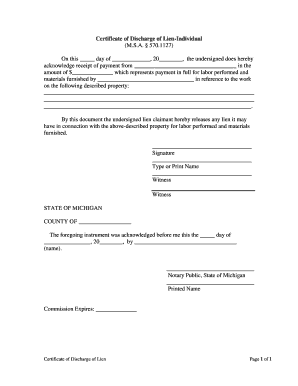
Property description

Accurate street address plus legal description or parcel number sufficient for the county register to index the lien against the correct real property record and to avoid title ambiguity during sale or financing.

Amount claimed

Itemized dollar amount or total sum for labor, materials, and other recoverable costs, including dates of invoices and any retainage; avoid vague language such as reasonable value.

Scope of work

Concise description of the labor or materials provided and the project location so third parties can connect the claim to specific improvements and dates.

Signatures and dates

Authorized signature(s) and execution date; if the jurisdiction requires notarization, include a proper notary block with acknowledgment to validate recordation.

Service and filing info

Record the filing county, recording instrument details, and keep proof of service to owners or mortgagees as required by statute and title companies.

Typical digital workflow settings for electronic lien preparation

Configure an electronic workflow to collect signatures, add notarization where allowed, and route the completed lien for filing and service.

Field Configuration
Signature field Signer signs electronically or uploads signature image
Date field Auto-fill execution date on completion
Notary block Enable RON or local notarization instructions as required
Recipient routing Auto-route signed copy to claimant and title agent

Digital signing and eSubmission considerations

Choose a platform that supports PDF/DOCX, audit trails, and required signer authentication for legal reliability.

  • File formats: PDF, DOCX, and other common formats
  • Integrations: Salesforce, NetSuite, Google Workspace integration
  • Authentication: Email, SMS, or advanced signer verification

eSignature vendor pricing and compliance snapshot for lien workflows

Compare common eSignature vendors on starting price, trial availability, bulk-send capability, audit trail, HIPAA compliance, and envelope or session caps to match lien and title workflows.

signNow DocuSign Adobe Sign PandaDoc HelloSign
Starting Price $8/user/mo $15/user/mo $14/user/mo $19/user/mo $15/user/mo
Free Trial 7-day free trial Varies by vendor Varies by vendor Varies by vendor Varies by vendor
Bulk Send Yes Yes Yes Yes No
Audit Trail Yes Yes Yes Yes Yes
HIPAA Compliant Yes Yes Yes No No
Envelope Cap No cap 100 envelopes/user/year Varies by plan Varies by plan Varies by plan

Key timing considerations and common statutory windows

Lien effectiveness often depends on meeting statutory notice and filing windows; statutes vary, so treat listed ranges as illustrative rather than jurisdictionally definitive.

Preliminary Notices:

Some jurisdictions require pre-filing notices; timelines range widely by state.

Filing Window:

Many lien statutes use 30–180 day filing windows measured from last work date.

Enforcement Period:

Lien enforcement (foreclosure) deadlines typically begin from filing; many states set 1–2 year limits.

Release Obligations:

Paid claims generally require recorded releases or satisfaction documents promptly after payment.

Title Clearing:

Title companies may demand recorded releases before closing; plan for processing time.

Common mistakes to avoid when preparing a Michigan Lien

  • Incomplete property description — vague descriptions cause mis-indexing and title delays; use parcel numbers where possible.
  • Mismatched names — using trade names instead of legal entity names can lead to rejection or invalidation of the claim.
  • Missed notarization or affirmation — failing to include required notary or acknowledgment blocks can prevent county recording.
  • Insufficient documentation — lack of invoices, change orders, or delivery receipts weakens enforcement and title clearance.

Consequences of incorrect or late lien filing

Invalid Lien: Claim may be rejected or unenforceable
Priority Loss: Late filing can reduce priority against other claims
Statutory Penalties: Possible fines or costs under state law
Liability Risk: Wrongful claim may expose claimant to damages
Title Delays: Unclear liens delay sales and closings
Increased Costs: Additional attorney and release fees

Frequently asked questions about Michigan Liens

Answers to common practical and technical questions about preparing, signing, and filing a Michigan Lien, including eSignature and notarization considerations.


Need help? Contact support

be ready to get more
Join over 28 million airSlate SignNow users