Establishing secure connection…Loading editor…Preparing document…

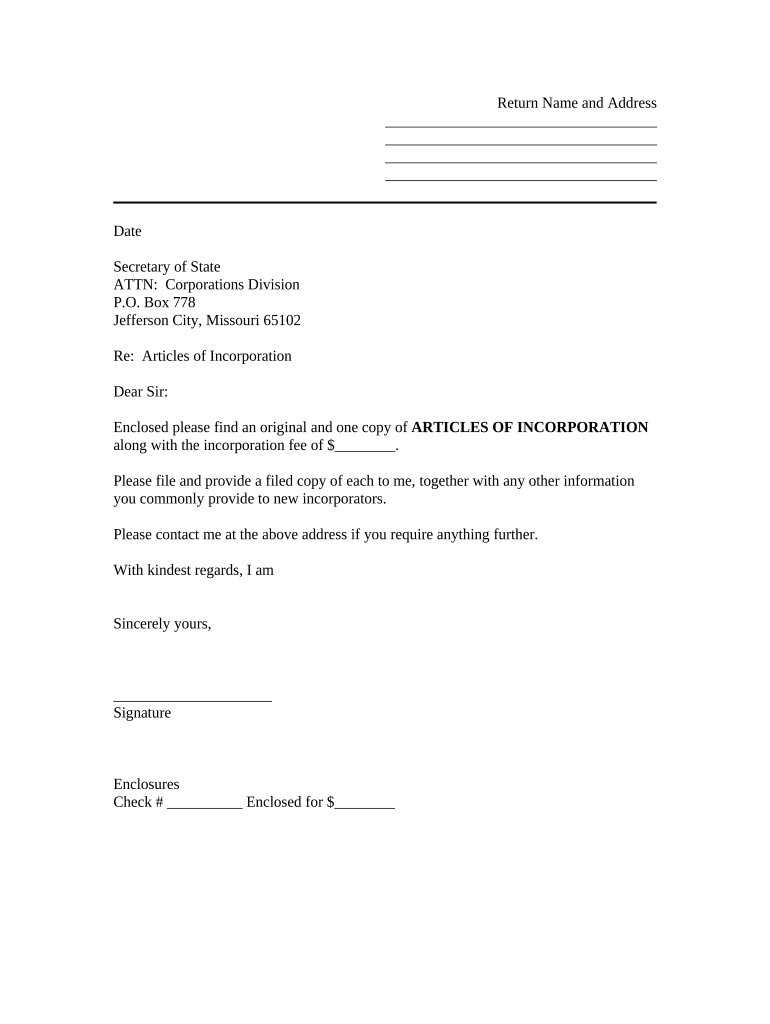
Missouri Transmittal Form

This template is fully customizable. Edit the text, fill out the fields, and send it for signature. Give it a try!
Missouri Transmittal Form

What the Missouri Transmittal Form Is and when it's used

The Missouri Transmittal Form is a cover or routing document used to accompany records, filings, or packages sent to government offices, courts, title companies, lenders, or other recipients. It identifies sender and recipient, lists enclosed documents, provides reference numbers, and specifies delivery or processing instructions. Organizations use it to standardize submissions, reduce processing delays, and ensure the receiving party can match materials to the correct file or docket. Electronic versions are commonly accepted where ESIGN (15 U.S.C. ch. 96) and state e-signature laws apply.

Why a clear transmittal matters for filings and tracking

Using a Missouri Transmittal Form improves clarity, reduces misplaced pages, creates an audit trail, and speeds processing. A standardized form helps recipients verify completeness and follow consistent routing steps, which lowers rework and clarifies responsibility when multiple documents or parties are involved.

Why a clear transmittal matters for filings and tracking

Typical users and recipients of a transmittal form

Organizations and individuals use transmittal forms wherever paperwork needs consistent labeling, tracking, or official submission.

  • Government agencies and clerks who receive and index incoming records for public files or dockets.
  • Real estate and title professionals sending deeds, settlement packages, or closing documents to recording offices.
  • Law firms and lenders transmitting court filings, loan files, or evidence exhibits to courts and administrative bodies.

Match the transmittal format to your recipient's preferred method and include any account or filing numbers to avoid processing delays.

Core components to include on a professional Missouri Transmittal Form

A complete transmittal form should identify parties, itemize enclosed documents, specify return instructions, include reference numbers, indicate required authentication, and provide contact information for follow-up.

Sender

Name, organization, phone, email, and mailing address so recipients can contact the submitting party directly about missing items or clarifications.
Recipient

Name of agency or person, department, physical address and, where applicable, internal account or docket number used by the recipient.

Document list

Clear, itemized list of enclosed documents with page counts and document types so the receiver can verify completeness upon intake.

Reference numbers

Include case numbers, file numbers, loan numbers, or county recorder references to enable correct indexing and reduce processing errors.

Delivery notes

Indicate preferred return method, special handling instructions, certified mail or courier tracking numbers, and any required return receipts.

Signature block

Authorized signer name, title, signature and date; indicate whether the signature is electronic or requires notarization or witness signatures.

Step-by-step: completing and submitting the Missouri Transmittal Form

Follow a consistent sequence to assemble, verify, sign, and submit the transmittal with its attachments.

  • 01
    Prepare documents: Gather originals, copies, and exhibits; number pages and create a document list.
  • 02
    Complete form: Fill every required field; enter reference numbers and contact details accurately.
  • 03
    Sign and authenticate: Obtain required signatures, notarization, or witnesses before submission.
  • 04
    Submit and confirm: Send via the recipient's accepted channel and obtain a receipt or tracking confirmation.

Configuring an online transmittal workflow

When automating transmittals, configure authentication, formats, routing, and retention to match recipient requirements.

Field Configuration
Authentication Method Email link or SMS code; stronger options include KBA or MFA.
File Format PDF or PDF/A recommended for long-term retention and consistent printing.
Auto-routing Set recipient order and conditional routing based on document type.
Retention Policy Apply a policy for archiving original transmittals and attachments.

Typical destinations and submission methods

Choose the recipient's accepted channel and include tracking or confirmation to document delivery.

  • County recorder: Physical or electronic submission to county recorder for deeds and real property instruments.
  • State agency portal: Upload through the agency's electronic filing portal when available.
  • Secure email: Send encrypted email attachments where recipient accepts email filings.
  • Courier or certified mail: Use tracked delivery methods for physical packages requiring proof of receipt.

Platform and format requirements for electronic transmittal

Confirm the receiving office's preferred formats and any authentication requirements before sending electronically.

  • File formats: PDF or PDF/A preferred for compatibility and long-term archiving.
  • Integrations: Connectors to systems like NetSuite or Salesforce can automate routing.
  • Security: TLS in transit and AES-256 at rest are standard controls.

Ensure your platform supports audit trails, document versioning, and secure downloads so recipients and auditors can verify submissions.

Timing considerations, acknowledgements, and correction windows

Be aware of recipient deadlines, expected acknowledgement times, and how to correct incomplete or rejected submissions.

Filing window:

Submit within the window required by the recipient to avoid late processing or penalties.

Acknowledgment timeframe:

Expect electronic or mailed confirmations within 3–10 business days, depending on agency workload.

Correction window:

Recipients commonly allow resubmission within 7–30 days to fix clerical errors.

Statutory deadlines:

Time-sensitive filings must meet statutory deadlines; check the governing statute or agency rule.

Escalation timeframe:

If no acknowledgement arrives, follow recipient escalation procedures after 10 business days.

Common mistakes to avoid when preparing a transmittal

  • Omitting reference or case numbers so the receiver cannot match documents to an existing file, causing rework and delays.
  • Failing to sign, notarize, or include required witness statements, which can render a submission incomplete or rejected.
  • Sending incorrect or incompatible file formats that the recipient cannot open, slowing processing and requiring resubmission.
  • Not including return instructions or a contact, leaving recipients unable to provide delivery confirmation or request missing items.

Consequences of incorrect or incomplete transmittals

Rejection: Submission returned
Late fees: Civil or administrative penalties possible
Privacy breach: Improper handling may violate HIPAA
Tax impact: Incorrect transmittal can trigger backup withholding
Contract risk: Unsigned pages may void agreements
Professional liability: Practitioners face ethics or malpractice exposure

eSignature vendor pricing and feature snapshot for transmittals

Comparison of typical entry-level pricing and basic feature availability for common eSignature vendors; signNow is listed first for reference.

signNow DocuSign Adobe Sign PandaDoc HelloSign
Starting Price $8/user/mo $15/user/mo $14/user/mo $19/user/mo $15/user/mo
Free Trial 7-day free trial Varies by vendor Varies by vendor Varies by vendor Varies by vendor
Bulk Send Yes Yes Yes Yes No
Audit Trail Yes Yes Yes Yes Yes
HIPAA Compliant Yes Yes Yes No No
Envelope Cap No envelope cap 100 envelopes/user/year Varies by plan Varies by plan Varies by plan

Practical tips to speed processing and reduce rejections

Adopt consistent controls and templates to make transmittal handling predictable and auditable.

Standardize your template
Use a single transmittal template with locked required fields to prevent omission. Templates reduce manual entry errors and allow quick validation before submission.
Verify recipient requirements
Confirm whether the receiving office requires notarization, witness signatures, or a specific electronic format. Matching recipient rules prevents returns and rework.
Include tracking and confirmation
Use certified mail, courier tracking, or electronic upload receipts and retain those confirmations to prove timely submission and aid dispute resolution.
Keep an audit trail
Capture who prepared, reviewed, and sent the transmittal along with timestamps and attachments to support compliance and internal controls.

Supporting documents and file export options to include

Provide commonly requested attachments and export the package in stable formats for recipient systems.

Attachment list

Attach exhibits, cover letters, deeds, affidavits, and any payment receipts. Provide a table of contents matching the itemized document list on the transmittal.

Signed originals

Retain signed originals where required and include a notarized copy or certified copy if the recipient accepts copies instead of originals.

Export formats

Provide PDF/A for archival needs and standard PDF for day-to-day review. Avoid editable formats unless requested by the recipient.

Metadata

Embed minimal metadata such as document title, author, and date to improve searchability and e-filing compatibility.

Representative examples of transmittal use in practice

Real-world examples illustrate how transmittals reduce friction across common workflows.

Optica Ventures LLC

Optica used a standardized transmittal for investor documents to reduce reconciliation errors during closings.

  • The interface simplified matching multiple enclosure types.
  • As a result the firm reported fewer returned packages, faster acceptance by recipients, and clearer internal tracking of document custody.

Martin Properties

A property manager centralized closing packages with a transmittal to send to county recorders.

  • This ensured deed exhibits and payment confirmations were attached.
  • The manager reduced recording delays and follow-up calls, and maintained a single indexed record for each closing.

Who typically signs or authorizes a transmittal

Brian Fitzgibbons, COO

Operations leaders such as COOs or office managers often sign transmittals on behalf of organizations. They confirm completeness, authorize submission, and provide a point of contact for follow-up communications.

Tim Martin, Founder

Company founders or authorized officers may sign when legal or financial accountability is required. Their approval confirms that attachments are accurate and that any required payments or authorizations are in place.

FAQs and troubleshooting for the Missouri Transmittal Form

Answers to common questions about completion, authentication, e-signing, corrections, and filing expectations.


Need help? Contact support

be ready to get more
Join over 28 million airSlate SignNow users