Establishing secure connection…Loading editor…Preparing document…

Motion for Federal Court

This template is fully customizable. Edit the text, fill out the fields, and send it for signature. Give it a try!
Motion for Federal Court

What a Motion for Federal Court Is and when it’s used

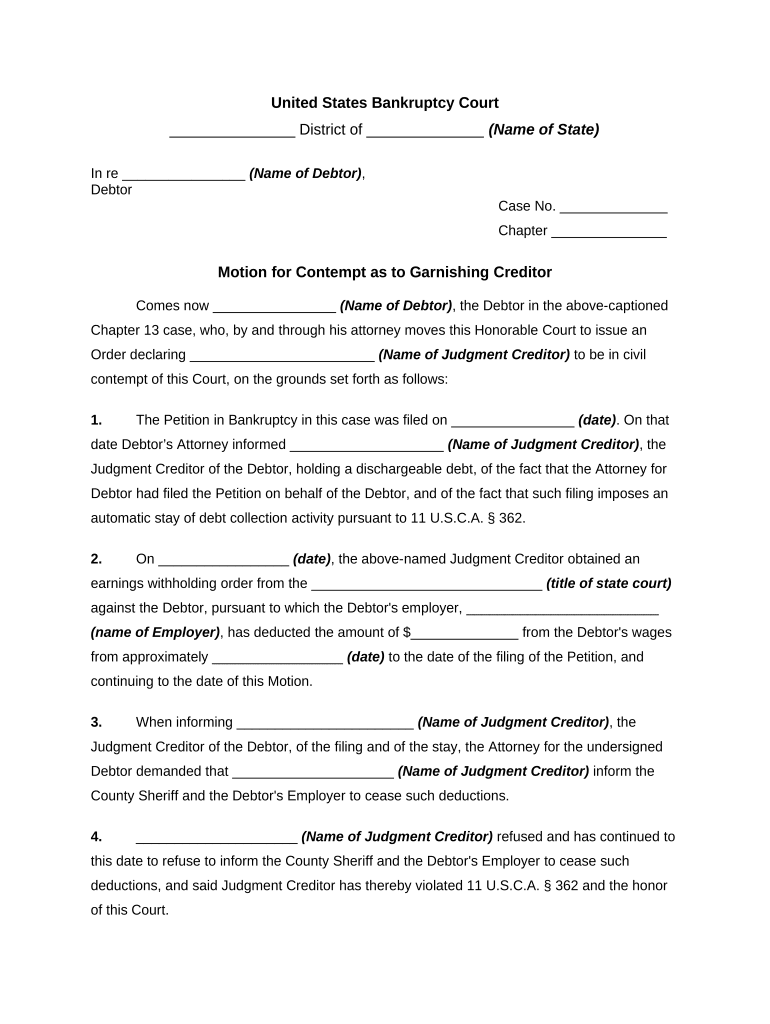
A Motion for Federal Court is a written request submitted to a United States federal district court asking the judge to issue an order or to rule on a specific legal matter within a pending case. Motions address procedural and substantive issues — for example, motions to dismiss, for summary judgment, to compel discovery, or for a protective order — and must comply with the Federal Rules of Civil Procedure, the court’s local rules, and applicable scheduling orders. Proper captioning, service, and evidence support are essential to ensure the court accepts and considers the motion.

Why a properly drafted motion matters

A clear, rule-compliant motion focuses the court on discrete legal questions, preserves issues for appeal, and improves the chance of timely judicial action under FRCP and local rules.

Why a properly drafted motion matters

Who typically prepares and files federal motions

Federal motions are usually prepared by attorneys but may be filed by pro se litigants with court deadlines and formatting expectations.

  • Litigating attorneys preparing motion briefs, exhibits, and proposed orders.
  • Pro se litigants who must follow the same formatting and service rules as represented parties.
  • Court clerks and judges who enforce local rules, civil standing orders, and page limits.

Core components of a professional federal motion

A professional motion for federal court combines correct captioning, a concise statement of facts, jurisdictional and procedural authority, evidentiary exhibits, and a clear prayer for relief to facilitate judicial review.

Caption and Case Info

Complete caption with court name, docket number, parties, and case title aligned to local rules; errors can cause rejection by the clerk.
Statement of Facts

Concise, relevant facts with citations to the record and numbered paragraphs where the court expects precise factual references.

Legal Argument

Organized legal analysis with statutory or case law citations, clear headings, and identification of the specific relief requested.

Evidence and Exhibits

Affidavits, declarations, and exhibits must be referenced in the brief and labeled consistently; include exhibits as separate attachments or eFiled exhibits per court rules.

Certification of Service

Statement confirming how and when opposing counsel and parties were served, including method (ECF, email if allowed) and date.

Proposed Order

A short, fillable proposed order formatted to the court’s template or local practice, enabling the judge to enter clear relief language.

How to prepare and file a motion — sequential steps

Follow this sequence to prepare a motion that meets federal and local filing rules and facilitates judicial consideration.

  • 01
    Draft the motion: Compose caption, facts, argument, and relief sought.
  • 02
    Assemble exhibits: Number, label, and reference each exhibit in the brief.
  • 03
    Check local rules: Confirm page limits, formatting, and proposed order requirements.
  • 04
    File and serve: Submit via CM/ECF and serve parties according to FRCP and local practice.

Where a motion goes after you file it

Understand the downstream steps after eFiling so you can track responses, hearing dates, and order entry in the court docket.

  • Clerk intake: Clerk assigns a docket entry and confirms filing.
  • Service to parties: Opposing counsel receives notice per CM/ECF rules.
  • Response/Reply: Opposing briefs are filed per scheduling rules.
  • Judge review: Judge rules, schedules hearing, or issues order.

Digital signing and eSubmission considerations

Confirm the court’s eFiling and electronic signature policies before relying on an eSignature or remote notary for a filing.

  • eFiling Systems: CM/ECF required for most federal courts.
  • eSignature Standards: ESIGN and UETA support electronic signatures generally.
  • Authentication: Stronger signer authentication reduces challenges.

Common timing checkpoints and scheduling notes

Timing for responses and hearings varies by motion type and local rules; always verify the applicable FRCP provision and the court’s civil standing order.

Service and Filing Date:

File via CM/ECF and serve opposing counsel on the same day unless court rules provide otherwise.

Response Deadline:

Response periods vary by local rule; check the court’s rules and the scheduling order for exact days.

Reply Deadline:

Replies are typically shorter than responses and set by local practice or briefing schedule.

Hearing Scheduling:

Court sets oral argument dates per calendar load and local practice.

Order Entry:

Judge’s ruling is docketed; entry timing varies with chambers’ workflow.

Key milestones from filing to final order

Track milestones sequentially to ensure timely responses, hearing preparation, and post-order compliance in federal litigation.

01

File Motion

Prepare brief, exhibits, and proposed order for clerk intake.

02

Serve Parties

Provide notice and proof of service consistent with FRCP 5.

03

Opposition Filed

Receive and review opposing papers and evidence.

04

Judge Issues Ruling

Court issues an order, opinion, or hearing date.

Common mistakes to avoid when preparing a motion

  • Incorrect captioning or docket number that causes filing or service errors.
  • Failing to attach or properly reference supporting exhibits and declarations.
  • Ignoring local rules for page limits, fonts, or filing cover sheets.
  • Incomplete proof of service or improper service method under FRCP.

Consequences of procedural or substantive errors

Dismissal Risk: Court may deny or dismiss motion.
Sanctions: Monetary or other sanctions for misconduct.
Waiver: Arguments not preserved for appeal.
Delay: Extended litigation timelines and cost increases.
Rejection: Clerk may reject noncompliant filings.
Service Defect: Relief may be denied for improper notice.

Required information and key fields at a glance

Case Caption: Court and parties
Docket Number: Exact case number
Filing Party: Name and counsel
Relief Sought: Precise remedy
Exhibit List: Numbered attachments
Service Statement: How and when served

Practical tips for accurate and efficient motions

Adopt a reproducible checklist and templates to reduce errors and speed preparation while remaining compliant with court requirements.

Use a motion checklist
Create and follow a checklist that includes caption verification, page limits, exhibit labeling, proof of service, and proposed order formatting before filing.
Confirm local formatting rules
Verify the court’s local rules for margins, font size, spacing, and required cover sheets; many clerks will reject nonconforming PDFs.
Label exhibits consistently
Number exhibits sequentially, reference them by exhibit number in the text, and include a table of exhibits to simplify judicial review.
Preserve audit trails
When using eSign or electronic submission, maintain timestamps, signer authentication logs, and certificates of completion for evidentiary integrity.

Representative examples of motion workflows

These examples show how motions move from drafting to resolution in common scenarios involving electronic preparation and filing.

Civil Discovery Motion

A plaintiff files a narrowly tailored motion to compel discovery after meet-and-confer efforts failed

  • Motion attaches annotated exhibits and a declaration
  • The court schedules a short hearing and issues an order granting limited relief with costs shifted to the noncompliant party.

Summary Judgment Motion

Defendant files a motion supported by sworn declarations and documentary evidence

  • Brief focuses on undisputed material facts and legal standards
  • Judge issues a written opinion granting summary judgment, disposing of some or all claims.

eSignature vendor comparison for filing and signing court documents

Vendor pricing and enterprise features vary; signNow appears first to reflect its verified pricing model and compliance posture compared with common alternatives.

signNow DocuSign Adobe Sign PandaDoc HelloSign
Starting Price $8/user/mo $15/user/mo $14/user/mo $19/user/mo $15/user/mo
Free Trial 7-day free trial Varies Varies Yes, limited Yes, limited
Bulk Send Yes Yes Yes Yes No
Audit Trail Yes Yes Yes Yes Yes
HIPAA Compliant Yes Yes Yes No No

Frequently asked questions about preparing and eSubmitting motions

Answers address common procedural, service, and eSignature issues encountered when preparing motions for federal court.


Need help? Contact support

be ready to get more
Join over 28 million airSlate SignNow users