Establishing secure connection…Loading editor…Preparing document…

Motion to Appoint

This template is fully customizable. Edit the text, fill out the fields, and send it for signature. Give it a try!
Motion to Appoint

What a Motion to Appoint Is and when courts use it

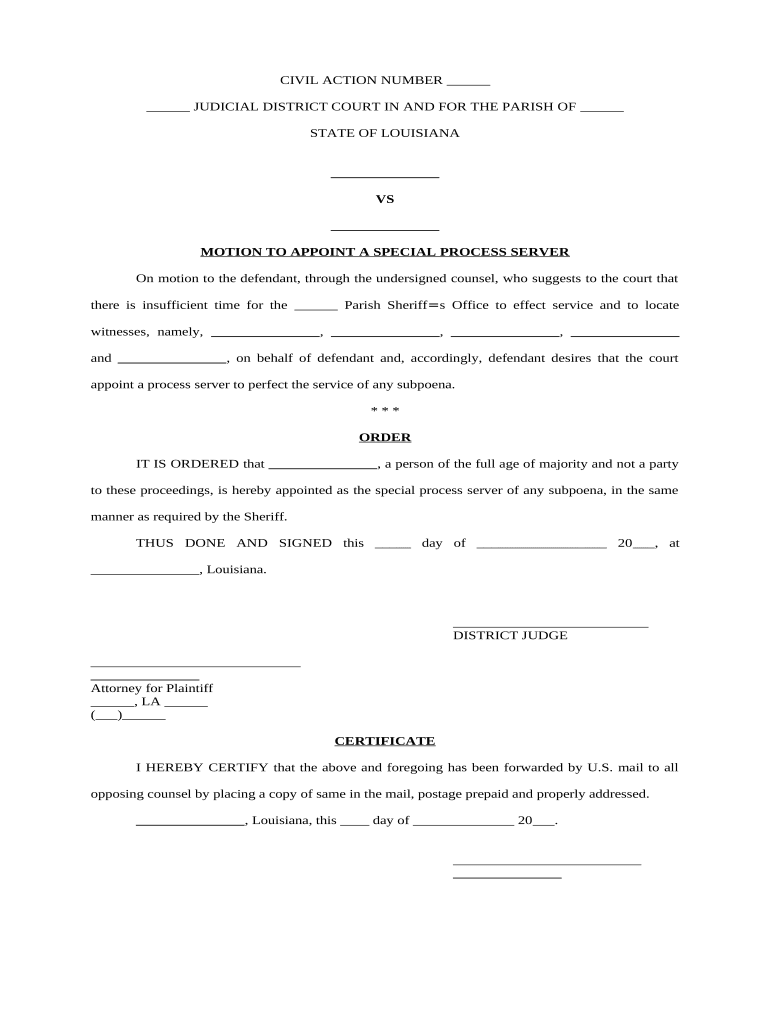
Motion to Appoint is a court filing that asks a judge to name an individual or entity to a legal role—for example, guardian, receiver, conservator, personal representative, or counsel. It typically includes a caption, statement of jurisdiction, factual grounds for appointment, legal authorities, proposed order, and any supporting affidavits or declarations. The motion must identify the proposed appointee, explain qualifications, and state the proposed scope and duration of authority. Service rules, proof of service, and compliance with local rules are required for processing by clerks and judges in U.S. courts.

Legal validity and when e-signatures apply

Motion to Appoint is enforceable when properly filed and served; electronic signatures meet ESIGN (15 U.S.C. §7001) and UETA standards in most jurisdictions, but court filings and certain judicial orders may require local e-filing rules or in-person signatures under state practice.

Legal validity and when e-signatures apply

Who typically files a Motion to Appoint

Typical filers include attorneys, fiduciaries, family members, or corporate officers seeking judicial appointment for authority or oversight.

  • Attorneys representing clients in guardianship, probate, or receivership matters statewide
  • Heirs or next of kin petitioning to be personal representative in estate administration
  • Corporate officers or creditors seeking appointment of a receiver or special manager

Core parts of a strong Motion to Appoint

A professional Motion to Appoint clearly states authority sought, factual basis, legal citations, proposed appointee details, service, and the exact relief requested.

Caption

Include court name, case number, party names, and document title. Accurate caption ensures the clerk files and routes the motion correctly and links it to the underlying case file.
Statement of Facts

Summarize events supporting appointment, date ranges, and any prior court orders. Be concise, cite exhibits, and avoid argumentative language that belongs in memoranda of law.

Legal Basis

Cite enabling statutes, rules, or case law authorizing appointment. Explain statutory thresholds and how the facts meet each required element for judicial approval, explicitly mapping evidence to elements.

Appointee Details

Provide full legal name, contact information, qualifications, affiliations, conflicts of interest, prior experience, and any required disclosures or licensing information relevant to the role.

Proposed Order

Attach a concise proposed order granting the appointment, defining powers, limits, reporting requirements, duration, and any bond or fiduciary safeguard the court should impose immediately.

Service

Explain how parties were served or will be served, include proof of service or request for alternative service, and list notice recipients required by statute or local rule.

Required information at a glance

Court Caption: Court name, case number, parties
Appointee Identity: Full legal name and contact
Qualifications: Resume or credential summary
Legal Basis: Statute, rule, or case citation
Proposed Order: Draft order specifying powers
Service Proof: Affidavit or certificate of service

Step-by-step: preparing and filing the Motion to Appoint

Follow these sequential steps to prepare, file, and serve a Motion to Appoint in U.S. civil or probate courts.

  • 01
    Prepare Motion: Draft caption, facts, legal basis, and proposed order.
  • 02
    Attach Evidence: Add affidavits, declarations, licenses, and exhibits.
  • 03
    File with Court: Submit to clerk per local filing rules.
  • 04
    Serve Parties: Serve all required parties and file proof.

Where to file and how submissions travel

Typical submission routes vary by court: e‑file system, clerk's office, or hand-delivery when e-filing is unavailable.

  • E-Filing: Use court's electronic filing portal and set correct event code.
  • Clerk's Office: Deliver paper copies and verify filing stamp and receipt.
  • Mail: Send via certified mail with return receipt requested.
  • Hand Delivery: File in person and obtain clerk's stamped copy.

Digital signing and e-submission considerations

Use an e-signature platform that supports ESIGN/UETA compliance, audit trails, and document formats accepted by court e-filing.

  • File Formats: PDF/A, DOCX, or court-specific PDF
  • Authentication: Email, SMS code, or higher
  • Integrations: Connectors for Case management or cloud

Common deadlines and timing expectations

Deadlines vary by jurisdiction and case type; local rules determine response periods, hearing notice, and filing windows.

Response Period:

Typically 14 to 21 days after service, depending on local rule.

Hearing Notice:

Courts often require 7 to 21 days' notice for contested hearings.

Emergency Motions:

Can be expedited; contact clerk for shortened response schedule.

Proof of Service:

File within days of service as required by rule.

Processing Time:

Clerk processing may take one to ten business days.

Common mistakes that delay or defeat appointment

  • Incomplete caption or wrong case number causes clerks to misfile or reject the motion, delaying proceedings and requiring re-submission with proper corrections.
  • Failing to attach required affidavits, qualifications, or exhibits weakens the motion and may lead the judge to deny appointment or set a hearing for additional proof.
  • Serving parties improperly—such as via uncertified mail when statute requires personal service—can void notice and result in vacated orders or rehearings.
  • Overbroad proposed orders that grant undefined powers risk appellate reversal or require immediate clarification and limits from the court.

Consequences of incorrect or incomplete motions

Dismissal Risk: Court may deny motion.
Delay: Proceedings postponed for refiling.
Vacated Orders: Orders can be voided.
Sanctions: Judge may impose fees.
Liability: Appointee could face legal exposure.
Backup Withholding: If tax forms incorrect, IRS penalties.

Realistic examples of Motions to Appoint in practice

These examples illustrate how a Motion to Appoint functions in common scenarios: probate guardianship and commercial receivership.

Probate Guardianship

A daughter filed a Motion to Appoint as conservator after documenting incapacity and submitting medical declarations and bond information.

  • Court held a hearing and appointed the conservator.
  • The proposed order clarified authority over banking, healthcare decisions, and reporting frequency; the court required annual accountings and limited powers to specific asset categories to protect third-party interests and creditors.

Commercial Receivership

A creditor moved to appoint a receiver for income-producing property after borrower defaulted and evidence showed mismanagement and failure to maintain insurance.

  • Temporary receiver secured assets and rents.
  • The court's order allowed the receiver to collect rents, hire management, and preserve capital pending a full accounting; bond and reporting requirements protected tenant, creditor rights and third-party claimants.

E-signature vendor pricing and feature snapshot for Motion to Appoint workflows

At-a-glance vendor pricing and feature availability for e-signature solutions relevant to filing Motions to Appoint.

signNow DocuSign Adobe Sign PandaDoc HelloSign
Starting Price $8/user/mo $15/user/mo $14/user/mo $19/user/mo $15/user/mo
Free Trial 7-day free trial Limited trial Limited trial Limited trial Limited trial
Bulk Send Yes Yes Yes Yes No
Audit Trail Yes Yes Yes Yes Yes
HIPAA Compliant Yes Yes Yes No No

Frequently asked questions about Motions to Appoint

Common questions about preparing, filing, and electronically executing a Motion to Appoint, including authentication, service, and retention concerns.


Need help? Contact support

be ready to get more
Join over 28 million airSlate SignNow users