Establishing secure connection…Loading editor…Preparing document…

Motion to Withdraw

This template is fully customizable. Edit the text, fill out the fields, and send it for signature. Give it a try!
Motion to Withdraw

What a Motion to Withdraw Is and When It’s Used

A Motion to Withdraw is a court filing that asks a judge to permit an attorney or party to withdraw from representation or to remove a previously filed pleading or motion. It explains the legal and factual grounds for withdrawal, confirms client notice where required, and requests any related scheduling adjustments from the court. Most jurisdictions require the court's approval before an attorney may withdraw if withdrawal could prejudice the client or affect case deadlines, and local rules often dictate the form, timing, and required attachments.

Why Preparing a Clear Motion to Withdraw Matters

A well-prepared Motion to Withdraw protects client interests, complies with local rules, and reduces the risk of delay or sanctions by giving the court and opposing parties the facts they need to rule.

Why Preparing a Clear Motion to Withdraw Matters

Who Prepares and Uses Motions to Withdraw

Typical users range from private practitioners to public defenders and litigation counsel who must change representation or withdraw documents.

  • Private attorneys seeking court permission to end representation while protecting client rights and case continuity.
  • In-house counsel or corporate litigators withdrawing on conflict or change-of-circumstance grounds.
  • Pro se litigants filing motions to remove a previously filed attorney appearance or to rescind a motion.

Filers should confirm local court rules and ethical obligations before filing to avoid procedural defects.

Essential Parts of a Professional Motion to Withdraw

A professional motion organizes facts, cites legal grounds, and attaches supporting documents so the court can evaluate the request without further briefing.

Caption

Complete case caption with court name, parties, case number, and judge to ensure the document is filed in the correct matter and routed properly.
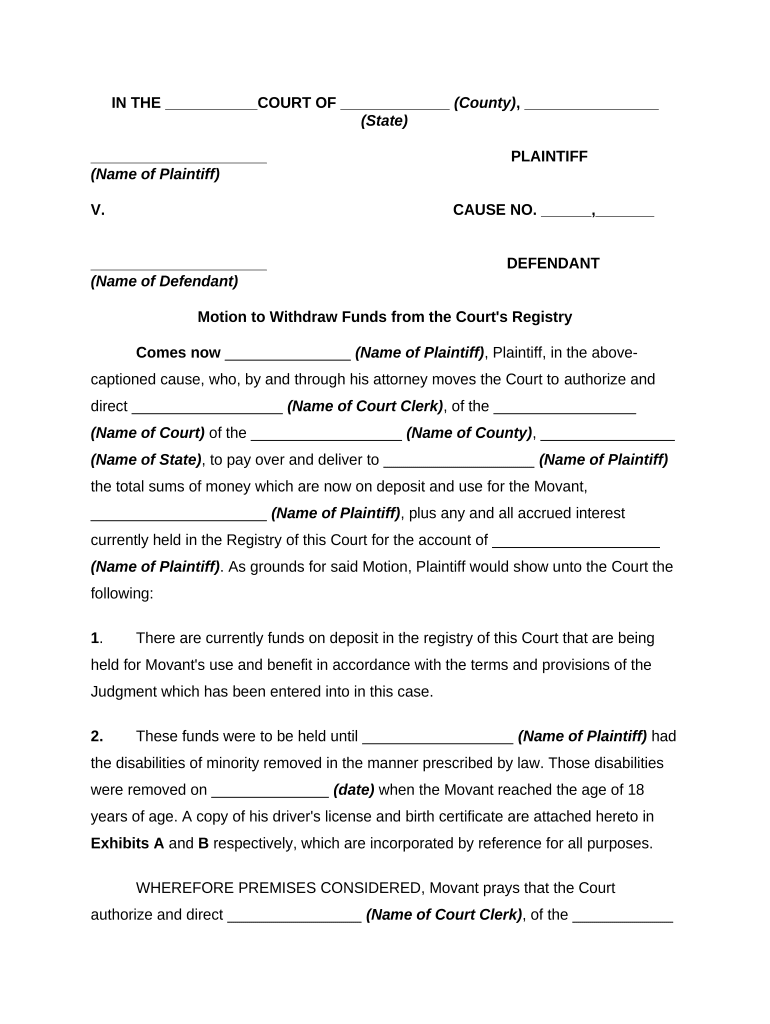
Title

A clear title such as 'Motion to Withdraw as Counsel' that states the relief requested in plain terms for judicial efficiency and docket clarity.

Statement of Facts

Concise chronology and material facts explaining why withdrawal is sought, avoiding extraneous detail that could prejudice the client or waive privilege.

Legal Grounds

Specific citations to local rules or ethical standards supporting withdrawal, plus a short legal argument demonstrating why the motion should be granted.

Proposed Order

Draft order for the judge to sign that specifies effective date of withdrawal and any conditions, such as preserving deadlines or requiring client contact information.

Certificate of Service

Statement confirming how and when parties and the client were served with the motion, including method and date, to meet service requirements.

Step-by-Step: Preparing and Filing the Motion

Follow these core steps to prepare a compliant Motion to Withdraw and reduce the chance of rejection or delay.

  • 01
    Confirm Authority: Verify local rules and client consent requirements before drafting.
  • 02
    Draft Motion: Prepare caption, facts, grounds, and a proposed order.
  • 03
    Attach Support: Add any required affidavits, declarations, or client consents.
  • 04
    File and Serve: E-file or submit to clerk and serve all parties per local rule.

Where to File and How the Court Processes the Motion

Use the court's filing system and follow local procedural rules for submission, service, and scheduling to avoid delays.

  • Clerk Filing: Submit the motion to the court clerk for docketing when e-filing is unavailable.
  • E-Filing System: Upload documents through the court’s electronic filing portal where required.
  • Service on Parties: Serve opposing counsel and the client using the approved methods and include a certificate of service.
  • Judicial Review: Judge reviews motion and issues an order, sometimes after a hearing or brief period for responses.

Digital Filing and eSubmission Requirements

Courts and e-filing systems vary; verify required file types and signing methods before uploading documents.

  • PDF/A Format: Many systems require PDF or PDF/A for long-term archiving.
  • eSignature Audit Trail: Signed documents should include a timestamp, signer attribution, and certificate of completion.
  • Authentication: Some courts require attorney e-filing certificates or logins linked to bar credentials.

Confirm local e-filing rules and acceptable signature methods to ensure successful upload and clerk acceptance.

Timing Considerations and Common Deadlines

Deadlines for filing, service, and hearing notices vary by court and case type; check local rules to comply with specific timeframes.

Local Rule Deadline:

Follow the court’s rule for motion filing and hearing notice period.

Service Timing:

Serve opposing counsel within the timeframe required to permit responses.

Response Period:

Opposing parties typically have a set number of days to oppose the motion.

Effective Date:

Withdrawal usually becomes effective by court order, not by filing alone.

Expedited Filings:

Motions seeking immediate relief require a separate ex parte or expedited request.

Key Milestones from Draft to Order

Track these sequential milestones so the motion progresses smoothly through drafting, filing, service, and resolution.

01

Draft Complete

Motion prepared with supporting documents and proposed order.

02

File Motion

Submit to the clerk or e-filing portal for docketing.

03

Serve Parties

Provide proof of service to the court and parties.

04

Judicial Ruling

Judge issues an order granting or denying the motion.

Common Preparation Mistakes to Avoid

  • Failing to attach a required client consent or affidavit, which can lead to denial or delay by the court.
  • Using incorrect case caption or case number, causing misdocketing or rejection at filing.
  • Disclosing privileged communications in the motion rather than using a sealed affidavit or in-camera submission.
  • Not serving opposing counsel per local rules, resulting in a procedural default or rehearing request.

Potential Consequences of an Improper Motion

Denial: Court may refuse the motion without prejudice.
Delay: Case schedules and hearings can be postponed.
Sanctions: Court sanctions may follow for procedural noncompliance.
Ethics Concern: Withdrawal without proper notice can raise ethical issues.
Fee Liability: Client may be billed for additional time or costs.
Prejudice: Client rights or deadlines may be compromised.

Typical eSignature and eFiling Vendor Comparison for Motion Documents

Choose an eSignature provider that meets court and evidence requirements; the table shows common plan and compliance distinctions among leading vendors.

signNow DocuSign Adobe Sign PandaDoc HelloSign
Starting Price $8/user/mo $15/user/mo $14/user/mo $19/user/mo $15/user/mo
Free Trial 7-day trial Varies by vendor Varies by vendor Varies by vendor Varies by vendor
Bulk Send Yes Yes Yes Yes Varies
Audit Trail Yes Yes Yes Yes Yes
HIPAA Compliant Yes Yes Yes No No

Frequently Asked Questions About Motions to Withdraw

Answers to common procedural and technical questions about preparing, serving, and submitting a Motion to Withdraw in U.S. courts.


Need help? Contact support

be ready to get more
Join over 28 million airSlate SignNow users