Establishing secure connection…Loading editor…Preparing document…

North Carolina Amendment to Trust

This template is fully customizable. Edit the text, fill out the fields, and send it for signature. Give it a try!
North Carolina Amendment to Trust

What the North Carolina Amendment to Trust Is and When It Applies

A North Carolina Amendment to Trust is a written instrument used to change, add, or remove terms in an existing trust without creating a new trust. Typical amendments address successor trustee appointments, beneficiary shares, distribution timing, trustee powers, or trust situs. Amendments must conform to the original trust's amendment provisions and to North Carolina law; many trusts require the settlor's signature, and some permit trustee-only amendments within defined powers. Electronic execution and retention may be valid under the ESIGN Act (15 U.S.C. ch. 96) and UETA, where applicable, provided the legal-validity conditions are met.

Why a Properly Drafted Amendment Matters

A clear amendment preserves settlor intent, avoids probate disputes, and keeps the trust administrable. Proper form reduces challenges from heirs, prevents downstream title or tax complications, and ensures beneficiaries and trustees have a reliable record of current trust terms.

Why a Properly Drafted Amendment Matters

Who Typically Prepares or Signs a Trust Amendment

Common participants in a trust amendment process include the settlor, current trustee, successor trustees, beneficiaries when consent is required, and legal counsel overseeing compliance.

  • Settlor or Grantor — Person who created the trust and generally has amendment authority under the trust instrument.
  • Trustee — May sign when the trust grants trustee amendment powers or when executing ministerial changes.
  • Attorney or Paralegal — Prepares language, confirms governing law, and reviews tax or creditor implications.

Document preparation varies by trust language; many practitioners recommend attorney review for amendments that affect distributions, removing or adding beneficiaries, or changing fiduciary powers.

Who Can Sign and Why Their Role Matters

Settlor / Grantor

The settlor must sign when the trust instrument reserves amendment rights to the settlor. If the settlor is incapacitated or deceased, authority normally shifts to named trustees or requires court intervention; confirm the original trust's amendment clause and any durable power of attorney limits.

Trustee / Successor

A trustee signs when the trust grants trustee-level amendment authority or for ministerial updates. Trustee signatures should be accompanied by an attestation of authority and, when required, beneficiary consents to avoid later disputes.

Core Elements to Include in a Professional Amendment

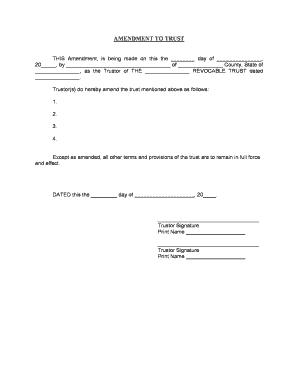
A concise amendment identifies the trust, specifies the changes, and documents execution details so the amendment is enforceable and easily understood by trustees and beneficiaries.

Title

Reference the original trust name and date so the amendment clearly ties to the right document and avoids identity confusion.
Recitals

State the parties, the original trust date, and the reasons for amendment in brief recitals to provide context for later interpretation.

Modifying Language

Use precise, unambiguous wording that identifies sections being replaced, added, or deleted, with quoted text where practical for clarity.

Effective Date

Specify whether the amendment is effective on signing, on a future date, or upon a triggering event to avoid timing disputes.

Signature Block

Include a dated signature line for the signing party, capacity of the signer, and printed name; add trustee attestation when applicable.

Acknowledgments

Add notary acknowledgement or witness lines if the trust requires authentication or if state practice recommends a self-proving format.

Step-by-Step: Execute a Trust Amendment in North Carolina

Follow a clear sequence to ensure validity and reduce the chance of challenge.

  • 01
    Review Trust: Confirm the amendment clause and signer authority before drafting.
  • 02
    Draft Amendment: Prepare precise language citing the original provisions to be changed.
  • 03
    Obtain Signatures: Have the settlor or authorized trustee sign in presence of required witnesses or notary.
  • 04
    Distribute Copies: Provide executed copies to trustees and relevant beneficiaries; retain originals in a secure file.

Where to File, Send, and Store an Executed Amendment

A trust amendment is usually kept with original trust records and provided to trustees and affected beneficiaries; filing requirements are limited but certain steps improve enforceability and accessibility.

  • Trustee File: Place the original amendment with the trust’s primary records and update the trust ledger or administration folder.
  • Beneficiaries: Send copies to beneficiaries if required by the trust instrument or to avoid surprise distribution disputes.
  • Successor Trustees: Provide the amendment to successor trustees and include it in onboarding documentation.
  • Recording (If Applicable): Record only if amendment affects real property title; recording rules vary by county and instrument language.

Digital Signing and eSubmission Considerations

Electronic signing and secure distribution are accepted in most contexts when the legal-validity requirements are met under ESIGN and UETA.

  • Authentication: Use reliable signer authentication (email link, SMS code, or stronger methods) to establish attribution.
  • Tamper Evidence: Choose a platform that provides an audit trail and tamper-evident PDF output to preserve integrity.
  • Integrations: Confirm compatibility with systems such as Microsoft 365, Google Workspace, Salesforce, NetSuite, and cloud storage providers.

Maintain a formatted executed copy (PDF/A), an audit trail, and secure backups; where HIPAA or other controls apply, require a BAA and the appropriate platform assurances.

Customize an Online Amendment Workflow

Configure a simple digital workflow that captures identity, signatures, and stores a secure audit trail for future reference.

Field Configuration
Signer Authentication Email + SMS code or SSO for trustees
Signature Type Visible e-signature with audit metadata
Document Output PDF/A with certificate of completion
Storage Encrypted cloud storage with access controls

eSignature Vendor Pricing Snapshot for Trust Amendments

Comparing common vendor starting prices and core capabilities helps select a platform that supports notarization, audit trails, and HIPAA or regulatory needs without referencing a data date.

signNow DocuSign Adobe Sign PandaDoc HelloSign
Starting Price $8/user/mo $15/user/mo $14/user/mo $19/user/mo $15/user/mo
Free Trial Yes, 7-day No No Yes, limited Yes, limited
Bulk Send Yes Yes Yes Yes No
Audit Trail Yes Yes Yes Yes Yes
HIPAA Compliant Yes Yes Yes No No

Risks and Legal Consequences of Flawed Amendments

Challenge Risk: Amendments with ambiguous language invite beneficiary litigation
Invalid Execution: Improper signatures or missing acknowledgements can render the amendment void
Tax Exposure: Unintended tax consequences if amendments change grantor trust status
Title Problems: Failure to record when required can cloud real property title
Breach of Fiduciary Duty: Trustees acting beyond authority can face removal or surcharge
Privacy Violations: Improper handling of health data may trigger HIPAA compliance issues

Common Mistakes to Avoid

  • Using vague replacement language instead of quoting new provisions.
  • Failing to confirm who has amendment authority under the trust instrument.
  • Neglecting to notarize or witness when the trust or state practice requires it.
  • Not distributing executed copies to trustees and affected beneficiaries.

Practical Tips for Accurate and Efficient Amendments

Small drafting and process choices reduce disputes and administrative friction.

Use Precise Drafting
Quote replaced language and avoid ambiguous cross-references; clarity prevents conflicting interpretations later.
Confirm Authority
Review the trust instrument to verify who can amend and whether beneficiary consent or court approval is required.
Maintain Originals
Keep the signed original in a secure, access-controlled location and provide certified copies to trustees.
Document Distribution
Log who receives copies and when to establish a clear chain of custody for future reference.

Practical Examples of Trust Amendment Uses

Two common scenarios illustrate how amendments are used in practice and what to watch for.

Family Succession Update

A settlor updates successor trustee appointments after a relocation

  • Trustee name is replaced and successor powers clarified
  • The amendment includes notarization, copies distributed to trustees and banks, and a retention note in the trust file to prevent administration gaps.

Beneficiary Share Change

A settlor modifies beneficiary shares to reflect a new child

  • The amendment specifies revised percentage distributions and effective date
  • Counsel reviewed tax implications, the trustee executed the document, and account custodians received certified copies for asset re-titling.

Frequently Asked Questions About North Carolina Trust Amendments

Answers address common execution, validity, and storage questions to reduce uncertainty for settlors, trustees, and practitioners.


Need help? Contact support

be ready to get more
Join over 28 million airSlate SignNow users