Establishing secure connection…Loading editor…Preparing document…

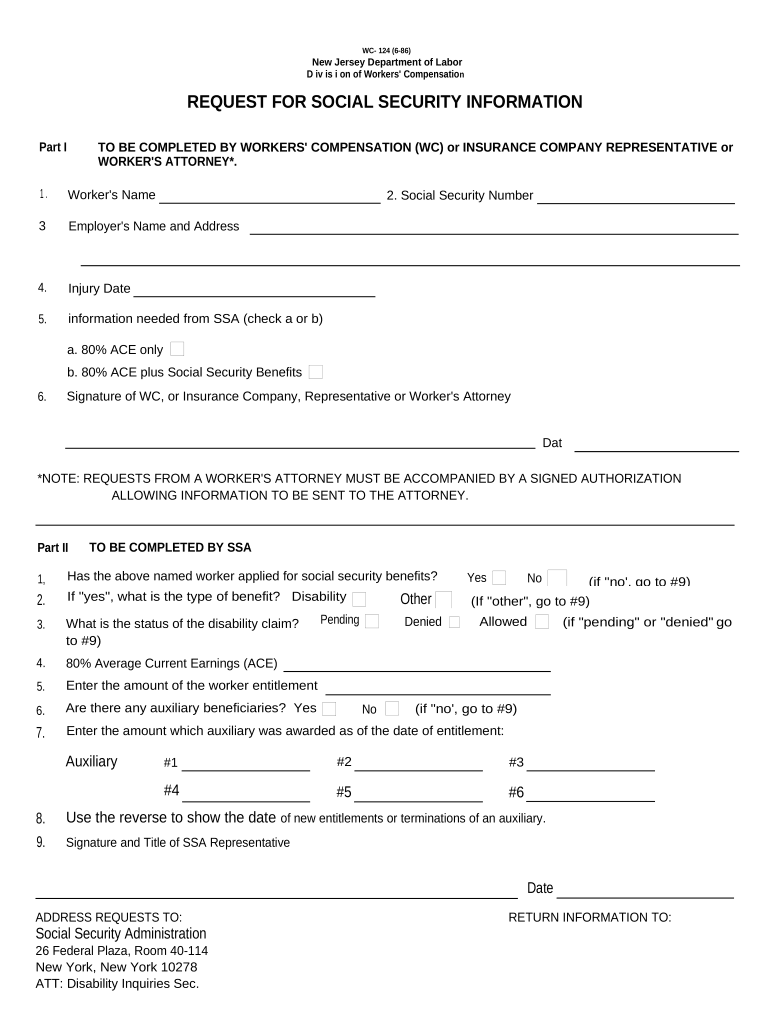
New Jersey Request for Social Security Information

This template is fully customizable. Edit the text, fill out the fields, and send it for signature. Give it a try!
New Jersey Request for Social Security Information

What the New Jersey Request for Social Security Information Is

The New Jersey Request for Social Security Information is a standardized written request used by New Jersey employers, educational institutions, and government agencies to collect an individual’s Social Security number or taxpayer identification for identification, payroll, benefits eligibility, or official recordkeeping. The document records the purpose for the collection, the requester’s authority, and the individual’s consent and signature to create an auditable record. Proper documentation supports accurate wage and tax reporting and helps organizations meet federal and state privacy and retention obligations.

Why a Clear Written SSN Request Matters

A documented request clarifies the legal purpose, demonstrates consent, and establishes an audit trail for collection and disclosure of SSNs. Clear requests reduce errors in tax reporting, help avoid backup withholding, and support compliance with federal statutes and state privacy requirements.

Why a Clear Written SSN Request Matters

Who Typically Prepares and Receives This Request

Typical requestors include employers, payroll or HR teams, university registrars, and agencies that need SSNs for tax reporting, benefits enrollment, or identity verification.

  • Employers and payroll administrators collect SSNs for W-2 reporting and to avoid backup withholding.
  • Universities and registrars request SSNs for financial aid, tuition reporting, or transcript processing.
  • Government benefit administrators and licensing agencies collect SSNs to verify identity and eligibility.

Representative Roles That Handle These Requests

HR Manager

An HR manager uses the request during onboarding to capture a hire’s SSN, document consent for tax reporting, and confirm identity. They coordinate secure storage, provide instructions about privacy rights, and ensure payroll receives accurate taxpayer identification to prevent backup withholding or reporting errors.

University Registrar

A registrar collects SSNs when required for tuition reporting or federal aid. They verify identity, link the SSN to student records, and follow institutional privacy policies to limit access, secure transmission, and retention according to federal and state rules.

Key Parts of a Professional Request for Social Security Information

A clear form includes identification, purpose, consent language, precise fields, authentication, and a signature block. Each component helps substantiate lawful collection and supports accurate downstream reporting.

Requestor Details

Name, department, and contact information for the organization requesting the SSN so the individual knows who is collecting and why the data is needed.
Purpose Statement

A concise explanation of why the SSN is requested (payroll, tax forms, benefits, eligibility) to satisfy the principle of purpose limitation and support informed consent.

Data Requested

Explicit fields for SSN or taxpayer identification number, full legal name, date of birth, and other identifiers to ensure the SSN is attributed to the correct person.

Consent Language

Clear text stating the individual’s consent to provide the SSN, any optional nature of the request, and consequences of refusal, aligned with applicable consumer disclosure rules.

Verification Steps

Instructions for verifying identity (ID check, document upload, or e-authentication) to reduce risk of misattribution or identity fraud.

Signature Block

Signature and date fields with space for printed name and role; note whether electronic signature is accepted and how it will be authenticated.

Required Fields and Short Data Notes

Full Legal Name: Exact name on ID
Social Security Number: Nine digits, no dashes
Date of Birth: MM/DD/YYYY format
Purpose of Use: Specific use case
Consent Checkbox: Signed or checked
Requester Contact: Name and phone

Step-by-Step: Completing the New Jersey SSN Request

Follow these sequential steps to complete the request accurately and preserve a compliant record of consent and identity verification.

  • 01
    Prepare Form: Enter requester name, purpose, and contact details.
  • 02
    Collect Identifiers: Ask for full legal name, SSN, and date of birth.
  • 03
    Verify Identity: Check government ID or use electronic identity verification.
  • 04
    Obtain Signature: Capture dated signature or authenticated electronic signature.

How to Configure an Online SSN Request Workflow

Configure fields, verification, and notifications in advance so online submissions produce complete, auditable records and integrate with payroll or student systems.

Field Configuration
SSN Field Numeric, masked input for nine digits
Consent Checkbox Required; timestamped on submit
Identity Verification Email + SMS code or ID upload
Notifications Email to requester on completion

Typical Process Flow for Collecting SSNs Securely

This simple flow shows how information moves from request to storage while preserving verification and audit evidence.

  • Create Request: Prepare form with purpose and fields
  • Send to Signer: Deliver by email link or secure portal
  • Authenticate Signer: Use SMS code, KBA, or ID upload
  • Store Record: Save signed form and audit trail securely

Technical Considerations for eSubmission and Signing

Ensure the chosen platform supports secure file formats, authentication methods, and integration with your HR or records systems.

  • File Formats: PDF, DOCX support
  • Integrations: Salesforce, Google Workspace
  • Authentication: Email, SMS, KBA

Key Timing Considerations and Related Tax Deadlines

Timing for SSN collection is often driven by the downstream reporting timeline for payroll or vendor payments; ensure collection well before tax filing deadlines.

Provide on Request:

W-9: provide when requested by payer

Employee Wage Reporting:

W-2s to employees by Jan 31 each year

1099-NEC Reporting:

File recipient and IRS copies by Jan 31

1099-MISC Paper Filing:

Paper to IRS generally due Feb 28

1099-MISC Electronic:

Electronic IRS filing typically due Mar 31

Common Mistakes When Preparing SSN Requests

  • Collecting incomplete identifiers, which delays matching SSNs to the correct person and may lead to incorrect tax reporting.
  • Failing to capture explicit consent wording, increasing privacy and compliance risk for consumer-facing collections.
  • Storing unencrypted copies of SSNs in email or shared folders rather than using secure, access-controlled repositories.
  • Accepting unchecked or poorly authenticated electronic signatures, which can raise disputes over attribution and intent.

Penalties and Risks from Incorrect or Missing SSN Data

Incorrect TIN: Triggers backup withholding
Failure to File: IRC §6721 penalties apply
Late 1099: $60–$330 per form
Intentional Disregard: $660+ per form
I-9 Noncompliance: $281–$2,789 per violation
Privacy Breach: State fines and remediation costs

Practical Tips for Accurate and Efficient Completion

Adopt a consistent process, train staff, and use secure electronic tools to reduce errors and safeguard sensitive data when collecting SSNs.

Standardize the Form
Use a single, reviewed template with clear purpose language and mandatory fields to reduce variability and ensure each request contains required consent and identification fields.
Prefer Secure eSubmission
Configure secure portals with TLS and encrypted storage, restrict access by role, and capture an audit trail to demonstrate chain-of-custody and consent.
Authenticate Appropriately
Match authentication strength to risk: email or SMS for low-risk collections, KBA or ID upload for higher-risk uses to reduce fraudulent submissions.
Limit Data Exposure
Mask SSNs in user interfaces, restrict full SSN access to authorized staff, and avoid storing unneeded copies in email or shared drives.

Real-World Examples of Using an SSN Request

These examples show practical scenarios where a documented SSN request supports compliance, reporting, and secure onboarding.

Payroll Onboarding

A medium-sized employer collects SSNs during electronic onboarding to populate payroll systems and prepare W-2s.

  • The employer verifies identity via uploaded ID and SMS code.
  • The signed electronic request is stored with an audit trail and supports accurate year-end wage reporting while reducing manual entry errors.

University Financial Aid

A registrar requests an SSN to confirm federal aid eligibility and tax reporting for scholarships.

  • Students submit SSNs through a secure portal with consent checkbox.
  • The registrar attaches the signed request to the student record, limiting access and meeting institutional retention and reporting policies.

Sample eSignature Vendor Comparison for SSN Requests

Compare common vendor characteristics relevant to securely collecting and storing SSNs; signNow is shown first for parity with other providers.

signNow DocuSign Adobe Sign PandaDoc HelloSign
Starting Price $8/user/mo $15/user/mo $14/user/mo $19/user/mo $15/user/mo
Free Trial 7-day free trial Varies by plan Varies by plan Varies by plan Varies by plan
Bulk Send Yes Yes Yes Yes No
Audit Trail Yes Yes Yes Yes Yes
HIPAA Compliant Yes Yes Yes No No

Frequently Asked Questions

Answers to common questions about collecting Social Security numbers, eSign validity, consent, and what to do if information is missing or incorrect.


Need help? Contact support

be ready to get more
Join over 28 million airSlate SignNow users