Establishing secure connection…Loading editor…Preparing document…

New Jersey Judgment

This template is fully customizable. Edit the text, fill out the fields, and send it for signature. Give it a try!
New Jersey Judgment

What a New Jersey Judgment Covers and Why it Matters

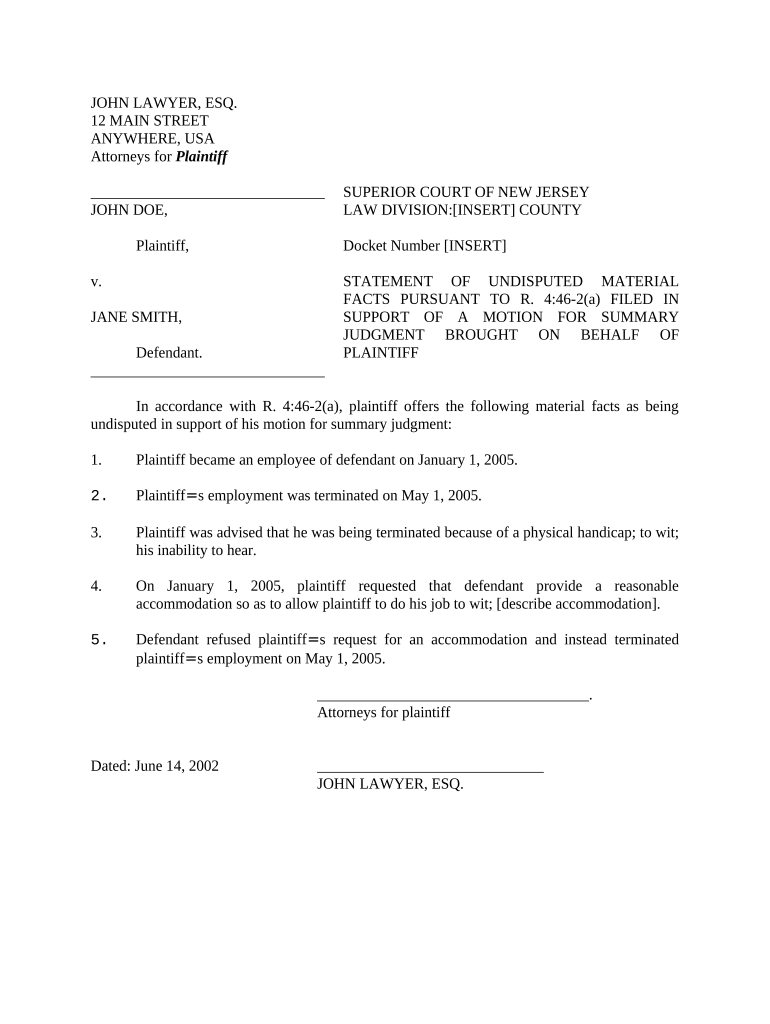
A New Jersey judgment is a court-issued determination that a debtor owes a specific amount to a creditor following a civil proceeding. It establishes a legal right to collect, creates a docketed record in the appropriate county, and can form the basis for post-judgment remedies such as wage garnishment, execution, or a judgment lien against real property. The judgment identifies parties, the amount awarded, post-judgment interest if applicable, and the entry date; accurate entry and docketing are essential for enforceability and establishing priority among creditors.

Why a Properly Prepared Judgment Benefits Enforcement

A clear, complete judgment makes enforcement predictable, protects priority rights, and reduces litigation over collection. It also provides the official record needed by clerks, title companies, and enforcement officers.

Why a Properly Prepared Judgment Benefits Enforcement

Who Typically Prepares or Relies on a New Jersey Judgment

Parties who prepare or rely on judgments include creditors, attorneys, and court clerks handling civil collections.

  • Creditors and collection attorneys who pursue civil collection remedies and need an enforceable record.
  • Judgment debtors who must understand obligations, timelines, and potential enforcement actions.
  • Title professionals and lien searchers who check public records for encumbrances and priority.

Each participant has a distinct role: prepare accurate content, verify docketing procedures, and follow local filing practices to preserve enforcement rights.

Core Elements to Include in a Professional New Jersey Judgment

A judgment should present identity, case details, monetary terms, and enforcement instructions in a standardized format so clerks can accept and index it without delay.

Case Caption

Full court name, docket number, and plaintiff/defendant names exactly as on the case record to ensure accurate indexing and retrieval by the county clerk.
Judgment Amount

State the principal award precisely in numerals and words, list any awarded costs or fees separately, and show the total amount entered by the court.

Interest Provision

Specify post-judgment interest rate and statutory basis, or indicate 'statutory interest' to clarify how interest will accrue after entry.

Execution Directions

Include explicit language authorizing writs, garnishment, levy, and other remedies and note any restrictions or stays entered by the court.

Lien Notice

State whether the judgment should be docketed as a judgment lien and identify the county or recorder’s office for lien recording if different from the filing court.

Entry Date and Clerk Signature

Leave space for the clerk’s filing stamp, entry date, and any required signature or seal that completes the official record.

Required Data Elements at a Glance

Document Type: Judgment Certificate
Court Name: County Superior Court
Docket Number: Case identifier
Parties: Plaintiff | Defendant names
Amount: Principal plus costs
Entry Date: Date judgment entered

Step-by-Step: From Entry to Enforcement

Follow these sequential steps to prepare, file, and begin enforcement of a New Jersey judgment.

  • 01
    Prepare Judgment: Confirm case caption and compute totals accurately.
  • 02
    Obtain Court Entry: Submit proposed judgment for the judge’s signature or adopt the court’s form.
  • 03
    File with Clerk: Deliver signed judgment to county clerk for docketing.
  • 04
    Enforce Remedies: Record liens, seek garnishment, or levy assets as permitted.

Where to File and How Documents Move Through the System

A judgment travels from the entering court to county clerks and, where applicable, to county recording offices for lien effects.

  • Court of Entry: The judge signs and the court enters judgment on the docket.
  • County Clerk: Clerk receives the judgment and applies the official entry stamp.
  • Recorder / Register: If creating a lien, submit required documents to the county recording office.
  • Enforcement Unit: Sheriff or enforcement authority executes writs or garnishment following clerk routing.

Electronic Filing, Signing, and File Formats

Many county clerks accept electronic filings and PDF submissions; requirements vary by county and court division.

  • File Formats: PDF/A preferred; also accept DOCX in some e-filing systems
  • Authentication: Email or multi-factor signer verification typically required
  • Integrations: Works with common systems like NetSuite, Google Workspace

Verify the target court or county clerk’s e-filing rules before submission to ensure accepted formats, signature types, and required cover sheets.

Timeframes and Processing Expectations

Expect processing timelines to vary by county; confirm local clerk practices for accurate scheduling.

Entry Date:

Official date the judgment is entered on the court docket.

Clerk Processing Time:

Often same day to a few business days depending on workload.

Recording Lien Time:

Recording at the county office typically takes 1–5 business days.

Appeal Period Start:

Appeal time typically begins from the entry date — check local court rules.

Enforcement Actions:

Execution, garnishment, or levy scheduling depends on clerk availability and statutory notices.

Common Preparation Errors to Avoid

  • Using incorrect party names or docket numbers that cause the clerk to reject or mis-index the judgment.
  • Failing to separate costs, fees, or accrued interest leading to calculation disputes during enforcement.
  • Neglecting to leave space for the clerk’s entry stamp and signature, which can render the filing incomplete.
  • Assuming electronic filing formats without verifying county-specific e-filing rules or signature acceptance.

Consequences of an Incorrect or Incomplete Judgment

Lost Priority: Lien priority may be impaired
Clerk Rejection: Filing may be refused
Enforcement Delay: Collection efforts postponed
Appeal Exposure: Procedural defects invite challenges
Sanctions Risk: Court sanctions for improper filings
Data Disputes: Amount errors create enforcement litigation

Practical Tips for Accurate, Efficient Judgments

Follow consistent procedures and confirm local rules to reduce delay and challenge risk.

Verify court docket and party names
Compare the judgment text to the official case caption and court filings before submission. Consistent naming prevents mis-indexing and ensures enforcement actions target the correct party.
Compute amounts carefully
Break out principal, costs, fees, and statutory interest. Maintain a clear calculation worksheet so clerk staff and opposing parties can reconcile totals without dispute.
Check local e-filing requirements
Confirm accepted file formats, required cover sheets, and any authentication or signature rules for the target county to avoid rejection or processing delays.
Retain an audit trail for eSignatures
When signing electronically, preserve timestamp, IP, signer verification, and the signed file to support validity under ESIGN and UETA if challenged.

Real-World Use Cases for New Jersey Judgments

Typical examples show how judgments support collection, lien creation, and title clearance in different sectors.

Landlord Collection

A landlord obtains a default judgment after an unpaid rent case is decided.

  • The judgment is docketed with the county clerk.
  • Once entered and recorded, the landlord uses the judgment to lien rental property and pursue wage garnishment if permitted; clear documentation and timely docketing preserved priority against later creditors.

Medical Billing

A provider secures a judgment for an unpaid balance following a small claims action.

  • The provider records the judgment to create a lien.
  • Properly formatted judgments and verified party identities reduce post-judgment disputes and support collection through asset levies or negotiated payment plans.

Comparing eSignature Pricing and Core Capabilities

Basic pricing and capabilities vary by vendor and plan; signNow is shown first for consistent comparison of key features and compliance options.

signNow DocuSign Adobe Sign PandaDoc HelloSign
Starting Price $8/user/mo $15/user/mo $14/user/mo $19/user/mo $15/user/mo
Free Trial 7-day free trial Varies Varies Varies Varies
Bulk Send Yes Yes Yes Yes No
Audit Trail Yes Yes Yes Yes Yes
HIPAA Compliant Yes Yes Yes No No

Frequently Asked Questions About New Jersey Judgments

Answers to common questions about validity, e-signing, filing, retention, and enforcement of judgments in New Jersey.


Need help? Contact support

be ready to get more
Join over 28 million airSlate SignNow users