Establishing secure connection…Loading editor…Preparing document…

Nonqualified Stock Option Agreement

This template is fully customizable. Edit the text, fill out the fields, and send it for signature. Give it a try!
Nonqualified Stock Option Agreement

What the Nonqualified Stock Option Agreement Is and When it Applies

A Nonqualified Stock Option Agreement (NQSO Agreement) is a contract between a company and an option holder that grants the right to purchase company stock at a specified exercise price for a defined period. Unlike incentive stock options, NQSOs do not meet the special tax-preference rules under the Internal Revenue Code and typically trigger ordinary income tax on exercise. The agreement sets vesting, exercise mechanics, expiration, transfer restrictions, and any post-termination exercise windows. Corporate boards, HR, and finance use the agreement to document equity compensation and protect issuer rights.

Why a Professional NQSO Agreement Matters for Issuers and Recipients

A clearly drafted Nonqualified Stock Option Agreement defines rights and obligations, reduces tax and compliance risk, and preserves corporate governance controls while enabling equity-based compensation. It provides enforceable vesting schedules, exercise procedures, and transfer restrictions that protect both company equity and employee expectations under U.S. securities and tax law.

Why a Professional NQSO Agreement Matters for Issuers and Recipients

Typical Parties Involved and Practical Roles

The Nonqualified Stock Option Agreement is used by corporate issuers, employees and contractors receiving options, and advisors who review equity plans.

  • Corporate issuer: Board approves grants and maintains stock ledger; legal ensures compliance.
  • Option holder: Employee, consultant, or director who accepts terms and follows exercise procedures.
  • Payroll / Finance: Handles tax withholding, reporting, and updates to capitalization tables.

Who Signs and Why

Company Representative

Typically an authorized officer or delegated HR/compensation administrator signs on behalf of the issuer and confirms board approval and stock ledger entry. This signer ensures the grant aligns with the company equity plan and corporate resolutions.

Option Holder

The individual receiving the option signs to accept grant terms, vesting, exercise price, and transfer restrictions. Their signature documents intent to be bound and starts the timeline for vesting and post-termination exercise rights.

Core Provisions to Include in a Robust NQSO Agreement

A professional agreement balances issuer protections and grantee rights by addressing grant terms, vesting, exercise mechanics, tax treatment, restrictions, and termination conditions.

Grant Details

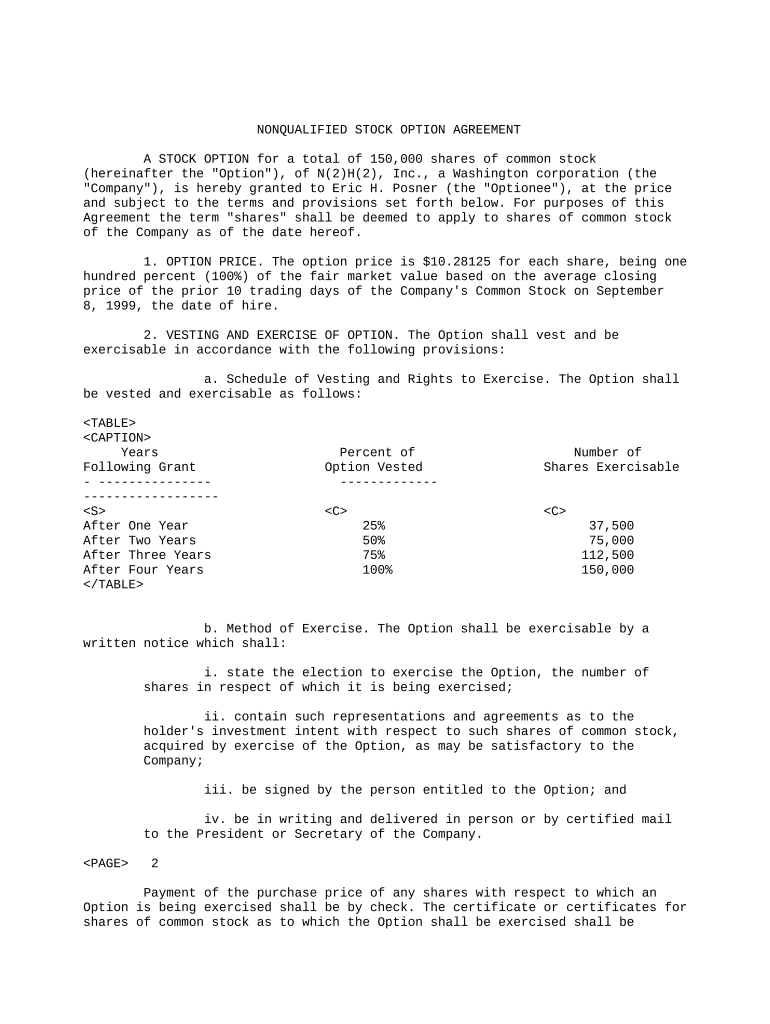
Specify number of options, exercise price per share, grant date, and whether the award is intended as a nonqualified stock option under federal tax law.
Vesting Schedule

Define vesting commencement, cliff provisions, and acceleration triggers such as change in control or termination without cause.

Exercise Mechanics

Explain notice procedures, acceptable payment methods, partial exercises, and delivery of shares upon payment and tax withholding.

Termination and Forfeiture

Set post-termination exercise windows for resignation, termination for cause, retirement, disability, and death to avoid disputes.

Transfer Restrictions

Include restrictions on assignment, right of first refusal, repurchase rights, and securities law legend requirements.

Tax and Withholding

State that grantee is responsible for taxes, describe employer withholding obligations, and reference relevant reporting forms and timing.

Required Information and Common Data Elements

Grantee Name: Full legal name
Grant Date: MM/DD/YYYY
Number of Options: Integer shares
Exercise Price: Price per share
Vesting Terms: Schedule summary
Governing Law: Selected state

Step-by-Step: How to Complete an NQSO Agreement

Follow these sequential steps to draft, review, and execute a Nonqualified Stock Option Agreement that aligns with board approvals and payroll processes.

  • 01
    Prepare grant: Enter grant date, shares, and exercise price.
  • 02
    Confirm vesting: Set vesting commencement and any cliffs.
  • 03
    Add tax language: Specify withholding and reporting responsibilities.
  • 04
    Execute and record: Collect signatures and update the stock ledger.

How to Configure an Online NQSO Signing Workflow

Set up a controlled digital workflow that enforces required fields, signer order, and authentication to meet corporate and legal requirements.

Field Configuration
Required Fields Make name, grant date, and signature mandatory
Signer Order Company signs before grantee when required
Authentication Use email link with optional SMS code
Audit Trail Enable IP, timestamp logging

Where to Send and How Execution Flows

A consistent routing flow reduces errors and ensures the company captures all approvals and tax information before shares issue.

  • Prepare document: Populate template with grant and vesting terms
  • Company signature: Authorized officer executes issuer portion
  • Deliver to grantee: Send via secured e-sign link or email
  • Record and store: Update ledger and send executed copies

Digital Signing and eSubmission Requirements

Ensure the chosen eSignature platform supports required authentication, audit trails, and secure storage for equity documents.

  • Authentication: Email, SMS, or stronger
  • Audit Trail: IP and timestamp logs
  • Document Formats: PDF and DOCX supported

Key Timing Considerations and Reporting Deadlines

Track grant date, vesting milestones, exercise windows, and payroll reporting deadlines to avoid penalties and ensure accurate tax treatment.

Grant Date Effects:

Determines option pricing and tax reference

Vesting Milestones:

Trigger rights and potential tax events

Post-Termination Exercise:

Set firm expiration after termination

Payroll Reporting:

W-2 or 1099 reporting timing applies

Recordkeeping:

Retain executed agreement and ledger entries

Common Mistakes When Preparing an NQSO Agreement

  • Using ambiguous vesting language that leads to disputes about when options become exercisable, particularly around termination or change-of-control events.
  • Failing to confirm exercise price meets fair market value requirements, which can create adverse tax consequences and potential disallowance of preferred tax treatments.
  • Neglecting to update the stock ledger and corporate records after issuance, which can impair enforceability of share transfers and complicate cap table reconciliation.
  • Omitting or incorrectly describing tax withholding obligations; this can result in employer liability and penalties under IRS reporting rules.

Penalties and Compliance Risks to Watch For

Tax Withholding: Employer may owe withholding
Reporting Penalties: IRC §6721 penalties possible
Transfer Disputes: Unclear restrictions cause litigation
Breach of Fiduciary Duty: Improper grants risk board liability
Securities Violations: State blue sky issues possible
Recordkeeping Failures: Leads to audit exposure

Practical Tips for Accurate and Efficient Completion

Follow consistent templates, use clear vesting language, and centralize recordkeeping to reduce errors and speed processing.

Use standardized templates
Maintain a board-approved template reflecting current plan rules, default vesting, and tax provisions to ensure consistent grants.
Verify names and data
Confirm grantee legal name, tax identification, and contact information before executing to prevent reporting mismatches.
Coordinate payroll
Communicate exercise events to payroll immediately for correct withholding and Form W-2 or 1099 reporting.
Centralize storage
Retain executed agreements and ledger updates in a secure, auditable repository for compliance and future audits.

Real-World Examples of NQSO Use

Sample scenarios illustrate common approaches to vesting, exercise, and tax handling in different organizational contexts.

Early-Stage Startup

Grant includes four-year vesting with one-year cliff and standard ROFR

  • Includes exercise window 90 days post-termination
  • Company uses digital signature, updates cap table, and tracks withholding on exercise to ensure regulatory and tax compliance.

Late-Stage Employer

Grant ties vesting to performance milestones and change-in-control acceleration

  • Option price set to FMV at grant date
  • Employer coordinates payroll for withholding and prepares shareholder consent for share issuance upon exercise.

eSignature Pricing and Feature Comparison for NQSO Execution

Compare typical eSignature vendor plans and capabilities relevant to executing Nonqualified Stock Option Agreements, including starting price, trial options, bulk sending, audit trail, HIPAA compliance, and envelope limits.

signNow DocuSign Adobe Sign PandaDoc HelloSign
Starting Price $8/user/mo $15/user/mo $14/user/mo $19/user/mo $15/user/mo
Free Trial 7-day free trial Varies by vendor Varies by vendor Varies by vendor Varies by vendor
Bulk Send Yes Yes Yes Yes No
Audit Trail Yes Yes Yes Yes Yes
HIPAA Compliant Yes Yes Yes No No

Frequently Asked Questions About Nonqualified Stock Option Agreements

Answers to common questions about enforceability, tax consequences, digital signing, and recordkeeping for NQSO Agreements.


Need help? Contact support

be ready to get more
Join over 28 million airSlate SignNow users