Establishing secure connection…Loading editor…Preparing document…

Notice Furnishing Form

This template is fully customizable. Edit the text, fill out the fields, and send it for signature. Give it a try!
Notice Furnishing Form

What the Notice Furnishing Form Is and When It’s Used

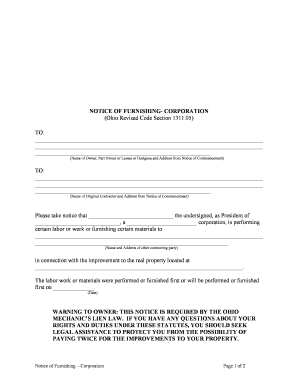
A Notice Furnishing Form documents that one party intends to provide specified information about an account, transaction, or consumer relationship to a third party and records the details required for lawful transmission and recordkeeping. Typical uses include notifying consumers, counterparties, or reporting agencies that data will be shared, confirming the scope of information furnished, and capturing authorizations, dates, and contact details. The form serves both operational and compliance functions: it creates an auditable record of the notice, supports dispute resolution, and preserves evidence that the recipient and sender acknowledged the content and timing of the disclosure.

Why a Clear Notice Furnishing Form Matters

A well-prepared Notice Furnishing Form reduces legal risk, documents consent and intent, and creates an auditable record that supports regulatory compliance and business continuity.

Why a Clear Notice Furnishing Form Matters

Who Prepares and Who Receives This Form

Common preparers and recipients vary by industry and purpose; identify the role that applies before completing the form.

  • Credit and collections teams: Send notices when furnishing account status or payment history to consumer reporting agencies or third-party processors.
  • HR and hiring managers: Provide notices when employment verification or background-check data is furnished to vendors or regulatory bodies.
  • Property managers and landlords: Furnish tenant-related information to screening services, debt collectors, or legal counsel.

Match the preparer to the correct signatory authority and retention rules to ensure the notice is valid and enforceable.

Who Can Sign on Behalf of an Organization

Authorized Representative

A named employee with delegated authority (title and scope documented). The representative must sign using the organization name and include job title, demonstrating authority to provide the notice on the entity’s behalf.

Third-Party Agent

An outside vendor or attorney authorized by written power (agency agreement or POA). Attach the authorization document and specify the agent’s signing limits and contact information.

Core Elements to Include on a Professional Notice Furnishing Form

A complete form combines identity, scope, timing, and legal acknowledgments. Include standardized sections so recipients and auditors can locate essential information quickly.

Sender Identification

Full legal name of the organization or individual furnishing the information, business address, phone number, and designated compliance contact to support follow-up or dispute handling.
Recipient Details

Name and contact information for the third party that will receive furnished data, including company name, address, and a specific recipient or department to eliminate routing uncertainty.

Description of Information

Clear description of the categories of data to be furnished (for example, account status, dates of service, payment amounts, or employment verification) and any exclusions.

Purpose and Legal Basis

Statement of why the information is being furnished (e.g., reporting, verification, collection) and any legal or contractual authority supporting the disclosure.

Effective Date and Duration

The date the notice takes effect and how long furnishing is authorized, including any automatic termination conditions or renewal instructions.

Signature and Attestation

Signature block for authorized signer, printed name, title, date, and a short attestation that information is accurate to the signer’s knowledge under penalty of law as applicable.

Step-by-Step: Completing and Issuing the Notice Furnishing Form

Follow these steps in sequence to prepare a compliant, auditable notice.

  • 01
    1. Gather details: Collect full party names, account identifiers, and contact information.
  • 02
    2. Define scope: Specify precisely what data will be furnished and for what purpose.
  • 03
    3. Obtain authorization: Confirm internal signatory authority or attach external agency authorization.
  • 04
    4. Record signature: Capture the signature and timestamp; preserve the audit trail.

Configuring an Online Workflow for Notice Furnishing

Set up fields and routing in your eSubmission tool to enforce required data entry and preserve evidence of delivery.

Field Configuration
Required Fields Mark identity, recipient, description, date, and signature as mandatory.
Conditional Logic Show additional fields when ongoing reporting is selected.
Signer Authentication Use email code, SMS, or stronger methods for high-risk notices.
Retention Settings Enable automatic archival with audit trail export.

Where to Send, File, and Store Completed Notices

Route the completed form to operational owners, the intended recipient, and a secure archive for compliance.

  • Recipient Delivery: Email, secure portal, or API transmission to the named recipient.
  • Internal Records: Store a signed copy in the compliance or account file.
  • Audit Archive: Preserve the audit trail and delivery receipts for recordkeeping.
  • Consumer Copy: Provide a copy to the consumer if required by policy or law.

Digital Signing and eSubmission Considerations

Choose platform settings that capture intent, attribution, and a tamper-evident record when you e-sign or send notices.

  • Authentication: Email, SMS, KBA, or SSO
  • Audit Trail: IP, timestamp, and action log
  • File Formats: PDF/A, DOCX supported

Common Timelines to Consider When Furnishing Notices

Timelines vary by purpose and industry. Use internal SLAs and legal requirements to set target dates for issuance, response, and retention.

Issue Timing:

Often issued at transaction time or when reporting is scheduled.

Recipient Acknowledgment:

Expect confirmation within 1–14 days depending on transmission method.

Correction Requests:

Allow at least 30 days for investigation and response when receiving dispute claims.

Retention Trigger:

Retention begins on the effective date or last furnished transaction date.

Audit Exports:

Preserve signed copies and logs for the duration of the retention period.

Key Milestones and Processing Stages

Track milestone stages from preparation through archival to ensure traceability and timely action.

01

Prepare Notice

Assemble required data and assign a preparer.

02

Authorize Signature

Obtain signature from authorized representative.

03

Transmit to Recipient

Send via chosen delivery channel and capture receipt.

04

Archive and Audit

Store signed form and audit trail in secure archive.

Common Mistakes and How They Cause Delays

  • Incomplete recipient information that prevents delivery and triggers manual follow-up, adding days to processing time.
  • Mismatched legal names or account numbers that cause records not to reconcile with internal systems or third-party databases.
  • Missing or vague scope language that leads to overbroad disclosures or disputes about what data may be furnished.
  • Using weak signer authentication for high-risk notices, which can undermine proof of intent and increase legal exposure.

Principal Risks If the Notice Is Incorrect or Incomplete

Regulatory Fines: Administrative penalties or enforcement actions
Contract Breach: Damages or termination claims by counterparties
Consumer Liability: Dispute-driven corrections and potential statutory damages
Data Exposure: Increased risk of breach or unauthorized sharing
Operational Delay: Processing backlogs and remediation costs
Reputational Harm: Loss of trust with customers or partners

Required Information Elements and Security Practices

Sender Name: Full legal entity
Recipient Name: Full company or individual
Data Scope: Specific categories listed
Effective Date: MM/DD/YYYY format
Signature: Signed and dated
Audit Trail: Timestamp and delivery log

eSignature Vendor Comparison for Completing Notice Furnishing Forms

Compare common plan features and starting prices across vendors; signNow appears first per comparison convention and offers a low starting price for standard e-sign and audit-trail use cases.

signNow DocuSign Adobe Sign PandaDoc HelloSign
Starting Price $8/user/mo $15/user/mo $14/user/mo $19/user/mo $15/user/mo
Free Trial 7-day trial Yes Yes Yes Yes
Bulk Send Yes Yes Yes Yes Yes
Audit Trail Yes Yes Yes Yes Yes
HIPAA Compliant Yes Yes Yes No No

Practical Examples of Notice Furnishing Scenarios

Two concise scenarios show common uses and practical outcomes when the form is completed correctly.

Tenant Screening Notice

A landlord notifies a tenant-screening agency of an applicant’s rental application status and previous tenancy balances

  • One-time furnishing of account and reference details
  • The standardized notice shortened verification time and reduced follow-up by documenting consent and the exact data furnished.

Employment Verification Notice

An employer authorizes a background-check vendor to receive employment history and dates of service

  • Ongoing furnishing for multiple checks during recruitment
  • Clear scope language and a designated recipient contact prevented data overreach and simplified audit traces during hiring audits.

Frequently Asked Questions and Troubleshooting

Answers to common questions about validity, e-signing, authentication, retention, and handling disputes related to Notice Furnishing Forms.


Need help? Contact support

be ready to get more
Join over 28 million airSlate SignNow users