Establishing secure connection… Loading editor… Preparing document…
Navigation

Fill and Sign the Notice Garnishment Form
Fill and Sign the Notice Garnishment Form

How it works

Open the document and fill out all its fields.
Apply your legally-binding eSignature.
Save and invite other recipients to sign it.

Rate template

4.4
36 votes
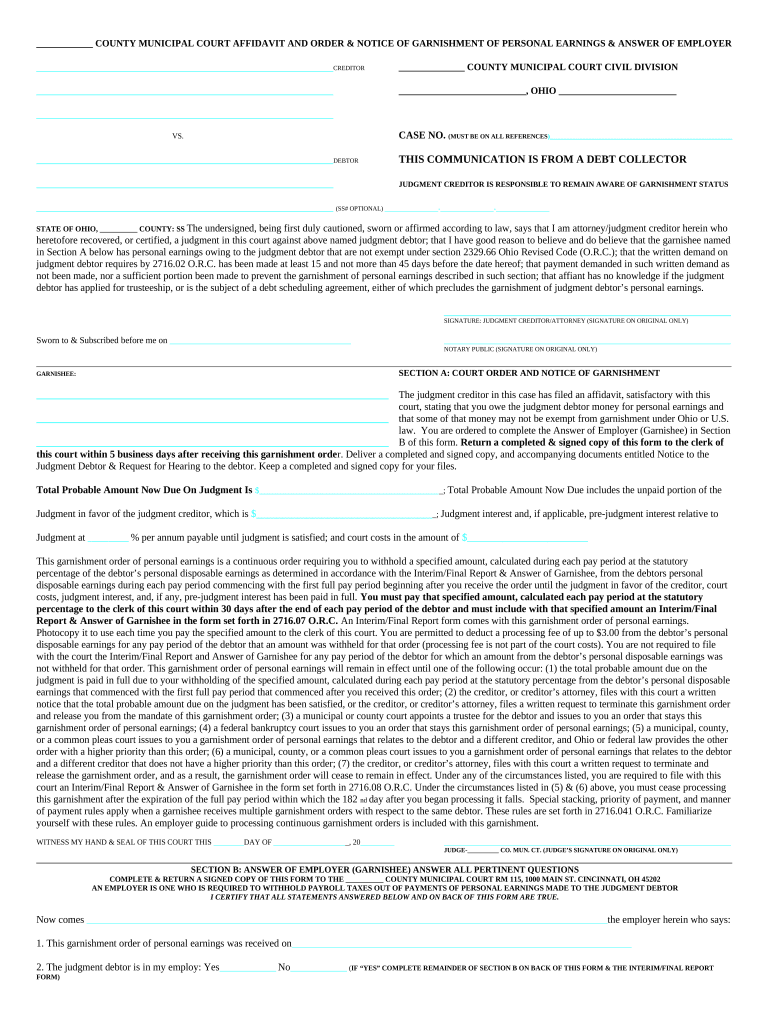
____________ COUNTY MUNICIPAL COURT AFFIDAVIT AND ORDER & NOTICE OF GARNISHMENT OF PERSONAL EARNINGS & ANSWER OF EMPLOYER ___________________________________________________________ CREDITOR ______________ COUNTY MUNICIPAL COURT CIVIL DIVISION ___________________________________________________________ ___________________________, OHIO _________________________ ___________________________________________________________ VS. CASE NO. (MUST BE ON ALL REFERENCES )__________________________________________________________ ___________________________________________________________ DEBTOR THIS COMMUNICATION IS FROM A DEBT COLLECTOR ___________________________________________________________ JUDGMENT CREDITOR IS RESPONSIBLE TO REMAIN AWARE OF GARNISHMENT STATUS ___________________________________________________________ (SS# OPTIONAL) _________________-_________________-_________________ STATE OF OHIO, __________ COUNTY: SS The undersigned, being first duly cautioned, sworn or affirmed according to law, says that I am attorney/judgment creditor herein who heretofore recovered, or certified, a judgment in this court against above named judgment debtor; that I have good reason to believe and do believe that the garnishee named in Section A below has personal earnings owing to the judgment debtor that are not exempt under section 2329.66 Ohio Revised Code (O.R.C.); that the written demand on judgment debtor requires by 2716.02 O.R.C. has been made at least 15 and not more than 45 days before the date hereof; that payment demanded in such written demand as not been made, nor a sufficient portion been made to prevent the garnishment of personal earnings described in such section; that affiant has no knowledge if the judgment debtor has applied for trusteeship, or is the subject of a debt scheduling agreement, either of which precludes the garnishment of judgment debtor’s personal earnings. _________________________________________________________ SIGNATURE: JUDGMENT CREDITOR/ATTORNEY (SIGNATURE ON ORIGINAL ONLY) Sworn to & Subscribed before me on ________________________________________________ ____________________________________________________________________________ NOTARY PUBLIC (SIGNATURE ON ORIGINAL ONLY) _____________________________________________________________________________________________________________________________________________________________________________________________________________________________ GARNISHEE: SECTION A: COURT ORDER AND NOTICE OF GARNISHMENT ________________________________________________________________________________ The judgment creditor in this case has filed an affidavit, satisfactory with this court, stating that you owe the judgment debtor money for personal earnings and ________________________________________________________________________________ that some of that money may not be exempt from garnishment under Ohio or U.S. law. You are ordered to complete the Answer of Employer (Garnishee) in Section ________________________________________________________________________________ B of this form. Return a completed & signed copy of this form to the clerk of this court within 5 business days after receiving this garnishment orde r. Deliver a completed and signed copy, and accompanying documents entitled Notice to the Judgment Debtor & Request for Hearing to the debtor. Keep a completed and signed copy for your files. Total Probable Amount Now Due On Judgment Is $____________________________________________ _; Total Probable Amount Now Due includes the unpaid portion of the Judgment in favor of the judgment creditor, which is $___________________________________ _; Judgment interest and, if applicable, pre-judgment interest relative to Judgment at __________ % per annum payable until judgment is satisfied; and court costs in the amount of $________________________ This garnishment order of personal earnings is a continuous order requiring you to withhold a specified amount, calculated during each pay period at the statutory percentage of the debtor’s personal disposable earnings as determined in accordance with the Interim/Final Report & Answer of Garnishee, from the debtors personal disposable earnings during each pay period commencing with the first full pay period beginning after you receive the order until the judgment in favor of the creditor, court costs, judgment interest, and, if any, pre-judgment interest has been paid in full. You must pay that specified amount, calculated each pay period at the statutory percentage to the clerk of this court within 30 days after the end of each pay period of the debtor and must include with that specified amount an Interim/Final Report & Answer of Garnishee in the form set forth in 2716.07 O.R.C. An Interim/Final Report form comes with this garnishment order of personal earnings. Photocopy it to use each time you pay the specified amount to the clerk of this court. You are permitted to deduct a processing fee of up to $3.00 from the debtor’s personal disposable earnings for any pay period of the debtor that an amount was withheld for that order (processing fee is not part of the court costs). You are not required to file with the court the Interim/Final Report and Answer of Garnishee for any pay period of the debtor for which an amount from the debtor’s personal disposable earnings was not withheld for that order. This garnishment order of personal earnings will remain in effect until one of the following occur: (1) the total probable amount due on the judgment is paid in full due to your withholding of the specified amount, calculated during each pay period at the statutory percentage from the debtor’s personal disposable earnings that commenced with the first full pay period that commenced after you received this order; (2) the creditor, or creditor’s attorney, files with this court a written notice that the total probable amount due on the judgment has been satisfied, or the creditor, or creditor’s attorney, files a written request to terminate this garnishment order and release you from the mandate of this garnishment order; (3) a municipal or county court appoints a trustee for the debtor and issues to you an order that stays this garnishment order of personal earnings; (4) a federal bankruptcy court issues to you an order that stays this garnishment order of personal earnings; (5) a municipal, county, or a common pleas court issues to you a garnishment order of personal earnings that relates to the debtor and a different creditor, and Ohio or federal law provides the other order with a higher priority than this order; (6) a municipal, county, or a common pleas court issues to you a garnishment order of personal earnings that relates to the debtor and a different creditor that does not have a higher priority than this order; (7) the creditor, or creditor’s attorney, files with this court a written request to terminate and release the garnishment order, and as a result, the garnishment order will cease to remain in effect. Under any of the circumstances listed, you are required to file with this court an Interim/Final Report & Answer of Garnishee in the form set forth in 2716.08 O.R.C. Under the circumstances listed in (5) & (6) above, you must cease processing this garnishment after the expiration of the full pay period within which the 182 nd day after you began processing it falls. Special stacking, priority of payment, and manner of payment rules apply when a garnishee receives multiple garnishment orders with respect to the same debtor. These rules are set forth in 2716.041 O.R.C. Familiarize yourself with these rules. An employer guide to processing continuous garnishment orders is included with this garnishment. WITNESS MY HAND & SEAL OF THIS COURT THIS ________ DAY OF ___________________ _, 20 _________ ____________________________________________________________________________ JUDGE-__________ CO. MUN. CT. (JUDGE’S SIGNATURE ON ORIGINAL ONLY) ______________________________________________________________________________________________________________________________________________________________ SECTION B: ANSWER OF EMPLOYER (GARNISHEE) ANSWER ALL PERTINENT QUESTIONS COMPLETE & RETURN A SIGNED COPY OF THIS FORM TO THE __________ COUNTY MUNICIPAL COURT RM 115, 1000 MAIN ST. CINCINNATI, OH 45202 AN EMPLOYER IS ONE WHO IS REQUIRED TO WITHHOLD PAYROLL TAXES OUT OF PAYMENTS OF PERSONAL EARNINGS MADE TO THE JUDGMENT DEBTOR I CERTIFY THAT ALL STATEMENTS ANSWERED BELOW AND ON BACK OF THIS FORM ARE TRUE. Now comes __________________________________________________________________________________________________________________________________________ the employer herein who says: 1. This garnishment order of personal earnings was received on __________________________________________________________________________________________ 2. The judgment debtor is in my employ: Yes _______________ No _______________ ( IF “YES” COMPLETE REMAINDER OF SECTION B ON BACK OF THIS FORM & THE INTERIM/FINAL REPORT FORM) If the answer is “no” give date of last employment _________________________________________________ ___________________________________________________________ __________________________ __ _____________________________________________________________ PRINT NAME AND TITLE OF PERSON WHO COMPLETED FORM DATE SIGNATURE OF PERSON COMPLETING FORM ________________________________________________________________________________________________________________________________________________________________________________________ HOLDING (CLERK USE ONLY) _________________________________________________________________________________________ CREDITOR/ATTORNEY $______________________ CASH CHECK ______ _____________________________________________________________ ADDRESS __________ _________________________________ PH# _____________________ FILE DAT E_______________________________________________________________ CITY, STATE, ZIP CODE judge _____________________ REVISED 09/00 SECTION B: ANSWER OF EMPLOYER (GARNISHEE), CONTINUED 3. (A) Is the debt to which this garnishment order of personal earnings pertains the subject of an existing agreement for debt scheduling between the judgment debtor and a budget and debt counseling service, and has the judgment debtor made every payment that was due under the agreement for debt scheduling no later than 45 days after the date on which the payment was due? YES _________ NO __________ If the answer to both parts of this question is “YES”, give all available details of the agreement, sign this form, and return it to the court. __________________________________________________________________________________________________________________________________________ __________________________________________________________________________________________________________________________________________ __________________________________________________________________________________________________________________________________________ __________________________________________________________________________________________________________________________________________ (B) Were you, on the date that you received this garnishment order of personal earnings, withholding moneys from the judgment debtor’s personal disposable earnings pursuant to another garnishment order of personal earnings that Ohio or federal law provides with a higher priority than this garnishment order of personal earnings (such as a support order, or internal revenue service levy)? YES _________ NO __________ If the answer to this question is “YES” give the name of the court that issued the higher priority order, the associated case number, the date upon which you received that order, and the balance due to the relevant judgment creditor under that order. __________________________________________________________________________________________________________________________________________ __________________________________________________________________________________________________________________________________________ (C) Did you receive prior to the date that you received this garnishment order of personal earnings one or more other garnishment orders of personal earnings that are not described in question 3(B), and are you currently processing one or more of those orders of the statutorily required time period, or holding one or more of those orders for processing for a statutorily required period in the sequence of their receipt by you? YES _________ NO __________ If the answer to this question is “YES” give the name of the court that issued each of those previously received orders, the associated case numbers, the date upon which you received each of those orders, and the balance due to the relevant judgment creditor under each of those orders. List first the previously received order(s) that you are currently processing, and list each of the other previously received orders in the sequence that you are required to process them. __________________________________________________________________________________________________________________________________________ __________________________________________________________________________________________________________________________________________ __________________________________________________________________________________________________________________________________________ I CERTIFY THAT THE STATEMENTS ABOVE ARE TRUE, AND THAT A COMPLETED AND SIGNED COPY OF THIS FORM, ALONG WITH TWO COPIES OF THE NOTICE TO THE JUDGMENT DEBTOR FORM, AND A REQUEST FOR HEARING FORM, HAVE BEEN DELIVERED TO THE JUDGMENT DEBTOR. EACH DEDUCTION FROM THE EMPLOYEE’S PAY WILL BE THE RESULT OF A CONTINUOUS GARNISHMENT.

Helpful suggestions for finishing your ‘Notice Garnishment’ online

Are you fed up with the inconvenience of handling paperwork? Look no further than airSlate SignNow, the premier electronic signature platform for individuals and organizations. Bid farewell to the lengthy process of printing and scanning files. With airSlate SignNow, you can effortlessly complete and sign documents online. Take advantage of the comprehensive tools integrated into this user-friendly and cost-effective platform to transform your document management strategy. Whether you need to approve forms or gather signatures, airSlate SignNow manages it all effortlessly, with just a few clicks.

Adhere to this step-by-step guide:

  1. Sign in to your account or register for a complimentary trial with our service.
  2. Click +Create to upload a document from your device, cloud storage, or our template collection.
  3. Open your ‘Notice Garnishment’ in the editor.
  4. Click Me (Fill Out Now) to complete the form on your end.
  5. Add and assign fillable fields for others (if necessary).
  6. Proceed with the Send Invite settings to request eSignatures from additional parties.
  7. Download, print your copy, or convert it into a reusable template.

Don’t fret if you need to collaborate with your colleagues on your Notice Garnishment or send it for notarization—our solution provides you with everything required to accomplish these tasks. Create an account with airSlate SignNow today and elevate your document management to a new level!

Here is a list of the most common customer questions. If you can’t find an answer to your question, please don’t hesitate to reach out to us.

Need help? Contact Support

The best way to complete and sign your notice garnishment form

Save time on document management with airSlate SignNow and get your notice garnishment form eSigned quickly from anywhere with our fully compliant eSignature tool.

How to Sign a PDF Online How to Sign a PDF Online

How to complete and sign documents online

In the past, dealing with paperwork took lots of time and effort. But with airSlate SignNow, document management is quick and easy. Our powerful and easy-to-use eSignature solution enables you to easily complete and electronically sign your notice garnishment form online from any internet-connected device.

Follow the step-by-step guide to eSign your notice garnishment form template online:

  • 1.Register for a free trial with airSlate SignNow or log in to your account with password credentials or SSO authorization option.
  • 2.Click Upload or Create and add a form for eSigning from your device, the cloud, or our form collection.
  • 3.Click on the document name to open it in the editor and utilize the left-side toolbar to fill out all the empty fields accordingly.
  • 4.Drop the My Signature field where you need to eSign your sample. Provide your name, draw, or upload an image of your regular signature.
  • 5.Click Save and Close to finish editing your completed document.

After your notice garnishment form template is ready, download it to your device, save it to the cloud, or invite other people to eSign it. With airSlate SignNow, the eSigning process only takes several clicks. Use our robust eSignature solution wherever you are to manage your paperwork successfully!

How to Sign a PDF Using Google Chrome How to Sign a PDF Using Google Chrome

How to complete and sign documents in Google Chrome

Completing and signing paperwork is simple with the airSlate SignNow extension for Google Chrome. Installing it to your browser is a fast and productive way to manage your paperwork online. Sign your notice garnishment form sample with a legally-binding eSignature in just a couple of clicks without switching between programs and tabs.

Follow the step-by-step guide to eSign your notice garnishment form in Google Chrome:

  • 1.Navigate to the Chrome Web Store, find the airSlate SignNow extension for Chrome, and add it to your browser.
  • 2.Right-click on the link to a document you need to sign and select Open in airSlate SignNow.
  • 3.Log in to your account with your password or Google/Facebook sign-in buttons. If you don’t have one, you can start a free trial.
  • 4.Use the Edit & Sign toolbar on the left to complete your template, then drag and drop the My Signature field.
  • 5.Add a picture of your handwritten signature, draw it, or simply type in your full name to eSign.
  • 6.Verify all information is correct and click Save and Close to finish editing your form.

Now, you can save your notice garnishment form sample to your device or cloud storage, send the copy to other people, or invite them to eSign your document via an email request or a protected Signing Link. The airSlate SignNow extension for Google Chrome enhances your document workflows with minimum effort and time. Try airSlate SignNow today!

How to Sign a PDF in Gmail How to Sign a PDF in Gmail How to Sign a PDF in Gmail

How to complete and sign paperwork in Gmail

Every time you receive an email containing the notice garnishment form for approval, there’s no need to print and scan a file or save and re-upload it to another tool. There’s a much better solution if you use Gmail. Try the airSlate SignNow add-on to rapidly eSign any documents right from your inbox.

Follow the step-by-step guidelines to eSign your notice garnishment form in Gmail:

  • 1.Go to the Google Workplace Marketplace and look for a airSlate SignNow add-on for Gmail.
  • 2.Install the tool with a corresponding button and grant the tool access to your Google account.
  • 3.Open an email containing an attached file that needs approval and utilize the S key on the right sidebar to launch the add-on.
  • 4.Log in to your airSlate SignNow account. Opt for Send to Sign to forward the document to other parties for approval or click Upload to open it in the editor.
  • 5.Place the My Signature option where you need to eSign: type, draw, or import your signature.

This eSigning process saves time and only requires a couple of clicks. Use the airSlate SignNow add-on for Gmail to adjust your notice garnishment form with fillable fields, sign paperwork legally, and invite other parties to eSign them al without leaving your mailbox. Enhance your signature workflows now!

How to Sign a PDF on a Mobile Device How to Sign a PDF on a Mobile Device How to Sign a PDF on a Mobile Device

How to complete and sign forms in a mobile browser

Need to rapidly complete and sign your notice garnishment form on a mobile phone while working on the go? airSlate SignNow can help without the need to install additional software programs. Open our airSlate SignNow tool from any browser on your mobile device and add legally-binding electronic signatures on the go, 24/7.

Follow the step-by-step guidelines to eSign your notice garnishment form in a browser:

  • 1.Open any browser on your device and go to the www.signnow.com
  • 2.Create an account with a free trial or log in with your password credentials or SSO authentication.
  • 3.Click Upload or Create and pick a file that needs to be completed from a cloud, your device, or our form library with ready-to go templates.
  • 4.Open the form and complete the blank fields with tools from Edit & Sign menu on the left.
  • 5.Put the My Signature area to the form, then type in your name, draw, or upload your signature.

In a few easy clicks, your notice garnishment form is completed from wherever you are. When you're finished editing, you can save the document on your device, create a reusable template for it, email it to other people, or invite them eSign it. Make your paperwork on the go quick and efficient with airSlate SignNow!


How to Sign a PDF on iPhone How to Sign a PDF on iPhone

How to complete and sign forms on iOS

In today’s business community, tasks must be completed rapidly even when you’re away from your computer. Using the airSlate SignNow application, you can organize your paperwork and approve your notice garnishment form with a legally-binding eSignature right on your iPhone or iPad. Set it up on your device to conclude agreements and manage documents from just about anywhere 24/7.

Follow the step-by-step guidelines to eSign your notice garnishment form on iOS devices:

  • 1.Open the App Store, search for the airSlate SignNow app by airSlate, and set it up on your device.
  • 2.Launch the application, tap Create to import a template, and select Myself.
  • 3.Select Signature at the bottom toolbar and simply draw your signature with a finger or stylus to eSign the sample.
  • 4.Tap Done -> Save after signing the sample.
  • 5.Tap Save or take advantage of the Make Template option to re-use this paperwork in the future.

This method is so simple your notice garnishment form is completed and signed in just a couple of taps. The airSlate SignNow application works in the cloud so all the forms on your mobile device remain in your account and are available any time you need them. Use airSlate SignNow for iOS to enhance your document management and eSignature workflows!


How to Sign a PDF on Android How to Sign a PDF on Android

How to complete and sign forms on Android

With airSlate SignNow, it’s easy to sign your notice garnishment form on the go. Set up its mobile application for Android OS on your device and start improving eSignature workflows right on your smartphone or tablet.

Follow the step-by-step guide to eSign your notice garnishment form on Android:

  • 1.Open Google Play, find the airSlate SignNow app from airSlate, and install it on your device.
  • 2.Log in to your account or create it with a free trial, then upload a file with a ➕ option on the bottom of you screen.
  • 3.Tap on the uploaded file and select Open in Editor from the dropdown menu.
  • 4.Tap on Tools tab -> Signature, then draw or type your name to eSign the template. Fill out empty fields with other tools on the bottom if necessary.
  • 5.Utilize the ✔ key, then tap on the Save option to end up with editing.

With an easy-to-use interface and full compliance with main eSignature standards, the airSlate SignNow application is the best tool for signing your notice garnishment form. It even works without internet and updates all record adjustments when your internet connection is restored and the tool is synced. Fill out and eSign documents, send them for eSigning, and make re-usable templates anytime and from anywhere with airSlate SignNow.

Sign up and try Notice garnishment form
  • Close deals faster
  • Improve productivity
  • Delight customers
  • Increase revenue
  • Save time & money
  • Reduce payment cycles







