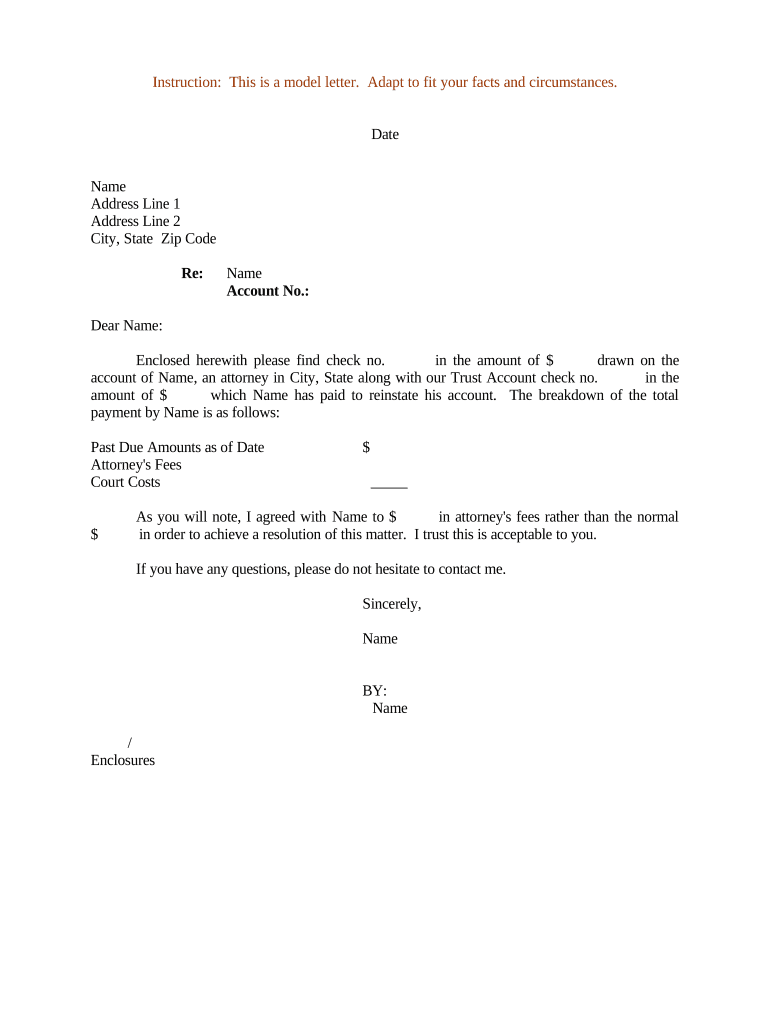
Letter Regarding Payment of Attorney's Fees
What a Letter Regarding Payment of Attorney's Fees Is
Why a Clear Fee Demand Letter Matters
A precise Letter Regarding Payment of Attorney's Fees establishes written proof of the charge, the legal basis, and payment terms. It clarifies expectations between parties and creates a record useful for collections, lien filings, or court enforcement.
Who Typically Prepares and Receives This Letter
Professionals and organizations that manage legal billing or collections commonly prepare this letter to document fees, demand payment, and trigger contractual remedies.
- Private practice attorneys seeking payment from clients after final invoice or settlement.
- In-house counsel documenting fee allocation under retainer or third-party billing arrangements.
- Collections teams or law firms preparing evidence for lien filing or small claims actions.
Step-by-Step: Preparing and Sending the Letter
-
01Gather Documents: Collect retainer, invoice, judgment, and payment records.
-
02Draft Letter: State parties, amount owed, legal basis, and deadline.
-
03Review and Sign: Attorney signs and dates; include firm contact information.
-
04Send and Track: Deliver by certified mail or e-sign and retain proof.
How the Fee Demand Workflow Typically Proceeds
-
Prepare: Assemble facts, invoices, and contractual citations.
-
Authorize: Attorney approves content and signs letter.
-
Deliver: Send via tracked mail, courier, or eSignature solution.
-
Follow-up: Record response, apply payments, or escalate to collections.
Recommended Digital Workflow Settings
| Field | Configuration |
|---|---|
| Signature Type | Image overlay with audit trail and timestamp |
| Authentication | Email link or SMS code; upgrade to KBA if required |
| Routing Order | Parallel for multiple payors or sequential for approvals |
| Retention Setting | Keep signed copy for minimum seven years; export PDF/A |
Platform Capabilities to Look For
Use an eSignature platform that supports authentication, audit trails, secure storage, and exportable evidence suitable for legal proceedings.
- File Formats: PDF and Word DOCX supported formats
- Integrations: Works with CRM and document management systems
- Authentication Options: Email, SMS code, or advanced KBA
Key Deadlines and Timing Considerations
Payment Deadline:
State a clear due date in MM/DD/YYYY format
Interest Start Date:
Specify when late interest accrues and the rate
Response Window:
Allow reasonable time for dispute or cure, typically 30 days
Tax Reporting:
Reportable if paid; verify 1099 or W-9 obligations
Escalation Deadline:
Set final date before collections or lien filing
Milestones from Demand to Enforcement
Issue Demand
Send letter stating fees, basis, and deadline
Acknowledge Receipt
Confirm delivery and obtain recipient acknowledgment
Negotiate or Cure
Allow short negotiation or payment plan if appropriate
Enforce Rights
File lien or commence collection after deadline passes
Common Preparation Mistakes to Avoid
- Failing to cite the retainer agreement, invoice details, or statutory basis leads to disputes over the legitimacy and amount of claimed fees.
- Not attaching an itemized invoice, timesheets, or retainer can make the claim difficult to verify and may be rejected by payors.
- Addressing the letter to the wrong party or omitting a corporate payor name delays payment and complicates enforcement.
- Sending only by email without proof of delivery can weaken collection efforts where certified mailing or e-sign audit trail is preferred.
Penalties and Risks from Incorrect or Incomplete Letters
Vendor Pricing and Feature Comparison for eSigning Fee Letters
| signNow | DocuSign | Adobe Sign | PandaDoc | HelloSign | |
|---|---|---|---|---|---|
| Starting Price | $8/user/mo | $15/user/mo | $14/user/mo | $19/user/mo | $15/user/mo |
| Bulk Send | Yes | Yes | Yes | Yes | No |
| Audit Trail | Yes | Yes | Yes | Yes | Yes |
| HIPAA Compliant | Yes | Yes | Yes | No | No |
| Envelope Cap | No cap | 100 envelopes/user/year | Varies by plan | Varies by plan | Varies by plan |
Practical Examples of Fee Letters in Use
Optica Ventures
Brian Fitzgibbons, COO at Optica Ventures, used structured fee letters to accelerate client payments and reduce follow-ups.
- Used eSign and itemized invoice.
- The documentary record allowed faster reconciliation, fewer disputes, and provided a clear trail for accounting and potential collection steps without repeated client calls.
Martin Properties
Tim Martin, Founder of Martin Properties, processes legal fee demands online for efficiency and compliance.
- Mobile signing on-site.
- Combining an itemized fee letter with a secure signed record reduced turnaround time, ensured auditability, and preserved evidence for any subsequent enforcement or escrow reconciliation needs.
Common Questions About Fee Demand Letters and Electronic Signing
-
Is an electronic letter enforceable?
Yes. Electronic signatures and records are generally legally equivalent to handwritten signatures under the ESIGN Act (15 U.S.C. §7001) and UETA where adopted. Document signer intent, consent, attribution, and reliable retention to support enforceability in court or arbitration.
-
When do I need a notary?
Most fee demand letters do not require notarization. Notarization is necessary only if a contract or state law requires it for enforcement, recording, or lien purposes. Confirm local requirements before notarizing.
-
What records should I keep?
Retain the signed letter, itemized invoice, retainer or judgment references, delivery receipts (certified mail or e-sign audit trail), and related correspondence for the applicable retention period to support audits and enforcement.
-
Can I use Remote Online Notarization?
Many states permit RON with identity proofing and audio-video recording. Verify whether your jurisdiction and the receiving party accept RON and meet retention requirements for notarization records.
-
How can I reduce disputes?
Attach an itemized invoice, cite the contractual or statutory basis for fees, set a clear deadline, and provide payment instructions. Offer a limited cure period and document any agreed changes in writing.
-
What if the recipient disputes the fees?
Respond promptly, produce supporting documents, and explore negotiation or mediation. Preserve all records and escalate to arbitration or court only after written refusal or missed payment deadlines.