Establishing secure connection…Loading editor…Preparing document…

Petition to Remove and Reinter Remains

This template is fully customizable. Edit the text, fill out the fields, and send it for signature. Give it a try!
Petition to Remove and Reinter Remains

What the Petition to Remove and Reinter Remains Is

The Petition to Remove and Reinter Remains is a court filing used to request legal authorization to disinter human remains from one burial site and reinter them at another. It documents the petitioner’s authority, identifies the decedent and both locations, explains the reasons for relocation, and asks the court or administrative agency for an order permitting transfer. Courts and local health departments typically require supporting documents such as burial permits, cemetery consent, death certificate, and evidence of next-of-kin authority before granting permission.

Why this Petition Matters

A properly completed petition secures lawful permission, protects responsible parties from civil or criminal liability for unauthorized disturbance, and creates an official record authorizing relocation. It clarifies chain of custody and coordinates required permits and cemetery consent to reduce delays and regulatory risk.

Why this Petition Matters

Who typically prepares and files this petition

Common filers include next of kin, estate representatives, funeral directors, and cemetery or municipal officials acting with legal authority.

  • Next of kin or personal representative who controls the decedent’s remains and has legal standing to request relocation.
  • Funeral directors or cemetery administrators who prepare documentation, obtain permits, and coordinate logistics for reinterment.
  • Attorneys representing estates or families where court approval or interpretation of authority is required.

In complex cases, such as disputed family authority or interstate relocations, attorneys or court-appointed guardians commonly handle the filing and hearing coordination.

Primary signers and filers

Next of Kin

A surviving spouse, adult child, or appointed personal representative who holds statutory authority to direct disposition. This person must supply proof of relationship, any probate appointment documents if applicable, and a signed statement of consent where required by state law.

Funeral Director

Licensed mortuary professional who prepares burial permit documentation, secures cemetery consent, and often files administrative permits or assists with court filings on behalf of the family to ensure compliance with public health and cemetery rules.

Key data and compliance elements to include

Decedent Name: Full legal name shown on death certificate
Death Certificate: State-issued certificate number and date
Current Burial Site: Cemetery name and plot identifier
Destination Site: New cemetery name and plot identifier
Authority Statement: Relationship or court appointment details
Permits Attached: Burial permit and cemetery consent included

Penalties and legal risks for improper filings

Criminal Liability: Unauthorized disinterment may lead to misdemeanor or felony charges
Civil Claims: Family members may sue for emotional harm or trespass
Administrative Fines: Health or cemetery code fines may apply
Invalid Reinterment: Improper process can invalidate burial authority
Probate Delays: Estate administration may be delayed by disputes
Permit Rejection: Missing documents can cause permit denial

Common preparation pitfalls to avoid

  • Filing with an incorrect petitioner listed or lacking proof of legal authority, which often triggers hearings or dismissal and delays the process by weeks.
  • Failing to attach a certified death certificate, burial permit, or cemetery consent, leading agencies to return the petition or require post-filing supplementation.
  • Neglecting to confirm public health or environmental restrictions for disinterment at either site, creating compliance gaps and potential fines.
  • Assuming electronic signatures are acceptable without verifying state exceptions or required notarization, resulting in rejected filings or the need for re-execution.

Step-by-step: completing the petition

Follow these steps so the petition is complete, authorized, and ready for court or agency review.

  • 01
    Confirm Authority: Verify petitioner’s legal standing and gather proof
  • 02
    Gather Documents: Attach death certificate, burial permit, cemetery consent
  • 03
    File Petition: Submit to appropriate court or county office with filing fee
  • 04
    Obtain Order: Attend hearing if required and secure written court order

How the filing and approval process typically flows

The process requires coordination between petitioner, cemetery, local health department, and the court; actions below summarize the usual flow.

  • Prepare Petition: Complete form, attach permits, and verify signatures
  • Administrative Review: Clerk or health official confirms documents and fees
  • Court Hearing: Judge issues order if statutory conditions are met
  • Coordinate Transfer: Cemetery and funeral director perform removal and reinterment

Essential components of a professional petition

A complete petition is structured to present authority, facts, consent, and a clear request for relief so agencies and judges can act without further clarification.

Caption

Court name, case number (if assigned), and petitioner identification to establish jurisdiction and case management
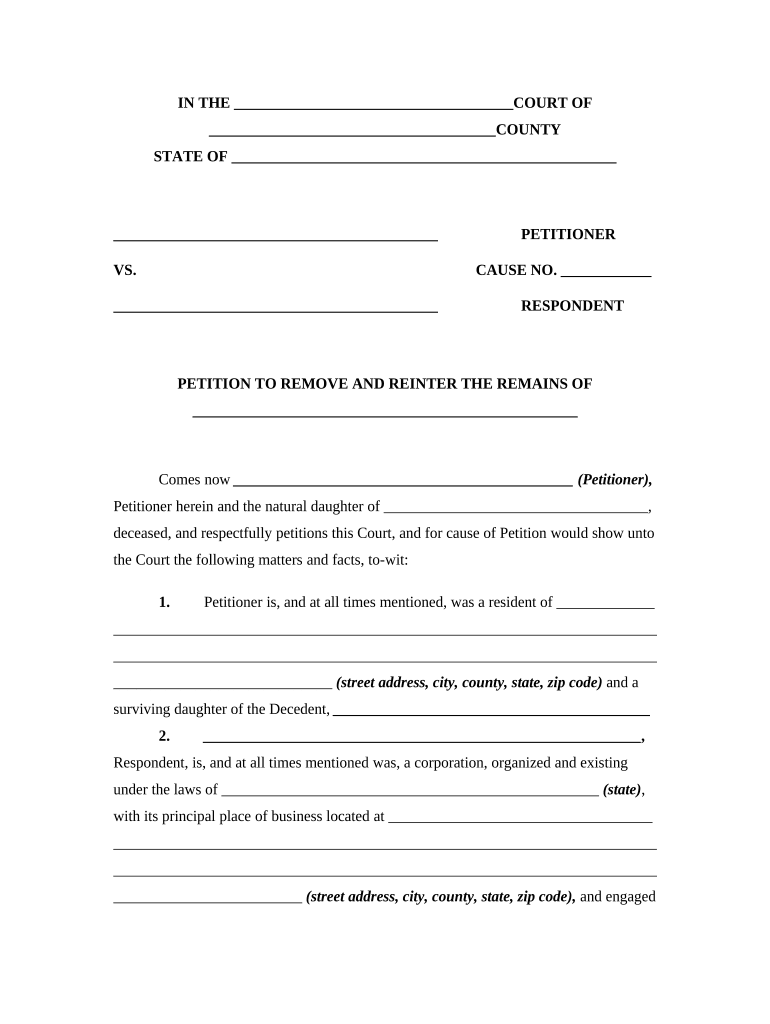
Decedent Details

Full legal name, date of death, last residence, and official death certificate citation to uniquely identify the remains

Current Burial Facts

Exact cemetery name, plot number, and any interment records or deed references for chain-of-custody clarity

Reason for Transfer

Concise explanation for relocation (family request, cemetery closure, religious reasons, repatriation) with supporting documentation

Consent and Authority

Signed consents from cemetery and next of kin or court appointment documentation demonstrating legal authority to move remains

Requested Relief

Clear prayer for an order authorizing disinterment, method of removal, transport conditions, and reinterment instructions

Digital signing and eSubmission requirements

Before using eSignature for petition components, confirm your jurisdiction accepts electronic signatures and whether notarization must be in-person or remote.

  • File Formats: PDF, DOCX supported
  • Authenticator Options: Email, SMS, KBA, or advanced methods
  • Integrations: CRM and cloud storage integrations available

Where electronic signatures are permitted, use platforms that support tamper-evident PDFs, audit trails, optional RON, and HIPAA BAAs for health-related documents to preserve legal validity and security.

Typical eSubmission workflow settings for the petition

Configure these workflow settings when preparing a petition for electronic signing and filing.

Field Configuration
Authentication Email link or SMS code; use KBA if required
Notary Option Select RON or in-person acknowledgement as required
Routing Order Petitioner → Cemetery → Notary → Court
Archive Copy Store signed PDF and audit trail in secure repository

eSignature provider comparison for petition workflows

Comparing providers can help select a platform that supports required formats, notarization workflows, and compliance features for petitions and supporting forms.

signNow DocuSign Adobe Sign PandaDoc HelloSign
Starting Price $8/user/mo $15/user/mo $14/user/mo $19/user/mo $15/user/mo
Free Trial 7-day free trial Trial available Trial available Trial available Trial available
Bulk Send Yes (Business Premium) Yes Yes Yes No
Audit Trail Yes Yes Yes Yes Yes
HIPAA Compliant Yes Yes Yes No No
Envelope Cap No envelope cap 100 envelopes/user/year Varies by plan Varies by plan Varies by plan

Frequently asked questions and answers

Answers address common issues: signer authority, required supports, electronic signature acceptability, notarization, and timing considerations.


Need help? Contact support

be ready to get more
Join over 28 million airSlate SignNow users