Establishing secure connection…Loading editor…Preparing document…

Qualified Personal Residence Trust Form

This template is fully customizable. Edit the text, fill out the fields, and send it for signature. Give it a try!
Qualified Personal Residence Trust Form

What the Qualified Personal Residence Trust Form Is

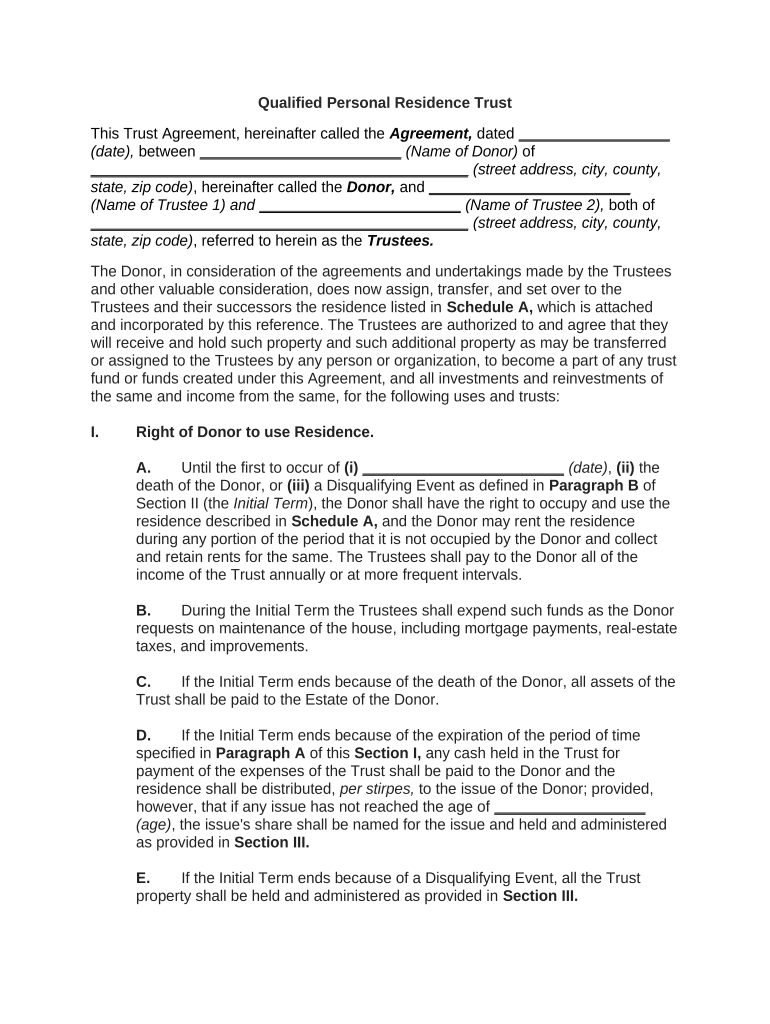
A Qualified Personal Residence Trust Form documents a transfer of a primary or secondary residence into a specialized irrevocable trust known as a Qualified Personal Residence Trust (QPRT). The form records the settlor's grant of the residence to the trust for a fixed term while retaining the right to occupy the property for that term. On expiration the property typically passes to named remainder beneficiaries, and the transfer may produce a valuated gift for federal gift-tax reporting. Proper execution ensures the transfer, occupancy rights, and trustee powers are clear for estate and tax purposes.

Why a Proper QPRT Form Matters

A correctly drafted and executed QPRT Form can reduce the settlor's taxable estate by transferring future appreciation out of the estate while allowing temporary residence use; accuracy affects gift-tax valuation and future title transfer.

Why a Proper QPRT Form Matters

Who Typically Prepares or Signs a QPRT Form

Estate planners, trust attorneys, settlors, and family beneficiaries commonly prepare or sign QPRT documentation when seeking estate-tax planning for residential property.

  • Estate attorneys and trust professionals who draft trust instruments and advise on tax consequences.
  • Settlor(s) — homeowners seeking to shift future appreciation out of their taxable estate while retaining occupancy rights for a term.
  • Trustees and successor trustees who accept fiduciary duties and may need to sign trustee certificates or ancillary documents.

Primary Signatories and Their Roles

Settlor / Grantor

The settlor is the homeowner who transfers title or a beneficial interest into the QPRT and retains a right to occupy for the trust term; their accurate identity and tax reporting (Form 709) are critical to avoid valuation disputes.

Trustee

The initial trustee receives legal title or control of the trust property and must perform fiduciary duties; trustee acceptance, signature, and possible successor-trustee provisions ensure smooth administration and later transfer to remainder beneficiaries.

Essential Parts of a Professional QPRT Form

A complete QPRT form combines trust terms, occupancy and rent provisions, transfer and deed instructions, remainder beneficiary designations, trustee powers, and tax-reporting directions.

Trust Term

Specifies the fixed duration (years) during which the settlor retains occupancy rights and establishes when the remainder interest vests to beneficiaries.
Occupancy Rights

Defines who may live in the property, whether rent is payable after the term, and conditions that can terminate settlor occupancy early.

Remainder Beneficiaries

Names the persons or entities who receive the residence after the term and addresses contingent beneficiaries and per stirpes distribution.

Trustee Powers

Outlines trustee authority over maintenance, insurance, repairs, lease authority, and the power to convey title when required.

Deed and Recording

Provides instructions for transferring title (warranty or quitclaim deed) and for recording at the county recorder or land records office.

Tax Reporting

Includes guidance on gift-tax valuation, the requirement to file Form 709 where applicable, and any allocation of tax liabilities.

Step-by-Step: Completing and Executing a QPRT Form

Follow these practical steps to prepare the QPRT Form, execute deeds correctly, and complete post-execution reporting.

  • 01
    Draft Trust: Prepare trust instrument matching form details.
  • 02
    Prepare Deed: Execute deed transferring residence to trustee.
  • 03
    Notarize and Witness: Complete notarization and witness steps as required.
  • 04
    File and Report: Record deed and file Form 709 if required.

Typical Workflow: From Draft to Recorded Transfer

A QPRT transfer moves through drafting, signing, notarization, recording and tax reporting stages; coordination ensures legal and tax outcomes align.

  • Drafting: Attorney prepares trust and deed documents.
  • Execution: Settlor and trustee sign before a notary.
  • Recording: County recorder accepts deed for record.
  • Tax Filing: Settlor files Form 709 if gift valuation applies.

Setting Up a Digital QPRT Workflow

Configure an online document workflow that matches the paper execution sequence: signer order, notarization, and county recording documents.

Field Configuration
Signer Order Settlor → Trustee → Notary
Authentication Email + SMS code for signer verification
Notary Handling Use RON or in-person notarization record
Export Format Generate signed PDF with audit trail

Digital Signing and eSubmission Requirements

Use integrations with cloud storage and case management systems and confirm the platform meets ESIGN/UETA and any industry-specific compliance such as HIPAA when applicable.

  • Audit Trail: Timestamped event log
  • Notary Support: Remote or in-person options
  • Document Formats: PDF/A and DOCX support

Security and Compliance Considerations for QPRT Documents

Encryption: AES-256 at rest; TLS 1.2/1.3
Audit Trails: Timestamped logs and signer data
Access Controls: Role-based permissions and SSO
Compliance: ESIGN, UETA, SOC 2 Type II
HIPAA Support: BAA available where required
Document Integrity: Tamper-evident signed PDFs

Common Penalties and Risks of Incorrect QPRT Forms

Gift-Tax Reporting: Failure to file Form 709
Title Defects: Improper deed description
Recording Rejection: Missing notarization or witness
Estate Inclusion: Incorrect term results in estate inclusion
Trust Ambiguities: Unclear trustee powers
Beneficiary Gaps: No contingent beneficiaries named

Practical Tips for Accurate QPRT Completion

Apply careful review, coordinate deed recording, and involve tax counsel to align estate planning and reporting obligations.

Confirm the legal property description
Copy the exact legal description from the current deed or county records to avoid recording rejection and to ensure the transferred property is identified unambiguously.
Coordinate deed execution and trust date
Ensure the deed conveying the residence to the trustee references the trust name and effective date that matches the trust instrument to avoid mismatches in title records.
Document occupancy and rent terms clearly
If the settlor will pay fair market rent after the trust term for continued occupancy, state the conditions and calculations to avoid post-term disputes or unintended tax consequences.
Engage tax counsel for gift reporting
Consult a tax advisor about the need to file Form 709, valuation discounts, and potential gift-tax liabilities to minimize surprises at audit or audit risk.

Notarization and Witness Steps for Execution and Recording

Complete execution steps in the correct order to ensure a recordable deed and enforceable trust transfer across jurisdictions.

01

Prepare Documents

Have trust and deed ready before signing.

02

Arrange Signers

Confirm settlor, trustee, and witness availability.

03

Notary Acknowledgement

Notary completes acknowledgment block per state rules.

04

Witness Attestation

Witnesses sign if the state requires them for deeds.

05

Affix Signatures

All parties sign and date in presence of notary/witnesses.

06

Prepare Recording Packets

Assemble deed, any transfer affidavits, and recording fees.

07

Record Deed

Submit to county recorder for indexing and recording.

08

Distribute Copies

Provide executed copies to trustee, settlor, and beneficiaries.

eSignature Platform Pricing and Feature Comparison

Compare common platform criteria relevant to QPRT execution workflows; signNow is listed first per platform comparison conventions.

signNow DocuSign Adobe Sign PandaDoc HelloSign
Starting Price $8/user/mo $15/user/mo $14/user/mo $19/user/mo $15/user/mo
Free Trial Yes, 7-day trial Varies by vendor Varies by vendor Varies by vendor Varies by vendor
Bulk Send Yes Yes Yes Yes No
Audit Trail Yes Yes Yes Yes Yes
HIPAA Compliant Yes Yes Yes No No

FAQs and Troubleshooting for QPRT Forms

Answers to common questions about execution, recording, tax reporting, and electronic signing for Qualified Personal Residence Trusts.


Need help? Contact support

be ready to get more
Join over 28 million airSlate SignNow users