Establishing secure connection… Loading editor… Preparing document…
Navigation

Fill and Sign the Restraining Orders Get Form

Fill and Sign the Restraining Orders Get Form

How it works

Open the document and fill out all its fields.
Apply your legally-binding eSignature.
Save and invite other recipients to sign it.

Rate template

4.7
47 votes
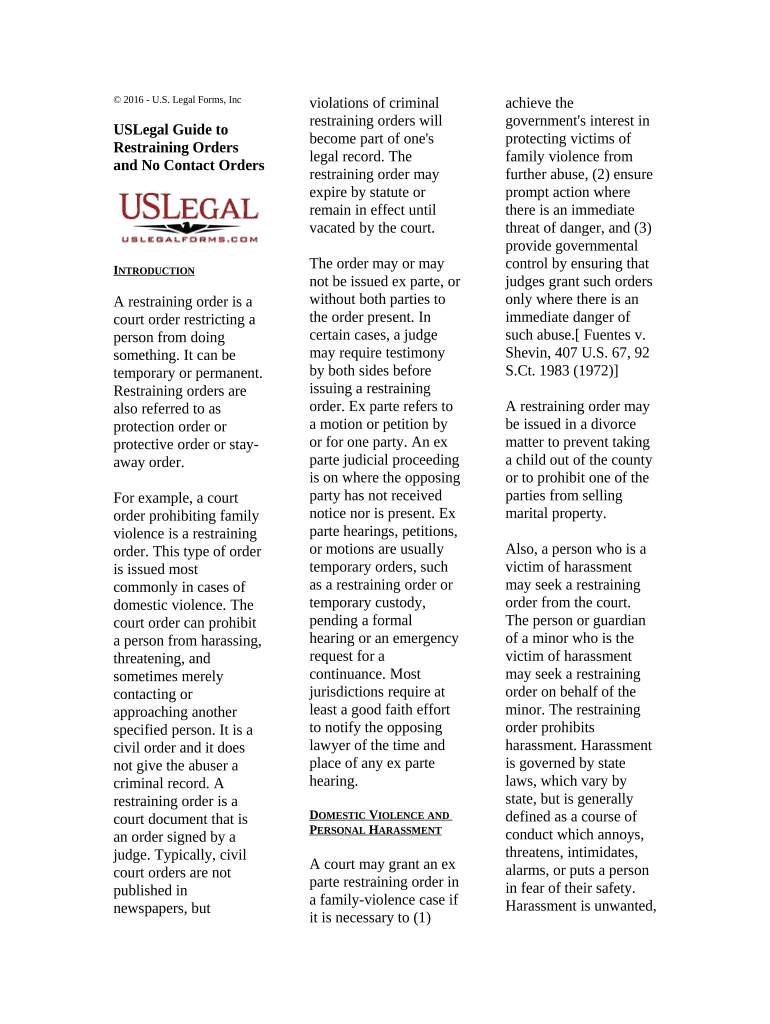
© 2016 - U.S. Legal Forms, Inc USLegal Guide to Restraining Orders and No Contact Orders I NTRODUCTION A restraining order is a court order restricting a person from doing something. It can be temporary or permanent. Restraining orders are also referred to as protection order or protective order or stay- away order. For example, a court order prohibiting family violence is a restraining order. This type of order is issued most commonly in cases of domestic violence. The court order can prohibit a person from harassing, threatening, and sometimes merely contacting or approaching another specified person. It is a civil order and it does not give the abuser a criminal record. A restraining order is a court document that is an order signed by a judge. Typically, civil court orders are not published in newspapers, but violations of criminal restraining orders will become part of one's legal record. The restraining order may expire by statute or remain in effect until vacated by the court. The order may or may not be issued ex parte, or without both parties to the order present. In certain cases, a judge may require testimony by both sides before issuing a restraining order. Ex parte refers to a motion or petition by or for one party. An ex parte judicial proceeding is on where the opposing party has not received notice nor is present. Ex parte hearings, petitions, or motions are usually temporary orders, such as a restraining order or temporary custody, pending a formal hearing or an emergency request for a continuance. Most jurisdictions require at least a good faith effort to notify the opposing lawyer of the time and place of any ex parte hearing. D OMESTIC V IOLENCE AND P ERSONAL H ARASSMENT A court may grant an ex parte restraining order in a family-violence case if it is necessary to (1) achieve the government's interest in protecting victims of family violence from further abuse, (2) ensure prompt action where there is an immediate threat of danger, and (3) provide governmental control by ensuring that judges grant such orders only where there is an immediate danger of such abuse.[ Fuentes v. Shevin, 407 U.S. 67, 92 S.Ct. 1983 (1972)] A restraining order may be issued in a divorce matter to prevent taking a child out of the county or to prohibit one of the parties from selling marital property. Also, a person who is a victim of harassment may seek a restraining order from the court. The person or guardian of a minor who is the victim of harassment may seek a restraining order on behalf of the minor. The restraining order prohibits harassment. Harassment is governed by state laws, which vary by state, but is generally defined as a course of conduct which annoys, threatens, intimidates, alarms, or puts a person in fear of their safety. Harassment is unwanted, unwelcome, and uninvited behavior that demeans, threatens or offends the victim and results in a hostile environment for the victim. Harassing behavior may include, but is not limited to, epithets, derogatory comments or slurs and lewd propositions, assault, impeding or blocking movement, offensive touching or any physical interference with normal work or movement, and visual insults, such as derogatory posters or cartoons. A restraining order may be issued against an individual who has engaged in harassment, or against organizations which have sponsored or promoted harassment. The person against whom a restraining order may be issued includes your current or former spouse, boyfriend, or girlfriend; a relative; the father of your child; the person with whom you now or used to live; or someone you have recently dated. The distance required to be maintained is governed by the language of each specific order, which may include places of work, school, etc. You can request that the defendant leave the home and stay away; you can request that the defendant refrain from abuse; you can request custody of your children, support for your children, that the defendant be prohibited from having any guns or weapons, from keeping or consuming alcohol; restitution for damages caused by the defendant, participation in counseling, and any other order the court deems appropriate. A restraining order can only deal with custody and parenting time issues temporarily. To get “permanent” custody and parenting time orders, you need to a file a family law case, such as a divorce or a custody case. The no contact portion of the order means the defendant cannot come near you, cannot call you, cannot write you letters or send you cards, cannot send you flowers or leave you notes, and cannot send someone else to talk to or call you on the defendant's behalf. It does not matter whether or not the contact involves any threat. The defendant simply cannot contact you. Often the restrained person will ask for a mutual stay-away order. If the other party never wants to see this person again, it may be irrelevant if they are restrained from visiting the restrained person's house. Therefore, by staying away from eachother, their needs may be met and court avoided by stipulating to a mutual order. A temporary restraining order is an order of a court to preserve current conditions as they are until a hearing is held at which both parties are present. Temporary restraining orders typically expire on the hearing date, but local law should be consulted for specific requirements. To renew the order, you must file the court paperwork before the order ends. S TEPS FOR O BTAINING A R ESTRAINING O RDER Step 1. Complete the proper forms. Step 2. Give the completed forms to the court clerk. Provide as much information as possible about the qualifying incidents and how to locate the abuser. It is helpful to provide the court with the following information about the respondent: a photograph, social security number, addresses of residence and employment, phone numbers, description and plate number of the abuser's car, and any history of drugs, violence or gun ownership. Generally, you must pay a fee to file the request. If the harassment has included violence or threats of violence, however, there may be no filing fee pursuant to state laws, which vary by state. Also, if you cannot afford to pay the filing fee, you may request that this filing fee be waived. You will need to obtain an Application for Waiver of Court Fees and Costs or similar form. Step 3. Make note of the hearing date, get copies of the order and keep a copy with you at all times. Step 4. Have the papers served on the person sought to be restrained. Someone who is over 18 and not protected by the restraining order must personally serve (give) a copy of the restraining order forms to the other party a certain number of days before the Court hearing. The forms can be served by someone you know, a process server, or the sheriff. If the respondent is a juvenile and the parent or legal guardian is not the petitioner, the court will mail a copy of the order to the respondent’s parent or legal guardian at their last known address. If personal service cannot be completed because the respondent is avoiding service or you do not know the respondent’s address, you may ask the court administrator’s office to complete service by published notice. Step 5. Make a copy of the marshal's return of service. If you had a friend serve the papers, Your friend will have to fill out an "Affidavit of Proof of Service" or similarly named form and sign it in front of a notary. Make two copies of this and take the original to the clerk to be filed. One copy is for your file. The clerk will "certify" the other copy. The Proof of Service shows the judge and police that the restrained person got a copy of the order. Make copies of the completed Proof of Service and bring a copy to your hearing. Step 6. Attend the hearing. Bring all other papers that you have not already filed that support your case. Bring at least 3 copies: one for yourself, one for the judge, and one for the person you want to have restrained. You can bring a friend or relative for support, but that person must not talk for you in court. If you are representing yourself your support person may sit with you, even during a hearing. Step 7. Present your case. Tell the truth. Speak slowly and calmly. Do not interrupt the judge or the restrained person. Give complete answers. If you don't understand, say "I don't understand." If you do not agree with what the restrained person says in court, wait until he or she finishes talking. Then tell the judge. Speak only to the judge unless it is your turn to ask questions.

Valuable advice on finishing your ‘Restraining Orders Get’ online

Are you fed up with the complexities of handling paperwork? Look no further than airSlate SignNow, the ultimate electronic signature service for individuals and businesses. Say farewell to the monotonous routine of printing and scanning documents. With airSlate SignNow, you can effortlessly complete and sign forms online. Utilize the extensive capabilities packed into this intuitive and cost-effective platform and transform your method of document management. Whether you need to authorize forms or collect electronic signatures, airSlate SignNow manages it all effortlessly, with just a few clicks.

Follow this comprehensive guide:

  1. Sign in to your account or initiate a complimentary trial with our service.
  2. Click +Create to upload a document from your device, cloud, or our template collection.
  3. Open your ‘Restraining Orders Get’ in the editor.
  4. Click Me (Fill Out Now) to set up the form on your end.
  5. Add and designate fillable fields for others (if needed).
  6. Proceed with the Send Invite options to request eSignatures from others.
  7. Save, print your version, or transform it into a reusable template.

No need to worry if you have to collaborate with others on your Restraining Orders Get or submit it for notarization—our service provides everything necessary to accomplish such tasks. Sign up with airSlate SignNow today and enhance your document management to a new standard!

Here is a list of the most common customer questions. If you can’t find an answer to your question, please don’t hesitate to reach out to us.

Need help? Contact Support

The best way to complete and sign your restraining orders get form

Save time on document management with airSlate SignNow and get your restraining orders get form eSigned quickly from anywhere with our fully compliant eSignature tool.

How to Sign a PDF Online How to Sign a PDF Online

How to fill out and sign forms online

Previously, working with paperwork required pretty much time and effort. But with airSlate SignNow, document management is fast and easy. Our robust and user-friendly eSignature solution allows you to effortlessly fill out and electronically sign your restraining orders get form online from any internet-connected device.

Follow the step-by-step guide to eSign your restraining orders get form template online:

  • 1.Sign up for a free trial with airSlate SignNow or log in to your account with password credentials or SSO authorization option.
  • 2.Click Upload or Create and import a form for eSigning from your device, the cloud, or our form collection.
  • 3.Click on the file name to open it in the editor and use the left-side toolbar to fill out all the empty areas properly.
  • 4.Place the My Signature field where you need to approve your sample. Provide your name, draw, or import an image of your handwritten signature.
  • 5.Click Save and Close to accomplish editing your completed document.

After your restraining orders get form template is ready, download it to your device, save it to the cloud, or invite other people to electronically sign it. With airSlate SignNow, the eSigning process only requires a couple of clicks. Use our powerful eSignature solution wherever you are to deal with your paperwork successfully!

How to Sign a PDF Using Google Chrome How to Sign a PDF Using Google Chrome

How to fill out and sign paperwork in Google Chrome

Completing and signing paperwork is easy with the airSlate SignNow extension for Google Chrome. Installing it to your browser is a fast and effective way to manage your paperwork online. Sign your restraining orders get form sample with a legally-binding eSignature in a few clicks without switching between applications and tabs.

Follow the step-by-step guidelines to eSign your restraining orders get form template in Google Chrome:

  • 1.Navigate to the Chrome Web Store, find the airSlate SignNow extension for Chrome, and install it to your browser.
  • 2.Right-click on the link to a document you need to eSign and select Open in airSlate SignNow.
  • 3.Log in to your account using your credentials or Google/Facebook sign-in option. If you don’t have one, sign up for a free trial.
  • 4.Utilize the Edit & Sign menu on the left to fill out your sample, then drag and drop the My Signature option.
  • 5.Add a picture of your handwritten signature, draw it, or simply type in your full name to eSign.
  • 6.Make sure all the details are correct and click Save and Close to finish editing your paperwork.

Now, you can save your restraining orders get form sample to your device or cloud storage, send the copy to other individuals, or invite them to electronically sign your document via an email request or a protected Signing Link. The airSlate SignNow extension for Google Chrome improves your document processes with minimum effort and time. Try airSlate SignNow today!

How to Sign a PDF in Gmail How to Sign a PDF in Gmail How to Sign a PDF in Gmail

How to complete and sign forms in Gmail

When you receive an email with the restraining orders get form for approval, there’s no need to print and scan a file or download and re-upload it to a different program. There’s a much better solution if you use Gmail. Try the airSlate SignNow add-on to rapidly eSign any documents right from your inbox.

Follow the step-by-step guidelines to eSign your restraining orders get form in Gmail:

  • 1.Navigate to the Google Workplace Marketplace and look for a airSlate SignNow add-on for Gmail.
  • 2.Install the tool with a corresponding button and grant the tool access to your Google account.
  • 3.Open an email with an attached file that needs signing and use the S symbol on the right sidebar to launch the add-on.
  • 4.Log in to your airSlate SignNow account. Opt for Send to Sign to forward the file to other people for approval or click Upload to open it in the editor.
  • 5.Place the My Signature option where you need to eSign: type, draw, or upload your signature.

This eSigning process saves efforts and only requires a couple of clicks. Take advantage of the airSlate SignNow add-on for Gmail to adjust your restraining orders get form with fillable fields, sign documents legally, and invite other individuals to eSign them al without leaving your inbox. Improve your signature workflows now!

How to Sign a PDF on a Mobile Device How to Sign a PDF on a Mobile Device How to Sign a PDF on a Mobile Device

How to complete and sign documents in a mobile browser

Need to quickly fill out and sign your restraining orders get form on a smartphone while working on the go? airSlate SignNow can help without needing to install extra software apps. Open our airSlate SignNow tool from any browser on your mobile device and add legally-binding electronic signatures on the go, 24/7.

Follow the step-by-step guide to eSign your restraining orders get form in a browser:

  • 1.Open any browser on your device and follow the link www.signnow.com
  • 2.Sign up for an account with a free trial or log in with your password credentials or SSO authentication.
  • 3.Click Upload or Create and pick a file that needs to be completed from a cloud, your device, or our form catalogue with ready-made templates.
  • 4.Open the form and complete the blank fields with tools from Edit & Sign menu on the left.
  • 5.Put the My Signature area to the sample, then enter your name, draw, or add your signature.

In a few easy clicks, your restraining orders get form is completed from wherever you are. Once you're done with editing, you can save the file on your device, create a reusable template for it, email it to other people, or invite them eSign it. Make your documents on the go prompt and productive with airSlate SignNow!

How to Sign a PDF on iPhone How to Sign a PDF on iPhone

How to fill out and sign documents on iOS

In today’s business world, tasks must be completed rapidly even when you’re away from your computer. Using the airSlate SignNow app, you can organize your paperwork and sign your restraining orders get form with a legally-binding eSignature right on your iPhone or iPad. Set it up on your device to close deals and manage forms from anyplace 24/7.

Follow the step-by-step guide to eSign your restraining orders get form on iOS devices:

  • 1.Go to the App Store, search for the airSlate SignNow app by airSlate, and set it up on your device.
  • 2.Open the application, tap Create to upload a form, and choose Myself.
  • 3.Opt for Signature at the bottom toolbar and simply draw your signature with a finger or stylus to eSign the form.
  • 4.Tap Done -> Save after signing the sample.
  • 5.Tap Save or use the Make Template option to re-use this paperwork in the future.

This process is so straightforward your restraining orders get form is completed and signed in just a few taps. The airSlate SignNow app works in the cloud so all the forms on your mobile device are kept in your account and are available whenever you need them. Use airSlate SignNow for iOS to enhance your document management and eSignature workflows!

How to Sign a PDF on Android How to Sign a PDF on Android

How to complete and sign documents on Android

With airSlate SignNow, it’s simple to sign your restraining orders get form on the go. Install its mobile app for Android OS on your device and start boosting eSignature workflows right on your smartphone or tablet.

Follow the step-by-step guide to eSign your restraining orders get form on Android:

  • 1.Open Google Play, find the airSlate SignNow application from airSlate, and install it on your device.
  • 2.Sign in to your account or register it with a free trial, then upload a file with a ➕ button on the bottom of you screen.
  • 3.Tap on the imported file and select Open in Editor from the dropdown menu.
  • 4.Tap on Tools tab -> Signature, then draw or type your name to eSign the sample. Complete empty fields with other tools on the bottom if necessary.
  • 5.Use the ✔ key, then tap on the Save option to end up with editing.

With a user-friendly interface and full compliance with main eSignature standards, the airSlate SignNow app is the best tool for signing your restraining orders get form. It even works offline and updates all form modifications when your internet connection is restored and the tool is synced. Complete and eSign forms, send them for approval, and generate re-usable templates anytime and from anyplace with airSlate SignNow.

Sign up and try Restraining orders get form
  • Close deals faster
  • Improve productivity
  • Delight customers
  • Increase revenue
  • Save time & money
  • Reduce payment cycles