Establishing secure connection…Loading editor…Preparing document…

Acknowledgment of Application Letter

This template is fully customizable. Edit the text, fill out the fields, and send it for signature. Give it a try!
Acknowledgment of Application Letter

What an Acknowledgment of Application Letter Is and When It’s Used

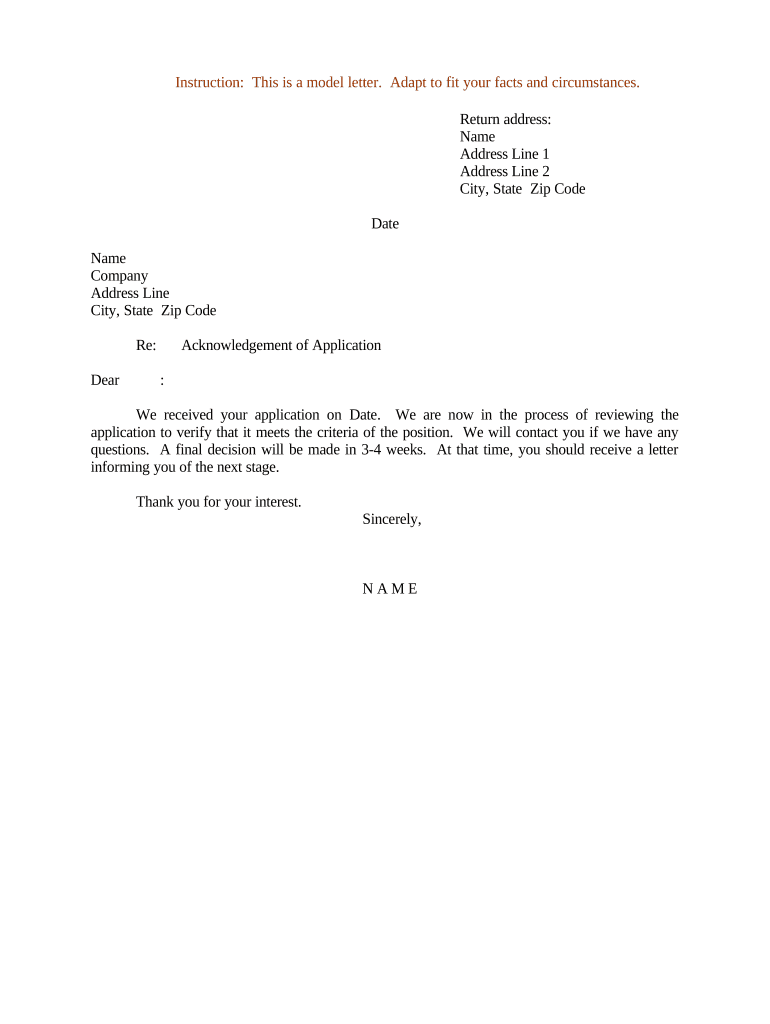
An Acknowledgment of Application Letter is a formal notice sent by an organization to confirm receipt of an application, submission, or request. It documents the date and method of receipt, identifies the applicant and the application type, and may outline next steps, expected timelines, or additional documentation required. This letter creates a clear administrative record that helps both sender and recipient track progress, guard against disputes about timing, and meet internal or regulatory filing requirements for many transactional and programmatic processes.

Why a Clear Acknowledgment Letter Matters for Process and Compliance

A concise acknowledgment reduces confusion, establishes the official receipt date, and supports audit trails required by internal policy or external regulators.

Why a Clear Acknowledgment Letter Matters for Process and Compliance

Who Typically Issues and Receives These Letters

Organizations that accept formal applications use acknowledgment letters to confirm receipt and begin processing.

Recipients rely on the letter as proof of submission and as a reference point for deadlines and appeals.

Who Signs or Approves the Acknowledgment of Application Letter

Program Administrator

A program administrator or intake coordinator typically issues the acknowledgment. They are responsible for accurate receipt details and routing the file to the next reviewer, and their title and contact information should appear in the letter for follow-up.

Authorized Officer

In regulated contexts, an authorized officer (e.g., licensing manager, HR director) may sign to attest to official receipt and to commit the organization to the stated timeline or next steps.

Core Elements to Include in a Professional Acknowledgment

A complete acknowledgment letter balances clarity and brevity: identify the submission, confirm receipt, and provide actionable next steps and contact details.

Header

Organization name, address, date, and reference or tracking number to tie the letter to internal records and correspondence.
Applicant ID

Full applicant name and any assigned ID or application number exactly as provided on the submission to avoid mismatches during processing.

Receipt Statement

A clear sentence confirming receipt with the date and method (email, online portal, in-person) to establish the official filing date.

Next Steps

Concise explanation of the review process, expected timelines, required supporting documents, and any conditional approvals.

Contact

Name, title, phone, and email for inquiries plus business hours and any reference code for tracking.

Signature

Typed name and title of issuing official; include digital signature or initials if required for audit trail purposes.

Required Information to Capture in the Letter

Applicant Name: Full legal name
Application ID: Assigned reference number
Receipt Date: MM/DD/YYYY
Submission Method: Email, portal, in person
Next Steps: Review timeframe
Issuer Contact: Name and phone

Step-by-Step: Creating and Sending the Acknowledgment

Use a repeatable workflow to ensure every acknowledgment contains consistent, auditable information.

  • 01
    Verify Submission: Confirm application details and attachments.
  • 02
    Assign ID: Generate or confirm reference number.
  • 03
    Populate Letter: Complete fields with exact formats.
  • 04
    Send and Archive: Deliver acknowledgment and save to records.

Routing and Filing: Where the Letter Travels Next

Map the recipient, internal routing, and archival location to maintain a single authoritative record for the application.

  • Applicant Copy: Email or portal message sent to applicant.
  • Review Folder: Route to reviewer or committee queue.
  • Records Archive: Store signed copy in document management.
  • Audit Log: Capture timestamp, sender, recipient details.

Online Workflow Settings to Automate Acknowledgments

Configure the e-submission system to auto-generate acknowledgments and retain a searchable record for audits.

Field Configuration
Auto-Generate ID Enable sequential or UUID generation
Auto-Send Trigger Send on receipt confirmation
Audit Trail Capture Record IP, timestamp, actor
Archive Location Set folder and retention label

Technical and Platform Considerations for Digital Delivery

Ensure the platform supports secure e-delivery, archive, and searchable audit trails.

  • Document Formats: PDF, DOCX supported
  • Integrations: Salesforce, NetSuite, Google Workspace
  • Authentication: Email, SMS, or stronger

Validate that the chosen system preserves timestamps, audit data, and retention metadata for compliance.

Vendor Pricing and Capability Snapshot for eSignature (signNow listed first)

Comparison focuses on starting price and key capabilities relevant to acknowledgments and high-volume administrative workflows.

signNow DocuSign Adobe Sign PandaDoc HelloSign
Starting Price $8/user/mo $15/user/mo $14/user/mo $19/user/mo $15/user/mo
Free Trial 7-day trial Varies Varies Varies Varies
Bulk Send Yes Yes Yes Yes Varies
HIPAA Compliant Yes Yes Yes Varies Varies
Envelope Cap No cap 100 envelopes/user/yr Varies Varies Varies

Consequences of Inaccurate or Missing Acknowledgments

Missed Deadline: Can forfeit appeal rights
Regulatory Exposure: Potential fines or sanctions
Operational Delay: Processing backlog increases
Legal Dispute: Weaker proof of timely filing
Backup Withholding: Incorrect tax data triggers withholding
Reputational Harm: Applicant dissatisfaction rises

Common Mistakes to Avoid When Preparing an Acknowledgment

  • Failing to record the exact receipt date or method, which creates disputes about priority or timeliness during reviews.
  • Using inconsistent applicant identifiers across systems, which prevents reliable retrieval and slows adjudication.
  • Omitting contact details or next-step information, forcing applicants to submit follow-ups and increasing processing volume.
  • Relying on unprotected email without audit metadata, making it hard to prove authenticity in audits or disputes.

Practical Tips for Accurate, Efficient Acknowledgment Letters

Adopt clear templates, verification checks, and automated routing to reduce human error and create auditable records.

Use a Standard Template
Maintain a single standardized template with required fields to ensure consistency across offices. Update the template centrally when policies or required disclosures change to prevent divergent formats that impede record matching.
Automate ID Assignment
Generate and embed a unique application reference number automatically to enable efficient lookups and to uniquely link the acknowledgment to the submission in document management systems.
Capture Audit Metadata
Record sender, recipient, IP, and timestamps automatically. Preserve this metadata in the archive to satisfy audit and regulatory requests without manual reconstruction.
Validate Contact Info
Confirm applicant contact details at intake and include a clear contact point in the acknowledgment. This reduces follow-up and shortens the time to resolve missing attachments or questions.

Real-World Examples of Acknowledgment Letters in Use

Practical examples show how organizations phrase acknowledgement content and incorporate next-step information for applicants.

Optica Ventures LLC — Intake Confirmation

Optica issued an automated acknowledgment confirming receipt and ID assignment

  • They highlighted next steps and contact details
  • The result reduced applicant follow-ups and improved tracking, according to COO Brian Fitzgibbons, who noted the interface simplicity for both team and customers.

Martin Properties — Rental Applications

Martin Properties used acknowledgments to timestamp rental application submissions

  • The letter listed missing documents and timeline
  • Founder Tim Martin reported processing and executing documents online with compliance and improved efficiency for mobile workflows.

Frequently Asked Questions and Troubleshooting

Answers to common operational and legal questions about preparing, delivering, and retaining acknowledgment letters.


Need help? Contact support

be ready to get more
Join over 28 million airSlate SignNow users