Requestor ID
Provide the full legal name, contact information, and proof of authority to request deed delivery, such as purchase confirmation or power of attorney, to establish entitlement.
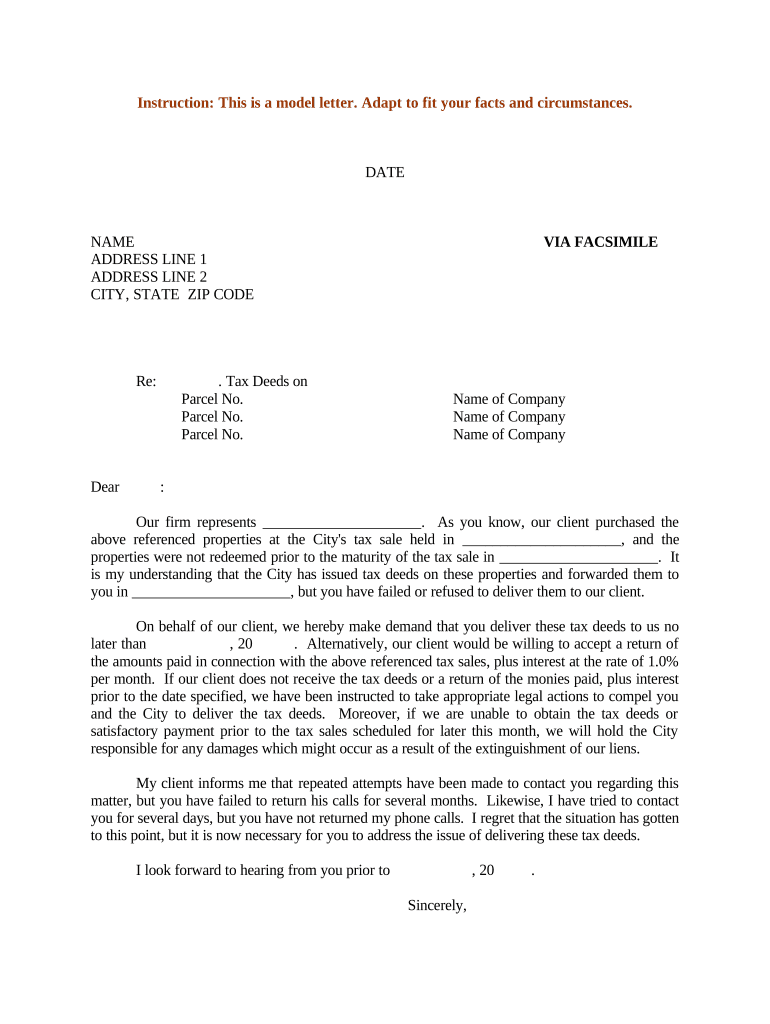
A clear demand letter documents the requester’s claim to the deed, creates an auditable record, and prompts administrative action from county or municipal offices.

Keep letters factual, reference recorded document numbers, and include contact details to streamline retrieval and reduce processing delays.
| Field | Configuration |
|---|---|
| Signer Authentication | Email link or SMS code for identity verification |
| Attachments | Attach PDFs of recorded instruments and proof of purchase |
| Delivery Method | Certified mail, registered mail, or secure eDelivery |
| Audit Trail | Capture timestamps, IP, and delivery receipts |
Where counties permit electronic records, choose a solution that preserves an immutable audit trail and allows export of signed PDFs for filing or recording.
Allow 14–60 days depending on county workload
Record retrieval or deed preparation can take 30–90 days
Retain USPS tracking and return receipt for evidence
If no response, consider legal notice after deadline
Ensure compliance with any concurrent tax reporting deadlines
Provide the full legal name, contact information, and proof of authority to request deed delivery, such as purchase confirmation or power of attorney, to establish entitlement.
List parcel number, street address, and legal description in full; include assessor’s parcel number or TMS to avoid record search errors and speed retrieval.
Cite the specific tax sale certificate, deed book/page or instrument number, and recording date so clerks can directly cross-reference the county recording system.
Clearly state that you demand delivery or certified copies of the tax deed and describe the format you require (original, certified copy, or certified electronic copy).
Specify an exact calendar date for delivery and acceptable delivery methods (certified mail, in-person pickup, or secure eDelivery) to avoid disputes over timeliness.
Include a dated signature block with printed name, title, and attachment of any authorization document; if organizational, attach corporate resolution or power of attorney.
Certified copy of tax sale certificate or redemption paperwork that shows the transaction and entitlement to request the recorded deed.
If available, attach any prior recorded deed copy, book/page or instrument number to help clerks locate the full record chain.
Power of attorney, assignment, or corporate resolution demonstrating the signer’s authority to request documents on behalf of the entity.
Government-issued ID for individuals or business formation records for entities plus daytime phone and email to coordinate pickup or delivery.
A tax resolution firm requested a certified copy of a tax deed to clear title for resale.
A county treasurer responded to a purchaser’s demand for deed transfer following a confirmed tax sale.
| signNow | DocuSign | Adobe Sign | PandaDoc | HelloSign | |
|---|---|---|---|---|---|
| Starting Price | $8/user/mo | $15/user/mo | $14/user/mo | $19/user/mo | $15/user/mo |
| Free Trial | Yes, 7-day free trial | Varies by plan | Varies by plan | Varies by plan | Varies by plan |
| Bulk Send | Yes | Yes | Yes | Yes | No |
| Audit Trail | Yes | Yes | Yes | Yes | Yes |
| HIPAA Compliant | Yes | Yes | Yes | No | No |
Often the custodian of tax sale and deed records. The treasurer or clerk is responsible for locating recorded instruments and producing certified copies upon proper request, following county procedures.
A buyer or agent who secured title at a tax sale. They prepare the demand, provide sale certificate evidence, and may need to demonstrate authority to accept deed delivery in coordination with legal counsel.
Draft letter, attach exhibits, and set delivery deadline.
Send via certified mail or authorized eDelivery method.
Clerk locates records and prepares certified copies.
Receive deed and add to title file or record chain.