Establishing secure connection…Loading editor…Preparing document…

Letter of Condolence for Death of a Loved One

This template is fully customizable. Edit the text, fill out the fields, and send it for signature. Give it a try!
Letter of Condolence for Death of a Loved One

What the Letter of Condolence for Death of a Loved One Is

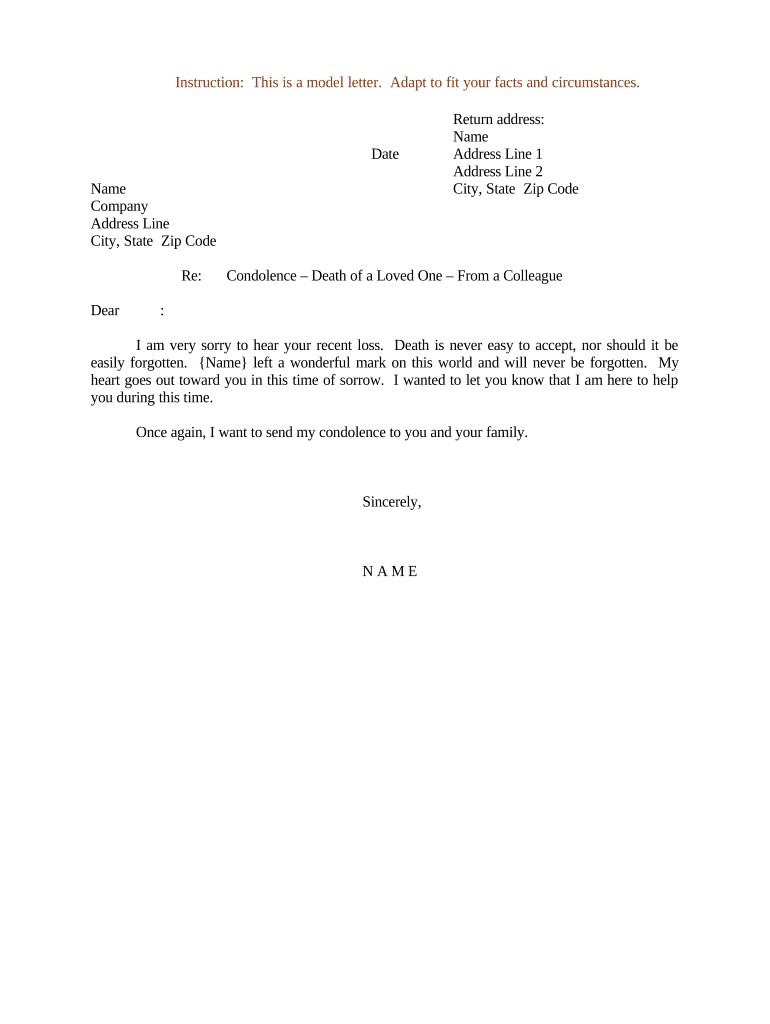
A Letter of Condolence for Death of a Loved One is a brief, personal written message expressing sympathy to someone who has lost a family member or close friend. It typically acknowledges the loss, offers comfort or practical support, and shares a respectful memory or sentiment about the deceased. The letter is not a legal instrument; its purpose is social and emotional rather than contractual. Writers should use a compassionate, concise tone, avoid speculative causes of death, and respect the recipient's privacy while offering clear, sincere support.

Why a Thoughtful Condolence Letter Matters

A clear, considerate condolence letter helps sustain relationships, provides immediate emotional support, and documents your expression of sympathy in a respectful record.

Why a Thoughtful Condolence Letter Matters

Who Typically Sends and Receives Condolence Letters

Condolence letters are used by individuals, organizations, and professional contacts after a death to communicate sympathy and support.

  • Family members and friends sending personal messages of support and shared memories.
  • Employers and colleagues offering workplace condolences and practical assistance for bereaved staff.
  • Organizations or associations notifying members and expressing sympathy on behalf of a group.

Choose wording and delivery (handwritten, printed, or electronic) based on your relationship and cultural expectations.

Step-by-Step: Writing a Condolence Letter

Follow these steps to create a respectful, concise letter that conveys sympathy without overstepping boundaries.

  • 01
    Open respectfully: Address recipient by name and acknowledge the loss.
  • 02
    Express sympathy: Offer sincere condolences in plain language.
  • 03
    Share memory: Mention a positive memory or quality of the deceased.
  • 04
    Offer support: State specific help or express continued availability.

Configuring an Online Condolence Letter Template

When preparing a reusable digital template, set fields, authentication, and delivery options for consistency and privacy.

Field Configuration
Template Name Condolence Letter Template
Authentication Email verification or guest signer
Signing Order Single signer or group sender
Delivery Options Email, PDF download, or printed mail

How Digital Delivery of a Condolence Letter Works

Digital workflows let you prepare, route, and deliver condolence letters securely while preserving a clear audit trail.

  • Prepare document: Use a template with editable fields for names, date, and message.
  • Choose delivery: Select email, secure link, or PDF for the recipient.
  • Optional authentication: Use email verification or SMS code where appropriate.
  • Record retention: Store sent copy and delivery confirmation for records.

Essential Elements to Include in a Professional Condolence Letter

A well-composed letter balances empathy with brevity, includes identifying information, and offers practical or emotional support without presuming facts.

Respectful Opening

Begin with the recipient's name and a direct expression of sorrow, such as 'I am so sorry for your loss,' avoiding overly formal or scripted phrasing.
Acknowledge the Loss

Briefly name the deceased and note the loss; avoid describing cause of death unless the family has shared it and consented to mention.

Share a Memory

Offer one sincere memory or detail that highlights the deceased's character, keeping recollection brief and relevant to the recipient.

Offer Practical Help

State a specific way you can assist (meals, childcare, errands) rather than a general 'let me know if I can help.'

Close with Care

End with a brief statement of continued support and your signature; avoid platitudes that may feel dismissive.

Delivery Preference

Choose handwritten, printed, or electronic delivery based on relationship and the family's circumstances; preserve a copy for your records.

Privacy and Accuracy Checks Before Sending

Use Compassionate Tone: Keep language kind and nonjudgmental.
Avoid Medical Details: Do not disclose health specifics without consent.
Confirm Spelling: Verify names and titles for accuracy.
Limit Length: Keep the letter to a few paragraphs.
Check Recipient: Ensure you have the correct recipient contact.
Record Copy: Store one copy for personal records.

Risks and Potential Consequences to Avoid

Privacy Violation: Unlawful disclosure of health facts
Defamatory Statement: False claims about the deceased
Insensitivity: Tone that aggravates grief
Incorrect Recipient: Sending to the wrong person
Legal Admissions: Speculative cause-of-death language
Recordkeeping Risk: Retaining sensitive details unnecessarily

Common Mistakes When Preparing a Condolence Letter

  • Overly long messages that shift focus from the bereaved to the sender and may feel burdensome during grief.
  • Revealing medical or sensitive details without explicit permission, which can raise privacy concerns and legal exposure in healthcare contexts.
  • Using platitudes or clichés that may come across as dismissive rather than empathetic during a deeply personal loss.
  • Delaying too long to send a message; excessive delay can make the sentiment seem less sincere or reduce its comforting effect.

Timing Guidance for Sending a Condolence Letter

Timing affects how the message is received; choose a window that respects immediate funeral arrangements and the recipient's grieving process.

Immediate Window:

Send within a few days of learning of the death when feasible.

Late Condolence:

Sending within weeks is acceptable; late notes remain meaningful.

Workplace Notices:

Coordinate with HR regarding group messages and timing.

Memorial Period:

Sending around memorial events is often appropriate.

Recordkeeping:

Keep a copy if the organization tracks supportive outreach.

Key Milestones When Preparing and Sending the Letter

A simple milestone sequence helps manage drafting, review, delivery, and follow-up with sensitivity.

01

Draft the Message

Compose a concise, empathetic note focusing on support.

02

Review for Accuracy

Check names, dates, and any details for correctness.

03

Send via Preferred Channel

Deliver by mail, hand, or secure electronic message.

04

Follow Up Appropriately

Offer continued support after the immediate bereavement period.

eSignature Provider Comparison for Sending Condolence Letters

This vendor comparison shows common pricing and capability dimensions for lightweight document delivery and eSignature workflows; signNow is listed first per table conventions.

signNow DocuSign Adobe Sign PandaDoc HelloSign
Starting Price $8/user/mo $15/user/mo $14/user/mo $19/user/mo $15/user/mo
Free Trial 7-day trial Varies by vendor Varies by vendor Varies by vendor Varies by vendor
Bulk Send Yes (Business Premium) Yes Yes Yes Yes
Audit Trail Yes Yes Yes Yes Yes
HIPAA Compliant Yes (BAA) Yes (BAA) Yes (BAA) Varies Varies
Envelope Cap No cap 100 envelopes/user/year Varies by plan Varies by plan Varies by plan

Two Practical Examples of Condolence Letters

These short scenarios show respectful phrasing and delivery choices for different relationships and organizational contexts.

Personal Friend

I was deeply sorry to hear about your loss; your friend meant a great deal to me and will be remembered for kindness.

  • Shared memory of their warmth and an example of how they helped others.
  • Close by offering a specific favor, such as dropping off meals, and sign with your name and contact information.

Employer to Employee Family

On behalf of our team, we extend sincere condolences for your loss; we remember their contributions and extend support.

  • Note practical assistance, such as leave options or point of contact in HR.
  • End with an offer to coordinate practical help and include organization contact details for follow-up.

Frequently Asked Questions About Condolence Letters

Answers to common questions about tone, timing, privacy, and delivery when preparing a Letter of Condolence for Death of a Loved One.


Need help? Contact support

be ready to get more
Join over 28 million airSlate SignNow users