Establishing secure connection… Loading editor… Preparing document…
Navigation

Fill and Sign the Software Distribution Agreement Form
Fill and Sign the Software Distribution Agreement Form

How it works

Open the document and fill out all its fields.
Apply your legally-binding eSignature.
Save and invite other recipients to sign it.

Rate template

4.7
43 votes
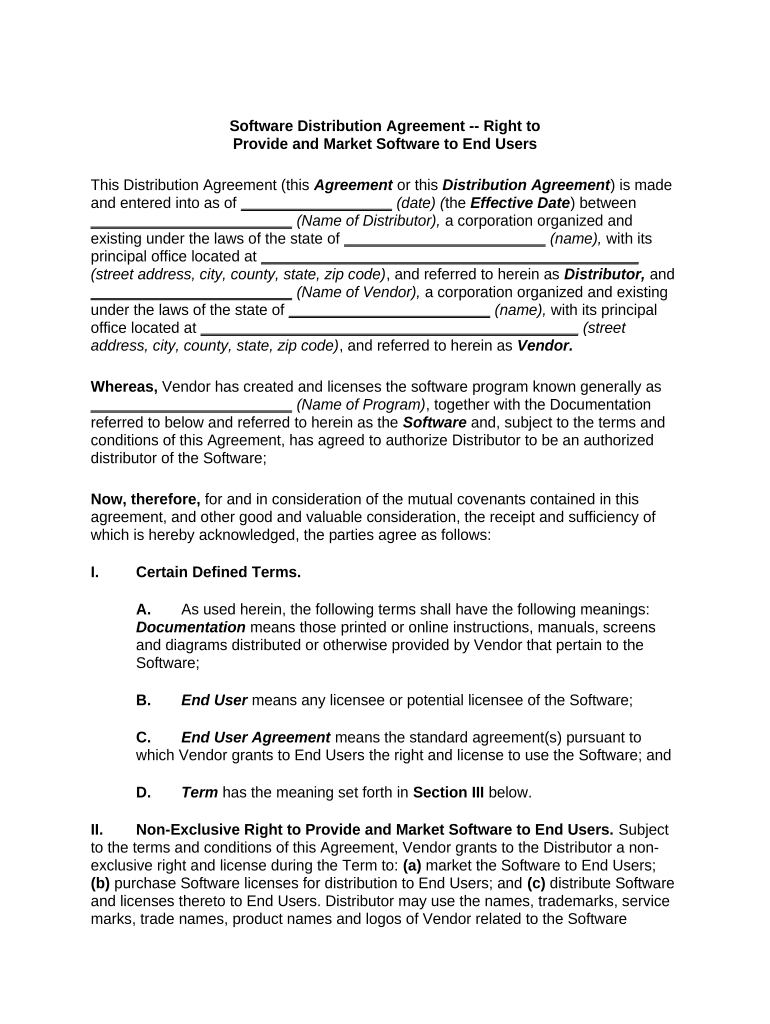
Software Distribution Agreement -- Right to Provide and Market Software to End Users This Distribution Agreement (this Agreement or this Distribution Agreement ) is made and entered into as of __________________ (date) ( the Effective Date ) between ________________________ (Name of Distributor), a corporation organized and existing under the laws of the state of ________________________ (name), with its principal office located at _____________________________________________ (street address, city, county, state, zip code) , and referred to herein as Distributor, and ________________________ (Name of Vendor), a corporation organized and existing under the laws of the state of ________________________ (name), with its principal office located at _____________________________________________ (street address, city, county, state, zip code) , and referred to herein as Vendor. Whereas, Vendor has created and licenses the software program known generally as ________________________ (Name of Program) , together with the Documentation referred to below and referred to herein as the Software and, subject to the terms and conditions of this Agreement, has agreed to authorize Distributor to be an authorized distributor of the Software; Now, therefore, for and in consideration of the mutual covenants contained in this agreement, and other good and valuable consideration, the receipt and sufficiency of which is hereby acknowledged, the parties agree as follows: I. Certain Defined Terms. A. As used herein, the following terms shall have the following meanings: Documentation means those printed or online instructions, manuals, screens and diagrams distributed or otherwise provided by Vendor that pertain to the Software; B. End User means any licensee or potential licensee of the Software; C. End User Agreement means the standard agreement(s) pursuant to which Vendor grants to End Users the right and license to use the Software; and D. Term has the meaning set forth in Section III below. II. Non-Exclusive Right to Provide and Market Software to End Users. Subject to the terms and conditions of this Agreement, Vendor grants to the Distributor a non- exclusive right and license during the Term to: (a) market the Software to End Users; (b) purchase Software licenses for distribution to End Users; and (c) distribute Software and licenses thereto to End Users. Distributor may use the names, trademarks, service marks, trade names, product names and logos of Vendor related to the Software (Vendor Trademarks) for advertising, distribution and promotion of the Software to End Users. Distributor agrees that it will not modify, alter, conceal, remove or make any other modification to any Vendor Trademark without Vendor’s prior approval. Vendor shall be responsible for causing each End User that becomes authorized to use the software to enter into an End User Agreement. The Distributor agrees that it will not modify or alter any End User Agreement. III. Term and Termination. A. This Agreement shall commence as of the Effective Date and, unless earlier terminated as provided herein, shall continue until the first anniversary of the Effective Date (the Initial Term ). This Agreement shall automatically renew for successive one (1) year renewal terms (each, a Renewal Term ) at the end of the Initial Term or any succeeding Renewal Term, unless (i) either party provides the other with written notice at least ________________________ (number) days prior to the beginning of any such Renewal Period electing to not renew this Agreement for such Renewal Period or (ii) this Agreement is otherwise terminated as provided herein. The Initial Term and all Renewal Terms are, collectively, the Term. B. Notwithstanding the foregoing provisions of this Section III, (i) either party may terminate this Agreement, at any time and for any reason, upon ________________________ (number) days prior written notice to the other party and (ii) if either party (the breaching party) breaches this Agreement, the other party may provide written notice thereof to the breaching party and if such breach is not cured within ________________________ (number) days after the breaching party’s receipt of such notice, the other party may terminate this Agreement upon written notice to the breaching party. C. Effect of Termination; Remedies Cumulative; Survival. Upon the effective date of expiration or termination of this Agreement, for any reason, Distributor’s rights pursuant to Section II shall terminate. Each right or remedy of a party in this Agreement shall be cumulative and in addition to, and not in lieu of, each other right and remedy of such party hereunder or pursuant to applicable law. The following provisions of this Agreement shall survive any expiration or termination hereof: Sections IV and VIII through XV. In addition, any accrued rights to payment and remedies for breach of this Agreement shall survive any expiration or termination hereof and, if so directed by Distributor, Vendor shall fulfill any Software orders placed hereunder prior to any expiration or termination of this Agreement, even if such fulfillment occurs after such expiration or termination. IV. Prices and Payment. The fees charged by Vendor to Distributor for the Software’s End User licenses that Distributor may order hereunder are set forth on Exhibit A hereto. The fees identified in this Agreement do not include any sales or use taxes resulting from the ordering of Software by Distributor hereunder. Unless a tax exemption is applicable, Vendor may invoice Distributor for sales and use taxes arising as a result of Distributor’s ordering of Software hereunder. For all fees and other charges hereunder, Vendor shall promptly invoice Distributor and invoices are due within (number) days after Distributor’s receipt thereof. V. Ordering and Provision. A. Distributor may order End User Software licenses hereunder by submitting a purchase order to Vendor. Each purchase order submission shall identify: the number of Software end user licenses to be purchased; the name of the End User for each license; the version of the Software for each license; and the Fulfillment Email Address. Fulfillment Email Address means, for any order, the email address specified in such order as the place where the Fulfillment Materials are to be sent to Distributor. If no such email address is specified in such order, the Fulfillment Email Address for such order shall be the email address of Distributor from which such order was originated. B. Within ________________________ (number) business days of its receipt of such an order, Vendor shall fulfill such order by sending the following materials (the Fulfillment Materials ) to the Fulfillment Email Address for each End User license included in such order: a license key; a serial number; and an Internet web link that enables such End User to access and download the licensed Software and agree to the End User Agreement. Vendor shall forward an End User’s Fulfillment Materials to such End User. VI. Title; Limitations on Use. The Distributor agrees that, as between the Vendor and the Distributor, Vendor shall have sole and exclusive ownership of and all right, title and interest in and to the Software. This Agreement does not provide the Distributor with title or ownership of the Software, but only the right to market and provide the Software as set forth herein. Distributor will not modify or prepare derivative works of the Software. The Distributor may not reverse assemble or reverse compile the Software or use other means to identify the Software’s source code. VII. Infringement Indemnity. Vendor shall indemnify, defend and hold Distributor harmless from and against any and all damages, costs, penalties, claims, demands, causes of action and expenses (including, without limitation, the fees and expenses of counsel) arising out of or resulting from the infringement of any patent, copyright, trademark, service mark, trade secret or other intellectual property right of a third party by the Software. Distributor agrees to promptly notify the Vendor after Distributor becomes aware of any claim giving rise to an indemnification obligation pursuant to this Section; provided that a failure to provide such notice shall not affect Distributor’s right to indemnification pursuant to this Section, except to the extent that the Vendor is actually prejudiced thereby. VIII. Warranties; Limitation of Liability. Vendor represents and warrants that (i) it has all power and authority, corporate and otherwise, to enter into this Agreement and perform its obligations hereunder, (ii) it has duly authorized, executed and delivered this Agreement and (iii) this Agreement is an enforceable agreement of Vendor, enforceable against Vendor in accordance with its terms. VENDOR DISCLAIMS ALL OTHER WARRANTIES, EXPRESS OR IMPLIED, INCLUDING, BUT NOT LIMITED TO, ANY IMPLIED WARRANTIES OF MERCHANTABILITY OR FITNESS FOR A PARTICULAR PURPOSE. NEITHER PARTY HERETO SHALL BE LIABLE TO THE OTHER PARTY OR ANY OTHER PERSON OR ENTITY FOR ANY SPECIAL, EXEMPLARY, PUNITIVE, CONSEQUENTIAL OR INCIDENTAL DAMAGES (INCLUDING, WITHOUT LIMITATION, LOST PROFITS), WHETHER CAUSED BY NEGLIGENCE OR OTHERWISE, EVEN IF ADVISED OF THE POSSIBILITY OF SUCH DAMAGES. IX. Assignment. Either party may assign its rights and obligations hereunder (in whole and not in part) to any person or entity, provided that (a) the assignee agrees to be bound, in writing, by this Agreement, (b) such an assignment shall not relieve the assignor of its obligations hereunder and (c) the assignor provides written notice of the assignment to the other party. This Agreement shall be binding upon the parties hereto and their respective successors and assigns. X. Confidential Information. A. Vendor Confidential Information means the Software. B. Distributor Confidential Information means the identity of, and other information regarding, End Users and information about Distributor’s plans, strategies, products and services. C. Confidential Information means the Vendor Confidential Information and the Distributor Confidential Information. D. Disclosing Party means a party hereto disclosing its Confidential Information hereunder and Receiving Party means a party hereto which receives Confidential Information of the disclosing party hereunder. E. Confidential Information may be oral, visual, in writing or electronic. Confidential Information of the disclosing party shall not include information which: (i) is or becomes generally available to the public, other than as a result of a disclosure by the receiving party or any of its Representatives (as defined below); ( ii) was available to receiving party on a non-confidential basis prior to its disclosure to the receiving party by the disclosing party, provided that the source of such information was not bound by a confidentiality agreement with, or other contractual, legal or fiduciary obligation of confidentiality to, the disclosing party; (iii) is or becomes available to the receiving party on a non-confidential basis from a source other than the disclosing party, provided that such source was not bound by a confidentiality agreement with, or other contractual, legal or fiduciary obligation of confidentiality to, the disclosing party or any of its affiliates; or (iv) is or was independently developed or discovered by the receiving party without use of or reference to the Confidential Information of the disclosing party. F. The Confidential Information will not be used by the receiving party or any of the receiving party’s employees, officers, directors or contractors (Representatives) for any purpose other than the receiving party’s performance of its obligations or exercise of its rights pursuant to this Agreement. The Confidential Information of the disclosing party will not be disclosed or divulged by the receiving party to anyone except: with the disclosing party’s prior written permission; as may be required by law, rule or regulation or by the order or demand of a court or government agency or authority; or as may be permitted pursuant to this Agreement. Notwithstanding the foregoing, the receiving party may disclose the disclosing party’s Confidential Information to those of the receiving party’s Representatives who need to review such Confidential Information for the purpose of the receiving party’s performance of its obligations or exercise of its rights pursuant to this Agreement, but only after the receiving party has informed them of the confidential nature of such Confidential Information and they have agreed, in writing, to treat such Confidential Information confidentially on terms substantially similar to those of this Agreement. If the receiving party or any of its Representatives shall be requested or required by governmental order, judicial process or similar means to disclose any Confidential Information of the disclosing party, the receiving party agrees to provide prompt written notice to the disclosing party of such request and to cooperate with the disclosing party in seeking to limit such disclosure and in seeking an appropriate protective order and confidential treatment. The receiving party acknowledges that the disclosing party will suffer irreparable injury as a result of the use or disclosure of the disclosing party’s Confidential Information in violation of this Section, for which money damages will be inadequate. Accordingly, in addition to any other remedy available to the disclosing party pursuant to this Agreement or applicable law, the disclosing party shall be entitled to obtain preliminary and permanent injunctive relief with respect to any breach or threatened breach of this Section, without the necessity of proving actual damages. Upon expiration or termination of this Agreement for any reason, the receiving party will return to the disclosing party or destroy all Confidential Information of the disclosing party and all copies thereof (except that Distributor may retain any Confidential Information needed to fulfill orders then pending as contemplated by this Agreement until such orders are fulfilled and any other Confidential Information that Distributor has a right to retain independent of this Agreement) and, upon the written request of the disclosing party, an authorized officer of the receiving party will certify in writing to the disclosing party that the receiving party has complied with this Section. In such event, the receiving party will continue to be bound by this Section. XI. Independent Contractor. The relationship between the parties is that of independent contractors and nothing herein shall be construed to create a partnership, joint venture, or agency relationship between the parties hereto. WITNESS our signatures as of the day and date first above stated. ________________________ ________________________ (Name of Distributor) (Name of Vendor) By:________________________ By:_________________________ (Signature of Officer) (Signature of Officer) ________________________ ________________________ (P rinted Name & Office in Corporation) (P rinted Name & Office in Corporation)

Valuable suggestions for finalizing your ‘Software Distribution Agreement’ online

Are you fatigued from the burden of handling paperwork? Look no further than airSlate SignNow, the premier electronic signature solution for individuals and businesses. Say farewell to the monotonous task of printing and scanning documents. With airSlate SignNow, you can effortlessly finalize and sign documents online. Take advantage of the robust features included in this user-friendly and cost-effective platform, and transform your document management approach. Whether you need to approve documents or collect electronic signatures, airSlate SignNow manages it all seamlessly, with just a few clicks.

Adhere to these comprehensive instructions:

  1. Log into your account or register for a free trial with our service.
  2. Click +Create to upload a file from your device, cloud storage, or our template collection.
  3. Open your ‘Software Distribution Agreement’ in the editor.
  4. Click Me (Fill Out Now) to set up the document on your end.
  5. Add and designate fillable fields for others (if needed).
  6. Continue with the Send Invite settings to solicit eSignatures from others.
  7. Download, print your version, or convert it into a multi-use template.

Don’t be concerned if you need to collaborate with your colleagues on your Software Distribution Agreement or send it for notarization—our platform offers everything required to complete such assignments. Register with airSlate SignNow today and elevate your document management to a new level!

Here is a list of the most common customer questions. If you can’t find an answer to your question, please don’t hesitate to reach out to us.

Need help? Contact Support

The best way to complete and sign your software distribution agreement form

Save time on document management with airSlate SignNow and get your software distribution agreement form eSigned quickly from anywhere with our fully compliant eSignature tool.

How to Sign a PDF Online How to Sign a PDF Online

How to fill out and sign paperwork online

In the past, dealing with paperwork required pretty much time and effort. But with airSlate SignNow, document management is easy and fast. Our robust and easy-to-use eSignature solution allows you to easily fill out and eSign your software distribution agreement form online from any internet-connected device.

Follow the step-by-step guidelines to eSign your software distribution agreement form template online:

  • 1.Sign up for a free trial with airSlate SignNow or log in to your account with password credentials or SSO authorization option.
  • 2.Click Upload or Create and add a form for eSigning from your device, the cloud, or our form collection.
  • 3.Click on the file name to open it in the editor and utilize the left-side toolbar to fill out all the blank fields accordingly.
  • 4.Put the My Signature field where you need to approve your sample. Type your name, draw, or import a photo of your handwritten signature.
  • 5.Click Save and Close to accomplish editing your completed document.

After your software distribution agreement form template is ready, download it to your device, export it to the cloud, or invite other individuals to electronically sign it. With airSlate SignNow, the eSigning process only takes a few clicks. Use our powerful eSignature solution wherever you are to manage your paperwork effectively!


How to Sign a PDF Using Google Chrome How to Sign a PDF Using Google Chrome

How to complete and sign forms in Google Chrome

Completing and signing documents is simple with the airSlate SignNow extension for Google Chrome. Adding it to your browser is a quick and efficient way to deal with your paperwork online. Sign your software distribution agreement form template with a legally-binding eSignature in just a few clicks without switching between programs and tabs.

Follow the step-by-step guidelines to eSign your software distribution agreement form in Google Chrome:

  • 1.Navigate to the Chrome Web Store, find the airSlate SignNow extension for Chrome, and add it to your browser.
  • 2.Right-click on the link to a form you need to eSign and choose Open in airSlate SignNow.
  • 3.Log in to your account with your credentials or Google/Facebook sign-in buttons. If you don’t have one, sign up for a free trial.
  • 4.Use the Edit & Sign menu on the left to complete your template, then drag and drop the My Signature field.
  • 5.Add an image of your handwritten signature, draw it, or simply enter your full name to eSign.
  • 6.Verify all data is correct and click Save and Close to finish modifying your paperwork.

Now, you can save your software distribution agreement form sample to your device or cloud storage, send the copy to other people, or invite them to eSign your form via an email request or a protected Signing Link. The airSlate SignNow extension for Google Chrome enhances your document workflows with minimum effort and time. Start using airSlate SignNow today!


How to Sign a PDF in Gmail How to Sign a PDF in Gmail How to Sign a PDF in Gmail

How to complete and sign forms in Gmail

Every time you get an email with the software distribution agreement form for signing, there’s no need to print and scan a file or save and re-upload it to a different tool. There’s a better solution if you use Gmail. Try the airSlate SignNow add-on to promptly eSign any paperwork right from your inbox.

Follow the step-by-step guide to eSign your software distribution agreement form in Gmail:

  • 1.Go to the Google Workplace Marketplace and locate a airSlate SignNow add-on for Gmail.
  • 2.Install the program with a corresponding button and grant the tool access to your Google account.
  • 3.Open an email containing an attached file that needs approval and utilize the S sign on the right sidebar to launch the add-on.
  • 4.Log in to your airSlate SignNow account. Opt for Send to Sign to forward the file to other parties for approval or click Upload to open it in the editor.
  • 5.Place the My Signature option where you need to eSign: type, draw, or import your signature.

This eSigning process saves time and only takes a few clicks. Take advantage of the airSlate SignNow add-on for Gmail to adjust your software distribution agreement form with fillable fields, sign paperwork legally, and invite other individuals to eSign them al without leaving your mailbox. Boost your signature workflows now!


How to Sign a PDF on a Mobile Device How to Sign a PDF on a Mobile Device How to Sign a PDF on a Mobile Device

How to complete and sign documents in a mobile browser

Need to rapidly submit and sign your software distribution agreement form on a smartphone while doing your work on the go? airSlate SignNow can help without the need to install additional software programs. Open our airSlate SignNow solution from any browser on your mobile device and create legally-binding electronic signatures on the go, 24/7.

Follow the step-by-step guide to eSign your software distribution agreement form in a browser:

  • 1.Open any browser on your device and follow the link www.signnow.com
  • 2.Create an account with a free trial or log in with your password credentials or SSO authentication.
  • 3.Click Upload or Create and pick a file that needs to be completed from a cloud, your device, or our form collection with ready-to go templates.
  • 4.Open the form and complete the empty fields with tools from Edit & Sign menu on the left.
  • 5.Add the My Signature area to the form, then enter your name, draw, or upload your signature.

In a few simple clicks, your software distribution agreement form is completed from wherever you are. Once you're done with editing, you can save the file on your device, create a reusable template for it, email it to other people, or ask them to electronically sign it. Make your paperwork on the go speedy and productive with airSlate SignNow!


How to Sign a PDF on iPhone How to Sign a PDF on iPhone

How to complete and sign forms on iOS

In today’s corporate environment, tasks must be done quickly even when you’re away from your computer. Using the airSlate SignNow app, you can organize your paperwork and approve your software distribution agreement form with a legally-binding eSignature right on your iPhone or iPad. Install it on your device to conclude agreements and manage forms from just about anywhere 24/7.

Follow the step-by-step guide to eSign your software distribution agreement form on iOS devices:

  • 1.Open the App Store, find the airSlate SignNow app by airSlate, and set it up on your device.
  • 2.Launch the application, tap Create to import a template, and select Myself.
  • 3.Choose Signature at the bottom toolbar and simply draw your autograph with a finger or stylus to eSign the sample.
  • 4.Tap Done -> Save after signing the sample.
  • 5.Tap Save or use the Make Template option to re-use this paperwork in the future.

This process is so straightforward your software distribution agreement form is completed and signed in just a couple of taps. The airSlate SignNow application works in the cloud so all the forms on your mobile device are kept in your account and are available whenever you need them. Use airSlate SignNow for iOS to improve your document management and eSignature workflows!


How to Sign a PDF on Android How to Sign a PDF on Android

How to complete and sign documents on Android

With airSlate SignNow, it’s simple to sign your software distribution agreement form on the go. Set up its mobile application for Android OS on your device and start improving eSignature workflows right on your smartphone or tablet.

Follow the step-by-step guidelines to eSign your software distribution agreement form on Android:

  • 1.Open Google Play, find the airSlate SignNow app from airSlate, and install it on your device.
  • 2.Sign in to your account or create it with a free trial, then import a file with a ➕ button on the bottom of you screen.
  • 3.Tap on the uploaded document and choose Open in Editor from the dropdown menu.
  • 4.Tap on Tools tab -> Signature, then draw or type your name to electronically sign the sample. Fill out empty fields with other tools on the bottom if necessary.
  • 5.Utilize the ✔ key, then tap on the Save option to finish editing.

With an intuitive interface and total compliance with primary eSignature standards, the airSlate SignNow app is the perfect tool for signing your software distribution agreement form. It even works without internet and updates all form changes when your internet connection is restored and the tool is synced. Fill out and eSign forms, send them for approval, and generate multi-usable templates anytime and from anywhere with airSlate SignNow.

Sign up and try Software distribution agreement form
  • Close deals faster
  • Improve productivity
  • Delight customers
  • Increase revenue
  • Save time & money
  • Reduce payment cycles

