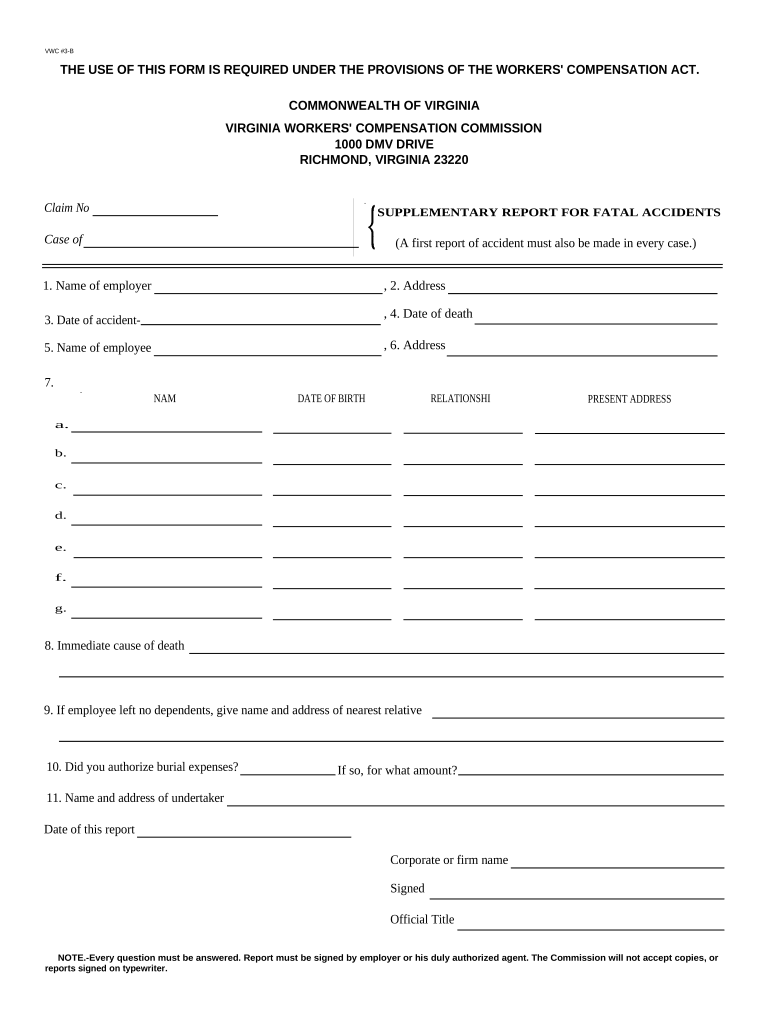
Virginia Supplementary Report for Fatal Accidents
What the Virginia Supplementary Report for Fatal Accidents Is
Why this report matters for compliance and investigations
Completing the Virginia Supplementary Report for Fatal Accidents creates an official record that facilitates state investigations, supports regulatory compliance, and documents actions taken after a fatal incident.
Who typically completes and receives this report
The report is usually prepared by employers, safety officers, or onsite supervisors who have direct knowledge of the incident.
- Employer safety officer or site supervisor responsible for incident documentation and initial notification to authorities.
- Human resources or company compliance team that coordinates follow-up reporting, investigations, and record retention.
- Legal counsel or claims handler that reviews facts for liability, regulatory responses, and insurer communications.
Step-by-step: completing the Virginia Supplementary Report for Fatal Accidents
-
01Collect facts: Secure the scene, gather witness contact details, and record evidence promptly.
-
02Complete fields: Enter identity, location, time, and incident description accurately.
-
03Sign and verify: Authorized official signs; include title and date for attribution.
-
04Submit: Send to the designated Virginia agency and retain a certified copy.
Typical processing flow after submission
-
Intake: Agency logs report and issues confirmation receipt.
-
Triage: Agency assesses severity and resources required for investigation.
-
Investigation: Inspectors may visit site, interview witnesses, and collect evidence.
-
Resolution: Findings recorded; corrective orders or citations may follow.
How to set up a digital workflow for this report
| Field Mapping | Map form fields to your records system for consistency. |
|---|---|
| Signer Roles | Assign roles: preparer, reviewer, authorized signatory. |
| Authentication | Require email or SMS verification for signers. |
| File Attachments | Allow photos, PDFs, and witness statements as attachments. |
| Submission Endpoint | Configure secure email or agency upload destination. |
Technical considerations for electronic completion and submission
Choose tools that provide secure document storage, audit trails, and reliable signer authentication.
- File formats: Support for PDF/X, DOCX, and attached images is recommended.
- Integrations: Connectors to case management, HRIS, and cloud storage streamline records.
- Security: Encryption, access control, and tamper-evident audit logs are essential.
Key reporting deadlines to know
Workplace fatality (OSHA):
Report to OSHA within 8 hours for a work-related fatality (29 CFR 1904.39).
Severe injury/hospitalization:
Report inpatient hospitalizations, amputations, or loss of an eye within 24 hours to OSHA.
Internal notification:
Notify legal, HR, and leadership immediately — timelines vary by employer policy.
State agency filing:
Virginia supplemental report timelines vary; submit as directed by the agency notification.
Record retention start:
Retention obligations begin on the incident date or report creation date.
Milestone timeline from incident to closure
Immediate Actions
Secure scene, render aid, and preserve evidence for investigators.
Internal Notice
Inform HR, safety, and legal teams within hours of the incident.
External Report
File OSHA and the Virginia supplementary report within required timeframes.
Investigation & Closure
Complete agency investigation and document corrective measures taken.
Common mistakes to avoid when preparing this report
- Incomplete incident descriptions that omit time, location, or witness contact information complicate investigations and delay responses.
- Using inconsistent names or dates across documents can create identity mismatches for the deceased and slow claims processing.
- Failing to attach supporting evidence such as photos, witness statements, or medical reports limits the agency's ability to verify facts.
- Delaying submission beyond required windows (federal or state) can lead to enforcement actions and increased scrutiny.
Penalties, liability, and legal risks associated with errors
eSignature vendor pricing and capability snapshot for submission workflows
| signNow | DocuSign | Adobe Sign | PandaDoc | HelloSign | |
|---|---|---|---|---|---|
| Starting Price | $8/user/mo | $15/user/mo | $14/user/mo | $19/user/mo | $15/user/mo |
| Free Trial | 7-day free trial | Varies by plan | Varies by plan | Varies by plan | Varies by plan |
| Bulk Send | Yes (Business Premium) | Yes | Yes | Yes | No |
| Audit Trail | Yes | Yes | Yes | Yes | Yes |
| HIPAA Compliant | Yes | Yes | Yes | No | No |
Frequently asked questions about the Virginia Supplementary Report for Fatal Accidents
-
Who must file this report?
Typically the employer, onsite supervisor, or designated safety officer completes the report. Check your agency instructions for required signatory roles and employer-specific obligations.
-
What is the reporting deadline?
Federal rules require OSHA notification for fatalities within 8 hours and for severe injuries within 24 hours. State supplemental reports often follow those windows; verify agency guidance.
-
Can the form be submitted electronically?
Many agencies accept electronic submission. Use secure formats (PDF) and platforms that provide tamper-evident records and an audit trail for legal defensibility.
-
Is notarization required?
Notarization requirements vary by state and by the specific form. Consult the Virginia agency instructions; some attachments or affidavits may need notarization.
-
What supporting documents help?
Include witness statements, photographs, medical or coroner reports, and internal incident logs. Proper attachments speed investigations and claims handling.
-
How long must I keep reports?
Retain reports per federal and industry rules: at least 3 years for tax/financial records, 6 years for HIPAA-covered records, and longer if state law requires.