Establishing secure connection…Loading editor…Preparing document…

Syllabus Acknowledgement Form

This template is fully customizable. Edit the text, fill out the fields, and send it for signature. Give it a try!
Syllabus Acknowledgement Form

What the Syllabus Acknowledgement Form Is

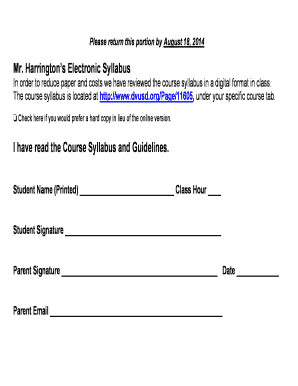
A Syllabus Acknowledgement Form is a record confirming that a student, parent, or participant has received and reviewed a course syllabus or program terms. It documents awareness of course objectives, grading policies, attendance expectations, academic integrity rules, and any required materials or fees. The form typically records the signer's name, relationship to the student, course identifier, date of receipt, and a signature or electronic acknowledgement. Institutions use it to show notice was given and to reduce disputes about published classroom policies.

Why a Signed Acknowledgement Matters

A signed acknowledgement creates a clear administrative record that the syllabus was delivered and seen, supporting enforcement of course rules and helping resolve disputes. It documents communication of grading criteria, attendance policies, and safety or conduct requirements.

Why a Signed Acknowledgement Matters

Who Typically Completes This Form

Schools, colleges, training providers, and program coordinators issue syllabus acknowledgements to students or guardians to confirm receipt.

  • Undergraduate and graduate students acknowledging course policies and requirements.
  • Parents or guardians for minors confirming they reviewed course expectations.
  • Program administrators tracking delivery and compliance across sections or terms.

Records of acknowledgements help administrative reporting, accreditation documentation, and student support interventions.

Primary Signer Profiles

Student — Undergraduate

An enrolled student signs to confirm understanding of course objectives, grading scale, required texts, and attendance policies. The acknowledgement supports grade appeals and verifies that policy changes were communicated during the enrollment period.

Parent / Guardian

For minors or dependent students, a parent or guardian signs to confirm review of conduct rules, field trip permissions, health disclosures, and contact procedures. Institutions often retain guardian acknowledgements for FERPA or health-related communication purposes.

Essential Elements of a Professional Acknowledgement

A clear form includes identifying details, the syllabus version, an explicit acknowledgement statement, signature fields, and instructions for returning or filing the form.

Identifier

Course code, section number, semester/term, and instructor name to link the acknowledgement to the correct syllabus document.
Version

Syllabus version or effective date so the acknowledgement refers to the precise policy set being accepted.

Acknowledgement Text

A concise statement the signer reads and accepts (for example: 'I have received and read the syllabus and understand the policies described').

Signature Block

Space for printed name, signature, signer role (student/guardian), and date; include electronic signature options for e-submission.

Return Instructions

How to submit the signed form (email, LMS upload, in-person dropoff) and the required deadline for return.

Retention Note

Statement of where the signed form will be stored and for how long for institutional recordkeeping.

Step-by-Step: Completing the Acknowledgement

Follow these steps to complete and submit a syllabus acknowledgement, whether on paper or using an electronic signing workflow.

  • 01
    Review Syllabus: Read the full syllabus before signing; note grading and attendance policies.
  • 02
    Fill Fields: Enter name, course code, term, and the date in the required formats.
  • 03
    Sign: Sign physically or use an eSignature method; ensure attribution is clear.
  • 04
    Submit: Return per the instructor's instructions or upload to the learning management system.

How Electronic Submission Typically Works

Electronic workflows reduce processing time and provide an audit trail; the typical sender-to-signer flow follows a few repeatable steps.

  • Upload Document: Administrator uploads the syllabus and places acknowledgement fields in the eSignature platform.
  • Assign Signers: The sender assigns students or guardians by email or ID and configures authentication level.
  • Signer Action: Signer receives a link, reviews the syllabus, and signs using hosted or embedded signing.
  • Record and Archive: Signed copy and audit trail are stored in the institution's records system.

Typical eSignature Workflow Settings

Configure these settings to balance low friction for signers with institutional verification needs.

Field Configuration
Authentication Email link by default; SMS code for higher assurance
Signature Type Click-to-sign allowed; typed or drawn signatures accepted
Notifications Email reminders at configurable intervals until signed
Storage Automatic PDF archiving with audit trail retained

Digital Delivery and Platform Considerations

Verify that your chosen eSignature provider supports required file formats, audit trails, and institutional integrations.

  • File Formats: PDF and DOCX support required for most LMS and records systems
  • Integrations: Look for LMS, Google Workspace, or Microsoft 365 compatibility
  • Accessibility: Ensure platform meets WCAG accessibility standards

Platforms with audit trails, role-based access, and secure storage simplify compliance and reduce administrative overhead for large classes.

Typical Timelines and Processing Expectations

Establish clear deadlines and communicate them in the syllabus to set expectations for timely return and recordkeeping.

Initial Distribution:

On or before first day of class; instructor responsibility

Acknowledgement Deadline:

Commonly within 7–14 days of distribution

Late Submissions:

Handled per instructor or department policy

Record Processing:

Administrative teams typically finalize records within 1–2 weeks

Retention Start:

Retention clock begins from the acknowledgement date

Key Processing Milestones

A concise milestone sequence clarifies roles and expected timing from distribution through archival.

01

Prepare Syllabus

Finalize syllabus text and effective date before distribution.

02

Distribute to Class

Publish syllabus in LMS and send acknowledgement request promptly.

03

Collect Signatures

Monitor returns and follow up on outstanding acknowledgements.

04

Archive Records

Store signed acknowledgements per institutional retention policy.

Common Pitfalls to Avoid

  • Using vague acknowledgement language that fails to specify which syllabus version was reviewed.
  • Collecting signatures without matching them to institutional records, causing reconciliation gaps.
  • Relying solely on student accounts without guardian confirmation when minors are enrolled.
  • Failing to retain an audit trail for electronic acknowledgements, which complicates later verification.

Potential Consequences of Incomplete or Incorrect Acknowledgements

Loss of Proof: May hinder enforcement
Administrative Delay: Delays in grade dispute resolution
FERPA Risk: Recordkeeping issues may affect compliance
Accreditation Impact: Incomplete records may affect reviews
Operational Burden: Increased staff time for reconciliation
Student Confusion: Unclear policy dates or versions

Security and Data Handling Considerations

Encryption: TLS 1.2/1.3 in transit
Data at Rest: AES-256 encrypted storage
Access Controls: Role-based access and SSO
Audit Trail: IP, timestamp, and action log
HIPAA Option: BAA available where required
Standards: SOC 2 and ISO 27001 compliance

eSignature Pricing Snapshot for Syllabus Acknowledgements

A quick comparison of starting prices and standard features across popular eSignature vendors; signNow is listed first per platform conventions.

signNow DocuSign Adobe Sign PandaDoc HelloSign
Starting Price $8/user/mo $15/user/mo $14/user/mo $19/user/mo $15/user/mo
Free Trial 7-day trial Varied by plan Varied by plan Varied by plan Varied by plan
Bulk Send Yes Varied by plan Varied by plan Varied by plan Varied by plan
Audit Trail Yes Yes Yes Yes Yes
Envelope Cap No envelope cap 100 envelopes/user/year Varies by plan Varies by plan Varies by plan

Real-World Examples of Use

Institutions and organizations rely on acknowledgements to manage large classes and remote participants — two examples are below.

Optica Ventures (COO)

Optica used a simple acknowledgement workflow to increase return rates and reduce follow-ups.

  • The interface remained easy for clients.
  • The result reduced administrative calls and improved record accuracy, allowing the team to focus on program delivery rather than chasing signatures.

Xerox (Director of NetSuite Operations)

Xerox integrated acknowledgements into its enterprise systems for consistent records.

  • Integration used NetSuite connectivity.
  • This allowed automated archival and reduced manual reconciliation across departments, improving audit preparedness.

Practical Tips for Accurate Completion

Follow these best practices to ensure acknowledgements are valid, easy to process, and legally defensible.

Use Clear Language
Write a single, plain-language acknowledgement statement specifying the syllabus version and effective date to avoid ambiguity.
Standardize Dates
Require MM/DD/YYYY format for dates and validate input to prevent mismatched records.
Match Institutional Records
Require the student's institutional name or ID to ensure correct record linkage and simplify reconciliation.
Keep an Audit Trail
Retain signed PDFs plus metadata (IP, timestamp, signer email) to support later verification or appeals.

Frequently Asked Questions

Answers to common questions about validity, electronic signing, storage, and handling of syllabus acknowledgement forms.


Need help? Contact support

be ready to get more
Join over 28 million airSlate SignNow users