Establishing secure connection…Loading editor…Preparing document…

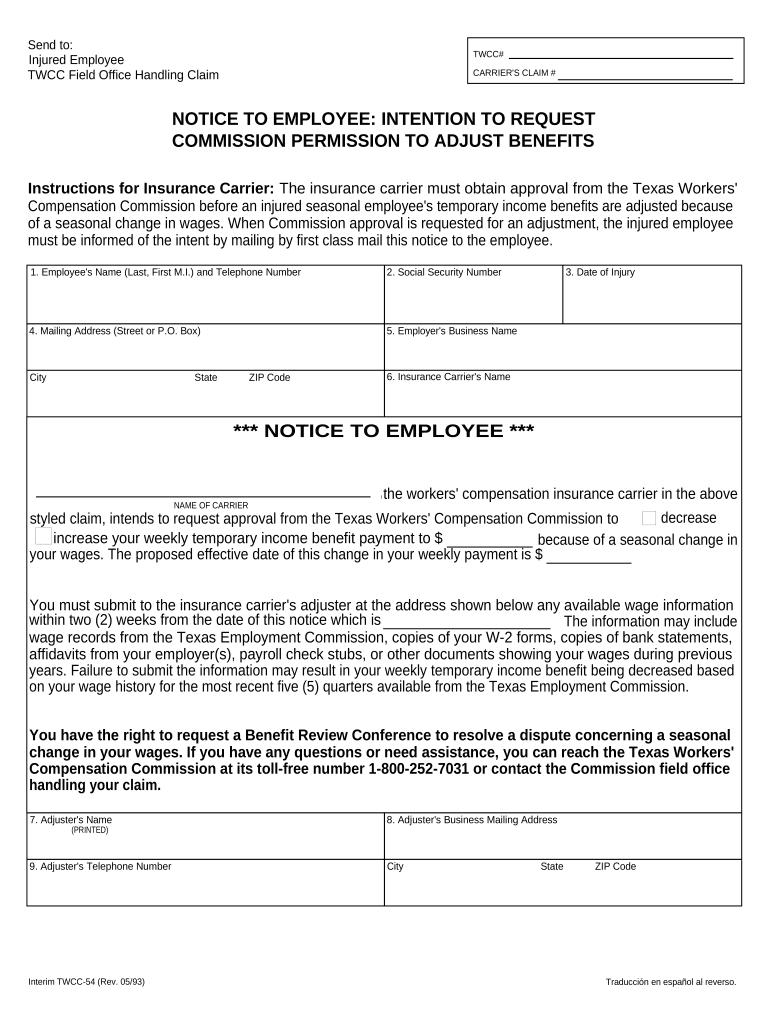
Texas Notice of Intention to Request Commission Permission to Adjust Benefits

This template is fully customizable. Edit the text, fill out the fields, and send it for signature. Give it a try!
Texas Notice of Intention to Request Commission Permission to Adjust Benefits

What this Texas notice is and when it’s used

The Texas Notice of Intention to Request Commission Permission to Adjust Benefits is a formal written notice used to inform a regulatory commission and affected parties that a person or entity intends to seek an administrative change to previously granted benefit amounts. Typical contexts include workers’ compensation, unemployment, and other publicly administered benefit programs where a governing commission must approve modifications. The notice documents the proposed adjustment, identifies the parties, summarizes the legal and factual basis, and starts any statutory or procedural timelines that apply to the request.

Why a clear, compliant notice matters

A properly prepared notice creates a record of intent, triggers required procedural steps, preserves statutory rights, and reduces the risk of denial or delay by the commission when modifying benefits.

Why a clear, compliant notice matters

Who typically prepares and receives this notice

The notice is used by parties with a legal interest in benefits and by their authorized representatives to initiate a formal adjustment request.

  • Claimants and beneficiaries who seek an increase, decrease, or correction to existing benefit awards.
  • Employers or payors contesting or seeking to revise previously awarded benefit amounts.
  • Attorneys, authorized agents, and case managers submitting requests on behalf of a party.

Each recipient must be identified and served according to commission rules so that the record is complete and hearings or reviews can proceed without procedural objections.

Primary signers and document roles

Claims Administrator

A claims administrator commonly prepares the notice for submission on behalf of an employer or insurer, ensuring required fields, supporting documents, and procedural service requirements are met before filing with the commission.

Injured Worker

An injured worker or beneficiary may draft and sign the notice directly or authorize counsel; their signature confirms identity, consent to seek adjustment, and attests to the factual basis supporting the requested change.

Core elements to include in a professional notice

A complete notice organizes facts, legal bases, and evidence so commission staff and opposing parties can evaluate the request efficiently and without procedural defects.

Caption

Case identifier and commission docket information should appear at the top to link the notice to the existing record and avoid misfiling or administrative delay.
Parties

List full legal names, roles (claimant, employer, insurer), mailing addresses, and counsel or representative contact details so service and response are directed correctly.

Adjustment Requested

State precisely the change sought (increase, decrease, retroactive correction) and the specific benefit lines, monetary amounts, or effective dates to avoid ambiguity.

Basis for Request

Summarize facts, legal authority, or new evidence supporting the adjustment, including references to statutes, prior orders, or medical/financial documentation.

Supporting Documents

Attach exhibits such as medical records, wage statements, or prior commission orders; list each exhibit by label and brief description in the notice body.

Signature Block

Include printed name, title, organization, signature, and date; identify the person signing and, when applicable, include counsel signature and contact information.

Step-by-step: prepare and submit the notice

Follow these steps in order to prepare, serve, and file a legally defensible request to adjust benefits with the commission.

  • 01
    Prepare: Assemble case number, parties, factual basis, and supporting exhibits.
  • 02
    Complete: Fill each field accurately; use MM/DD/YYYY for dates and full legal names.
  • 03
    Serve: Serve all required parties according to commission service rules and document proof of service.
  • 04
    File: Submit the notice to the commission via accepted channels and retain the proof of filing.

Suggested online workflow settings for digital completion

Configure your digital workflow to collect signatures, attach exhibits, and track service to create a complete administrative record.

Field Configuration
Upload Documents Allow PDF and DOCX; enforce file labeling for exhibits.
Assign Signers Set role-based signers and require signature order where appropriate.
Authentication Use email plus SMS or knowledge-based checks for higher assurance.
Retention Settings Enable audit trail and exportable signed PDF with certificate.

Platform and format considerations for eSubmission

Choose a platform that accepts PDF and DOCX, preserves metadata, and creates a tamper-evident signed file and audit trail.

  • File Formats: Accept PDF/A and PDF; ensure attachments remain searchable and intact.
  • Authentication: Support email, SMS, or stronger multi-factor authentication as required by the commission.
  • Audit Trail: Record timestamps, IP, and signer actions for evidentiary integrity.

Confirm the commission accepts electronic submissions and whether any consumer-facing disclosure or consent is required before relying on an electronic signature.

Typical routing and submission options

Notices may be delivered by certified mail, hand delivery, or electronic filing depending on commission rules; confirm allowed channels before submission.

  • Certified Mail: Provide proof of mailing and delivery to meet service requirements.
  • Hand Delivery: Obtain a dated stamped receipt from the commission or clerk.
  • Email Filing: Use commission-approved email addresses and confirm receipt.
  • Online Portal: Upload signed PDF and exhibits via the commission’s e-file system when available.

Consequences of incorrect or late notices

Filing Deadlines: Missed deadlines result in denial
Incorrect Amounts: Orders requiring repayment or adjustment
Improper Notice: Procedure may be invalidated
Unverified Signatures: Commission may reject filing
Lack of Supporting Docs: Delays and requests for supplementation
Fraud Allegations: Civil and criminal exposure

Common preparation challenges to anticipate

  • Confusing case identifiers or missing docket numbers can cause administrative misrouting and substantial processing delays if not corrected.
  • Incomplete exhibit lists or unlabelled attachments force the commission to request clarifications, extending the review timeline significantly.
  • Failure to serve all required parties properly can lead to motions to dismiss or re-servicing requirements that reset procedural timelines.
  • Using inconsistent names or dates across documents undermines identity verification and can result in rejection or requests for notarized proof.

Practical tips for accurate, efficient completion

Adopt consistent procedures and checklists to reduce errors, speed review, and preserve rights when requesting benefit adjustments.

Use a standardized template
Standard templates reduce omissions; include a checklist for exhibits and service proof to ensure procedural completeness.
Confirm service rules
Verify required service methods and deadlines with the commission before filing to avoid procedural defects.
Use clear exhibit labeling
Label and reference each attachment precisely in the notice body to simplify review and avoid supplementation requests.
Document consent for e-signatures
For consumer-facing benefits, include ESIGN consumer disclosure and evidence of consent when relying on electronic signatures.

Realistic example scenarios

Two typical situations illustrate how a notice initiates administrative review and what supporting materials are useful.

Workers' Compensation Adjustment

A claimant discovers an unpaid medical expense in the claim record and files a notice to adjust benefits.

  • The claimant attaches medical bills and provider statements.
  • The commission reviews the notice, verifies exhibits, and schedules a hearing if contested; clear exhibit labeling and proof of service shortened resolution timeline and reduced procedural objections.

Unemployment Benefit Correction

An employer identifies an overpayment calculation error and files a notice to reduce benefits.

  • Employer includes payroll records and the calculation worksheet.
  • The commission evaluates the payroll evidence and either issues an administrative adjustment or sets a contested case; precise dates and corroborating payroll documentation expedited the outcome and limited appeals.

Comparing eSignature vendor pricing and compliance features

Basic pricing and compliance features for common eSignature vendors. Choose a plan that meets required authentication and retention standards for administrative filings.

signNow DocuSign Adobe Sign PandaDoc HelloSign
Starting Price $8/user/mo $15/user/mo $14/user/mo $19/user/mo $15/user/mo
Free Trial 7-day free trial Yes (trial) Yes (trial) Yes (trial) Yes (trial)
Bulk Send Yes Yes Yes Yes No
Audit Trail Yes Yes Yes Yes Yes
HIPAA Compliant Yes Yes Yes No No

Common questions and practical answers

Answers to frequent questions about completing, signing, and submitting a notice to request a commission adjustment.


Need help? Contact support

be ready to get more
Join over 28 million airSlate SignNow users