Establishing secure connection…Loading editor…Preparing document…

United Methodist Church Medical Report of Ministerial Candidate

This template is fully customizable. Edit the text, fill out the fields, and send it for signature. Give it a try!
United Methodist Church Medical Report of Ministerial Candidate

What the United Methodist Church Medical Report of Ministerial Candidate is

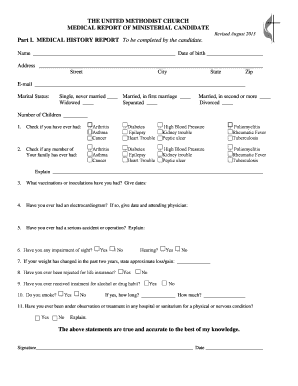
The United Methodist Church Medical Report of Ministerial Candidate is a structured form completed by a candidate and a licensed healthcare provider to document medical history, physical examination findings, and the provider’s professional assessment regarding fitness for ministry. The report is used by district or annual conference committees reviewing ordination, candidacy, or continuing ministerial credentials. It typically collects identifying data, relevant chronic conditions, medication lists, functional limitations, and a physician’s declaration. The completed report becomes part of the candidate’s credentialing file and is retained under applicable recordkeeping rules.

Why this medical report matters for credentialing and care coordination

A clear, complete medical report gives conference committees the clinical information needed to evaluate a candidate’s ability to serve, helps identify reasonable accommodations, and documents steps taken to protect congregational safety and candidate health. Proper completion reduces administrative delays and supports consistent decision-making across districts.

Why this medical report matters for credentialing and care coordination

Who prepares, reviews, and relies on this medical report

Key participants include the candidate, the examining clinician, and conference or district credentialing bodies who evaluate fitness for ministry.

  • Ministerial candidates submitting medical information for ordination, candidacy, or conference credentialing decisions.
  • Licensed physicians, nurse practitioners, or physician assistants documenting history, exam findings, and professional assessment.
  • District/annual conference committees and medical review panels that review the report for credentialing determinations.

Each participant has specific responsibilities: the candidate provides accurate history, the clinician documents findings, and the committee maintains confidentiality and compliance with applicable laws.

Primary signatories and their roles

Candidate — Ministerial

A ministerial candidate provides personal and medical history, discloses medications and prior diagnoses, and signs any consent or authorization blocks. Accuracy is essential because incomplete or inconsistent information can delay credentialing and affect fitness determinations.

Physician — Examiner

A licensed clinician completes the examination sections, records objective findings, states functional limitations when present, and signs and dates the form. The clinician’s declaration supports the committee’s assessment and may be subject to privacy protections under HIPAA.

Step-by-step process to complete and submit the medical report

Follow these ordered steps to prepare a complete report, obtain provider validation, and submit it to the conference office.

  • 01
    Gather Records: Collect relevant medical records and medication lists.
  • 02
    Complete Sections: Candidate fills history and consent fields before examination.
  • 03
    Physician Review: Clinician performs exam, records findings, and signs.
  • 04
    Submit: Send to district conference office by secure channel.

Configuring an online workflow for secure completion

Set up a digital workflow that preserves privacy, captures signatures, and routes the completed report to the right parties.

Field Configuration
Access Restrict to candidate and provider emails only
Authentication Use email + SMS or two-factor for clinicians
Field Mapping Lock clinician fields until provider signs
Notification Auto-alert committee when final signed copy available

Typical eSubmission sequence for the medical report

A standard electronic path reduces wait times and keeps an audit trail for compliance.

  • Upload Document: Administrator uploads the blank form for the candidate.
  • Pre-fill Data: Candidate fields are pre-filled where possible.
  • Provider Signing: Clinician authenticates and signs electronically.
  • Committee Receipt: Final signed PDF and audit trail delivered to reviewers.

Key components to include in a professional medical report

A complete report balances concise clinical detail with clear administrative data so committees can make informed decisions quickly.

Candidate Information

Full legal name, DOB, contact, and candidate identification used by the conference to match records and verify identity.
Medical History

Relevant conditions, surgeries, allergies, medications, and psychiatric history summarized to provide clinical context for fitness evaluation.

Physical Examination

Objective findings, vital signs, and any test results that support the clinician’s assessment of current physical status.

Functional Assessment

Narrative describing any limitations in mobility, cognition, stamina, or other functions relevant to ministerial duties.

Provider Declaration

Clinician statement on fitness for ministry, recommended restrictions, follow-up, and signature with license details and date.

Submission Instructions

Clear guidance on where to send the completed report, privacy notices, and whether notarization or additional forms are required.

Essential data fields to capture on the form

Name: Full legal name
Date of Birth: MM/DD/YYYY
Diagnosis Summary: Primary conditions listed
Medications: Current prescription list
Provider ID: License number included
Signatures: Dates and signer role

Consequences and risks of incomplete or incorrect reports

Credential Delay: Processing slow or postponed
Invalid Submission: Form may be rejected
Privacy Breach: HIPAA penalties possible
Liability Risk: Provider malpractice exposure
Accommodation Denial: Missed reasonable accommodations
Recordkeeping Error: Audit issues later

Common mistakes to avoid when preparing the report

  • Omitting required provider license details or failing to include the clinician’s signature can invalidate the form and delay credentialing.
  • Using inconsistent names or dates between the report and conference records leads to verification issues and unnecessary follow-up.
  • Entering vague clinical descriptions rather than specific objective findings reduces the committee’s ability to assess fitness accurately.
  • Sharing the form through unsecure email or storage may violate HIPAA and expose parties to privacy breach liability.

eSignature vendor pricing and capability snapshot for medical report workflows

Compare core pricing and compliance features relevant to completing and storing medical reports. signNow is shown first as the baseline comparison.

signNow DocuSign Adobe Sign PandaDoc HelloSign
Starting Price $8/user/mo $15/user/mo $14/user/mo $19/user/mo $15/user/mo
Free Trial 7-day trial Varies Varies Varies Varies
Bulk Send Yes (Premium) Yes Yes Yes No
Audit Trail Yes Yes Yes Yes Yes
HIPAA Compliant Yes Yes Yes No No
Envelope Cap No cap 100 envelopes/user/year Varies Varies Varies

Technical considerations for secure eSubmission and storage

Ensure the chosen platform supports required integrations, HIPAA controls, and commonly used file formats before routing medical reports.

  • Integrations: Salesforce, Microsoft 365, NetSuite supported
  • File Formats: PDF and DOCX are standard supported forms
  • Security: TLS 1.2/1.3 and AES-256 encryption

Frequently asked questions and common resolution steps

Answers to typical questions about signatures, notarization, privacy, and correcting entries for the medical report.


Need help? Contact support

be ready to get more
Join over 28 million airSlate SignNow users