Establishing secure connection… Loading editor… Preparing document…
Navigation

Fill and Sign the Trust Nominee Form
Fill and Sign the Trust Nominee Form

How it works

Open the document and fill out all its fields.
Apply your legally-binding eSignature.
Save and invite other recipients to sign it.

Rate template

4.5
63 votes
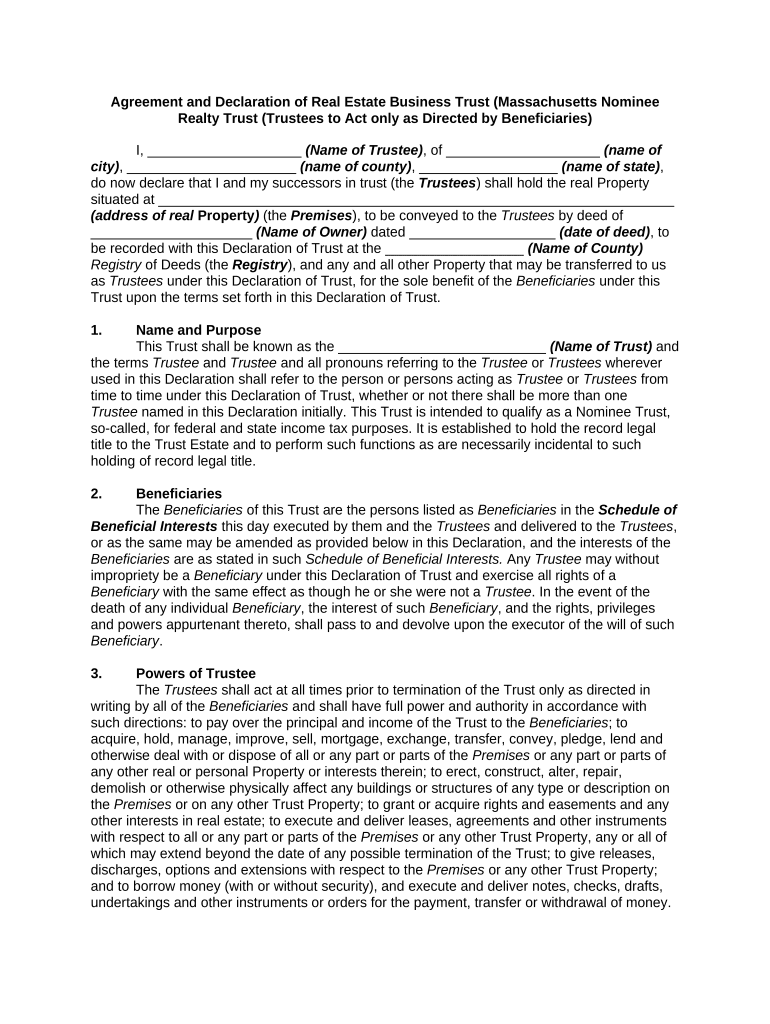
Agreement and Declaration of Real Estate Business Trust (Massachusetts Nominee Realty Trust (Trustees to Act only as Directed by Beneficiaries) I, ____________________ (Name of Trustee) , of ____________________ (name of city) , ______________________ (name of county) , __________________ (name of state) , do now declare that I and my successors in trust (the Trustees ) shall hold the real Property situated at ___________________________________________________________________ (address of real Property ) (the Premises ), to be conveyed to the Trustees by deed of _____________________ (Name of Owner) dated ___________________ (date of deed) , to be recorded with this Declaration of Trust at the __________________ (Name of County) Registry of Deeds (the Registry ), and any and all other Property that may be transferred to us as Trustees under this Declaration of Trust, for the sole benefit of the Beneficiaries under this Trust upon the terms set forth in this Declaration of Trust. 1. Name and Purpose This Trust shall be known as the ___________________________ (N ame of Trust ) and the terms Trustee and Trustee and all pronouns referring to the Trustee or Trustees wherever used in this Declaration shall refer to the person or persons acting as Trustee or Trustees from time to time under this Declaration of Trust, whether or not there shall be more than one Trustee named in this Declaration initially. This Trust is intended to qualify as a Nominee Trust, so-called, for federal and state income tax purposes. It is established to hold the record legal title to the Trust Estate and to perform such functions as are necessarily incidental to such holding of record legal title. 2. Beneficiaries The Beneficiaries of this Trust are the persons listed as Beneficiaries in the Schedule of Beneficial Interests this day executed by them and the Trustees and delivered to the Trustees , or as the same may be amended as provided below in this Declaration, and the interests of the Beneficiaries are as stated in such Schedule of Beneficial Interests. Any Trustee may without impropriety be a Beneficiary under this Declaration of Trust and exercise all rights of a Beneficiary with the same effect as though he or she were not a Trustee . In the event of the death of any individual Beneficiary , the interest of such Beneficiary , and the rights, privileges and powers appurtenant thereto, shall pass to and devolve upon the executor of the will of such Beneficiary . 3. Powers of Trustee The Trustees shall act at all times prior to termination of the Trust only as directed in writing by all of the Beneficiaries and shall have full power and authority in accordance with such directions: to pay over the principal and income of the Trust to the Beneficiaries ; to acquire, hold, manage, improve, sell, mortgage, exchange, transfer, convey, pledge, lend and otherwise deal with or dispose of all or any part or parts of the Premises or any part or parts of any other real or personal Property or interests therein; to erect, construct, alter, repair, demolish or otherwise physically affect any buildings or structures of any type or description on the Premises or on any other Trust Property; to grant or acquire rights and easements and any other interests in real estate; to execute and deliver leases, agreements and other instruments with respect to all or any part or parts of the Premises or any other Trust Property, any or all of which may extend beyond the date of any possible termination of the Trust; to give releases, discharges, options and extensions with respect to the Premises or any other Trust Property; and to borrow money (with or without security), and execute and deliver notes, checks, drafts, undertakings and other instruments or orders for the payment, transfer or withdrawal of money. Notwithstanding the foregoing provisions of this Article, the Trustees , until directed to the contrary by the Beneficiaries , shall have only the following powers and duties: A. To hold the Premises and any other Trust Property and to receive any money due the Trust; and B. To pay any net income of the Trust in their hands at least annually to the Beneficiaries in proportion to their respective interests. C. The Trustees shall not maintain bank accounts in the name of the Trust or Trustees unless specifically authorized to do so by the Beneficiaries ; however, the Trustees may maintain bank accounts in the name of the Beneficiaries for any purpose authorized by the Beneficiaries . In the event any successor to the original Trustees named in this Declaration, without specific authorization, does maintain bank accounts in the name of the Trust or Trustees or otherwise incurs financial obligations or accepts deposits of money in the name of the Trust or Trustees , the Trustees shall indemnify the Beneficiaries against, and hold the Beneficiaries harmless from, any liability resulting therefrom, including taxes and accounting expenses, unless this term is specifically waived by the Beneficiaries . D. Any and all instruments executed pursuant to the direction of the Beneficiaries may include obligations extending over any periods of time, including periods extending beyond the date of any possible termination of the Trust. E. Any action (other than the following actions requiring participation of the Beneficiaries : 1. Amendments of this instrument pursuant to Article 6 ; 2. Removals or appointments of Trustees pursuant to Article 7 ; and 3. Termination under Article 8 may be taken, and all instruments (other than those in connection with the foregoing actions requiring participation of the B eneficiaries ), whether or not under seal, may be executed on behalf of the Trust by the sole Trustee , by any one Trustee in the event the Trust has more than one Trustee , or by such agent as shall be authorized by a written certificate signed by all of the Trustees . F. The Trustees shall have no power to bind the Beneficiaries personally, and in every contract the Trustees shall enter into, reference shall be made to this Declaration of Trust, and the person, firm or corporation so contracting with the Trustees shall look only to the funds and Property of the Trust for payment under such contract or for payment of any debt, damage, judgment or decree or of any money which may otherwise become due and payable by reason of a failure on the part of the Trustees to perform such contract in whole or in part, and neither the Trustees nor the Beneficiaries , present or future, shall be personally liable for the same. 4. Third Party Reliance A. Notwithstanding the provisions of Article 3 concerning authorization of Trustee actions by the Beneficiaries , every agreement, deed, mortgage, pledge, note, assignment, transfer, check, extension, release, discharge and other writing or document executed by a person appearing from the records in the Registry to be a Trustee under this Declaration of Trust shall be conclusive evidence in favor of every person relying thereon or claiming thereunder that at the time of the execution or delivery thereof this Trust was in full force and effect and the Trustee executing and delivering such instrument was duly authorized, empowered and directed by the Beneficiaries to execute and deliver the same, and that, subject to Article 3 of this Declaration of Trust concerning the requirements for the execution of instruments, such instrument is valid, binding, effective, and legally enforceable. Notwithstanding anything in this instrument to the contrary, any person dealing with the Trust Property of the Trustees may always rely on a certificate signed by any person appearing from the records of the Registry to be a Trustee under this Declaration of Trust as to who are the Trustees or who are the Beneficiaries under this Declaration of Trust, of as to the authority of the Trustees to act, or as to the existence or nonexistence of any other fact or facts which are in any other manner germane to the affairs of the Trust. B. No purchaser, transferee, pledgee, mortgagee or other lender shall be under any responsibility or liability to see to the application of any purchase money, or of any money loaned, or Property lent or delivered to the Trustees , or to see that the terms and conditions of this Trust have been complied with or performed. 5. Limitation of Trustee Liability The Trustees shall not be held to any personal liability whatsoever, whether in tort, in contract, for error of judgment, or for loss arising out of any act or omission in the execution of the Trust, so long as they act in good faith, but each Trustee under this Declaration of Trust shall be responsible for his or her own willful breach of trust, knowingly and intentionally committed. No Trustee shall be liable for any act or omission by any other Trustee . If any Trustee shall at any time for any reason (other than for willful breach of trust) be held to be under personal liability as such Trustee , then such Trustee shall be held harmless and indemnified by the Beneficiaries , jointly and severally, from and against all loss, costs, damage, or expense by reason of such liability. The Trustees may withhold from any distribution, transfer or conveyance such amounts as they from time to time reasonably deem necessary to protect themselves from such liability. No Trustee shall be required to take any action directed by the Beneficiaries which will, in the opinion of the Trustee , involve the Trustee in any personal liability, unless first indemnified to the satisfaction of the Trustee . No court approval or license shall be requisite to the validity of any transaction entered into by the Trustees , and no Trustee shall be required to give any bond. 6. Amendments and Assignments This instrument may be amended at any time by a written instrument signed by all the Beneficiaries and Trustees and acknowledged by one or more Trustees . No amendment of this instrument shall become effective, except with respect to persons having actual knowledge thereof, until a certificate by a Trustee , setting forth the amendment and certifying that such amendment was duly made in accordance with the terms of this instrument or any amendment of this instrument, has been recorded as provided in this instrument. A Beneficiary may assign his or her beneficial interest provided that no such assignment shall be effective (except as provided in Article 3 ) until: A. The original assignment is delivered to the Trustees ; B. The assignee executes a new Schedule of Beneficial Interests that reflects the assignment; and C. At least one Trustee executes the new Schedule of Beneficial Interests. 7. Resignation and Appoint of Successor Trustee A. Any Trustee under this Declaration of Trust may resign by a written instrument Signed and acknowledged by such Trustee and delivered or mailed to each Beneficiary , and to each remaining Trustee , if any. B. Succeeding or additional Trustees may be appointed or any Trustee removed by a written instrument signed by all of the Beneficiaries and acknowledged by one or more of them, or one or more additional Trustees may be appointed from time to time by the existing Trustee or Trustees , provided that each of the Trustees appointed shall accept such office by a written instrument signed and acknowledged by him or her. C. In the event that there is no Trustee , either through death, resignation or for any other cause, a person purporting to be a successor Trustee under this Declaration of Trust may record in the Registry an affidavit, under pains and penalties of perjury, stating he or she has been appointed by all of the Beneficiaries as successor Trustee . Such affidavit, when so recorded together with an attorney's certificate under ________________ (citation of statute) , stating that such attorney has knowledge of the affairs of the Trust and that the person signing the affidavit has been appointed a Trustee by all of the Beneficiaries , shall have the same force and effect as if the certificate of a Trustee or Trustees required or permitted under this Declaration of Trust had been so recorded, and persons dealing in good faith with the Trust or Trust Estate may always rely without further inquiry upon such an affidavit as so executed and recorded as to the matters stated herein. D. Upon the appointment of any succeeding or additional Trustee or Trustees , the title to the Trust Estate shall then and without the necessity of any conveyance be vested in the succeeding or additional Trustee or Trustees jointly with the remaining Trustee or Trustees , if any. Each succeeding and additional Trustee shall have all the rights, powers, authority, privileges and duties as if named as an original Trustee under this Declaration of Trust. 8. Termination The Trust may be terminated at any time by all of the Beneficiaries by a written notice to the Trustees , and the Trust shall terminate upon the disposition by the Trust of its entire interest in the Premises and all other real Property held by the Trust, or _____ (number of years) years after the date of this Declaration of Trust, whichever shall first occur. In case of any such termination, the Trustees shall continue to have and may exercise all the rights, powers, authority and privileges conferred by this instrument upon the Trustees , for the full duration of such period (not exceeding two years from the date of termination, however) as the Trustees in their sole discretion determine to be necessary for winding up the affairs of the Trust. Upon the conclusion of any winding up of the affairs of the Trust which the Trustees may deem necessary, the Trustees shall transfer and convey the entire trust estate then remaining in their hands, subject to any leases, mortgages, contracts or other encumbrances thereon, to the Beneficiaries in proportion to their respective interests; provided that the Trustees shall not be required to transfer and convey the Trust Estate unless first indemnified to their satisfaction against any personal liability. 9. Notice Notwithstanding any other provision of this instrument, no amendment or termination of the Trust or change in the Trustees shall become effective except with respect to persons having actual knowledge thereof until such instrument of amendment, termination, resignation, removal, appointment or acceptance, or a certificate thereof by a Trustee certifying that such amendment, termination, resignation, removal, appointment or acceptance was duly made in accordance with the terms of this instrument or any amendment hereof, has been duly recorded in the Registry and, in the event this Trust shall in the future own real Property in a district or county other than the district or county in which the Registry is located, then, with respect to such other real property, until such amendment, termination, resignation, removal, appointment, acceptance or certificate has been recorded in the appropriate Registry of deeds for such district or county. 10. Definitions Whenever the context permits, the term Trustees shall include the Trustee or Trustees then serving under this Declaration of Trust, the term executor shall include administrator, the use of a particular gender shall include any other gender, and references to the singular or the plural shall be interchangeable. 11. Governing Law This Agreement shall be governed by, construed, and enforced in accordance with the laws of the State of ______________. 12. Severability The invalidity of any portion of this Agreement will not and shall not be deemed to affect the validity of any other provision. If any provision of this Agreement is held to be invalid, the parties agree that the remaining provisions shall be deemed to be in full force and effect as if they had been executed by both parties subsequent to the expungement of the invalid provision. 13. No Waiver The failure of either party to this Agreement to insist upon the performance of any of the terms and conditions of this Agreement, or the waiver of any breach of any of the terms and conditions of this Agreement, shall not be construed as subsequently waiving any such terms and conditions, but the same shall continue and remain in full force and effect as if no such forbearance or waiver had occurred. 14. Governing Law This Agreement shall be governed by, construed, and enforced in accordance with the laws of the State of ______________. 15. Mandatory Arbitration Any dispute under this Agreement shall be required to be resolved by binding arbitration of the parties hereto. If the parties cannot agree on an arbitrator, each party shall select one arbitrator and both arbitrators shall then select a third. The third arbitrator so selected shall arbitrate said dispute. The arbitration shall be governed by the rules of the American Arbitration Association then in force and effect. 16. Entire Agreement This Agreement shall constitute the entire agreement between the parties and any prior understanding or representation of any kind preceding the date of this Agreement shall not be binding upon either party except to the extent incorporated in this Agreement. 17. Modification of Agreement Any modification of this Agreement or additional obligation assumed by either party in connection with this Agreement shall be binding only if placed in writing and signed by each party or an authorized representative of each party. 18. In this contract, any reference to a party includes that party's heirs, executors, administrators, successors and assigns, singular includes plural and masculine includes feminine. WITNESS my signatures as of the day and date first above stated. _________________________ (Name of Trustee) By:____________________________________ (P rinted name & Signature) Note: Form of acknowledgment may vary by state. STATE OF __________________ COUNTY OF _____________________ Personally appeared before me, the undersigned authority in and for said County and State, on this _____ day of ______________, 20____, within my jurisdiction, the within named ______________________ (Name of Trustee) , who acknowledged that he executed the above and foregoing instrument. ______________________________ NOTARY PUBLIC My Commission Expires: ______________________

Useful Advice on Finalizing Your ‘Trust Nominee’ Online

Are you fed up with the inconvenience of managing paperwork? Search no further than airSlate SignNow, the premier eSignature solution for individuals and small businesses. Bid farewell to the lengthy process of printing and scanning documents. With airSlate SignNow, you can effortlessly complete and sign documents online. Utilize the robust features embedded in this intuitive and cost-effective platform to transform your document management approach. Whether you need to authorize forms or gather eSignatures, airSlate SignNow manages everything effortlessly, needing just a few clicks.

Adhere to this comprehensive guide:

  1. Sign in to your account or register for a free trial with our service.
  2. Click +Create to upload a file from your device, cloud storage, or our template library.
  3. Access your ‘Trust Nominee’ in the editor.
  4. Click Me (Fill Out Now) to prepare the document on your end.
  5. Add and designate fillable fields for others (if necessary).
  6. Proceed with the Send Invite settings to solicit eSignatures from others.
  7. Save, print your version, or transform it into a reusable template.

Don’t fret if you need to collaborate with others on your Trust Nominee or send it for notarization—our solution provides you with everything required to accomplish such tasks. Sign up with airSlate SignNow today and enhance your document management to a new level!

Here is a list of the most common customer questions. If you can’t find an answer to your question, please don’t hesitate to reach out to us.

Need help? Contact Support
Trust nominee meaning
Trust nominee vs trustee
Is a nominee trust revocable or irrevocable
Nominee trust Massachusetts
Nominee trust vs revocable trust
Nominee trust tax reporting
Does a nominee trust Need an ein
Nominee trust bank account
Is a nominee trust revocable or irrevocable
Trust nominee vs trustee
Trust nominee form
Trust nominee example

The best way to complete and sign your trust nominee form

Save time on document management with airSlate SignNow and get your trust nominee form eSigned quickly from anywhere with our fully compliant eSignature tool.

How to Sign a PDF Online How to Sign a PDF Online

How to fill out and sign documents online

In the past, working with paperwork required lots of time and effort. But with airSlate SignNow, document management is easy and fast. Our powerful and easy-to-use eSignature solution allows you to effortlessly complete and electronically sign your trust nominee form online from any internet-connected device.

Follow the step-by-step guide to eSign your trust nominee form template online:

  • 1.Sign up for a free trial with airSlate SignNow or log in to your account with password credentials or SSO authentication.
  • 2.Click Upload or Create and import a file for eSigning from your device, the cloud, or our form library.
  • 3.Click on the file name to open it in the editor and use the left-side toolbar to fill out all the empty fields accordingly.
  • 4.Put the My Signature field where you need to approve your form. Type your name, draw, or upload a photo of your handwritten signature.
  • 5.Click Save and Close to finish modifying your completed document.

As soon as your trust nominee form template is ready, download it to your device, save it to the cloud, or invite other people to eSign it. With airSlate SignNow, the eSigning process only requires a couple of clicks. Use our powerful eSignature solution wherever you are to handle your paperwork productively!

How to Sign a PDF Using Google Chrome How to Sign a PDF Using Google Chrome

How to fill out and sign documents in Google Chrome

Completing and signing paperwork is easy with the airSlate SignNow extension for Google Chrome. Adding it to your browser is a fast and effective way to manage your forms online. Sign your trust nominee form sample with a legally-binding electronic signature in just a couple of clicks without switching between programs and tabs.

Follow the step-by-step guide to eSign your trust nominee form template in Google Chrome:

  • 1.Navigate to the Chrome Web Store, search for the airSlate SignNow extension for Chrome, and install it to your browser.
  • 2.Right-click on the link to a document you need to approve and select Open in airSlate SignNow.
  • 3.Log in to your account with your credentials or Google/Facebook sign-in buttons. If you don’t have one, sign up for a free trial.
  • 4.Use the Edit & Sign toolbar on the left to fill out your template, then drag and drop the My Signature option.
  • 5.Add an image of your handwritten signature, draw it, or simply enter your full name to eSign.
  • 6.Verify all data is correct and click Save and Close to finish modifying your form.

Now, you can save your trust nominee form sample to your device or cloud storage, send the copy to other individuals, or invite them to eSign your form with an email request or a secure Signing Link. The airSlate SignNow extension for Google Chrome improves your document workflows with minimum time and effort. Start using airSlate SignNow today!

How to Sign a PDF in Gmail How to Sign a PDF in Gmail How to Sign a PDF in Gmail

How to fill out and sign forms in Gmail

Every time you get an email with the trust nominee form for signing, there’s no need to print and scan a file or save and re-upload it to a different program. There’s a much better solution if you use Gmail. Try the airSlate SignNow add-on to rapidly eSign any documents right from your inbox.

Follow the step-by-step guidelines to eSign your trust nominee form in Gmail:

  • 1.Go to the Google Workplace Marketplace and find a airSlate SignNow add-on for Gmail.
  • 2.Set up the tool with a related button and grant the tool access to your Google account.
  • 3.Open an email containing an attached file that needs signing and utilize the S key on the right panel to launch the add-on.
  • 4.Log in to your airSlate SignNow account. Choose Send to Sign to forward the document to other people for approval or click Upload to open it in the editor.
  • 5.Drop the My Signature option where you need to eSign: type, draw, or upload your signature.

This eSigning process saves efforts and only takes a few clicks. Use the airSlate SignNow add-on for Gmail to adjust your trust nominee form with fillable fields, sign documents legally, and invite other people to eSign them al without leaving your mailbox. Enhance your signature workflows now!

How to Sign a PDF on a Mobile Device How to Sign a PDF on a Mobile Device How to Sign a PDF on a Mobile Device

How to complete and sign forms in a mobile browser

Need to rapidly complete and sign your trust nominee form on a mobile phone while working on the go? airSlate SignNow can help without the need to install additional software apps. Open our airSlate SignNow solution from any browser on your mobile device and add legally-binding electronic signatures on the go, 24/7.

Follow the step-by-step guidelines to eSign your trust nominee form in a browser:

  • 1.Open any browser on your device and follow the link www.signnow.com
  • 2.Register for an account with a free trial or log in with your password credentials or SSO option.
  • 3.Click Upload or Create and pick a file that needs to be completed from a cloud, your device, or our form library with ready-made templates.
  • 4.Open the form and complete the empty fields with tools from Edit & Sign menu on the left.
  • 5.Put the My Signature area to the sample, then enter your name, draw, or upload your signature.

In a few simple clicks, your trust nominee form is completed from wherever you are. When you're done with editing, you can save the document on your device, build a reusable template for it, email it to other people, or ask them to electronically sign it. Make your paperwork on the go speedy and efficient with airSlate SignNow!


How to Sign a PDF on iPhone How to Sign a PDF on iPhone

How to fill out and sign documents on iOS

In today’s business world, tasks must be accomplished quickly even when you’re away from your computer. With the airSlate SignNow application, you can organize your paperwork and sign your trust nominee form with a legally-binding eSignature right on your iPhone or iPad. Set it up on your device to conclude agreements and manage documents from anywhere 24/7.

Follow the step-by-step guidelines to eSign your trust nominee form on iOS devices:

  • 1.Open the App Store, find the airSlate SignNow app by airSlate, and install it on your device.
  • 2.Launch the application, tap Create to upload a form, and choose Myself.
  • 3.Choose Signature at the bottom toolbar and simply draw your autograph with a finger or stylus to eSign the sample.
  • 4.Tap Done -> Save right after signing the sample.
  • 5.Tap Save or utilize the Make Template option to re-use this paperwork later on.

This method is so straightforward your trust nominee form is completed and signed in just a couple of taps. The airSlate SignNow app works in the cloud so all the forms on your mobile device remain in your account and are available any time you need them. Use airSlate SignNow for iOS to improve your document management and eSignature workflows!


How to Sign a PDF on Android How to Sign a PDF on Android

How to fill out and sign paperwork on Android

With airSlate SignNow, it’s simple to sign your trust nominee form on the go. Install its mobile application for Android OS on your device and start enhancing eSignature workflows right on your smartphone or tablet.

Follow the step-by-step guidelines to eSign your trust nominee form on Android:

  • 1.Navigate to Google Play, find the airSlate SignNow app from airSlate, and install it on your device.
  • 2.Sign in to your account or create it with a free trial, then upload a file with a ➕ button on the bottom of you screen.
  • 3.Tap on the imported document and select Open in Editor from the dropdown menu.
  • 4.Tap on Tools tab -> Signature, then draw or type your name to eSign the sample. Complete blank fields with other tools on the bottom if necessary.
  • 5.Use the ✔ button, then tap on the Save option to end up with editing.

With a user-friendly interface and full compliance with major eSignature requirements, the airSlate SignNow app is the best tool for signing your trust nominee form. It even operates without internet and updates all record adjustments once your internet connection is restored and the tool is synced. Fill out and eSign forms, send them for approval, and make multi-usable templates whenever you need and from anywhere with airSlate SignNow.

Sign up and try Trust nominee form
  • Close deals faster
  • Improve productivity
  • Delight customers
  • Increase revenue
  • Save time & money
  • Reduce payment cycles