Establishing secure connection… Loading editor… Preparing document…
Navigation

Fill and Sign the Trusts Estates Wills Probate Without a Will Colorado Judicial Branch Form
Fill and Sign the Trusts Estates Wills Probate Without a Will Colorado Judicial Branch Form

How it works

Open the document and fill out all its fields.
Apply your legally-binding eSignature.
Save and invite other recipients to sign it.

Rate template

4.4
46 votes
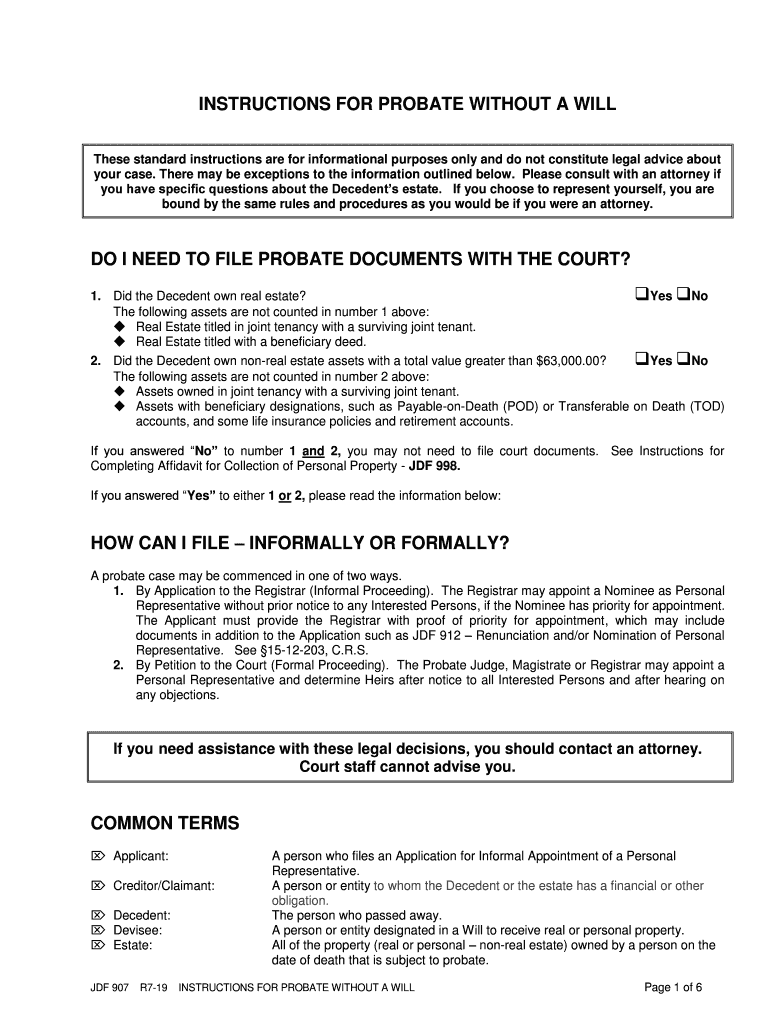
JDF 907 R 7-19 INSTRUCTIONS FOR PROBATE WITHOUT A WIL L Page 1 of 6 INSTRUCTIONS FOR PROBATE WITHOUT A WILL These standard instructions are for informational purposes only and do not constitute legal advice about your case. There may be exceptions to the information outlined below. Please consult with an attorney if you have specific questions about the Decedent’s estate. If you choose to represent yourself, you are bound by the same rules and procedures as you would be if you were an attorney. DO I NEED TO FI LE PROBATE DOCUMENTS WITH THE COURT ? 1. Did the Decedent own real estate? ❑ Yes ❑ No The following assets are not counted in number 1 above: ◆ Real Estate titled in joint tenancy with a surviving joint tenant. ◆ Real Estate titled with a beneficiary deed. 2. Did the Decedent own non -real estate assets with a total value greater than $6 3,000.00 ? ❑ Yes ❑ No The following assets are not counted in number 2 above: ◆ Assets owned in joint tenancy with a surviving joint tenant. ◆ Assets with beneficiary designations, such as Payable -on -Death (POD) or Transf erable on Death (TOD) accounts, and some life insurance policies and retirement accounts . If you answered “ No ” to number 1 and 2, you may not need to file court documents. See Instructions for Completing Affidavit for Collection of Personal Property - JD F 998 . If you answered “ Yes ” to either 1 or 2, please read the information below: HOW CAN I FILE – INFORMALLY OR FORMAL LY? A probate case may be commenced in one of two ways. 1. By Application to the Registrar (Informal Proceeding) . The Registrar may appoint a Nominee as Personal Representative without prior notice to any Interested Persons , if the Nominee has priority for appointment. Th e Applicant must provide the Registrar with proof of priority for appointment , which may include documents in a ddition to the Application such as JDF 912 – Renunciation and/or Nomination of Personal Representative . See §15 -12 -203, C.R.S. 2. By Petition to the Court (Formal Proceeding) . Th e Probate Judge , Magistrate or Registrar may appoint a Personal Representativ e and determine Heirs after notice to all Interested Persons and after hearing on any objections. If you need assistance with th ese legal decision s, you should contact an attorney. Court staff cannot advise you. COMMON TERMS  Applicant: A person who files an Application for Informal Appointment of a Personal Representative .  Creditor/Claimant: A person or entity to whom the Decedent or the estate has a financial or other obligation.  Decedent: The person who passed away.  Devise e: A person or entity designated in a W ill to receive real or personal property.  Estate: All of the property (real or personal – non -real estate ) owned by a person on the date of death that is subject to probate. JDF 907 R 7-19 INSTRUCTIONS FOR PROBATE WITHOUT A WIL L Page 2 of 6  Formal: Opening an estate after prior n otice to Interested Persons.  Heir: Person(s) entitled to the property of the Decedent under statutes of Intestate Succession. See Heirship Tree on page 6.  Informal: Opening an estate without prior notice to Interested Persons.  Interested Person s: Persons identified by Colorado Law who must be given notice of a court proceeding. The term may include heirs, children, spouse, devisees, beneficiaries, creditors, claimants, and persons having priority to serve as personal representative, dependin g on the circumstances.  Intestate: Estate in which the Decedent did not leave a will.  Intestate Succession: By Colorado law, a list of who will inherit the property when someone dies without a W ill. (§15 -11 -101 , et. seq., C.R.S.)  Letters: A document issued by the Court, identifying the authority of the Personal Representative  Nominee: The person seeking appointment as Personal Representative.  Petitioner: A person who files a Petition for Formal Appointment of Personal Representative and/or D etermination of Heirs.  Personal Representative: A person at least 21, resident or non -resident of Colorado , who has been appointed to admini ster the estate of the Decedent ; previously referred to as Executor/Executrix.  Right of Survivorship: Property tha t is owned by two or more people, such that upon the death of one of the co -owners, his or her share passes to the remaining co -owners without the necessity of probate.  Tenants in Common : Property that is owned by two or more people, such that upon the dea th of one of the co -owners, his or her share passes to his or her estate rather than to the remaining co -owners. Probate is necessary.  Testate: Estate in which the Decedent left a will. GENERAL INFORMATION TO FILE YOUR CASE IN PROBATE COURT ◆ If the Decedent resided or was domiciled in a Colorado county, the Application/ Petition must be filed in that county. ◆ If the Decedent resided or was domiciled in another state, the Application/ Petition may be filed in the Colorado County where the Decedent owned property. ◆ The Court cannot act on an Application or Petition before 120 hours have elapsed since the time of death. ◆ The nominated Personal Representative must be 21 years of age or older. ◆ A creditor cannot file a n Application/ Petition for Appointment of Personal Representative until 45 days have elapsed from the date of death. ◆ For additional information, please review §§15 -12-101 through 110 2, C.R.S. ◆ If you have a disability and need a reasonable accommodation to access the courts, please contact yo ur local ADA Coordinator. Contact information can be obtained from the following website: http://www.courts.state.co.us/Administration/HR/ADA/Coordinator_List.cfm If you do not understand this information, please contact an attorney. FEES A filing fee of $1 99 .00 is required . If you are unable to pay, you must complete the Motion to File without Payment and Supporting Financial Affidavit (JDF 205) and submit it t o the Court. Once you submit the completed JDF 205 form and a blank Order (JDF 206), the Court will decide whether you need to pay the filing fee. Other fees that a party to the case may encounter are as follows: ❑ Certification of Orders and Letters $20 .00 ❑ Copy of Documents $ .75 per page JDF 907 R 7-19 INSTRUCTIONS FOR PROBATE WITHOUT A WIL L Page 3 of 6 FORMS To access a form online go to www.courts.state.co.us and click on the “Forms” tab . The packet/forms are available in PDF or WORD by selecting Probate - Decedent’s Estate - New Case - Without a Will. You may complete a form online and print or you may print it and type or print legibly in black ink. Read these instructions carefully to determine what forms you may need . You h ave two choices on how to file. You can file informally or formally as described above. The table below identifies the forms that you may need to open the estate. Informal Formal JDF 91 6 – Application for Informal Appointment of Personal Representative JDF 922 - Petition for Adjudication of Intestacy and Formal Appointment of Personal Representative JDF 911 - Acceptance of Appointment JDF 911 - Acceptance of Appointment JDF 912 - Renunciation and/or Nomination of Personal Representative JDF 912 - Renu nciation and/or Nomination of Personal Representative JDF 721 - Irrevocable Power of Attorney JDF 721 - Irrevocable Power of Attorney JDF 711 - Notice of Hearing JDF 917 - Order for Informal Appointment of Personal Representative JDF 923 - Order of Intestacy, Determination of Heirs and Formal Appointment of Personal Representative JDF 915 - Letters of Administration JDF 915 - Letters of Administration STEPS TO FILING YOUR CASE Step 1: Complete Forms. The caption must be completed on all forms filed. Be sure to make a c opy for your own records of all of the forms you file with the Court. ❑District Court ❑Denver Probate Court __________________________________ County, Colorado Court Address: ▲ COURT USE ONLY ▲ In the Matter of the E state of: Deceased Attorney or Party Without Attorney (Name and Address): Phone Number: Email: FAX Number: Atty. Reg. #: Case Number: Division: Courtroom: NAME OF FORM ❑ Application for Informal Appointment of Personal Representative (JDF 91 6). or ❑ Petition for Adjudication of Intestacy and Formal Appointment of Personal Representative (JDF 9 22 ). ❑ Complete all applicable sections on the form. ❑ All heirs living on the Decedent’s date of death must b e listed . (§15 -11 -10 1, C.R.S. to §15 -11 -108, C.R.S .) Create a family tree, if necessary. See heirship tree on page 6 of the Instructions. Use the following as a guide when completing paragraph 8. Name Address (or date of death) Age, only if Minor Relation ship (e.g. spouse , child , brother, guardian for spouse, etc.) John Smith, Date of Death 10.15.08 N/A Spouse of Decedent Amanda Smith 123 South Street, Denver, CO 80123 N/A Sister of Decedent Joe Smith, incapacitated 456 North Street, Denver, CO 80123 N/A Brother of Decedent Robert Jones 850 Clark Street, Denver, CO 80266 N/A Guardian for Joe Smith Sandy Clark Date of Death 10.1.05 N/A Sister of John Smith John Clark 989 North Avenue, Paris, CA 90222 12 Nephew, son of Sandy Clark JDF 907 R 7-19 INSTRUCTIONS FOR PROBATE WITHOUT A WIL L Page 4 of 6 ❑ All addresses must be complete and include zip codes. ❑ List all names previously used by the Decedent in the caption, for example Robert Smith aka Bob Smith, aka Robert A. Smith, aka Robert Aaron Smith. This is important because assets cannot be released if the name on a deed, bank account, etc. is different f rom the name identified in the Letters. ❑ This form must be signed and dated in the presence of a Court Clerk or Notary Public. ❑ Acceptance of Appointment (JDF 911 ). ❑ The Nominee should complete the form and sign and date. ❑ Renunciation and/or Nomination of Personal Representative ( JDF 912 ). ❑ To file informally, file this form for a ny heir who ha s priority for appointment. To file formally, file this form for any heir who ha s priority for appointment or give notice of hearing to such persons. ❑ If there a re heirs under the age of 18, the Court may require a Conservator to be appointed. ❑ This form must be signed and dated in the presence of a Court Clerk or Notary Public. ❑ Irrevocable Power of Attorney ( JDF 721 ). ❑ The nominated Personal Representative mu st complete this form and sign it before a Notary Public if he or she lives out -of-state. ❑ Notice of Hearing (JDF 711 ). ❑ For Formal Probate only, obtain a hearing date by contacting the Court. ❑ Mail or d eliver the completed Notice of Hearing and al l documents filed with the Court to the persons listed in paragraph 9 of the Petition. ❑ If the address of any person listed in paragraph 9 or the identity of any heir is unknown, notice must be given by publication (JDF 716). ❑ The Court may require notic e to the Colorado Attorney General’s Office on behalf of any heir whose address or identity is unknown. ❑ Order for Informal Appointment of Personal Representative (JDF 917 ). or ❑ Order of Intestacy , Determination of Heirs and Formal Appointment of Perso nal Representative (JDF 923). ❑ Complete all applicable sections in preparation for the Court’s signature. Identify and calculate each heir’s share of the estate in paragraph 8. See §15 -11 -101, C.R.S. through §15 -11 -114, C.R.S. ❑ Letters of Administration (JDF 915 ). ❑ Complete only the caption on th is form. The Court will complete the remainder of the form. ❑ Letters are evidence of the Personal Representative’s appointment and proof of authority to act on behalf of the estate. ❑ More than one set of certifie d Letters may be needed during the administration of the estate. Provide the Court with the number of Letters that are needed immediately. Third parties may require Letters to have been certified within the past 60 days . Letters may be requested as needed . ❑ The cost to certify Letters is $20 .00 for certification and $ .75 per copy . Step 2: You are rea dy to file your papers with the Court. Provide the Court with the documents completed in Step 1 above and pay the $ 1 99 .00 filing fee . JDF 907 R 7-19 INSTRUCTIONS FOR PROBATE WITHOUT A WIL L Page 5 of 6 Step 3: Requirem ents after the Court appoints a Personal Representative . It is the responsibility of the Personal Representative to administer the estate. This includes collecting assets , valuing the assets, paying claims and distributing the remaining assets in accordan ce with the law . In addition, the Personal Representative is required to complete the forms listed below: ❑ Information of Appointment (JDF 940). ❑ This form informs heirs that the Personal Representative has been appointed and they may contact th e Personal Representative with their questions about the estate. ❑ This completed form must be sent to all heirs within 30 days from appointment. If the address or identity of any heir is unknown, this form must also be sent to the Colorado Attorney General ’s Office. ❑ This form , including the completed Certificate of Service, must be filed with the Court. ❑ Notice to Creditors by Publication (JDF 943 ). ❑ This form is used to notify any potential creditors of the Decedent’s estate of the deadline for fi ling any claims. ❑ Unless one year or more has elapsed since the death of the Decedent, the Personal Representative must publish notice to creditors in a local newspaper once a week for three consecutive weeks. ❑ Complete the form and provide to a local new spaper. ❑ The newspaper will provide you with Proof of Publication. File the Proof of Publication with the Court. ❑ Notice to Creditors by Mail or Delivery (JDF 944 ). ❑ This form is used to notify any known and unpaid creditors of the Decedent’s estate of the deadline for filing any claims. ❑ Unless one year or more has elapsed since the death of the Decedent, a Personal Representative m ust send this form to any known creditors . ❑ Decedent’s Estate Inventory (JDF 941). ❑ This form must be co mpleted within three months from the date of appointment. ❑ Identify all assets and encumbrances. ❑ Send the completed form to Interested Persons who request it or file the original with the Court. ❑ Send a copy of the Inventory to the Attorney General, if heir s are unknown or if there is not a person qualified to receive the distribution. ❑ This form does not need to be filed with the Court at this time. ❑ Interim/Final Accounting (JDF 942). ❑ Send the completed form to Interested Persons who request it. ❑ This fo rm does not need to be filed with the Court at this time. The Colorado Bar Association has various brochures regarding estate administration at www.cobar.org Step 4: Closing the Estate. The Personal Representative must complete forms to close an estate. Instructions are available. To determine which forms to file and to access the forms and instructions online go to www.courts.state.co.us and click on the “Forms” tab and then select Probate. JDF 907 R 7-19 INSTRUCTIONS FOR PROBATE WITHOUT A WIL L Page 6 of 6 Heirs are those people who are entitled by statute to the decedent’s property when there is no will (or when the will does not dispose of all assets). If none of the above , then: If none, then: IMPORTANT NOTE: If any person who would be an heir died before decedent, then their children substitute for them and become the decede nt’s heirs. Therefore, grandchildren, great -grandchildren, nieces, nephews, etc., must be considered when determining heirship. Heirs must survive the decedent by at least 120 hours. If decedent was married at the time of death, the sp ouse is an heir, unless the decedent is survived by a person with the right to inherit property pursuant to a designated beneficiary agreement. In that case, the designated beneficiary is an heir. See §15 -11 - 102.5. If dec edent had children (or descendants of pre -deceased children), the children/descendants are also heirs, unless all of them are children/descendants of the surviving spouse AND the surviving spouse does not have any surviving children/descendants with any other person. If the spouse is not an heir because the decedent is survived by a designated beneficiary, then the children/descendants are heirs regardless of their relationship to any surviving spouse. Decedent’s brothers and sisters (and descendants of any pre -deceased brothers and sisters) are the heirs. Decedent's grandparents, or if both grandparents on either side (maternal or paternal) are deceased, the descendants of the pre -deceased grandparents are also heirs. And If no descendants survive the decedent, surviving parents are also heirs, unless the decedent is survived by a designated beneficiary. And

Valuable assistance on preparing your ‘Trusts Estates Wills Probate Without A Will Colorado Judicial Branch’ online

Are you fed up with the inconvenience of handling paperwork? Look no further than airSlate SignNow, the premier electronic signature solution for individuals and organizations. Bid farewell to the lengthy routine of printing and scanning documents. With airSlate SignNow, you can effortlessly complete and sign documents online. Utilize the robust features integrated into this user-friendly and affordable platform and transform your strategy to document management. Whether you need to approve forms or collect eSignatures, airSlate SignNow simplifies it all with just a few clicks.

Follow this comprehensive guide:

  1. Log into your account or sign up for a complimentary trial with our service.
  2. Click +Create to upload a file from your device, cloud storage, or our form library.
  3. Open your ‘Trusts Estates Wills Probate Without A Will Colorado Judicial Branch’ in the editor.
  4. Click Me (Fill Out Now) to prepare the form on your end.
  5. Insert and designate fillable fields for other users (if necessary).
  6. Continue with the Send Invite settings to request eSignatures from others.
  7. Download, print your version, or convert it into a reusable template.

No need to worry if you need to collaborate with your colleagues on your Trusts Estates Wills Probate Without A Will Colorado Judicial Branch or send it for notarization—our platform provides you with everything necessary to accomplish such tasks. Register with airSlate SignNow today and elevate your document management to a new level!

Here is a list of the most common customer questions. If you can’t find an answer to your question, please don’t hesitate to reach out to us.

Need help? Contact Support

The best way to complete and sign your trusts estates wills probate without a will colorado judicial branch form


Save time on document management with airSlate SignNow and get your trusts estates wills probate without a will colorado judicial branch form eSigned quickly from anywhere with our fully compliant eSignature tool.

How to Sign a PDF Online How to Sign a PDF Online

How to fill out and sign documents online

In the past, dealing with paperwork took pretty much time and effort. But with airSlate SignNow, document management is fast and easy. Our powerful and user-friendly eSignature solution lets you easily fill out and electronically sign your trusts estates wills probate without a will colorado judicial branch form online from any internet-connected device.

Follow the step-by-step guide to eSign your trusts estates wills probate without a will colorado judicial branch form template online:

  • 1.Sign up for a free trial with airSlate SignNow or log in to your account with password credentials or SSO authentication.
  • 2.Click Upload or Create and add a form for eSigning from your device, the cloud, or our form collection.
  • 3.Click on the file name to open it in the editor and utilize the left-side menu to fill out all the blank areas appropriately.
  • 4.Place the My Signature field where you need to approve your sample. Type your name, draw, or import a picture of your handwritten signature.
  • 5.Click Save and Close to accomplish modifying your completed form.

After your trusts estates wills probate without a will colorado judicial branch form template is ready, download it to your device, save it to the cloud, or invite other parties to eSign it. With airSlate SignNow, the eSigning process only requires a couple of clicks. Use our powerful eSignature solution wherever you are to handle your paperwork effectively!


How to Sign a PDF Using Google Chrome How to Sign a PDF Using Google Chrome

How to complete and sign documents in Google Chrome

Completing and signing documents is easy with the airSlate SignNow extension for Google Chrome. Adding it to your browser is a fast and efficient way to deal with your forms online. Sign your trusts estates wills probate without a will colorado judicial branch form template with a legally-binding electronic signature in just a few clicks without switching between tools and tabs.

Follow the step-by-step guidelines to eSign your trusts estates wills probate without a will colorado judicial branch form in Google Chrome:

  • 1.Navigate to the Chrome Web Store, locate the airSlate SignNow extension for Chrome, and install it to your browser.
  • 2.Right-click on the link to a document you need to sign and choose Open in airSlate SignNow.
  • 3.Log in to your account using your credentials or Google/Facebook sign-in buttons. If you don’t have one, sign up for a free trial.
  • 4.Utilize the Edit & Sign menu on the left to fill out your template, then drag and drop the My Signature option.
  • 5.Add an image of your handwritten signature, draw it, or simply type in your full name to eSign.
  • 6.Verify all data is correct and click Save and Close to finish modifying your form.

Now, you can save your trusts estates wills probate without a will colorado judicial branch form sample to your device or cloud storage, email the copy to other people, or invite them to electronically sign your document with an email request or a secure Signing Link. The airSlate SignNow extension for Google Chrome improves your document processes with minimum time and effort. Try airSlate SignNow today!


How to Sign a PDF in Gmail How to Sign a PDF in Gmail How to Sign a PDF in Gmail

How to fill out and sign paperwork in Gmail

Every time you receive an email with the trusts estates wills probate without a will colorado judicial branch form for approval, there’s no need to print and scan a document or save and re-upload it to a different tool. There’s a better solution if you use Gmail. Try the airSlate SignNow add-on to promptly eSign any documents right from your inbox.

Follow the step-by-step guide to eSign your trusts estates wills probate without a will colorado judicial branch form in Gmail:

  • 1.Visit the Google Workplace Marketplace and find a airSlate SignNow add-on for Gmail.
  • 2.Set up the tool with a related button and grant the tool access to your Google account.
  • 3.Open an email with an attachment that needs signing and utilize the S sign on the right sidebar to launch the add-on.
  • 4.Log in to your airSlate SignNow account. Choose Send to Sign to forward the document to other people for approval or click Upload to open it in the editor.
  • 5.Put the My Signature field where you need to eSign: type, draw, or upload your signature.

This eSigning process saves time and only requires a couple of clicks. Use the airSlate SignNow add-on for Gmail to adjust your trusts estates wills probate without a will colorado judicial branch form with fillable fields, sign paperwork legally, and invite other parties to eSign them al without leaving your inbox. Boost your signature workflows now!


How to Sign a PDF on a Mobile Device How to Sign a PDF on a Mobile Device How to Sign a PDF on a Mobile Device

How to complete and sign forms in a mobile browser

Need to rapidly submit and sign your trusts estates wills probate without a will colorado judicial branch form on a mobile phone while working on the go? airSlate SignNow can help without the need to install additional software programs. Open our airSlate SignNow tool from any browser on your mobile device and add legally-binding electronic signatures on the go, 24/7.

Follow the step-by-step guidelines to eSign your trusts estates wills probate without a will colorado judicial branch form in a browser:

  • 1.Open any browser on your device and follow the link www.signnow.com
  • 2.Create an account with a free trial or log in with your password credentials or SSO option.
  • 3.Click Upload or Create and add a file that needs to be completed from a cloud, your device, or our form collection with ready-made templates.
  • 4.Open the form and fill out the blank fields with tools from Edit & Sign menu on the left.
  • 5.Put the My Signature field to the form, then enter your name, draw, or upload your signature.

In a few simple clicks, your trusts estates wills probate without a will colorado judicial branch form is completed from wherever you are. As soon as you're finished editing, you can save the document on your device, generate a reusable template for it, email it to other people, or ask them to eSign it. Make your documents on the go fast and effective with airSlate SignNow!


How to Sign a PDF on iPhone How to Sign a PDF on iPhone

How to complete and sign documents on iOS

In today’s business community, tasks must be done rapidly even when you’re away from your computer. Using the airSlate SignNow mobile app, you can organize your paperwork and sign your trusts estates wills probate without a will colorado judicial branch form with a legally-binding eSignature right on your iPhone or iPad. Install it on your device to conclude contracts and manage documents from anywhere 24/7.

Follow the step-by-step guide to eSign your trusts estates wills probate without a will colorado judicial branch form on iOS devices:

  • 1.Open the App Store, find the airSlate SignNow app by airSlate, and set it up on your device.
  • 2.Launch the application, tap Create to upload a template, and choose Myself.
  • 3.Select Signature at the bottom toolbar and simply draw your signature with a finger or stylus to eSign the form.
  • 4.Tap Done -> Save right after signing the sample.
  • 5.Tap Save or take advantage of the Make Template option to re-use this document in the future.

This process is so simple your trusts estates wills probate without a will colorado judicial branch form is completed and signed in just a few taps. The airSlate SignNow app works in the cloud so all the forms on your mobile device are kept in your account and are available any time you need them. Use airSlate SignNow for iOS to enhance your document management and eSignature workflows!


How to Sign a PDF on Android How to Sign a PDF on Android

How to fill out and sign paperwork on Android

With airSlate SignNow, it’s easy to sign your trusts estates wills probate without a will colorado judicial branch form on the go. Set up its mobile app for Android OS on your device and start enhancing eSignature workflows right on your smartphone or tablet.

Follow the step-by-step guide to eSign your trusts estates wills probate without a will colorado judicial branch form on Android:

  • 1.Open Google Play, find the airSlate SignNow app from airSlate, and install it on your device.
  • 2.Log in to your account or register it with a free trial, then upload a file with a ➕ button on the bottom of you screen.
  • 3.Tap on the imported document and choose Open in Editor from the dropdown menu.
  • 4.Tap on Tools tab -> Signature, then draw or type your name to electronically sign the template. Complete empty fields with other tools on the bottom if needed.
  • 5.Utilize the ✔ key, then tap on the Save option to finish editing.

With an easy-to-use interface and full compliance with major eSignature requirements, the airSlate SignNow app is the perfect tool for signing your trusts estates wills probate without a will colorado judicial branch form. It even operates without internet and updates all record modifications once your internet connection is restored and the tool is synced. Fill out and eSign documents, send them for eSigning, and create multi-usable templates whenever you need and from anywhere with airSlate SignNow.

Sign up and try Trusts estates wills probate without a will colorado judicial branch form
  • Close deals faster
  • Improve productivity
  • Delight customers
  • Increase revenue
  • Save time & money
  • Reduce payment cycles

