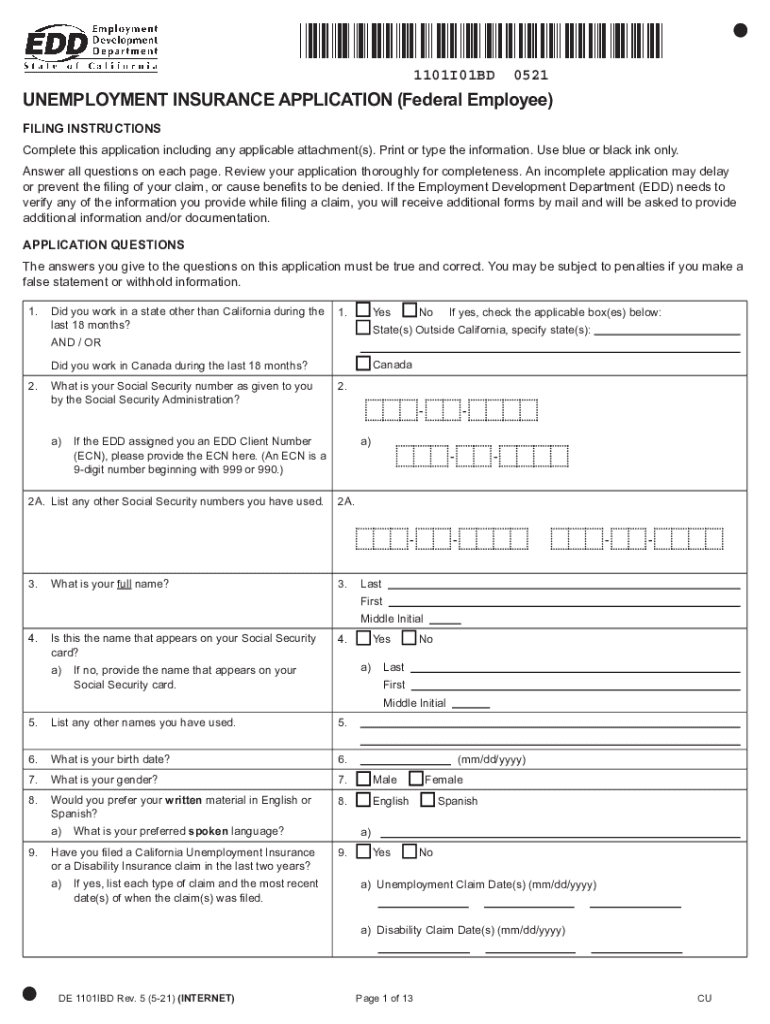
Unemployment Insurance Application for Federal Employees
What this application is and who it serves
Why a complete, accurate application matters
A properly completed application speeds eligibility determinations, prevents overpayments, and reduces the need for follow-up verification. Accurate entries help establish benefit amounts and support timely weekly certifications so payments start without avoidable delay.
Who typically completes and reviews this application
Each party plays a role: the claimant supplies accurate facts, the agency provides separation details, and the state office adjudicates and pays benefits.
- Separated federal employees filing initial claims and weekly certifications.
- Agency human resources or personnel officers preparing separation documentation.
- State unemployment adjudicators and benefit examiners reviewing eligibility.
Stepwise completion checklist
-
01Gather documents: Collect ID, separation letter, and recent pay statements.
-
02Complete fields: Enter required data carefully, using MM/DD/YYYY where requested.
-
03Verify identity: Attach scanned ID or follow state identity-proofing steps.
-
04Submit claim: Send via your state portal or accepted methods; retain confirmation.
Configuring an online application workflow
| Field | Configuration |
|---|---|
| Required Fields | Make SSN, name, separation date mandatory with format checks. |
| Conditional Fields | Show employer protest fields only if an employer dispute exists. |
| Attachments | Allow PDF/JPG pay stubs and separation notices up to 10 MB. |
| Notifications | Send confirmations and state-case updates by email or SMS. |
From form to benefits: the submission path
-
Prepare package: Complete application and attach required documents.
-
Sign and verify: Confirm identity and capture signature with timestamp.
-
Submit to state: File through the state unemployment portal or accepted channels.
-
State adjudication: State office reviews, requests additional info, and issues determination.
Technical considerations for eSubmission and eSignatures
Ensure the platform preserves an audit trail (timestamps, IP, signer events) and stores records in an encrypted form to satisfy retention and evidentiary needs.
- File formats: Accept PDF and DOCX for completed forms and JPEG/PNG for IDs.
- Authentication: Support email link, SMS code, or stronger identity-proofing (KBA or credential analysis).
- Integrations: Integrate with state portals, HR systems, or document storage like Google Workspace.
Timing: filing, certifications, and appeals
Initial claim filing:
File as soon as possible after separation to begin benefit consideration and avoid lost weeks.
Weekly or biweekly certifications:
Complete certifications on your state's schedule to maintain benefit eligibility and payments.
Appeal deadlines:
Appeal timeframes vary by state; commonly 10–30 days to file an appeal after a denial.
Employer protest response:
Provide requested evidence promptly to avoid default findings against the claimant.
Reporting changes:
Report re-employment, earnings, or availability changes immediately to prevent overpayments.
Risks and consequences of errors or omissions
Common pitfalls to avoid
- Entering an incorrect Social Security number causes identity verification failures and claim rejections.
- Omitting the employer's exact agency name or payroll office prolongs wage verification and adjudication.
- Failing to upload or attach a separation letter commonly triggers requests for additional documentation.
- Missing weekly certifications or failing to report earnings leads to payment suspensions or overpayment notices.
eSignature vendor pricing and capabilities for processing forms
| signNow | DocuSign | Adobe Sign | PandaDoc | HelloSign | |
|---|---|---|---|---|---|
| Starting Price | $8/user/mo | $15/user/mo | $14/user/mo | $19/user/mo | $15/user/mo |
| Free Trial | 7-day trial | Varies | Varies | Varies | Varies |
| Bulk Send | Yes | Yes | Yes | Yes | No |
| Audit Trail | Yes | Yes | Yes | Yes | Yes |
| HIPAA Compliant | Yes | Yes | Yes | No | No |
| Envelope Cap | No cap | 100 env/user/yr | Varies | Varies | Varies |
Practical filing examples
Federal Employee Claim
A separated employee gathers separation letter and pay stubs
- uploads documents to the state portal
- adjudicator verifies wages and issues benefits after a brief eligibility check, with weekly certifications processed electronically.
Agency-Assisted Filing
An HR officer completes the application with the employee's authorization
- attaches agency separation notice and contact info
- the state accepts the claim and requests no further documentation, speeding payment start.
Practical tips for accurate, efficient submissions
Frequently asked questions and quick answers
-
Can I sign the application electronically?
Yes. Electronic signatures are generally valid under the ESIGN Act (15 U.S.C. ch. 96) and UETA where adopted. Ensure the eSignature method captures intent, attribution, and a retrievable record.
-
What documents must I attach?
Typically include a separation letter, recent pay stubs, and government ID. Requirements vary by state; attaching these common items reduces requests for additional evidence.
-
How do I correct an error after submission?
Contact your state unemployment office immediately. Many states allow in-portal edits or will accept amended filings and supporting affidavits to correct material mistakes.
-
How long until I receive a determination?
Processing times vary widely by state and caseload; expect an initial adjudication in days to several weeks. Timely responses to requests accelerate decisions.
-
Is notarization required for this application?
Not generally. Most state unemployment claims do not require notarization; notarized affidavits are only requested in limited contested cases.
-
How do I appeal a denial?
File an appeal within the state-specific deadline shown on the denial notice. Appeals procedures and deadlines differ by state, and representation is permitted in many jurisdictions.