Washington DUI Form
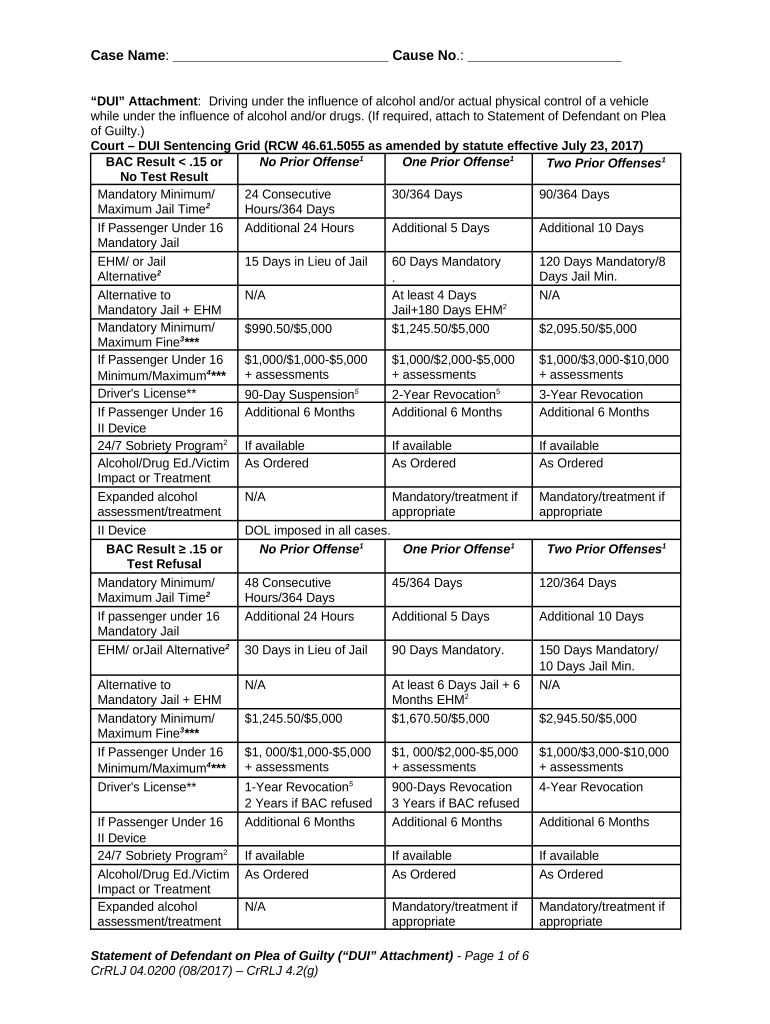
What the Washington DUI Form Is and when it applies
Why accurate completion matters
Accurate completion preserves procedural rights, starts statutory timelines, and ensures evidence and administrative records are available for hearings. Clear, complete forms reduce processing delays and minimize the risk of administrative defaults or unnecessary extension of suspension periods.

Who interacts with the Washington DUI Form
Law enforcement, Department of Licensing staff, prosecutors, defense attorneys, court clerks, and drivers commonly interact with the Washington DUI Form in administrative or judicial processes.
- Drivers — the accused individual who receives notice, may request an administrative hearing or submit a written response.
- Law enforcement — officer completes arrest sections and forwards reports to the prosecutor and Department of Licensing.
- Administrative staff — Department of Licensing records, schedules hearings, and issues suspension notices.
Organizations that manage public safety, court processing, and defendant representation rely on consistent completion for procedural fairness and accurate records.
Step-by-step completion checklist
-
01Record Incident: Enter date, time, location, and officer information accurately.
-
02Chemical Results: Record BAC numbers or refusal, and attach test printouts.
-
03Driver Info: Full name, DOB, address, and driver license number.
-
04Submit & Track: File with Department of Licensing and retain stamped copy.
Configuring an online completion workflow
| Field | Configuration |
|---|---|
| Authentication | Email link with optional SMS code |
| Required Fields | Full name, DOB, license, test result required |
| Attachments | Upload test printout, arrest report, photos |
| Routing | Auto-file to Department of Licensing and copy counsel |
Where to file and how the submission flows
-
Officer files: Send original report to prosecutor and administrative filing office
-
Prosecutor review: Evaluate evidence and confirm administrative charges or decline
-
Department of Licensing: Enter suspension action and issue notice to driver
-
Driver receipt: Driver receives notice with instructions to request hearing
Technical and record requirements for eSubmission
Electronic filing and eSignature for Washington DUI Forms require compatible PDF, secure transport, and accepted authentication methods per state policy.
- File formats: PDF/A or fillable PDF recommended
- Authentication: Email link, SMS code, or RON where permitted
- Record retention: Store signed copies with audit trail
Confirm Washington-specific acceptance of electronic signatures with the Department of Licensing or local court. When using remote notarization, verify compliance with Washington's RON rules and retain audio‑video records as required.
Timelines, deadlines, and what to expect
Hearing request window:
Check the notice for the exact deadline; missing it may forfeit review.
Processing time:
Administrative processing timelines vary by office and case complexity.
Evidence submission:
Provide supporting documents before the hearing per notice instructions.
Appeal periods:
Appeal rights and deadlines differ between administrative and judicial appeals.
Certificate issuance:
Allow time for official signed certificates and records to be posted.
Key milestones from arrest to final order
Arrest and report
Officer documents the stop and files required reports with prosecutor.
Administrative notice
Department issues notice of suspension or action to driver.
Hearing or waiver
Driver requests hearing or accepts administrative order; evidence submitted.
Final order
Decision issued; follow-up steps like interlock or reinstatement begin.
Common mistakes to avoid when preparing the form
- Using an outdated or nonstandard form version misses required fields and can cause rejection or additional requests for information from the Department of Licensing.
- Entering inconsistent personal data—different name spellings, incorrect birth dates, or wrong license numbers—creates identity verification problems and may delay hearings or trigger subpoenas.
- Failing to attach available supporting documents such as chemical test printouts, arrest reports, or hospital records reduces the ability to contest evidence effectively at administrative hearings.
- Relying on insecure or unaccepted eSignature methods without confirming state acceptance can render the signature invalid and lead to rejection or re-execution requirements.
Penalties and risks of incorrect or missing information
Pricing and feature snapshot for common eSignature providers
| signNow | DocuSign | Adobe Sign | PandaDoc | HelloSign | |
|---|---|---|---|---|---|
| Starting Price | $8/user/mo | $15/user/mo | $14/user/mo | $19/user/mo | $15/user/mo |
| Free Trial | Yes, 7-day free trial | Check vendor | Check vendor | Check vendor | Check vendor |
| Bulk Send | Yes | Yes | Yes | Yes | No |
| Audit Trail | Yes | Yes | Yes | Yes | Yes |
| HIPAA Compliant | Yes | Yes | Yes | No | No |
Frequently asked questions about the Washington DUI Form
-
Can I e-sign the Washington DUI Form?
Electronic signatures are generally acceptable if state agencies allow them and the signature meets the ESIGN Act and UETA four-prong validity test: intent, consent, attribution, and record retention. Verify with the Department of Licensing or the issuing agency before relying on e-signature alone.
-
Is notarization required for DUI-related affidavits?
Not all DUI forms require notarization; some sworn statements or proof affidavits do. When notarization is demanded, Washington may permit Remote Online Notarization subject to state rules. Confirm the specific filing instructions on the notice or with the clerk's office.
-
What happens if I miss the deadline?
Missing a hearing or filing deadline can result in administrative default, license suspension becoming effective without contest, and loss of opportunity to present evidence. Seek counsel promptly; some jurisdictions permit late relief only for narrow exceptional circumstances.
-
Can I submit supporting evidence electronically?
Many agencies accept electronic attachments such as PDF test printouts or photos if submitted per file-size and format rules. Confirm accepted file types, maximum sizes, and secure transmission requirements with the receiving office to ensure attachments are accepted and linked to your record.
-
Are electronic notarizations valid in Washington?
Washington has established rules for Remote Online Notarization; validity depends on compliance with identity-proofing, audio‑video recording, and technology standards. Verify current RON statutes or consult the state notary commission before relying on a remote notary for DUI-related sworn documents.
-
How does ESIGN affect evidence admissibility?
ESIGN (15 U.S.C. §7001) confirms electronic signatures' legal effect for interstate transactions when intent, consent, attribution, and retention are present. Admissibility in court depends on state rules, evidentiary standards, and preserved audit trails demonstrating signer identity and intent.