Establishing secure connection…Loading editor…Preparing document…

Business Plan Outline

This template is fully customizable. Edit the text, fill out the fields, and send it for signature. Give it a try!
Business Plan Outline

What a Business Plan Outline Is and When to Use It

A Business Plan Outline is a structured template that organizes the core elements of a business plan—executive summary, market analysis, operations, product or service description, marketing strategy, and financial projections. It is intended to guide founders, managers, and advisors through consistent, comparable planning documents that support internal decision-making, investor review, loan applications, and grant submissions. The outline itself is not a filing requirement but a practical framework to produce a full plan used by lenders, investors, incubators, and internal leadership for strategy and measurements.

Why Use a Standardized Outline for Your Plan

A consistent Business Plan Outline reduces omissions, speeds preparation, and makes plans easier for third parties to evaluate. It clarifies assumptions, highlights risks, and improves the quality of financial forecasts used in funding or lending decisions.

Why Use a Standardized Outline for Your Plan

Who Typically Prepares and Reviews This Outline

Different stakeholders prepare or consume business plans for specific purposes—fundraising, internal strategy, loan underwriting, or grant applications.

  • Startup founders and co‑founders preparing investor summaries and pitch materials.
  • Small business owners applying for loans, grants, or growth capital.
  • Company managers and advisors aligning budgets, KPIs, and operational plans.

Use the outline that matches your purpose: investor-focused plans stress market and returns; lender-focused plans emphasize cash flow and collateral.

Essential Sections to Include in Your Outline

A professional Business Plan Outline groups content so reviewers can find critical facts quickly. Each section should be concise, supported by evidence, and cross-referenced to financials or appendices where appropriate.

Executive Summary

Concise overview of opportunity, business model, funding need, and key financial metrics that gives reviewers a quick decision snapshot.
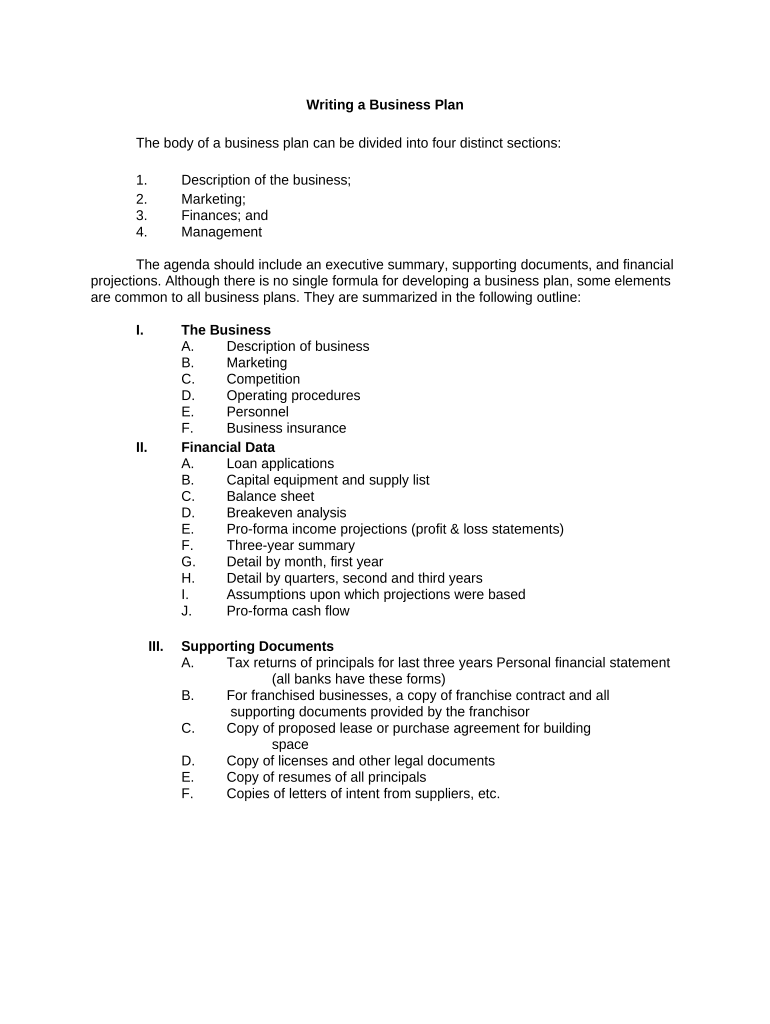
Market Analysis

Evidence-based description of target customers, market size, growth drivers, competitive landscape, and the sources used for market estimates.

Organization

Legal entity, ownership structure, key management biographies, and role responsibilities tied to execution of the plan.

Products / Services

Clear description of offerings, pricing rationale, unique value propositions, and product roadmaps or regulatory dependencies.

Financial Plan

Projected income statement, cash flow, and balance sheet for at least three years, with assumptions and sensitivity analyses.

Appendices

Supporting documents such as contracts, résumés, licenses, detailed forecasts, market research, and legal exhibits.

Step-by-Step: From Outline to Complete Plan

Follow these sequential steps to convert the outline into a deliverable business plan that stakeholders can evaluate.

  • 01
    Gather Inputs: Collect historical financials and research sources.
  • 02
    Draft Sections: Complete each outline section with concise narratives.
  • 03
    Build Projections: Model monthly cash flow and key metrics.
  • 04
    Review & Finalize: Validate assumptions and prepare appendices.

How to Configure an Online Template Workflow

Set up a repeatable template and signer workflow to share drafts and capture approvals electronically.

Field Configuration
Document Format PDF or DOCX accepted; preserve tables and formulas.
Template Name Use a consistent title with version number.
Signer Order Specify sequential or parallel review roles.
Authentication Email, SMS code, or stronger verification as required.

Typical Digital Review and Approval Flow

A simple online flow reduces turnaround time and preserves an audit trail for investor or lender review.

  • Prepare: Upload outline, insert fields, and attach exhibits.
  • Share: Invite reviewers with defined roles and deadlines.
  • Authorize: Reviewers approve and sign with documented intent.
  • Archive: Save signed copy with audit trail and attachments.

Technical Requirements for Secure e‑Submission

Choose a platform that supports common document formats, audit trails, and the authentication level your stakeholders require.

  • Supported Formats: PDF, DOCX, and XLSX for forecasts.
  • Integrations: CRM and cloud storage connectors reduce manual uploads.
  • Security: TLS in transit and AES‑256 at rest.

Ensure the chosen platform can export signed PDFs with certificates, retain revision history, and integrate with your document management systems for long‑term storage and auditability.

Common Preparation Pitfalls to Avoid

  • Unrealistic revenue or margin assumptions that lack documented sources and sensitivity testing, undermining credibility.
  • Incomplete appendices or missing signed contracts that lenders or investors expect to verify claims in the plan.
  • Inconsistent names or legal entity details between the plan, filings, and tax records, causing administrative or funding delays.
  • Poor version control when multiple contributors edit the plan, resulting in contradictory financials or outdated assumptions.

Typical eSignature Vendor Pricing and Capabilities

Comparison of entry‑level costs and common capabilities for eSignature providers relevant to signing and distributing business plans.

signNow DocuSign Adobe Sign PandaDoc HelloSign
Starting Price $8/user/mo $15/user/mo $14/user/mo $19/user/mo $15/user/mo
Free Trial 7-day trial Varies Varies Varies Varies
Bulk Send Yes Yes Yes Yes No
Audit Trail Yes Yes Yes Yes Yes
HIPAA Compliant Yes Yes Yes No No

Security and Compliance Considerations for Plan Documents

Encryption: TLS 1.2/1.3 in transit; AES-256 at rest
Audit Trail: Record timestamps, IPs, and signer actions
Access Controls: Role-based permissions and granular sharing
Authentication: Email, SMS OTP, or stronger methods
HIPAA Support: BAA required for PHI-bearing documents
Certifications: SOC 2 Type II and ISO 27001 available

Practical Risks of an Inaccurate Plan

Funding Denial: Lenders or investors may reject applications
Contractual Liability: Misstated obligations can create disputes
Tax Exposure: Incorrect financials may trigger IRS review
Reputational Harm: Inconsistencies erode stakeholder trust
Data Loss: Poor storage risks unauthorized disclosure
Regulatory Noncompliance: Missing disclosures may violate sector rules

Practical Tips for Accurate, Efficient Completion

Adopt consistent data sources, version control, and a clear review process to reduce rework and improve credibility with reviewers.

Cite Your Sources
Link market size and industry metrics to reputable sources and record those citations in an appendix for reviewer verification.
Use Conservative Projections
Model a downside scenario as well as base case and document customer acquisition assumptions and conversion rates explicitly.
Keep Financials Reconciled
Ensure that income, cash flow, and balance sheet tie together and that assumptions in narratives match spreadsheet inputs.
Control Versions
Use dated filenames and a single source template to avoid conflicting figures when multiple contributors edit the plan.

Real-World Examples of Digital Document Use

Select examples show how teams use electronic workflows to share and finalize strategic documents when stakeholders are remote.

Optica Ventures LLC

Brian Fitzgibbons, COO, used digital sharing for investor review

  • The interface is simple and easy-to-use for our team; more importantly, it is just as easy for our customers.
  • Resulting faster review cycles helped the team iterate projections and close initial investor conversations more quickly than prior manual exchanges.

Martin Properties

Tim Martin, Founder, processed agreements online for compliance

  • I can process and execute all of these documents online with 100% compliance and built-in security. Whether on mobile or working offline, I can get forms back to their necessary parties efficiently.
  • This reduced turnaround time and ensured signed project plans and funding agreements were stored with auditable trails.

Key Milestones from Outline to Funded Plan

Track these numbered milestones to keep the plan moving from draft to approved and archived for compliance and reporting.

01

Draft Completion

Finish all narrative sections and appendices for initial review.

02

Internal Review

Collect management feedback and update financial assumptions.

03

External Review

Share with advisors, lenders, or investors for comments.

04

Signatures and Archival

Capture approvals, save signed copies, and retain audit trails.

Frequently Asked Questions About the Outline

Answers to common questions about scope, signing, and acceptable formats for Business Plan Outlines.


Need help? Contact support

be ready to get more
Join over 28 million airSlate SignNow users