AI Proposal Generator for Efficient Document Creation

Streamline your document management and eSigning process with our user-friendly, budget-friendly solution that empowers your business to thrive.

Award-winning eSignature solution

What an ai proposal generator does for proposals

An ai proposal generator automates drafting commercial proposals by assembling content from templates, client data, and business rules. It can populate pricing tables, scope sections, and clause libraries, then format documents for review. When paired with an eSignature platform such as signNow, generated proposals move directly into secure signing workflows, reducing manual handoffs and lowering the chance of transcription errors while preserving audit trails and metadata for downstream recordkeeping.

Why a business may adopt an ai proposal generator

Automated proposal generation reduces repetitive drafting, standardizes language, and speeds delivery without replacing required legal review.

Why a business may adopt an ai proposal generator

Common challenges addressed by ai proposal generators

  • Inconsistent proposal language across teams leading to contract ambiguity and negotiation delays.
  • Time lost to manual assembly of pricing, scope, and redlines for each prospect.
  • Difficulty enforcing company-approved clauses and version control across many proposal drafts.
  • Hand-offs between proposal creation and signature processes that cause tracking gaps.

Representative user profiles for ai proposal generator workflows

Sales Manager

A Sales Manager relies on the ai proposal generator to combine pricing, product descriptions, and client-specific terms into a polished document. They use templates to keep brand voice consistent and reduce time spent on formatting, enabling faster proposal turnaround and fewer manual edits prior to sending for signature.

Contracts Administrator

A Contracts Administrator uses the ai proposal generator to enforce approved legal language, manage clause libraries, and track versions. They validate automated content, set review gates, and ensure each proposal meets compliance and record retention policies before enabling the signature step.

Teams that commonly use ai proposal generators

Sales, professional services, and procurement teams use ai proposal generators to standardize offers and shorten sales cycles.

  • Sales teams preparing customized quotes for prospects and enterprises.
  • Legal or contracts teams reviewing and approving standardized clauses and exceptions.
  • Operations or finance teams checking pricing and revenue recognition elements.

Cross-functional use improves accuracy and ensures consistent contract terms before documents are routed for signature.

Additional capabilities to consider for production use

Beyond core features, these capabilities support scaling, security, and measurement for proposal operations.

Role-based approvals

Multi-stage approval workflows let organizations require different reviewers based on deal size, region, or contract type, ensuring the correct stakeholders approve content before signature.


Variable pricing rules

Custom pricing engines apply discounts, bundling rules, and margin checks automatically during proposal generation to prevent unintended pricing and maintain profitability.

Content versioning

Version control tracks changes to templates and clauses, enabling auditability and rollback when language needs correction or historical context is required for disputes.

Analytics and reporting

Usage metrics and conversion tracking show which templates and clauses correlate with won deals, helping teams iterate on proposal content and process.

Multi-language support

Generating proposals in multiple languages with localized templates reduces translation overhead and maintains consistent regional compliance language.

Document output formats

Support for PDF and editable formats enables secure signing rides and post-signing archival while retaining searchable text and metadata for records.

be ready to get more

Choose a better solution

Core features to evaluate in an ai proposal generator

Focus on features that reduce manual work, preserve compliance, and integrate cleanly with signing platforms like signNow.

Template management

Centralized templates with conditional blocks and merge fields let teams compose consistent proposals quickly while limiting ad hoc edits and ensuring company-approved terms appear in every document.

Data merging

Bi-directional data mapping connects CRM fields, pricing tables, and client metadata to template placeholders so generated proposals reflect current rates and customer specifics without manual entry.

Clause library

A managed clause library stores approved legal and commercial language, enabling automated insertion of clauses based on deal attributes and preserving auditability for legal review.

Signing integration

Direct handoff to an eSignature service such as signNow routes finalized proposals into secure signing workflows with audit logs, authentication options, and signature certificates.
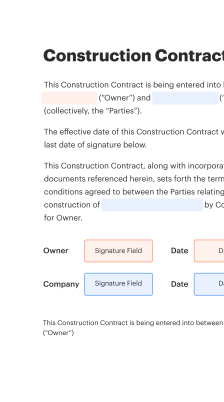
How to create and use an ai proposal generator online

The online flow typically moves from template definition to data merge, review, and electronic signature in a connected system.

  • Template authoring: Create modular templates with placeholders.
  • Data ingestion: Pull contact and pricing data from sources.
  • AI drafting: Generate sections and suggested wording.
  • Finalize and sign: Submit the approved document to signNow.
Collect signatures
24x
faster
Reduce costs by
$30
per document
Save up to
40h
per employee / month

Quick setup steps for an ai proposal generator workflow

Follow these core steps to configure an ai proposal generator and route outputs into an eSignature process.

  • 01
    Create templates: Define reusable sections and placeholders.
  • 02
    Map data: Link CRM fields to template placeholders.
  • 03
    Set approval gates: Specify reviewers and conditional routing.
  • 04
    Route to signature: Send finalized documents to signNow for signing.
be ready to get more

Why choose airSlate SignNow

  • Free 7-day trial. Choose the plan you need and try it risk-free.
  • Honest pricing for full-featured plans. airSlate SignNow offers subscription plans with no overages or hidden fees at renewal.
  • Enterprise-grade security. airSlate SignNow helps you comply with global security standards.
illustrations signature

Typical workflow settings for ai proposal generator integration

Common configuration options control reminders, signing order, template assignment, and archival behavior for generated proposals.

Feature Configuration
Default reminder notification delivery interval 48 hours after send
Standard signer sequence and authentication order Sequential signing
Template assignment for departments and teams Team-based templates
Automatic field population using saved data Enabled via mappings
Document expiration and archival retention policy 30 days then archive

Supported platforms and basic requirements

The ai proposal generator and signing integration work across modern desktop and mobile environments with supported browsers and OS versions.

  • Desktop: Windows, macOS supported
  • Mobile: iOS and Android apps
  • Browsers: Chrome, Edge, Safari

For production use, confirm browser versions, enable TLS for secure connections, and validate mobile app capabilities for offline signing and notifications before broad rollout.

Security and protection elements to expect

Encryption at rest: AES-256 encrypted storage
Encryption in transit: TLS 1.2+ for data transfer
Access controls: Role-based permissions
Audit logging: Immutable activity trail
Data residency options: Region-specific storage available
HIPAA considerations: Support for HIPAA configurations

Industry examples of ai proposal generator use

Two concise case examples show how automated proposal generation integrates with signature workflows to improve accuracy and speed.

Case Study 1

A midmarket IT reseller used the ai proposal generator to combine customer requirements and product bundles into consistent proposals quickly.

  • Automated price tables adjusted to customer tiers.
  • Reduced manual edits and approval cycles.

Resulting in a faster sales cycle and fewer post-signature disputes.

Case Study 2

A professional services firm centralized clause libraries and client-specific billing terms into templates for reuse.

  • Templates enforced approved legal language.
  • Review gates preserved compliance and billing accuracy.

Leading to standardized contracts, reduced negotiation time, and clearer revenue recognition.

Best practices for accurate, secure proposal generation

Apply operational controls and review processes to reduce risk and ensure consistent, compliant proposals.

Use standardized templates and merge fields consistently
Maintain a central template library with version control and clear naming conventions. Limit edit access to designated owners and require approvals for changes to legal or pricing content. Test merges with representative records to confirm formatting and data accuracy before using templates in production.
Enforce role-based reviews and approval gates
Implement approval workflows that require legal or finance review for exceptions or high-value deals. Capture reviewer decisions in the system to create an auditable record of who approved which terms prior to signing.
Validate signer identity and authentication methods
Select signer authentication levels proportionate to transaction risk, using multi-factor options where necessary. Document chosen methods and maintain logs showing successful authentication during the signing event for compliance purposes.
Archive signed proposals and retain metadata
Store final signed documents with associated metadata, version history, and audit trails according to your retention schedule. Ensure archived files are encrypted and accessible for legal or financial audits.

FAQs About ai proposal generator

Answers to frequent questions about setup, integration, compliance, and common errors when using an ai proposal generator with signing workflows.

Feature availability: signNow compared with a leading alternative

This concise comparison shows key capabilities for proposal-to-signature workflows across two providers commonly used in the U.S.

Capability signNow (Recommended) DocuSign
eSignature support
Bulk Send capability
API access REST API REST API
HIPAA-ready
be ready to get more

Get legally-binding signatures now!

Retention, expiration, and key timeline policies

Define clear timelines for proposal expiration, signature windows, and archival to support compliance and operational clarity.

Template review cadence:

Annual review schedule

Proposal signature expiration window:

30 days by default

Post-signature archival timeline:

Retain signed documents seven years

Data purging schedule for drafts:

Remove drafts after 90 days

Audit log retention period:

Retain logs for three years

Operational risks if controls are missing

Data breach fines: Regulatory penalties
Contract disputes: Ambiguous terms
Audit failures: Incomplete trails
Privacy violations: Noncompliant handling
Revenue leakage: Incorrect pricing
Operational delays: Manual rework
walmart logo
exonMobil logo
apple logo
comcast logo
facebook logo
FedEx logo
be ready to get more

Get legally-binding signatures now!