Establishing secure connection…Loading editor…Preparing document…

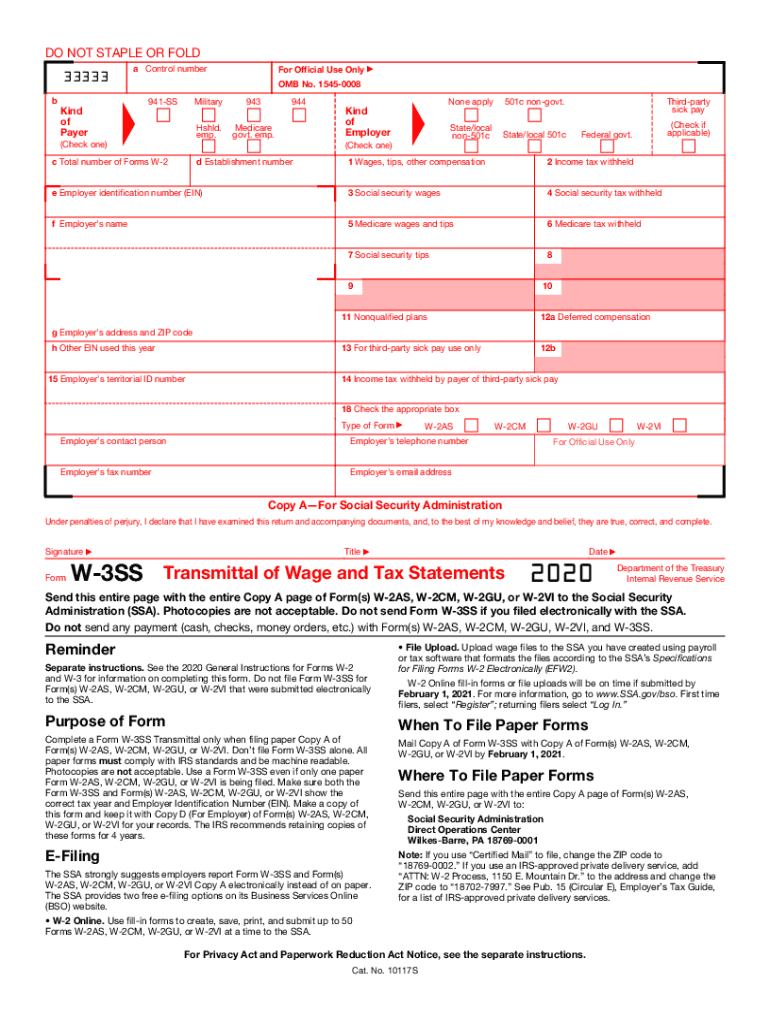
Form W-3SS Transmittal of Wage and Tax Statements

This template is fully customizable. Edit the text, fill out the fields, and send it for signature. Give it a try!
Form W-3SS Transmittal of Wage and Tax Statements

What the Form W-3SS Is and when it’s used

Form W-3SS Transmittal of Wage and Tax Statements is the summary transmittal used to send wage and tax statement copies to the appropriate federal or territorial tax agency. It accompanies individual wage statements and aggregates totals such as wages, federal income tax withheld, Social Security wages, and Medicare wages so the agency can reconcile payer-level totals. Employers, payroll providers, and third-party agents use a W-3SS when submitting sets of wage statements for a reporting group or territory that requires this transmittal format. Accurate totals and correct identifiers are required to avoid processing delays.

Why accurate completion matters

Completing Form W-3SS correctly ensures employee wage statements reconcile with agency records, reduces notices and penalties, and streamlines year-end reporting. Accuracy supports correct tax withholding records and prevents backup withholding or mismatch penalties.

Why accurate completion matters

Who commonly prepares and receives W-3SS

Typical preparers and recipients span payroll, HR, and third-party filers handling aggregated wage reporting.

  • Payroll departments and payroll managers responsible for year-end reporting and reconciliation across multiple payroll runs or subsidiaries.
  • Third-party payroll processors and PEOs that group multiple client wage statements under a single transmittal or territory-specific filing.
  • Accountants and tax preparers who reconcile wages and withholding totals before submission to federal or territorial tax agencies.

Use accurate employer identifiers, consistent EINs, and verified totals to prevent rejections and late notices.

Authorized signers and typical approvers

Payroll Manager

The payroll manager or head of payroll typically reviews totals, confirms the EIN and company name, and signs or authorizes the transmittal on behalf of the employer. That person verifies supporting W-2/W-2SS forms and resolves discrepancies with HR and accounting before submission.

Third-Party Agent

A certified payroll service or PEO may sign as the filer when authorized by the employer. The agent must retain written authorization and reconciliation records proving that totals reflect client data and that consent exists for third-party filing.

Step-by-step: preparing and submitting Form W-3SS

Follow these sequential steps to complete, verify, and submit the transmittal with supporting wage statements.

  • 01
    Gather Documents: Collect all individual wage statements that the transmittal will accompany.
  • 02
    Verify Identifiers: Confirm EIN, business name, and contact details match IRS records.
  • 03
    Calculate Totals: Sum wages and withheld amounts; reconcile to payroll ledger.
  • 04
    Submit and Retain: File with the agency using the accepted method and keep copies for retention.

Configuring a digital workflow for transmittal and attachments

Set up a consistent digital workflow so attachments, approvals, and audit trails remain traceable during eSubmission.

Field Configuration
Document Set Group W-3SS with corresponding wage statements as a single submission packet.
Approvals Add a signer and a countersigner step for payroll and finance review.
Authentication Use email plus SMS or knowledge-based authentication for higher-assurance signers.
Retention Configure automatic archival and export to secure storage after filing.

Typical electronic filing flow for a transmittal

The eSubmission flow captures signer events and retains a compliance-grade audit trail for agency reconciliation.

  • Upload: Upload W-3SS and attached wage statements into the filing package.
  • Place Fields: Add required signature, date, and numeric fields on the transmittal.
  • Authenticate: Authenticate signers using email, SMS, or stronger methods if required.
  • Send and File: Send to signers, capture signatures, then submit electronically or print for paper filing.

Primary components to include on a professional W-3SS

A complete transmittal groups payer details, totals, and certification language so agencies can process and match records.

Payer Identification

Clear employer name, address, and EIN are required so the agency can match totals to the correct tax account; inconsistencies are a leading cause of processing delays.
Wage Totals

Include aggregated totals for wages, Social Security wages, Medicare wages, and employer-reported income categories so the agency can reconcile with individual statements and payroll ledgers.

Tax Withheld

Report combined federal income tax withheld and other withholdings. Ensure amounts reconcile to attached statements to avoid notices or backup withholding triggers.

Number of Copies

State the exact number of attached wage statement copies and any recipient-specific variants so processing centers can confirm package completeness.

Certification Language

Include the signer’s certification that totals are true and correct and that the preparer is authorized, reducing later disputes and providing a clear audit trail.

Signature Block

Designate the signer, title, and date. For third-party filers, include authorization documentation and an agent identifier if required by the receiving agency.

Security and compliance features to consider

Encryption: TLS 1.2/1.3 and AES-256
Audit Trail: Comprehensive signing events
Certifications: SOC 2 Type II available
HIPAA: BAA available on request
Regulatory: 21 CFR Part 11 support
Accessibility: WCAG 2.0 Level AA

Distribution channels and integration needs

Choose distribution channels that preserve the record and provide an auditable trail when submitting transmittals and attachments.

  • Email Delivery: Send as secure PDF with audit trail
  • API / Direct: Submit via API for direct agency integrations
  • Cloud Storage: Archive to Box, Google Drive, or NetSuite

Confirm the receiving agency accepts your chosen submission method and ensure integrations capture signer authentication and retention metadata for compliance.

Key filing dates and timing expectations

Timely distribution to employees and filing with agencies avoids penalties and late notices; observe both recipient and agency deadlines.

Employee Delivery:

Provide wage statements to employees by Jan 31

Agency Filing:

File wage transmittals with the agency by Jan 31

Electronic vs Paper:

Electronic submissions may have different cutoff processes

Corrections:

Submit corrected transmittals as soon as errors discovered

Extensions:

Check agency guidance for available extension procedures

Milestones from preparation to agency acceptance

Track these milestones as part of your year-end reporting cycle to ensure accurate, on-time transmission and recordkeeping.

01

Prepare Package

Complete totals and attach all wage statements for the reporting group.

02

Internal Review

Finance and payroll reconcile totals and resolve discrepancies.

03

Authorize Filing

Authorized signer finalizes and signs the transmittal or authorizes electronic submission.

04

Confirm Receipt

Verify agency acceptance and retain confirmation for audit purposes.

Electronic submission versus paper filing

Compare core differences so you can select the method that meets agency acceptance rules and your internal audit requirements.

Criteria Electronic Paper
Acceptance
Processing Speed faster slower
Proof audit trail physical receipt
Amendments electronic corrections paper refile

Common preparation pitfalls

  • Mismatched employer identification numbers across attachments lead to rejections and time-consuming reconciliations with the agency.
  • Incorrect summed totals caused by rounding errors or excluded pay elements often trigger agency notices and requests for corrected filings.
  • Missing or unsigned transmittals when using paper submission can cause processing delays and require resubmission of the entire package.
  • Using inconsistent business names or DBAs without proper designation increases the risk of misapplied payments or IRS mismatch letters.

Potential penalties and compliance risks

Filing Penalties: Late filing penalties apply
Incorrect Totals: May trigger notices and fines
Intentional Disregard: Higher penalty exposure
I-9/Employment Errors: Separate fines may apply
Backup Withholding: Missing TINs risk 24% rate
Data Breach Risk: Exposes personally identifiable data

eSignature vendor comparison for document signing and transmittal workflows

Comparison of common plan and feature dimensions for eSignature platforms; signNow is listed first per vendor ordering requirements.

signNow DocuSign Adobe Sign PandaDoc HelloSign
Starting Price $8/user/mo $15/user/mo $14/user/mo $19/user/mo $15/user/mo
Free Trial Yes, 7-day free trial No No Yes, limited Yes, limited
Bulk Send Yes Yes Yes Yes No
Audit Trail Yes Yes Yes Yes Yes
HIPAA Compliant Yes Yes Yes No No

Frequently asked questions and troubleshooting

Practical answers to common questions about signing, filing, corrections, and retention for Form W-3SS transmittals.


Need help? Contact support

be ready to get more
Join over 28 million airSlate SignNow users