Establishing secure connection…Loading editor…Preparing document…

Certificate Authorizing Release of Benefit Information

This template is fully customizable. Edit the text, fill out the fields, and send it for signature. Give it a try!
Certificate Authorizing Release of Benefit Information

What the Certificate Authorizing Release of Benefit Information does

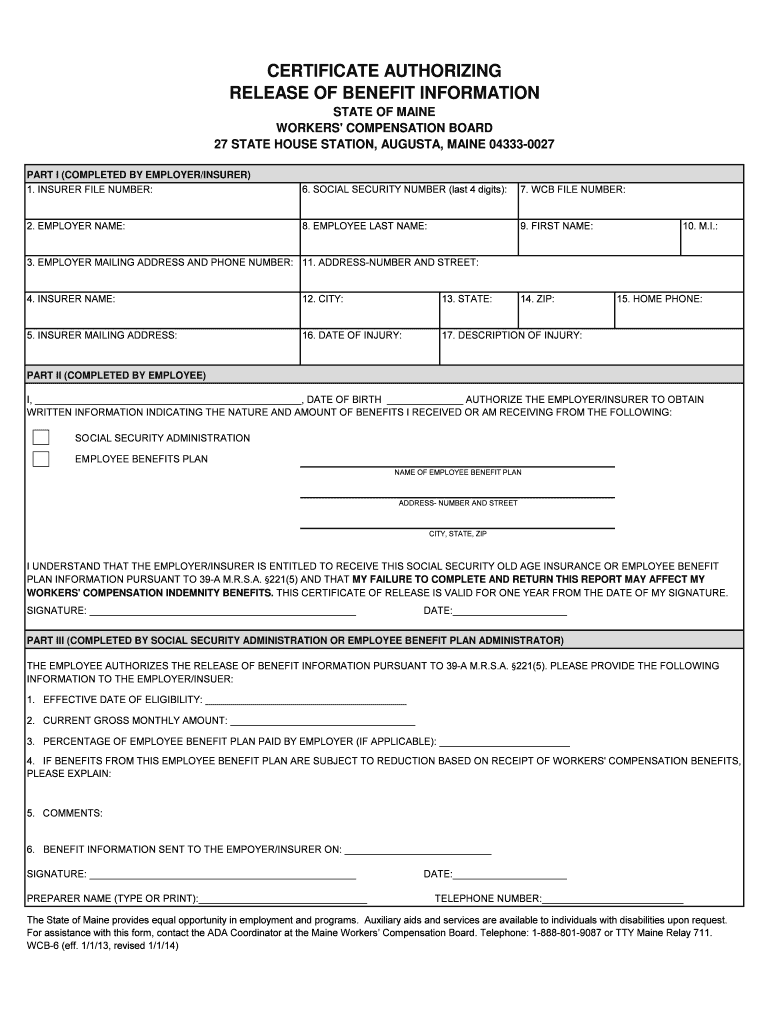
The Certificate Authorizing Release of Benefit Information is a signed authorization that permits an individual or organization to obtain specific benefit records about a claimant from a benefits administrator, insurer, or government agency. It identifies the claimant, specifies which benefit details may be released, names the recipient, states the purpose and time frame for disclosure, and documents the claimant's consent. The certificate helps streamline verification for claims, appeals, benefit coordination, and third-party requests while documenting the legal authority to receive sensitive benefit data.

Why this certificate matters for benefit coordination

A clear, executed certificate reduces delays when verifying eligibility or payments, documents consent for sharing protected information, and creates an auditable record that supports compliance with privacy and benefits rules.

Why this certificate matters for benefit coordination

Who typically completes and relies on this certificate

Organizations and individuals request or complete these certificates when they need authorized access to benefit records from insurers, government programs, or third-party administrators.

  • Claims handlers and benefit administrators who need claimant authorization to share records with third parties.
  • Healthcare or HR teams verifying benefit coordination or workers' compensation eligibility.
  • Attorneys and authorized representatives handling appeals, litigation, or benefit recovery matters.

Core parts of a complete Certificate Authorizing Release of Benefit Information

A professional certificate contains structured items that capture identity, scope, purpose, timing, and consent language so recipients and record keepers can act without ambiguity.

Claimant Identity

Full legal name and identifying details to match records precisely and avoid mismatches.
Benefit Details

Specify programs, claim numbers, policy numbers, or benefit categories to limit disclosure to relevant records.

Recipient

Name the individual, company, or agency authorized to receive the benefit information.

Purpose

State the reason for disclosure—appeal, verification, coordination, legal representation—so scope is clear.

Effective Period

Set a start and end date or event that limits how long the authorization remains valid.

Consent and Signature

Signed and dated by the claimant or authorized representative; include printed name and relationship when signed by a representative.

Stepwise process to complete the certificate correctly

Follow these steps in order to collect and record the information needed for a valid release.

  • 01
    Gather identifiers: Collect full legal name, DOB, and benefit or claim numbers.
  • 02
    Specify scope: List exact records or date ranges to be released.
  • 03
    Name recipient: Enter recipient organization and contact details.
  • 04
    Sign and date: Signer signs, dates, and provides representative authority if applicable.

How to set up an online workflow for this certificate

Configure an electronic workflow to collect fields, route approvals, and store signed certificates securely.

Field Configuration
Claimant name Required text field, exact-match validation
Benefit identifiers Repeating field group for claim or policy numbers
Recipient details Required fields for name, org, and email
Signature Electronic signature field with signer authentication

Digital signing needs and compatibility

Choose a platform that supports secure signatures, audit trails, and required authentication for sensitive benefit records.

  • Authentication: Email link, SMS code, or stronger KBA
  • Audit trail: Capture IP, timestamp, and action log
  • File formats: PDF and DOCX export supported

Typical routing from request to record release

A common processing flow moves from requester to claimant to custodian with defined checks and an audit log for each step.

  • Submit request: Requester provides recipient and purpose details
  • Claimant signs: Claimant reviews and signs the certificate
  • Custodian verifies: Records custodian confirms identity and scope
  • Records released: Authorized data transmitted to named recipient with audit trail

Essential data elements to include for identity and audit

Full legal name: Match to government ID
Date of birth: MM/DD/YYYY format
Benefit identifier: Claim or policy number
Recipient: Name and organization
Purpose: Specific reason for release
Signature details: Signer name, date, and authority

Common errors that delay or invalidate a release

  • Leaving the recipient unspecified or listing only a generic department can cause custodians to refuse release until clarified.
  • Providing incomplete benefit identifiers forces custodians to search broadly and may return records for the wrong individual.
  • Using vague purpose language such as 'for legitimate reasons' gives insufficient authority and increases the chance of a refusal.
  • Failing to sign, date, or indicate representative authority will commonly render the certificate invalid for third-party disclosures.

Legal and compliance risks from improper release handling

HIPAA violation: Civil penalties, corrective action (45 CFR §164.502)
Unauthorized disclosure: Breach response obligations and potential damages
Invalid consent: Refusal to release records and processing delays
Record tampering: Evidence issues for appeals or legal proceedings
Statutory penalties: Industry-specific fines may apply
Reputational risk: Loss of trust and oversight scrutiny

Timing considerations and expected response windows

Plan for request cycles and custodial processing times; responders often have internal SLA targets but statutory deadlines vary by agency and plan.

Request timing:

Submit requests well before claim deadlines to avoid delays

Custodian processing:

Response often 7–30 business days depending on organization

Expiration dates:

Certificates commonly expire after 30–180 days unless specified

Appeal windows:

Allow time for appeals that require document collection

Record retention:

Signed certificates should be retained per policy and law

eSignature vendor pricing and feature snapshot for certificate workflows

This comparison gives a concise view of starting prices and common feature considerations for eSignature platforms used to execute release certificates.

signNow DocuSign Adobe Sign PandaDoc HelloSign
Starting Price $8/user/mo $15/user/mo $14/user/mo $19/user/mo $15/user/mo
Free Trial 7-day free trial Varies by plan Varies by plan Varies by plan Varies by plan
Bulk Send Yes, Business Premium Yes, higher tiers Yes, higher tiers Yes, higher tiers Yes, higher tiers
Audit Trail Yes Yes Yes Yes Yes
HIPAA Compliant Yes Yes Yes No No
Envelope Cap No cap 100 envelopes/user/year Varies by plan Varies by plan Varies by plan

FAQs and troubleshooting for certificates and electronic execution

Answers to frequent questions about validity, e-signing, revocation, notarization, storage, and processing of release certificates.


Need help? Contact support

be ready to get more
Join over 28 million airSlate SignNow users