Establishing secure connection…Loading editor…Preparing document…

Complaint Reformation

This template is fully customizable. Edit the text, fill out the fields, and send it for signature. Give it a try!
Complaint Reformation

What a Complaint for Reformation Is and when it’s used

A Complaint for Reformation is a civil pleading that asks a court to correct or rewrite a written instrument to reflect the parties’ actual agreement or intent when the document contains mistake, ambiguity, or fraud. Typical reformation claims arise in contract, deed, and insurance disputes where the written record diverges from the mutual intent of the parties. Reformation remedies are equitable; courts examine the underlying evidence, contract language, and equitable factors before granting relief. Procedures and acceptable evidence vary by jurisdiction and local court rules.

Why a precise Complaint for Reformation matters

A well-drafted complaint frames the legal theory, identifies the specific instrument at issue, and sets the factual record to support equitable relief, improving the likelihood of a clear remedy and efficient case management.

Why a precise Complaint for Reformation matters

Who typically prepares and files a Complaint for Reformation

Early involvement by counsel and accurate supporting exhibits reduces risk of dismissal and speeds resolution through clearer remedies.

  • Plaintiff counsel preparing litigation pleadings and evidentiary attachments.
  • Real estate attorneys addressing deed or title errors and recording issues.
  • Insurance coverage counsel correcting policy terms or reinstatement documentation.

Core elements to include in a professional Complaint for Reformation

A complaint should be concise but complete: identify parties, describe the instrument, state the mistaken term, set forth supporting facts, request equitable relief, and attach the document to be reformed as an exhibit.

Caption

Court name, parties, docket caption and plaintiff contact information; ensures proper venue and service.
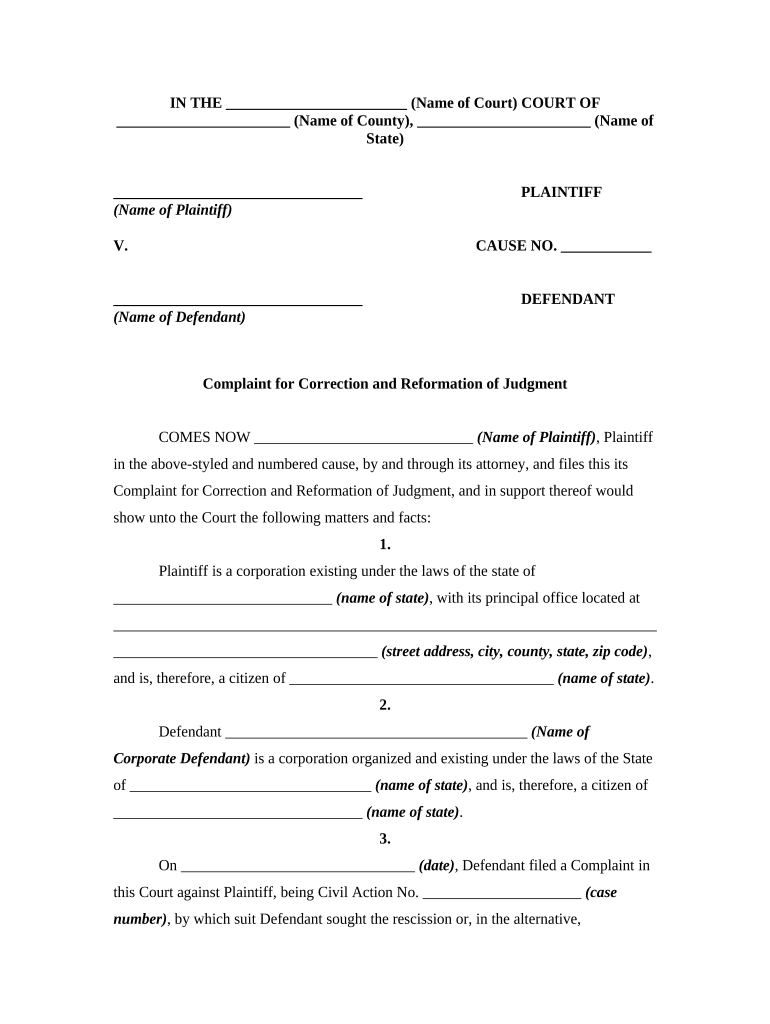
Instrument

Attach the written instrument (deed, contract, policy) as an exhibit and reference specific clauses to be reformed.

Factual Basis

Allege the mistake or fraud with dates, communications, and the mutual intent that the pleading asks the court to enforce.

Legal Claim

State the cause of action for reformation under applicable state law and any statutory or equitable grounds.

Requested Relief

Specify the exact reformation language sought, and request related relief such as declaratory judgment or quiet title as applicable.

Exhibits

Include supporting exhibits: original instrument, correspondence, affidavits, and any title reports or prior filings.

Step-by-step: preparing and filing a Complaint for Reformation

Follow a sequential process to prepare, verify, and submit the complaint while preserving evidence and meeting local filing rules.

  • 01
    Draft complaint: Assemble facts, exhibits, and legal claims
  • 02
    Verify exhibits: Attach instrument copies and supporting documents
  • 03
    File with court: Use local eFiling or clerk procedures
  • 04
    Serve parties: Complete service per state rules

How the eSubmission process typically flows

Electronic workflows streamline preparation and routing but must comply with local court eFiling and signature rules.

  • Prepare: Create complaint and assemble exhibits electronically
  • Format: Convert to court-acceptable PDF/A or PDF
  • File: Upload via court eFiling portal or clerk's office
  • Serve: Complete electronic or in-person service as authorized

Typical eFiling workflow settings and configuration

Configure the document and delivery settings to match the court's technical and procedural requirements before submitting.

Field Configuration
File Format PDF or PDF/A; follow court technical specifications
Signer Authentication Use email, SMS, or higher-assurance methods as needed
Routing Order Set sequential or parallel routing for internal review
Notifications Enable confirmations and delivery receipts

Technical considerations for digital completion and submission

Confirm the court’s eFiling rules and local clerk policies; technical compatibility reduces rejections and processing delays.

  • Formats: PDF, PDF/A, DOCX accepted by many courts
  • Integrations: Connectors: Salesforce, Microsoft 365, NetSuite, Google Workspace
  • Authentication: Email, SMS codes, and advanced options

Timing considerations and common deadlines

Deadlines vary by jurisdiction; observe response periods, service timeframes, and statute of limitations that may affect reformation claims.

Statute of Limitations:

Varies by state; check local statutes before filing

Response Period:

Often 20–30 days to answer; state rules apply

Service Deadline:

Complete service per state rules after filing

eFiling Rejections:

Courts typically allow short cure periods

Amendment Timing:

Motions to amend subject to local scheduling orders

Key milestones from draft to final disposition

Track milestones to preserve rights and meet procedural deadlines during litigation.

01

Draft and Review

Finalize facts, exhibits, and legal basis before filing

02

File Complaint

Submit to clerk or eFiling portal per local rules

03

Service of Process

Effect service within jurisdictional timeframes

04

Motion/Trial Stage

Expect dispositive motions or settlement discussions thereafter

Common drafting and procedural mistakes to avoid

  • Failing to attach the original instrument or a complete copy, which leaves the court unable to pinpoint the text to be reformed.
  • Naming the wrong party or using an informal business name, causing defective service or jurisdictional challenges.
  • Neglecting statute of limitations or discovery dates, exposing the claim to dismissal as time-barred.
  • Submitting unsupported or conclusory allegations without affidavits or documentary evidence of the parties' intended agreement.

Risks and potential court consequences of errors

Dismissal Risk: Court may dismiss for lack of standing
Sanctions: Counsel or party may face monetary sanctions
Service Failures: Improper service can delay or void proceedings
Statute Bar: Claims lost if time limitations lapsed
Evidentiary Gaps: Insufficient proof can defeat equitable relief
Cost Exposure: Adverse cost or fee awards possible

Comparison: eSignature pricing and basic features relevant to filings and workflow

Basic pricing and feature availability for common eSignature providers. signNow is listed first for direct comparison among vendors.

signNow DocuSign Adobe Sign PandaDoc HelloSign
Starting Price $8/user/mo $15/user/mo $14/user/mo $19/user/mo $15/user/mo
Free Trial 7-day free trial Varies by plan Varies by plan Varies by plan Varies by plan
Bulk Send Yes Yes Yes Yes Varies
Audit Trail Yes Yes Yes Yes Yes
HIPAA Compliant Yes Yes Yes No No
Envelope Cap No cap 100 envelopes/user/year Varies Varies Varies

Frequently asked questions about Complaint for Reformation

Answers to common procedural and technical questions when preparing, signing, and submitting a Complaint for Reformation.


Need help? Contact support

be ready to get more
Join over 28 million airSlate SignNow users