Establishing secure connection…Loading editor…Preparing document…

Judgment of Confirmation of Title

This template is fully customizable. Edit the text, fill out the fields, and send it for signature. Give it a try!
Judgment of Confirmation of Title

What a Judgment of Confirmation of Title Is

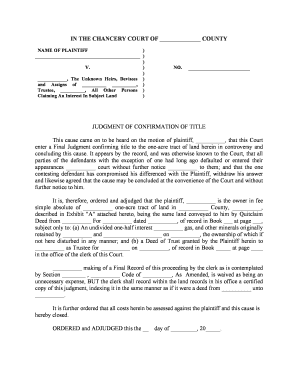
A Judgment of Confirmation of Title is a court order that establishes or clarifies ownership rights in a specific parcel of real property. It typically follows litigation, quiet title actions, or foreclosure proceedings and resolves competing claims, corrects defects, and directs the county recorder to accept a judgment entry for the public record. Recorded against the property, the judgment updates the chain of title so that subsequent transfers, financing, or title insurance issuance can proceed with reduced clouded-title risk.

Why this document matters for property and transactions

A Judgment of Confirmation of Title finalizes ownership disputes, clears clouds on title, and creates a recordable court determination that supports marketability and lending.

Why this document matters for property and transactions

Who typically prepares and relies on this judgment

Primary users include professionals who manage title risk, litigate property disputes, or handle post-foreclosure clearances.

  • Title companies and examiners who need a recorded court determination to insure or clear title.
  • Real estate attorneys and litigators preparing pleadings, court orders, and certified copies for recording.
  • Lenders, servicers, and trustees who require a clear title record before closing or releasing liens.

Core components you should expect to see in the judgment

A professional Judgment of Confirmation of Title includes formal court identification, precise party names, an unambiguous legal description, and explicit judicial language confirming rights and directing recording.

Court Caption

Name of court, case number, and filing county; ensures the judgment is traceable to official court dockets and to the administrative record for the action.
Parties Identified

Full legal names of plaintiff(s), defendant(s), lienholders, and other interested parties, stated exactly as on pleadings to avoid name-mismatch problems at recording or with title insurance.

Property Description

Complete legal description (lot, block, subdivision, metes and bounds) or assessor parcel number; brief street address alone is insufficient for recording and title examination.

Judicial Finding

Text stating the court’s conclusion that a particular party holds title, extinguishes or confirms liens, and any conditions or limitations on the ruling to guide downstream recording or releases.

Recording Instructions

Directive language ordering the judgment be entered of record in the county recorder’s office and specifying whether a certified copy or clerk’s certificate is required for acceptance.

Signature and Seal

Judge’s signature, court seal, and any required clerk certification; may include notarization language if the recorder requires a certified clerk's copy for indexing.

Step-by-step process to prepare and record the judgment

Follow a structured sequence: assemble records, prepare the order, submit to court, then record with the county.

  • 01
    Gather Records: Collect pleadings, title reports, lien searches, and proof of service before drafting the judgment.
  • 02
    Draft Judgment: Prepare clear judgment language that identifies parties, property, and recording instructions.
  • 03
    Court Entry: Obtain judicial signature and clerk certification; secure certified copies as required for recording.
  • 04
    Record Judgment: Submit the certified judgment to the county recorder and obtain recording information for title updates.

Online workflow settings for e-filing and e-signing

Configure signer roles, authentication, notifications, and final document delivery when using an eSignature or eFiling workflow.

Field Configuration
Signer roles and order Judge, clerk, attorney, parties
Authentication method Email link, SMS code, or in-person notarization
Recording copy delivery Certified copy to county recorder
Notifications Email to title company and counsel

Where the judgment goes and who receives it

After entry, the judgment must be delivered to the county recorder and to interested parties for title and lien management.

  • Prepare for Recording: Obtain clerk-certified copy and any required cover letter for the recorder.
  • Submit to Recorder: File certified judgment with the county recorder where property is located.
  • Notify Title Parties: Send recorded return to title insurer, lender, and property owner.
  • Update Title Reports: Title examiners incorporate recorded judgment to clear or note title status.

Essential data elements and security expectations

Case Number: Court docket identifier
Full Names: Exact legal party names
Legal Description: Complete parcel description
Judgment Date: MM/DD/YYYY format
Certifications: Clerk certificate or seal
Audit Trail: Timestamped signing history

Technical considerations for e-signing and e-filing

Use platforms that support required file formats, authentication methods, and certified-copy workflows for the clerk and recorder.

  • Supported formats: PDF and DOCX compatible
  • Integrations: Salesforce, NetSuite, Google Workspace
  • Authentication options: Email, SMS, KBA, SSO

Typical eSignature vendor pricing and capabilities for title workflows

Vendor pricing and capabilities vary; signNow appears first for direct comparison across common plan features and compliance items.

signNow DocuSign Adobe Sign PandaDoc HelloSign
Starting Price $8/user/mo $15/user/mo $14/user/mo $19/user/mo $15/user/mo
Free Trial 7-day trial Yes Yes Yes Yes
Bulk Send Yes Yes Yes Yes No
Audit Trail Yes Yes Yes Yes Yes
HIPAA Compliant Yes Yes Yes No No
Envelope Cap No cap 100 envelopes/user/year Varies by plan Varies by plan Varies by plan

Practical tips to reduce recording delays and title exceptions

Applying consistent verification and recording practices reduces rejections and speeds title clearance for subsequent transactions.

Use certified copies
Request a clerk-certified copy of the judgment for recording and provide the county recorder with any required cover letter to ensure proper indexing and acceptance.
Verify legal description
Cross-check the legal description against the deed, plat, and assessor records to prevent recording under the wrong parcel or creating a new reference error.
Confirm party names
Ensure party names match pleadings, identification, and title policy to avoid exceptions or demands for corrective instruments before closing.
Record promptly
File the certified judgment with the county promptly after entry to secure priority and enable title insurers and lenders to rely on the recorded determination.

Common preparation pitfalls to avoid

  • Incomplete legal descriptions or use of street addresses only, which leads to recording rejection and additional clerical work.
  • Name mismatches between pleadings, government ID, and judgment language causing title exceptions or insurer queries.
  • Failing to obtain a clerk-certified copy, resulting in the county recorder refusing to index the judgment.
  • Skipping notice to affected lienholders or failing to include required extinguishment language, which preserves unintended liens.

Consequences of errors or omissions

Recording Rejection: Rejected by recorder
Title Exceptions: Insurance denies coverage
Delayed Closings: Closings postponed
Extra Costs: Additional filing fees
Legal Exposure: Possible motions to amend
Lien Survival: Unintended liens remain

Real-world examples of electronic workflows for title confirmations

These short case notes show how practitioners combine court procedures with electronic tools to finalize and record title judgments.

Martin Properties

The firm processed judgment entries online and reduced turnaround time by removing in-person steps.

  • Focused on certified copies and proper indexing.
  • Using e-enabled workflows allowed them to close several portfolio sales faster while maintaining audit trails and clerk certifications for county recorders.

Optica Ventures LLC

Their counsel prepared court-confirmed title judgments with precise legal descriptions and immediate delivery to title insurers.

  • Emphasized accuracy in party names and clerk certification.
  • The combination of clear judicial language and certified recording copies enabled immediate underwriting decisions by title companies for subsequent financing.

Typical timing and processing expectations

Timelines vary by court and county; plan for judicial processing plus recorder indexing and allow additional time for appeals or clerical corrections.

Court Entry Time:

Processing depends on court calendar and judge availability; may range from days to weeks

Recording Turnaround:

County recorder processing often takes 1–10 business days depending on local workload

Appeal Window:

Appeal deadlines vary by state; verify local rules before finalizing transactions

Title Update:

Title companies typically update commitments within days of recorded judgment receipt

Certified Copy Request:

Allow additional days for clerk certification and mailing or pickup

Key milestones from judgment draft to recorded entry

A clear milestone sequence helps coordinate counsel, title examiners, and recorders to minimize delays and errors.

01

Draft Judgment

Prepare detailed judgment document with legal description and recording instructions.

02

Court Hearing

Present for judicial approval or submit for ex parte entry where permitted.

03

Entry of Judgment

Judge signs and clerk issues certified copy of the order for recording.

04

Recording and Notice

File certified copy with county recorder and notify title insurer and affected parties.

Frequently asked questions about the Judgment of Confirmation of Title

Answers to common legal and procedural questions about drafting, signing, recording, and correcting title judgments aimed at reducing common errors.


Need help? Contact support

be ready to get more
Join over 28 million airSlate SignNow users