Establishing secure connection… Loading editor… Preparing document…
Navigation

Fill and Sign the Csclcd 560 Rev Form
Fill and Sign the Csclcd 560 Rev Form

How it works

Open the document and fill out all its fields.
Apply your legally-binding eSignature.
Save and invite other recipients to sign it.

Rate template

4.6
61 votes
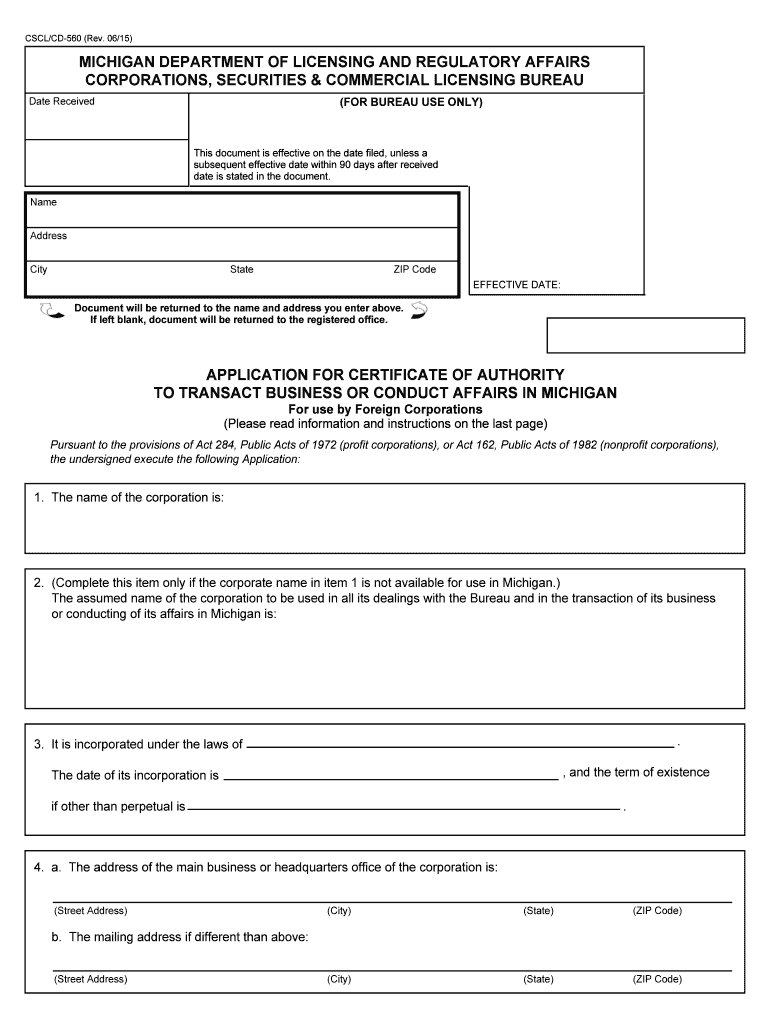
CSCL/CD-560 (Rev. 06/1 5) MICHIGAN DEPARTMENT OF LICENSING AND REGULATORY AFFAIRS CORPORATIONS, SECURITIES & COMMERCIAL LICENSING BUREAU Date Received (FOR BUREAU USE ONLY) This document is effective on the date filed, unless a subsequent effective date within 90 days after receiveddate is stated in the document. EFFECTIVE DATE: Name Address CityState ZIP Code Document will be returned to the name and address you enter above. If left blank, document will be returned to the registered office. APPLICATION FOR CERTIFICATE OF AUTHORITY TO TRANSACT BUSINESS OR CONDUCT AFFAIRS IN MICHIGAN For use by Foreign Corporations (Please read information and instructions on the last page) Pursuant to the provisions of Act 284, Public Acts of 1972 (profit cor porations), or Act 162, Public Acts of 1982 (nonprofit corporations), the undersi gned execute the following Application: 1. The name of the corporation is: 2.(Complete this item only if the corporate name in item 1 is not available for use in Michigan.) The assumed name of the corporation to be used in all its dealings with the Bureau and in the transaction of its business or conducting of its affairs in Michigan is: b. The mailing address if different than above: 4. a. The address of the main business or headquarters office of the corporation is: (Street Address) (City) (ZIP Code) (State) (Street Address) (City) (ZIP Code) (State) 3. . , and the term of existence It is incorporated under the laws of The date of its incorporation is if other than perpetual is . 7. (To be completed by profit corporations only)The total authorized shares of the corporation are: Signed this day of , (Type of Print Name ) By (Signature of Authorized Officer or Agent) , Michigan (Street Address or P.O. Box) (City)(ZIP Code) (Street Address) (City) The mailing address of the registered office in Michigan , if different than above: , Michigan (ZIP Code) 5. The street address of its registered office in Michigan is: The name of the resident agent at the registered office is: The resident agent is an agent of the corporation upon whom process against the corporation may be served. 6. The specific business or affairs which the corporation is to transact or conduct in Michigan is as follows: The corporation is authorized to transact such business or conduct those affairs in the jurisdiction of its incorporation. 8. If the applicant is a trust , please specify any powers or privileges possessed by the trust that are not possessed by an individual or a partnership. CSCL/CD-560 (Rev. 06/1 5) Submit with check or money order by mail: Michigan Department of Licensing and Regulatory Affairs Corporations, Securiti es & Commercial Licensing Bureau Corporation s Division P.O. Box 30054 Lansing, MI 48909 To submit in person: 2501 Woodlake CircleOkemos, MITelephone: (517) 241-6470 Fees may be paid by check, money order, VISA , Mastercard or Discover when delivered in person to our office. MICH-ELF (Michigan Electronic Filing System): First Time Users: Call (517) 241-6470, or visit our website at http://www.michi gan.gov/corporations Customer with MICH-ELF Filer Account: Send document to (517) 636-6437 INFORMATION AND INSTRUCTIONS 1. This Application for Certificate of Authority to Transact Business or Conduct Affairs must be used to procure a Certificate of Authority to Transact Business or Conduct Affairs in Michigan. A document re quired or permitted to be filed under the act cannot be filed unless it contains the minimum information required by the act. This is a legal document and agency staff cannot provide legal advic e. 2. Submit one original of this document. Upon filing, the document will be added to the records of the Corporations, Securiti es & Commercial Licensing Bureau. The original will be returned to your register ed office address unless you enter a different address in the box o n the front of this document. Since this document will be maintai ned on electronic format, it is important that the filing be legible. Documents with poor black and white contrast, or otherwise illegible, will be rejected. LARA is an equal opportunity employer/program. Auxiliary aids , services and other reasonable accommodations are available upon request to individuals with disabilities. 3. This Application is to be used pursuant to the provisions of Chapter 10 of 1972 PA 284 or 1982 PA 162 , by a foreign corporation for the purpose of obtaining a Certificate of Authority to Transact Business or Conduct Affairs in this state. If the for eign corporation subsequently changes any of the information set forth in the Application for Certificate of Authority, it must file an Amended Applica tion for Certificate of Authority to Transact Business in Michigan (form CSCL/CD -562 for use by foreign profit corporations or form CSCL/CD-565 for use by foreign nonprofit corporations ) with the Bureau not later than 30 days after the time a change becomes e ffective. 4. Attach to this Application a certificate executed by the official of the jurisdiction having custody of corporate records stating that the corporation is in good standing under the laws of the jurisdiction of its incorporation. The cer tificate cannot be dated earlier than 30 days prior to the date of receipt in this office. 5 . Item 2 - A foreign corporation whose true name is not avail able for use in Michigan is permitted to apply for a Certificate of Authority under a n ass umed name which is available for use and whic h becomes the corporation's name in Michigan to be used in all transactions and in its dealings with the administrator. Item 2 of the Application for Certificate of Authority to Transa ct Business or Conduct Affairs in Michigan is to be completed for this purpose only. Corporations may also transact business or conduct affairs under one or more assumed names by filing separate Certificates of Assumed Name . ( ) Preparer's name and business telephone number: 10. FEES : Make remittance payable to the State of Michigan. Include corporation name on check or money order. Profit Corporations NONREFUNDABLE.............................. INITIAL FRANCHISE FEE.................... TOTAL INITIAL ADMISSION FEES...... $10.00$50.00$60.00 Nonprofit Corporations NONREFUNDABLE..............................FRANCHISE FEE.................................. TOTAL INITIAL ADMISSION FEES...... $10.00$10.00$20.00 9 . The Application must be signed by an authorized officer or agent of the corporation. 8 . This document is effective on the date endorsed "filed" by the Bureau. A later effective date, no more than 90 days after the date of delivery, may be stated. 7 . Item 7 - Indicate the total authorized shares (not amount iss ued) from the Articles of Incorporation or most recent amendme nt. 60,000 shares will be considered initially attributable to Michigan. If shares attri butable to Michigan increase to over 60,00 0, or are subsequently changed, the corporation shall file an amended application in acco rdance with section 1021. To determine the total authorized shares attributable to Michigan, multiply the total authorized shares by the most re cent appointment percentage from the Michigan tax return. 6 . Item 6 - This item should state only the specific business or affairs to be transacted or conducted in Michigan. An all purpose activ ities statement is not permitted. Foreign cor porations cannot transact business or conduct affairs that a domestic corporation cannot lawfully transact or conduct. Optional expedited service. Expedited review and filing, if fileable, is available for all documents for profit corporations, limited liability companies, limited partnerships and nonprofit corporations. The nonrefundable expedited service fee is in addition to the regular fees applicable to the specific document. Please complete a separate CSCL/CD-272 form for expedited service for each document submitted in person, by mail or MICH-ELF.24-hour service - $50 for formation documents and applications for certificate of authority. 24-hour service - $100 for any document concerning an existing entity. Same day service Same day - $100 for formation documents and applications for certificate of authority. Same day - $200 for any document concerning an existing entity. Review completed on day of receipt. Document and request for same day expedited service must be received by 1 p.m. EST OR EDT. Two hour - $500 Review completed within two hours on day of receipt. Document and request for two hour expedited service must be received by 3 p.m. EST OR EDT. One hour - $1000 Review completed within one hour on day of receipt. Document and request for 1 hour expedited service must be received by 4 p.m. EST OR EDT. First time MICH-ELF user requesting expedited service must obtain a MICH-ELF filer number prior to submitting a document for expedited service. CSCL/CD-901. Changes to information on MICH-ELF user's account must be submitted before requesting expedited service. CSCL/CD-901.Documents submitted by mail are delivered to a remote location for receipts processing and are then forwarded to the Corporation s Division for review. Day of receipt for mailed expedited service requests is the day the Corporation s Division receives the request. Rev. 6/1 5 CSCL/CD-760 (Rev. 08/15 ) MICHIGAN DEPARTMENT OF LICENSING AND REGULATORY AFFAIRS CORPORATIONS, SECURITIES & COMMERCIAL LICENSING BUREAU Date Received This document is effective on the date filed, unless a subsequent effective date within 90 days after receiveddate is stated in the document. EFFECTIVE DATE: Name Address CityState ZIP Code Document will be returned to the name and address you enter above. If left blank, document will be returned to the registered office. (FOR BUREAU USE ONLY) APPLICATION FOR CERTIFICATE OF AUTHORITY TO TRANSACT BUSINESS IN MICHIGANFor use by Foreign Limited Liability Companies (Please read information and instruction on last page) B Pursuant to the provisions of Act 23, Public Acts of 1993, the undersigned execute the following Application: 2. (Complete this item only if the limited liability com pany name in Item 1 is not available for use in Michigan.) The assumed name of the limited liability company to be used in all its dealings with the Bureau and in the transaction of its business in Michigan is: 4. The address of the office required to be maintained in the state of organization or, if not so required, the principal office of the limited liability company is: 1. The name of the limited liability company is: 3. It is organized under the laws of The date of its organization is The duration of the limited liability company if other than perpetual is (Street Address) (City) (ZIP Code) (State) 5. a. The street address of its registered office in Michigan is: , Michigan (Street Address)(City)(ZIP Code) (City) b. The mailing address of the registered office, if different than above: , Michigan (Street Address or P.O. Box) (ZIP Code) c. The name of the resident agent at the registered office is: 6. The Department is appointed the agent of the foreign limited liability company for service of process if no agent has been appointed, or if appointed, the agent's authority has been revoked, the agent has resigned, or the agent cannot be found or served through the exercise of reasonable diligence. The name and address of a member or manager or other person to whom the administrator is to send copies of any process served on the administrator is: (Must be different than agent shown in Item 5c) (Name) (Street Address) (City) (ZIP Code) (State) 7. The specific business which the limited liability company is to transact in Michigan is as follows: The limited liability company is authorized to transact such business in the jurisdiction of its organization. Signed this day of , By (Signature) (Type or Print Name) (Type or Print Title) Submit with check or money order by mail: Michigan Department of Licensing and Regulatory Affairs Corporations, Securiti es & Commercial Licensing Bureau Corporation s Division P.O. Box 30054 Lansing, MI 48909 To submit in person: 2501 Woodlake Circle Okemos, MI Telephone: (517) 241-6470 Fees may be paid by check, money order, VISA or Mastercard when delivered in person to our office. MICH-ELF (Michigan Electronic Filing System): First Time Users: Call (517) 241-6470, or visit our website at http://www.michigan.gov/corporations Customer with MICH-ELF Filer Acc ount: Send document to (517) 636-6437 LARA is an equal opportunity employer/program. Auxiliary aids , services and other reasonable accommodations are available upon request to individuals with disabilities. INFORMATION AND INSTRUCTIONS 1. This Application for Certificate of Authority must be used to obtain a Certificat e of Authority to Transact Business in Michigan. A document required or permitted to be filed under the act cannot be filed unless it contains the minimum information required by the act. This is a legal doc ument and agency staff cannot provide legal advice. 10. NONREFUNDABLE FEE: Make remittance payable to the State of Michigan. Include limited liability company name and identification number on check or money order.......................................................................................... ............................................................$50.00 CSCL/CD-760 (Rev. 08/15) Preparer's Name Business telephone number ( ) 9. This document is effective on the dat e endorsed "Filed" by the Bureau. A later effective date, no more than 90 days after the date of delivery, may be stated as an additional article. 6. Item 7 - This item should state only t he specific business to be transacted in Mich igan. An all purpose activities statement is not permitted. 5. Item 6 - The person must be diffe rent than agent shown in Item 5(c). 3. This Application is to be used pursuant to the provisions of Article 10 of Act 23, P.A. of 1993, by a foreign limited liabi lity company for the purpose of obtaining a Certificate of Authority to Transact Business in this State. If the foreign limited liability company subsequently changes any of the information set forth in the Application for Certificate of Au thority, it must file an Amended Application for Certificate of Authority to Transact Business in Michigan (form CSCL/CD- 762) with the Bureau not later than 30 days after the time a change becomes effective. 2. Submit one original of this document. Upon filing, the document will be added to the records of the Corporations, Securiti es & Commercial Licensing Bureau. The original will be returned to your registered office address, unless you enter a different address in the box on the front of this document. Since this document will be maintained on elec tronic format, it is important that the filing be legible. Documents with poor b lack and white contrast, or otherwise illegible, will be rejected. 8. Attach to this Application a certif icate executed by the official of the juri sdiction having custody of limited liability c ompany records stating that the limited liability company is in good st anding under the laws of the jurisdiction of its organization. The certificate cannot be dated earlier than 30 days prior to the date of receipt in this office. 7. The Application must be signed by a person with authority to sign as provided in the laws of the jurisdiction of its organization. 4. Item 2 - A foreign limited liability company whose name is not available for use in Michigan is permitted to apply for a Certificate of Authority under an assumed name which is available for us e. The assumed name becomes the limited liability company's name in Michigan to be used in all transacti ons and in its dealings with the administrator . Item 2 of the Application for Certificate of Authority to Transact Business in Michigan is to be completed for this purpose only. Limited liab ility companies may also transact business under other assumed names by fili ng separate Certificate of Assumed Name. Optional expedited service. Expedited review and filing, if fileable, is available for all documents for profit corporations, limited liability companies, limited partnerships and nonprofit corporations. The nonrefundable expedited service fee is in addition to the regular fees applicable to the specific document. Please complete a separate CSCL/CD-272 form for expedited service for each document submitted in person, by mail or MICH-ELF.24-hour service - $50 for formation documents a nd applications for certificate of authority. 24-hour service - $100 for any documen t concerning an existing entity. Same day service Same day - $100 for formation documents and applications for certificate of authority. Same day - $200 for any document concerning an existing entity. Review completed on day of receipt. Document and request for same day expedited service must be received by 1 p.m. EST OR EDT. Two hour - $500 Review completed within two hours on day of receipt. Document and request for two hour expedited service must be received by 3 p.m. EST OR EDT. One hour - $1000 Review completed within one hour on day of receipt. Document and request for 1 hour expedited service must be received by 4 p.m. EST OR EDT. First time MICH-ELF user requesting expedited service must obtain a MICH-ELF filer number prior to submitting a document for expedited service. CSCL/CD-901. Changes to information on MICH-ELF user's account must be submitted before requesting expedited service. CSCL/CD-901.Documents submitted by mail are delivered to a remote location for receipts processing and are then forwarded to the Corporation s Division for review. Day of receipt for mailed expedited service requests is the day the Corporation s Division receives the request. Rev. 08/15

Helpful suggestions for completing your ‘Csclcd 560 Rev’ online

Feeling exhausted by the inconvenience of handling paperwork? Seek no further than airSlate SignNow, the premier digital signature solution for individuals and organizations. Bid farewell to the lengthy procedure of printing and scanning documents. With airSlate SignNow, you can effortlessly finalize and sign documents online. Leverage the robust capabilities embedded in this simple and cost-effective platform and transform your approach to document management. Whether you need to approve forms or gather electronic signatures, airSlate SignNow manages everything seamlessly, needing only a few clicks.

Follow this comprehensive guide:

  1. Access your account or sign up for a complimentary trial with our service.
  2. Select +Create to upload a file from your device, cloud storage, or our form repository.
  3. Edit your ‘Csclcd 560 Rev’ in the editor.
  4. Click Me (Fill Out Now) to get the form ready on your end.
  5. Add and designate fillable fields for others (if required).
  6. Continue with the Send Invite options to solicit eSignatures from additional parties.
  7. Save, print your version, or convert it into a reusable template.

No worries if you need to work with others on your Csclcd 560 Rev or send it for notarization—our platform supplies everything you need to complete such tasks. Sign up with airSlate SignNow today and take your document management to new levels!

Here is a list of the most common customer questions. If you can’t find an answer to your question, please don’t hesitate to reach out to us.

Need help? Contact Support
Cscl cd 560 rev pdf
Cscl cd 560 rev form
Michigan Certificate of Authority foreign corporation
LARA CSCL
LARA Corporations Online Filing System
Section 488 of 1972 PA 284
Michigan Council for Corporations
Name reservation Michigan
Cscl cd 560 rev pdf
Cscl cd 560 rev phone number
Cscl cd 560 rev form
CSCL CD 562

The best way to complete and sign your csclcd 560 rev form

Save time on document management with airSlate SignNow and get your csclcd 560 rev form eSigned quickly from anywhere with our fully compliant eSignature tool.

How to Sign a PDF Online How to Sign a PDF Online

How to complete and sign forms online

In the past, coping with paperwork took pretty much time and effort. But with airSlate SignNow, document management is easy and fast. Our robust and user-friendly eSignature solution lets you easily complete and eSign your csclcd 560 rev form online from any internet-connected device.

Follow the step-by-step guide to eSign your csclcd 560 rev form template online:

  • 1.Register for a free trial with airSlate SignNow or log in to your account with password credentials or SSO authorization option.
  • 2.Click Upload or Create and import a form for eSigning from your device, the cloud, or our form catalogue.
  • 3.Click on the document name to open it in the editor and use the left-side toolbar to fill out all the blank fields appropriately.
  • 4.Place the My Signature field where you need to eSign your sample. Provide your name, draw, or import an image of your regular signature.
  • 5.Click Save and Close to finish editing your completed form.

Once your csclcd 560 rev form template is ready, download it to your device, save it to the cloud, or invite other parties to eSign it. With airSlate SignNow, the eSigning process only takes a few clicks. Use our robust eSignature tool wherever you are to deal with your paperwork productively!

How to Sign a PDF Using Google Chrome How to Sign a PDF Using Google Chrome

How to complete and sign documents in Google Chrome

Completing and signing documents is simple with the airSlate SignNow extension for Google Chrome. Adding it to your browser is a quick and beneficial way to manage your paperwork online. Sign your csclcd 560 rev form sample with a legally-binding eSignature in a couple of clicks without switching between tools and tabs.

Follow the step-by-step guidelines to eSign your csclcd 560 rev form in Google Chrome:

  • 1.Navigate to the Chrome Web Store, search for the airSlate SignNow extension for Chrome, and add it to your browser.
  • 2.Right-click on the link to a form you need to eSign and select Open in airSlate SignNow.
  • 3.Log in to your account using your credentials or Google/Facebook sign-in option. If you don’t have one, you can start a free trial.
  • 4.Use the Edit & Sign menu on the left to complete your template, then drag and drop the My Signature option.
  • 5.Upload a picture of your handwritten signature, draw it, or simply type in your full name to eSign.
  • 6.Make sure all the details are correct and click Save and Close to finish modifying your form.

Now, you can save your csclcd 560 rev form template to your device or cloud storage, email the copy to other individuals, or invite them to eSign your form via an email request or a secure Signing Link. The airSlate SignNow extension for Google Chrome enhances your document workflows with minimum effort and time. Try airSlate SignNow today!

How to Sign a PDF in Gmail How to Sign a PDF in Gmail How to Sign a PDF in Gmail

How to fill out and sign paperwork in Gmail

Every time you receive an email containing the csclcd 560 rev form for approval, there’s no need to print and scan a file or download and re-upload it to another tool. There’s a much better solution if you use Gmail. Try the airSlate SignNow add-on to promptly eSign any documents right from your inbox.

Follow the step-by-step guide to eSign your csclcd 560 rev form in Gmail:

  • 1.Go to the Google Workplace Marketplace and find a airSlate SignNow add-on for Gmail.
  • 2.Set up the tool with a related button and grant the tool access to your Google account.
  • 3.Open an email containing an attached file that needs signing and utilize the S key on the right panel to launch the add-on.
  • 4.Log in to your airSlate SignNow account. Choose Send to Sign to forward the document to other people for approval or click Upload to open it in the editor.
  • 5.Drop the My Signature option where you need to eSign: type, draw, or import your signature.

This eSigning process saves efforts and only takes a couple of clicks. Use the airSlate SignNow add-on for Gmail to update your csclcd 560 rev form with fillable fields, sign paperwork legally, and invite other individuals to eSign them al without leaving your inbox. Improve your signature workflows now!

How to Sign a PDF on a Mobile Device How to Sign a PDF on a Mobile Device How to Sign a PDF on a Mobile Device

How to fill out and sign forms in a mobile browser

Need to rapidly complete and sign your csclcd 560 rev form on a smartphone while working on the go? airSlate SignNow can help without needing to set up extra software applications. Open our airSlate SignNow solution from any browser on your mobile device and create legally-binding eSignatures on the go, 24/7.

Follow the step-by-step guidelines to eSign your csclcd 560 rev form in a browser:

  • 1.Open any browser on your device and go to the www.signnow.com
  • 2.Register for an account with a free trial or log in with your password credentials or SSO option.
  • 3.Click Upload or Create and import a file that needs to be completed from a cloud, your device, or our form catalogue with ready-to go templates.
  • 4.Open the form and complete the blank fields with tools from Edit & Sign menu on the left.
  • 5.Place the My Signature field to the form, then enter your name, draw, or add your signature.

In a few easy clicks, your csclcd 560 rev form is completed from wherever you are. As soon as you're done with editing, you can save the document on your device, create a reusable template for it, email it to other people, or ask them to eSign it. Make your paperwork on the go fast and productive with airSlate SignNow!


How to Sign a PDF on iPhone How to Sign a PDF on iPhone

How to complete and sign documents on iOS

In today’s corporate environment, tasks must be completed quickly even when you’re away from your computer. Using the airSlate SignNow mobile app, you can organize your paperwork and sign your csclcd 560 rev form with a legally-binding eSignature right on your iPhone or iPad. Set it up on your device to close deals and manage forms from anywhere 24/7.

Follow the step-by-step guide to eSign your csclcd 560 rev form on iOS devices:

  • 1.Go to the App Store, find the airSlate SignNow app by airSlate, and install it on your device.
  • 2.Open the application, tap Create to import a form, and select Myself.
  • 3.Select Signature at the bottom toolbar and simply draw your signature with a finger or stylus to eSign the sample.
  • 4.Tap Done -> Save after signing the sample.
  • 5.Tap Save or utilize the Make Template option to re-use this paperwork later on.

This method is so straightforward your csclcd 560 rev form is completed and signed within a few taps. The airSlate SignNow app works in the cloud so all the forms on your mobile device remain in your account and are available any time you need them. Use airSlate SignNow for iOS to enhance your document management and eSignature workflows!


How to Sign a PDF on Android How to Sign a PDF on Android

How to complete and sign forms on Android

With airSlate SignNow, it’s simple to sign your csclcd 560 rev form on the go. Set up its mobile app for Android OS on your device and start enhancing eSignature workflows right on your smartphone or tablet.

Follow the step-by-step guidelines to eSign your csclcd 560 rev form on Android:

  • 1.Navigate to Google Play, find the airSlate SignNow app from airSlate, and install it on your device.
  • 2.Log in to your account or register it with a free trial, then import a file with a ➕ button on the bottom of you screen.
  • 3.Tap on the imported file and choose Open in Editor from the dropdown menu.
  • 4.Tap on Tools tab -> Signature, then draw or type your name to eSign the form. Complete empty fields with other tools on the bottom if required.
  • 5.Use the ✔ button, then tap on the Save option to end up with editing.

With an intuitive interface and full compliance with primary eSignature standards, the airSlate SignNow app is the perfect tool for signing your csclcd 560 rev form. It even works offline and updates all record changes when your internet connection is restored and the tool is synced. Fill out and eSign forms, send them for approval, and create re-usable templates whenever you need and from anywhere with airSlate SignNow.

Sign up and try Csclcd 560 rev form
  • Close deals faster
  • Improve productivity
  • Delight customers
  • Increase revenue
  • Save time & money
  • Reduce payment cycles







