Establishing secure connection… Loading editor… Preparing document…
Navigation

Fill and Sign the Current Developments in Monetary and Financial Law Vol 3 Form
Fill and Sign the Current Developments in Monetary and Financial Law Vol 3 Form

How it works

Open the document and fill out all its fields.
Apply your legally-binding eSignature.
Save and invite other recipients to sign it.

Rate template

4.6
48 votes
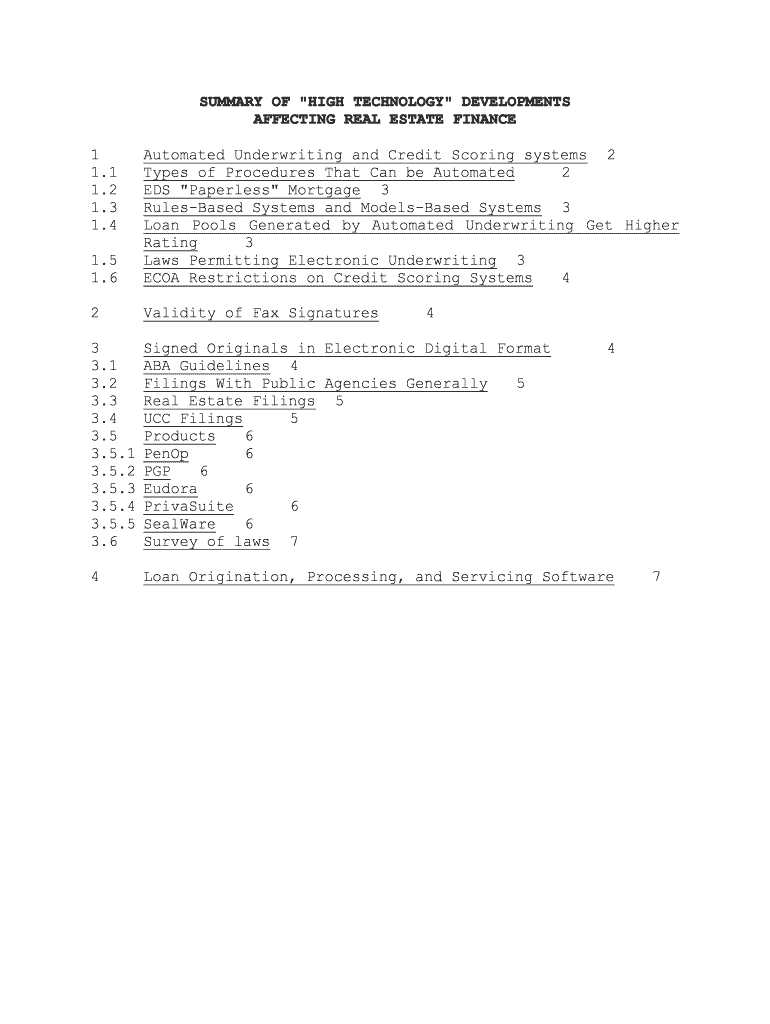
SUMMARY OF "HIGH TECHNOLOGY" DEVELOPMENTS AFFECTING REAL ESTATE FINANCE 1 Automated Underwriting and Credit Scoring systems 2 1.1 Types of Procedures That Can be Automated 2 1.2 EDS "Paperless" Mortgage 3 1.3 Rules-Based Systems and Models-Based Systems 3 1.4 Loan Pools Generated by Automated Underwriting Get Higher Rating 3 1.5 Laws Permitting Electronic Underwriting 3 1.6 ECOA Restrictions on Credit Scoring Systems 4 2 Validity of Fax Signatures 4 3 Signed Originals in Electronic Digital Format 4 3.1 ABA Guidelines 4 3.2 Filings With Public Agencies Generally 5 3.3 Real Estate Filings 5 3.4 UCC Filings 5 3.5 Products 6 3.5.1 PenOp 6 3.5.2 PGP 6 3.5.3 Eudora 6 3.5.4 PrivaSuite 6 3.5.5 SealWare 6 3.6 Survey of laws 7 4 Loan Origination, Processing, and Servicing Software 7 1. Automated Underwriting and Credit Scoring systems 1.1. Types of Procedures That Can be Automated "First, loan applications can actually be taken over the web using on-line preformatted forms. . . . Secure on-line connections can also automatically process a credit card fee using a system such as IC Verify, or using digital cash to pay for an application fee from one of the many automated banking systems such as Security First Network Bank at the web address http://www.sfnb.com. "Second, credit checks can be ordered on-line, employment can be verified, or financial reports can be accessed from services such as Dun & Bradstreet. "Third, . . . an appraisal can be ordered on-line and in some cases performed without the need for physical inspections, using fully computerized data bases, geographic information systems, or GIS, 1 and property address electronic photo banks. GIS is the mapping of data onto geographic space, allowing the user to visualize or analyze the data . . . . "In the case of residential property, Freddie Mac has started to implement an automated collateral assessment program in its on-line Loan Prospector program, which uses a nationwide network of real estate agents who verify the existence of the collateral property." Miller, "Web Implications and Resources for Real Estate Finance," Real Est. Fin., Fall 1996, at 74, 76. "[T]he time required to receive an `accept' decision from Freddie Mac for mortgage applications originated through the Loan Prospector system has been reduced to three or four minutes from the current 15-20 days under manual systems." 2 Fannie Mae states: We are not mandating the use of [automated underwriting or credit scoring systems]; however, we expect that, as other lenders become better acquainted with the 1 MapInfo (800-327-8627) is an example of a GIS software package used for market research purposes. 2 Standard & Poor's Structured Finance, Apr. 1996, at 5. concept of credit scoring and the benefits of Desktop Underwriter [which is Fannie Mae's automated underwriting system], they will decide on their own that the use of these tools can offer them many benefits. Fed. Nat'l Mge. Ass'n, "Mortgage Underwriting Tools -- Automated Underwriting and Credit Scores" (LL01-97, Feb. 21, 1997). 1.2. EDS "Paperless" Mortgage "EDS . . . has announced that 22 firms plan to participate in the `Accelerated Closing and Delivery' system, designed to squeeze paperwork out of the mortgage lending process. . . . The goal of the program . . . is to pave the way for the paperless mortgage. `Virtual' documents and electronic signatures will be used to satisfy regulatory requirements that mandate much of the paperwork used to close loans today. Larry Walker, head of EDS's mortgage and real estate division, said . . . `Our vision is that you could actually obtain a mortgage without a single sheet of paper.'" Cornwell, "EDS Advances the Paperless Mortgage," Nat. Mge. News, Mar. 31, 1997, at 17. Rules-Based Systems and Models-Based Systems Automated underwriting systems can be "rules-based," "models-based," or a combination of both. In a "rules-based" system, a single negative factor which does not meet the underwriting rules may result in the rejection of a loan application. In a "models-based" system, a loan application is scored on a continuum, and each factor is given a certain weight, with no single factor disqualifying a loan application. 3 Loan Pools Generated by Automated Underwriting Get Higher Rating Pools of loans originated with automated underwriting systems "that evidence a high degree of predictability coupled with consistency of scoring" will get a higher credit rating. 4 This means that lenders using such systems will be able to sell their loans for a premium in the secondary market. 1.3. Laws Permitting Electronic Underwriting Official Staff Interpretations issued by the Division of Consumer and Community Affairs of the Federal Reserve Board 3 Standard & Poor's Structured Finance, Nov. 1995, at 18. 4 Standard & Poor's Structured Finance, Nov. 1995, at 17-18. confirm that data entries into a computerized system qualify as a written application. 12 C.F.R. Pt. 202, App. D, §§ 202.5(e), 202.13(b), reprinted in Fed. Banking L. Rep. (CCH) ¶ 27-295 at 28,276, 28,287. Similarly, written records need not be retained if such records are preserved in computerized form. Id. § 202.12(b). 1.4. ECOA Restrictions on Credit Scoring Systems If the lender uses an automated credit scoring system as part of the loan underwriting process, the system must ultimately be validated by the lender's own credit experience in accordance with the regulations under the Equal Credit Opportunity Act ("ECOA"). If the lender obtains a credit scoring system from another party, but is "unable during the development process to validate the system based on its own credit experience . . ., the system must be validated when sufficient credit experience becomes available. A system that fails this validity test is no longer an empirically derived, demonstrably and statistically sound, credit scoring system for" that lender. 12 C.F.R. § 202.2(p). See also "Credit Scoring Models," OCC 97-24 (May 20, 1997), reprinted in Fed. Banking L.Rep. (CCH) ¶ 64-557. 2. Validity of Fax Signatures Signatures transmitted by fax machines are enforceable in many states pursuant to statute. For example, in the case of a "qualified financial contract," pursuant to Section 5-701(b)(4) of the New York General Obligations Law, the tangible written text produced by telex, telefacsimile, computer retrieval or other process by which electronic signals are transmitted by telephone or otherwise shall constitute a writing and any symbol executed or adopted by a party with the present intention to authenticate a writing shall constitute a signing. However, in Parma Tile Mosaic & Marble Co. v. Estate of Short , 87 N.Y.2d 524, 640 N.Y.S.2d 477 (1996), New York's highest court held that the line identifying the sender at the top of each fax page does not constitute a "signing." The court stated, "The act of identifying and sending a document to a particular destination does not, by itself, constitute a signing authenticating the contents of the document for Statute of Frauds purposes." See generally International Products & Technologies, Inc. v. Iomega Corp., 10 UCC Rep. Serv. 2d (Callaghan) 694 (E.D. Pa. 1989), aff'd mem. 908 F.2d 962 (3d Cir. 1990); Bazak Int'l Corp. v. Mast Industries, Inc., 73 N.Y.2d 113, 538 N.Y.S.2d 503, 535 N.E.2d 633 (1989). 3. Signed Originals in Electronic Digital Format ABA Guidelines The ABA's Information Security Committee has issued guidelines for the creation and verification of digital signatures. These guidelines contemplate that three different parties will be involved: the subscriber, the recipient, and the certification authority. The subscriber is a person who adds a digital signature to a document by means of a private key that corresponds to a public key identified in a certificate. The recipient is a party who receives a digital signature and who can rely on it. A certification authority issues a computer- based record which identifies such certification authority and the subscriber and contains the public key of the subscriber. 5 3.1. Filings With Public Agencies Generally The Florida Secretary of State's Advisory Committee on Digital Signatures is considering expanding the use of electronic digital signatures. According to Aaron Bowden of the Florida Bar's Law Office Management Assistance Service, "`The possibility of fraud must be minimized. Specifically, when a document is sent to you over the Internet, you want to verify the sender's identity and that the document hasn't been altered after it was sent." Fla. Bar News, Dec. 1, 1996 at 12. 3.2. Real Estate Filings California and Utah are among several states which have enacted legislation permitting electronic filing (from off-site locations) of real estate documents in local recording offices. Cal. Gov't Code § 165; Utah Code § 46-3-101. See generally Colavito, "Vision 2000: A Status Report," New York Law Journal, Aug. 18, 1997, at S16. UCC Filings "Texas now permits electronic filing, but so far has had little use. 5 Kennedy & Davids, "Bartleby the Cryptographer," New York Law Journal, Jan. 22, 1996, at S4. . . . . "The Drafting Committee considered whether to impose requirements for authenticating filings, such as termination statements. Some filing offices are considering the use of World Wide Web filing systems. The Drafting Committee decided not to mandate any specific security systems." Article 9 Drafting Committee Report (March 7-9, 1997 meeting) reprinted in Secured Transactions Guide (CCH) ¶ 55,607. "[D]ata transmitted electronically to the filing office and reduced to tangible form constitute a financing statement or other filing under Article 9 if they provide all the information required under the applicable provision of Article 9." PEB Commentary No. 15 - Electronic Filing Under Article 9 (July 16, 1996), reprinted in Secured Transactions Guide (CCH) ¶ 55,552. Products 3.2.1. PenOp PenOp (its website is www.penop.com) produces a device for secure electronic signatures, not by public key encryption, but by a holographic signature made on a pressure sensitive tablet. ApproveIT Toolkit by Silanis Technology, Inc., Dorval, Quebec, is a new digital signature application that allows documents to be hand-signed electronically using encryption technology which then protects the signature (and the document containing it) from manipulation and copying. PGP One form of encryption software, called "PGP" (for "Pretty Good Privacy"), is available for free at: http://web.mit.edu/network/pgp.html PGP uses a 2048-bit key, which provides an extraordinary level of protection that "probably is unbreakable even by the National Security Agency, clearly a level well beyond ordinary office needs. But PGP suffers from use difficulty." 6 More information on PGP is available at: 6 Beckman & Hirsch, "Making Encryption the Norm," 83 ABA J., Sept. 1997 at 82. http://www.abanet.org/lpm/catdiv/home.html http://www.pgp.com3.2.2. Eudora A well-known e-mail software program called Eudora plans to incorporate PGP. 7 More information is available at: http://www.eudora.com PrivaSuite PrivaSuite (made by Aliroo) uses 40-bit encryption. It encrypts any document in a Windows application. 8 3.2.3. SealWare SealWare (also made by Aliroo) "`echoes' the printed portion of the page in the white space [that appears on the same page] (printing a microscopic map of the document), which is either invisible to the eye or appears as slightly gray shading. One can then scan the document and decode it to make sure the visible text corresponds to the map, meaning it has not been altered." 9 This application could be very useful for reproducing signed loan documents and any other documents that need to be authenticated. 3.2.4. WitnesSoft Aliroo is also planning to market a software program called WitnesSoft, which "will put an invisible 100-bit label randomly on 50 different locations on a page. The label includes an authenticating signature that traces time, place of creation, and software and hardware used (down to the serial number of each)." 10 Survey of laws For a compilation of the status of digital signature laws in the U.S. see: 7 Id. 8 Id. 9 Id. at 83. 10 Id. www.magnet.state.ma.us/itd/legal/sigleg7.htm See generally Oxton, "Digital Signatures: Potential and Pitfalls," New York Law Journal, July 21, 1997; Science and Technology Section, Information Security committee of the American Bar Association, Digital Signature Guidelines (August 1996); "The Risks of Key Recovery, Key Escrow, and Trusted Third-Party Encryption" (available at http://www.crypto.com/key__study/report.shtml); "Cryptography's role in Securing the Information Society" Nat. Research Council: http://www.nap.edu/bookstore 4. Loan Origination, Processing, and Servicing Software - ALLTEL InterChange is available from Alltel Information Services, 601 Riverside Avenue, Jacksonville, Florida 32204-2987 (1-800-991-1274; 904-354-4650 (fax); www.alltelmd.com) (ALLTEL offers software systems ranging from mortgage origination, to secondary marketing, to servicing and industry-wide EDI connectivity). - Bankruptcy Navigator, available from Equifax. See Pettit, "System Aims at Predicting Defaults," Nat. Mge. News, Mar. 31, 1997. "Equifax has developed the Bankruptcy Navigator, a package of automated tools designed to improve the ability of lenders to monitor and forecast payment problems with existing customers as well as to predict patterns of payment and default." - CheckFree Software Solutions, Inc, 5655 Spalding Drive, Norcross, Georgia 30092 (770-734-3845) (offers loan origination and servicing software). - DOCX is available from DOCX National Sales Office, P.O. Box 889251, Atlanta, Georgia 30356 (creates mortgage assignments, satisfactions, sales of servicing agreements, loan sale agreements, etc.). - EDS (see the discussion of the EDS "paperless mortgage" above). - Excelis is a servicing system available from First American Real Estate Information Services, Inc. (800-717-5554). - Fair Isaac & Co., Inc. (mortgage servicing technology) "designs the credit bureau risk scoring systems that are most widely used in consumer and mortgage lending."11 - Fast Doc Plus software is available from Entyre Doc Prep, Inc. (800-292-8669) - Federal National Mortgage Association ("FNMA" or "Fannie Mae") has its own proprietary software for mortgage loan underwriting (Fannie Mae's automated underwriting system is called Desktop Underwriter), originations, and servicing. For more information, see its website (listed on the document entitled "Real Estate and Finance Internet Sites" with the filename "WEBSITES.897"). - Federal Home Loan Mortgage Corporation ("FHLMC" or "Freddie Mac") has its own proprietary software for mortgage loan underwriting, originations, and servicing. For more information, see its website (listed on the document entitled "Real Estate and Finance Internet Sites" with the filename "WEBSITES.897"). - Genesis 2000 for Windows (automated mortgage loan origination package, which, inter alia, allows loans to be submitted electronically to Fannie Mae MORNETPlus Network, and contains a pricing and rate locking system) - available from Genesis 2000, Inc., 5000 North Parkway Calabasas, Suite 200, Calabasas, California 91302 (800-882-0504; www.genesis2000.com). - Greatland (800-530-9393) offers MDM Mortgage Software (TIL Disclosure, Processing, Closing and Tracking Modules are available) and ARM Adjustment Auditor (intended to help justify ARM servicing practices). - Interlinq. See Kersnar, "INTERLINQ Software Gets Warm Reception," Mtge. Servicing News, Feb. 1997 at 16 "Interlinq Software Corp.'s MortgageWare Servicing software . . . provides all of the capabilities necessary to do loan servicing, such as collections, automatic payment processing, escrow tracking and analysis, and investor reporting." - Origination and servicing software is available from Financial Industry Computer Systems, Inc. (972-458-8583). 11 Standard & Poor's Structured Finance, Apr. 1996, at 7. - POINT mortgage origination software is available from Calyx Software (800-362-2599). - Standard & Poor's LEVELS model replaces the customary A-D scale used to rank residential mortgage loans, according to the probability of foreclosure, with a system of risk grades RG1 to RG7, with RG1 being the highest credit quality. 12 - The TRAKKER Loan Servicing Program is available from Multi-Financial Services Co., Inc., Tallahassee, Florida (800-326-4112). Books and articles : Real Estate Solutions, Inc., Guide to Real Estate & Mortgage Banking Software 12 Standard & Poor's Structured Finance, Sept. 1996, at 6.

Valuable advice on finishing your ‘Current Developments In Monetary And Financial Law Vol 3’ online

Are you fed up with the inconvenience of handling paperwork? Search no further than airSlate SignNow, the leading eSignature solution for individuals and small to medium-sized businesses. Bid farewell to the tedious process of printing and scanning documents. With airSlate SignNow, you can effortlessly complete and endorse paperwork online. Utilize the robust functionalities packed within this user-friendly and cost-effective platform and transform your method of document handling. Whether you need to authorize forms or collect signatures, airSlate SignNow manages it all effortlessly, with just a few clicks.

Adhere to this comprehensive guide:

  1. Log into your account or initiate a free trial with our service.
  2. Click +Create to upload a file from your device, cloud, or our form repository.
  3. Open your ‘Current Developments In Monetary And Financial Law Vol 3’ in the editor.
  4. Click Me (Fill Out Now) to set up the document on your end.
  5. Insert and designate fillable fields for others (if necessary).
  6. Proceed with the Send Invite options to solicit eSignatures from others.
  7. Download, print your copy, or convert it into a reusable template.

Don’t fret if you need to work with your colleagues on your Current Developments In Monetary And Financial Law Vol 3 or send it for notarization—our platform offers everything you require to accomplish such tasks. Establish an account with airSlate SignNow today and elevate your document management to a new level!

Here is a list of the most common customer questions. If you can’t find an answer to your question, please don’t hesitate to reach out to us.

Need help? Contact Support

The best way to complete and sign your current developments in monetary and financial law vol 3 form


Save time on document management with airSlate SignNow and get your current developments in monetary and financial law vol 3 form eSigned quickly from anywhere with our fully compliant eSignature tool.

How to Sign a PDF Online How to Sign a PDF Online

How to fill out and sign forms online

Previously, working with paperwork took lots of time and effort. But with airSlate SignNow, document management is quick and simple. Our powerful and easy-to-use eSignature solution lets you easily fill out and electronically sign your current developments in monetary and financial law vol 3 form online from any internet-connected device.

Follow the step-by-step guidelines to eSign your current developments in monetary and financial law vol 3 form template online:

  • 1.Sign up for a free trial with airSlate SignNow or log in to your account with password credentials or SSO authorization option.
  • 2.Click Upload or Create and import a form for eSigning from your device, the cloud, or our form collection.
  • 3.Click on the document name to open it in the editor and use the left-side menu to fill out all the blank areas properly.
  • 4.Put the My Signature field where you need to eSign your sample. Provide your name, draw, or import a picture of your handwritten signature.
  • 5.Click Save and Close to finish editing your completed form.

As soon as your current developments in monetary and financial law vol 3 form template is ready, download it to your device, save it to the cloud, or invite other people to eSign it. With airSlate SignNow, the eSigning process only takes several clicks. Use our powerful eSignature tool wherever you are to handle your paperwork successfully!


How to Sign a PDF Using Google Chrome How to Sign a PDF Using Google Chrome

How to fill out and sign documents in Google Chrome

Completing and signing paperwork is easy with the airSlate SignNow extension for Google Chrome. Adding it to your browser is a fast and effective way to manage your forms online. Sign your current developments in monetary and financial law vol 3 form sample with a legally-binding eSignature in just a couple of clicks without switching between applications and tabs.

Follow the step-by-step guide to eSign your current developments in monetary and financial law vol 3 form template in Google Chrome:

  • 1.Go to the Chrome Web Store, search for the airSlate SignNow extension for Chrome, and install it to your browser.
  • 2.Right-click on the link to a form you need to eSign and select Open in airSlate SignNow.
  • 3.Log in to your account with your password or Google/Facebook sign-in option. If you don’t have one, sign up for a free trial.
  • 4.Use the Edit & Sign toolbar on the left to fill out your template, then drag and drop the My Signature field.
  • 5.Upload a picture of your handwritten signature, draw it, or simply enter your full name to eSign.
  • 6.Verify all information is correct and click Save and Close to finish modifying your paperwork.

Now, you can save your current developments in monetary and financial law vol 3 form template to your device or cloud storage, send the copy to other people, or invite them to eSign your form via an email request or a protected Signing Link. The airSlate SignNow extension for Google Chrome enhances your document workflows with minimum effort and time. Start using airSlate SignNow today!


How to Sign a PDF in Gmail How to Sign a PDF in Gmail How to Sign a PDF in Gmail

How to complete and sign documents in Gmail

When you get an email containing the current developments in monetary and financial law vol 3 form for approval, there’s no need to print and scan a file or save and re-upload it to another program. There’s a better solution if you use Gmail. Try the airSlate SignNow add-on to rapidly eSign any paperwork right from your inbox.

Follow the step-by-step guide to eSign your current developments in monetary and financial law vol 3 form in Gmail:

  • 1.Go to the Google Workplace Marketplace and look for a airSlate SignNow add-on for Gmail.
  • 2.Install the program with a corresponding button and grant the tool access to your Google account.
  • 3.Open an email with an attachment that needs approval and utilize the S key on the right panel to launch the add-on.
  • 4.Log in to your airSlate SignNow account. Choose Send to Sign to forward the file to other people for approval or click Upload to open it in the editor.
  • 5.Place the My Signature field where you need to eSign: type, draw, or upload your signature.

This eSigning process saves efforts and only takes a few clicks. Use the airSlate SignNow add-on for Gmail to update your current developments in monetary and financial law vol 3 form with fillable fields, sign documents legally, and invite other people to eSign them al without leaving your inbox. Boost your signature workflows now!


How to Sign a PDF on a Mobile Device How to Sign a PDF on a Mobile Device How to Sign a PDF on a Mobile Device

How to fill out and sign forms in a mobile browser

Need to rapidly complete and sign your current developments in monetary and financial law vol 3 form on a mobile phone while doing your work on the go? airSlate SignNow can help without the need to set up additional software applications. Open our airSlate SignNow solution from any browser on your mobile device and add legally-binding electronic signatures on the go, 24/7.

Follow the step-by-step guidelines to eSign your current developments in monetary and financial law vol 3 form in a browser:

  • 1.Open any browser on your device and go to the www.signnow.com
  • 2.Sign up for an account with a free trial or log in with your password credentials or SSO authentication.
  • 3.Click Upload or Create and import a file that needs to be completed from a cloud, your device, or our form library with ready-made templates.
  • 4.Open the form and complete the empty fields with tools from Edit & Sign menu on the left.
  • 5.Place the My Signature area to the sample, then type in your name, draw, or upload your signature.

In a few simple clicks, your current developments in monetary and financial law vol 3 form is completed from wherever you are. As soon as you're done with editing, you can save the file on your device, create a reusable template for it, email it to other people, or ask them to eSign it. Make your paperwork on the go speedy and effective with airSlate SignNow!


How to Sign a PDF on iPhone How to Sign a PDF on iPhone

How to fill out and sign forms on iOS

In today’s corporate environment, tasks must be accomplished quickly even when you’re away from your computer. Using the airSlate SignNow mobile app, you can organize your paperwork and approve your current developments in monetary and financial law vol 3 form with a legally-binding eSignature right on your iPhone or iPad. Install it on your device to close deals and manage forms from just about anywhere 24/7.

Follow the step-by-step guide to eSign your current developments in monetary and financial law vol 3 form on iOS devices:

  • 1.Go to the App Store, find the airSlate SignNow app by airSlate, and set it up on your device.
  • 2.Open the application, tap Create to import a form, and select Myself.
  • 3.Select Signature at the bottom toolbar and simply draw your signature with a finger or stylus to eSign the sample.
  • 4.Tap Done -> Save after signing the sample.
  • 5.Tap Save or utilize the Make Template option to re-use this document in the future.

This method is so straightforward your current developments in monetary and financial law vol 3 form is completed and signed in just a couple of taps. The airSlate SignNow app works in the cloud so all the forms on your mobile device are kept in your account and are available whenever you need them. Use airSlate SignNow for iOS to boost your document management and eSignature workflows!


How to Sign a PDF on Android How to Sign a PDF on Android

How to fill out and sign paperwork on Android

With airSlate SignNow, it’s simple to sign your current developments in monetary and financial law vol 3 form on the go. Install its mobile application for Android OS on your device and start improving eSignature workflows right on your smartphone or tablet.

Follow the step-by-step guidelines to eSign your current developments in monetary and financial law vol 3 form on Android:

  • 1.Open Google Play, find the airSlate SignNow app from airSlate, and install it on your device.
  • 2.Log in to your account or register it with a free trial, then add a file with a ➕ option on the bottom of you screen.
  • 3.Tap on the imported file and choose Open in Editor from the dropdown menu.
  • 4.Tap on Tools tab -> Signature, then draw or type your name to eSign the template. Fill out empty fields with other tools on the bottom if required.
  • 5.Utilize the ✔ button, then tap on the Save option to end up with editing.

With an intuitive interface and total compliance with major eSignature standards, the airSlate SignNow app is the perfect tool for signing your current developments in monetary and financial law vol 3 form. It even operates offline and updates all document modifications when your internet connection is restored and the tool is synced. Complete and eSign documents, send them for eSigning, and create multi-usable templates whenever you need and from anywhere with airSlate SignNow.

Sign up and try Current developments in monetary and financial law vol 3 form
  • Close deals faster
  • Improve productivity
  • Delight customers
  • Increase revenue
  • Save time & money
  • Reduce payment cycles

